
Introducción
This manual provides detailed instructions for the setup, operation, and maintenance of your MageGee V560 Wireless Gaming Keyboard and Mouse Combo. Please read this manual thoroughly before use to ensure optimal performance and longevity of your device.

Image: The MageGee V560 Wireless Gaming Keyboard and Mouse Combo, featuring a blue, white, and purple color scheme, with the USB receiver visible.
Contenido del paquete
Por favor verifique que todos los artículos estén presentes en el paquete:
- Teclado inalámbrico MageGee V560
- Ratón inalámbrico MageGee
- 2.4GHz USB Receiver (stored in mouse battery compartment)
- Cable de carga USB-C
- Manual de usuario

Image: Contents of the MageGee V560 package, including the keyboard, mouse, USB receiver, charging cable, and user manual.
Instrucciones de instalación
- Localice el receptor USB: Open the battery cover of the wireless mouse. The 2.4GHz USB receiver is stored inside the compartment next to the mouse battery slot.
- Conecte el receptor: Conecte el receptor USB a un puerto USB disponible en su computadora.
- Dispositivos de encendido: Ensure both the keyboard and mouse are powered on. The devices are plug-and-play and should connect automatically.
- Carga inicial: For optimal performance, it is recommended to fully charge both the keyboard and mouse before first use. Use the provided USB-C charging cable.

Image: Illustration showing the 2-in-1 USB receiver connecting the keyboard and mouse wirelessly to a laptop.
Instrucciones de funcionamiento
Funciones del teclado
- Control de retroiluminación RGB:
- Prensa FN + INS para encender o apagar la luz de fondo.
- Prensa FN + RePág or FN + AvPág to adjust the 3-level backlight brightness.
- Prensa FN + 1 / 2 / 3 / 4 / 5 to switch between different backlight modes. Note: Backlight settings are not saved after power off.
- Atajos multimedia: Utilice el FN llave en combinación con F1-F12 keys for quick access to multimedia functions such as volume control, media playback, and more.
- Diseño ergonómico: The keyboard features a stepped layout and foldable brackets at the bottom, allowing you to adjust the typing angle for comfort during extended use.
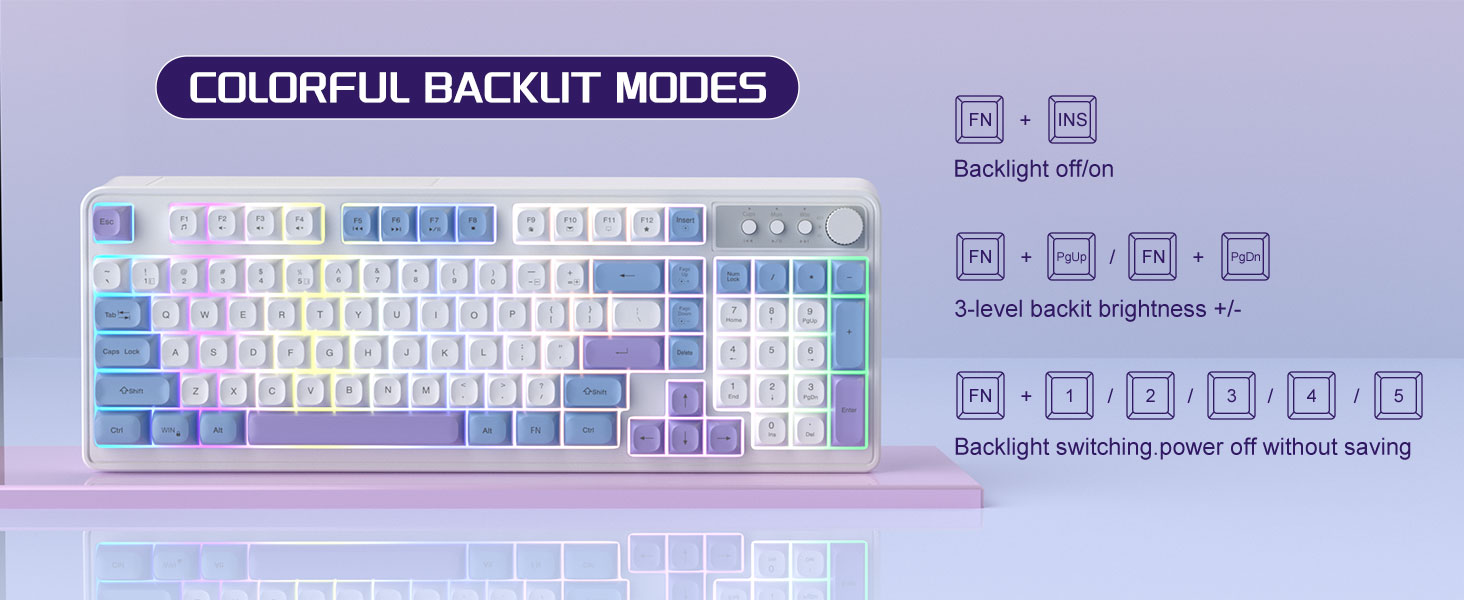
Image: The MageGee V560 keyboard displaying various colorful backlit modes, with instructions for controlling them.

Image: A visual representation of the 16 multimedia shortcuts available on the MageGee V560 keyboard, activated via the FN key.
Funciones del mouse
- Ajuste de PPP: The mouse supports 6 levels of DPI adjustment (600-3200 DPI). Press the DPI button (usually located below the scroll wheel) to cycle through the sensitivity settings. Internal indicator lights will show the current DPI level.
- Luz de fondo respirable: The mouse features 7 dazzling color breathing backlights. This lighting is automatic and indicates mouse activity.

Image: The MageGee V560 mouse highlighting its DPI settings (1000, 1200, 1600 DPI) and showing the USB-C charging port.
Carga y duración de la batería
- Both the keyboard and mouse are rechargeable. Use the provided USB-C charging cable to charge them.
- Keyboard Standby Time: Hasta 365 días.
- Mouse Standby Time: Hasta 270 días.
- Función de suspensión automática: The devices automatically enter sleep mode after a period of inactivity to conserve battery power and extend battery life.

Image: An illustration demonstrating the intelligent auto-sleep feature of the MageGee V560 combo, which conserves battery life.
Compatibilidad
The MageGee V560 Wireless Gaming Keyboard and Mouse Combo is compatible with the following operating systems:
- Win2000
- Ganar XP
- Ganarme
- Vista
- Win7
- Win8
- Win10
- Androide
- Linux
- Sistema operativo Mac
Solución de problemas
If you encounter issues with your MageGee V560 combo, please refer to the following common solutions:
- Dispositivo no conectado:
- Asegúrese de que el receptor USB esté conectado de forma segura a un puerto USB que funcione.
- Verifique que tanto el teclado como el mouse estén encendidos.
- Check the battery levels of both devices and charge if necessary.
- Intente conectar el receptor USB a un puerto USB diferente.
- Retraso o desconexión:
- Ensure the devices are within the 33 ft (10 meter) operating range of the USB receiver.
- Minimiza la interferencia de otros dispositivos inalámbricos de 2.4 GHz (por ejemplo, enrutadores Wi-Fi, teléfonos inalámbricos).
- Charge the devices to ensure sufficient power.
- Keys Not Registering / Mouse Not Responding:
- Recharge the keyboard and mouse.
- Asegúrese de que el receptor USB esté conectado correctamente.
- Reinicie su computadora.
- Problemas de retroiluminación:
- Asegúrese de que el teclado esté cargado.
- Usar FN + INS para alternar la luz de fondo.
- Ajuste el brillo con FN + Re Pág/Av Pág.
Presupuesto
| Marca | MageGee |
| Modelo | V560 |
| Tecnología de conectividad | 2.4GHz inalámbrica |
| Características especiales | RGB lighting, rechargeable keyboard and mouse, ergonomic design |
| Dispositivos compatibles | Personal Computer (Win2000, Win XP, Win ME, Vista, Win7, Win8, Win10, Android, Linux, Mac OS) |
| Peso del artículo | 1.87 libras |
| Dimensiones del paquete | 16.61 x 9.21 x 1.73 pulgadas |
| Fabricante | MAGEGE |
Mantenimiento
- Limpieza: Utilice un paño suave y seco para limpiar el teclado y el ratón. Para la suciedad difícil, utilice un paño ligeramente seco.amp Se puede utilizar un paño, asegurándose de que no entre líquido en el dispositivo.
- Almacenamiento: Guarde los dispositivos en un lugar fresco y seco, alejado de la luz solar directa y de temperaturas extremas.
- Cuidado de la batería: Avoid fully discharging the batteries frequently. Charge them regularly to maintain battery health.
Garantía y soporte
Este producto viene con un 1 año de garantía a partir de la fecha de compra.
For any questions or support needs, please contact MageGee customer service via Amazon email. We aim to respond within 12 hours and provide a satisfactory solution.