
1. Introducción
This manual provides detailed instructions for the installation, operation, and maintenance of the Intellinet 48-Port L3 Managed Gigabit PoE+ Switch, Model 562041. This device is designed for enterprise networks requiring efficient and scalable routing solutions with high-powered Power over Ethernet (PoE) capabilities.
2. Información de seguridad
Observe the following safety precautions to prevent damage to the device and injury to personnel:
- Asegúrese de que el dispositivo esté correctamente conectado a tierra.
- No exponga el interruptor al agua ni a la humedad excesiva.
- Utilice el dispositivo dentro de los rangos de temperatura y humedad especificados.
- Use only the power cable provided or a compatible replacement.
- No abra el interruptor casing; encargue el mantenimiento a personal cualificado.
- Ensure adequate ventilation around the switch to prevent overheating.
3. Contenido del paquete
Verifique que todos los artículos estén presentes en el paquete:
- Intellinet 48-Port L3 Managed Gigabit PoE+ Switch (Model 562041)
- Cable de alimentación
- 19" rackmount brackets
- Pies de goma
- Instrucciones (este manual)
4. Producto terminadoview
The Intellinet 562041 is a robust Layer 3 managed switch featuring 48 Gigabit PoE+ ports and six 10G SFP+ uplink slots. It supports a total power budget of 850 watts for PoE devices.
4.1 Panel frontal
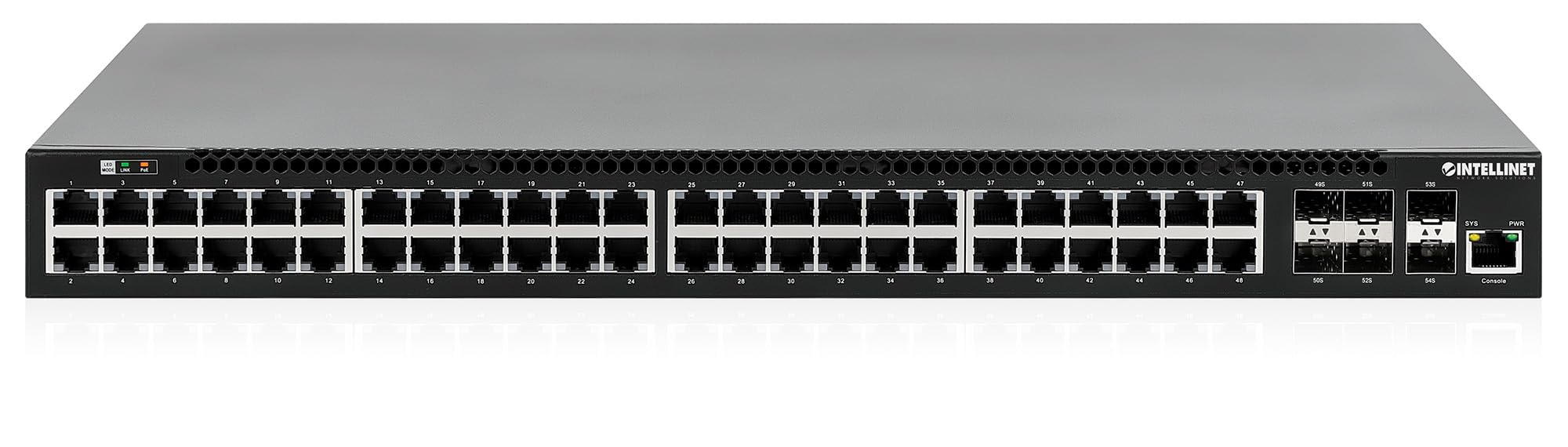
El panel frontal incluye:
- 48 x 10/100/1000 Mbps RJ45 Ports: These ports support Power over Ethernet Plus (PoE+) for connecting compatible devices.
- 6 x 10 Gigabit SFP+ Slots: For high-speed uplink connections to other network devices.
- Indicadores LED: Provide status information for power, system, link activity, and PoE status.
- Puerto de consola: For local management and configuration.


4.2 Panel trasero

The rear panel typically includes the AC power input and cooling fans for heat dissipation.

5. Configuración
5.1 Instalación física
The switch can be installed in a standard 19-inch equipment rack or placed on a desktop.
- Instalación en bastidor: Attach the provided rackmount brackets to the sides of the switch using the included screws. Secure the switch into a standard 19-inch rack.
- Instalación de escritorio: Attach the provided rubber feet to the bottom of the switch to prevent scratching and ensure stability. Place the switch on a flat, stable surface.
5.2 Conexión de alimentación
Connect the provided power cable to the AC power input on the rear panel of the switch and then to a grounded electrical outlet. Ensure the power switch is in the OFF position before connecting the power cable.
5.3 Conexiones de red
- Dispositivos PoE: Connect PoE-compatible devices (e.g., IP cameras, VoIP phones, wireless access points) to any of the 48 Gigabit RJ45 ports. The switch will automatically detect and provide power to these devices.
- Conexiones de enlace ascendente: Insert compatible SFP+ transceivers into the 10 Gigabit SFP+ slots and connect them to your core network or other high-speed devices using appropriate fiber optic cables.
- Conexión de consola: For initial configuration or direct management, connect a console cable from your computer to the console port on the switch.
5.4 Configuración inicial
Refer to the separate software configuration guide for detailed instructions on accessing the switch's management interface (web-based GUI or command-line interface via console port) and performing initial setup, including IP address assignment, user accounts, and basic network settings.
6. Instrucciones de funcionamiento
6.1 Enrutamiento de capa 3
This switch offers dynamic Layer 3 IP routing capabilities, including OSPF (Open Shortest Path First), RIP (Routing Information Protocol), and VRRP (Virtual Router Redundancy Protocol). These protocols enable efficient and scalable routing within complex network environments.

6.2 Alimentación a través de Ethernet (PoE+)
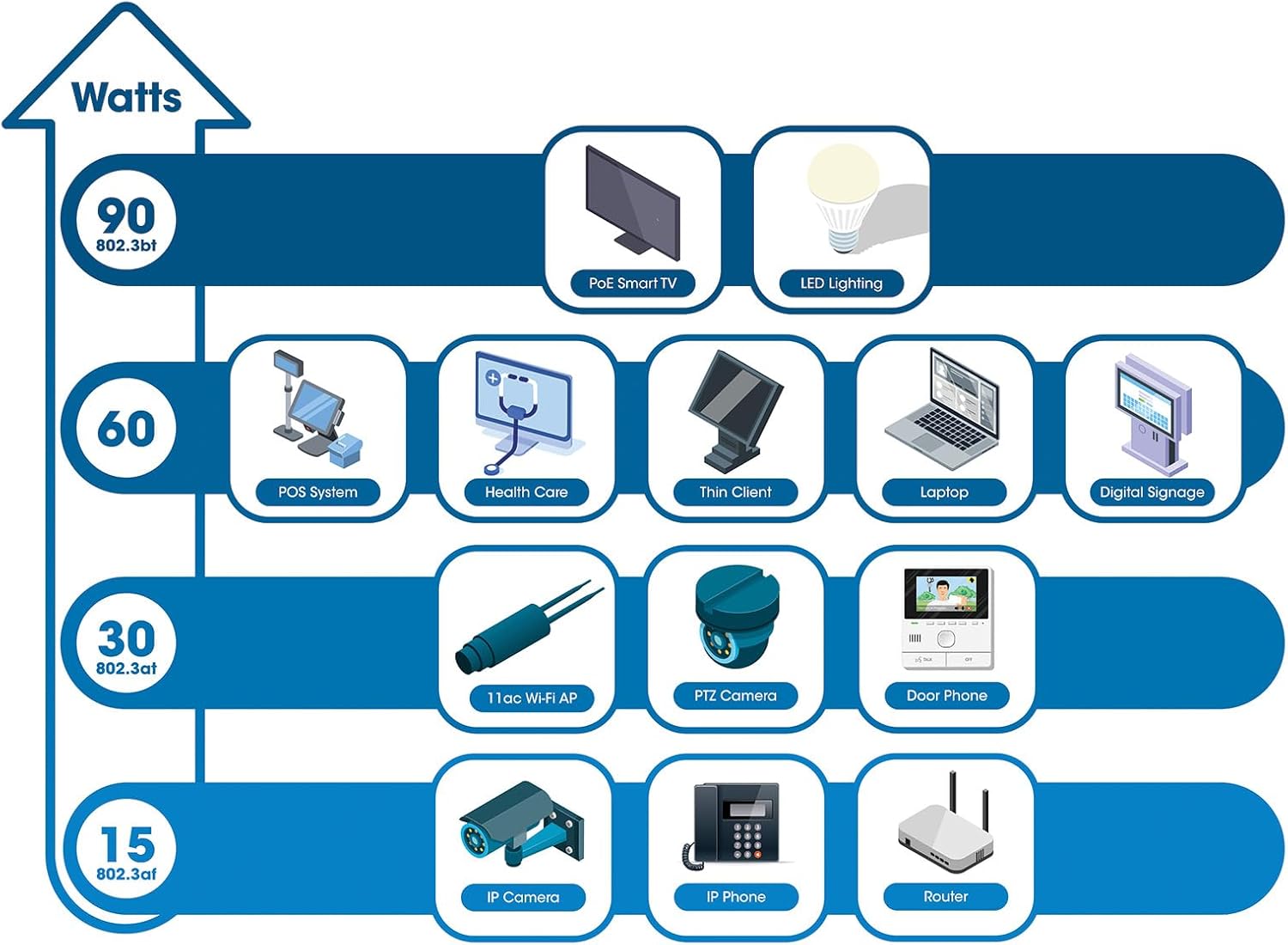
The switch provides up to 30 watts of power per port across its 48 PoE+ ports, with a total power budget of 850 watts. This allows for seamless integration of various PoE devices without the need for separate power adapters.
6.3 PoE Scheduling
The switch supports PoE scheduling, allowing administrators to define specific times for powering on, powering off, or rebooting connected PoE devices. This feature can optimize power consumption and enhance network security.


6.4 Self-Healing Functionality (PDM)
The Powered Device Monitor (PDM) feature enables the switch to proactively monitor the status of connected PoE devices. If a device becomes unresponsive, the PDM can automatically restart the PoE port to restore functionality, minimizing downtime and maintaining network integrity.
6.5 Gestión de la nube
The switch supports cloud management capabilities, allowing for remote configuration, monitoring, and troubleshooting of the device from a centralized platform. Refer to the cloud management documentation for setup and usage details.
7. Mantenimiento
7.1 actualizaciones de firmware
Regularly check the Intellinet Network Solutions website for the latest firmware updates. Applying firmware updates can improve performance, add new features, and address security vulnerabilities. Follow the instructions provided with the firmware update package carefully.
7.2 Limpieza
To clean the switch, power it off and disconnect all cables. Use a soft, dry cloth to wipe the exterior. Do not use liquid or aerosol cleaners. Ensure ventilation openings are free from dust and debris.
7.3 Consideraciones ambientales
Ensure the switch operates within its specified temperature and humidity ranges. Avoid placing the switch in direct sunlight, near heat sources, or in areas with high dust accumulation.
8. Solución de problemas
This section addresses common issues you might encounter with the switch.
8.1 Sin energía
- Verify the power cable is securely connected to both the switch and a working electrical outlet.
- Asegúrese de que el interruptor de encendido en el panel trasero esté en la posición ON.
- Verifique la toma de corriente con otro dispositivo para confirmar que funciona.
8.2 No hay enlace en un puerto
- Check the Ethernet cable connection at both ends. Ensure it is securely plugged in.
- Verifique que el cable no esté dañado. Pruebe con otro cable.
- Asegúrese de que el dispositivo conectado esté encendido y funcionando correctamente.
- Verifique el estado del puerto en la interfaz de administración del conmutador.
8.3 El dispositivo PoE no recibe energía
- Confirm the connected device is a PoE-compatible device.
- Verifique el LED de estado PoE para el puerto específico.
- Verify the total PoE power budget (850W) is not exceeded by all connected devices.
- Utilize the Powered Device Monitor (PDM) feature to automatically restart the port if the device is unresponsive.
- Check PoE settings in the switch's management interface.
9. Especificaciones
| Característica | Especificación |
|---|---|
| Número de modelo | 562041 |
| Marca | SOLUCIONES DE REDES INTELLINET |
| Número de puertos | 54 (48 x Gigabit PoE+, 6 x 10G SFP+) |
| Tipo de interfaz | PoE, SFP |
| Potencia máxima (presupuesto PoE) | 850 vatios |
| Velocidad de transferencia de datos | 10 Gigabits Per Second (SFP+ uplinks) |
| Peso del artículo | 6.2 kilogramos (13.64 libras) |
| Dimensiones del producto (L x An x Al) | 13.78 x 17.32 x 1.73 pulgadas |
| Clasificación de temperatura superior | 104 grados Fahrenheit (40 °C) |
| Clasificación de temperatura más baja | 32 grados Fahrenheit (0 °C) |
| Dispositivos compatibles | Desktop, Router, PoE devices (IP cameras, VoIP phones, WAPs) |
| Componentes incluidos | 19" rackmount brackets, Instructions, Rubber feet, power cable |
| Código Postal | 766623562041 |
10. Garantía y soporte
10.1 Información de garantía
This Intellinet Network Solutions product is covered by a Garantía del fabricante de 3 añosConserve su comprobante de compra para reclamaciones de garantía. La garantía cubre defectos de materiales y mano de obra en condiciones normales de uso.
10.2 Soporte técnico
For technical assistance, product documentation, or to register your product, please visit the official Intellinet Network Solutions websitio o contacte con su servicio de atención al cliente. La información de contacto normalmente se encuentra en la página del fabricante. websitio o en el embalaje del producto.