
1. Introducción
Thank you for choosing the Perlegear Tilting TV Wall Mount. This manual provides essential information for the safe and correct installation, operation, and maintenance of your TV wall mount. Please read all instructions carefully before installation and keep this manual for future reference.
2. Información de seguridad
ADVERTENCIA: No leer ni seguir todas las instrucciones puede provocar lesiones personales, daños a la propiedad o la anulación de la garantía.
- No comience la instalación hasta que haya leído y comprendido todas las instrucciones y advertencias contenidas en este manual.
- Asegúrese de que la superficie de montaje pueda soportar de forma segura el peso combinado del equipo y todo el hardware conectado.
- This product is designed for installation on wood stud walls, solid concrete walls, or brick walls. Do NOT install on drywall alone.
- Utilice siempre un detector de vigas para localizar con precisión las vigas de madera.
- Utilice equipos de seguridad y herramientas adecuados para la instalación.
- If you have any questions or concerns, contact Perlegear customer service.
3. Contenido del paquete
Verify that all components are present and undamaged before installation. If any parts are missing or defective, contact Perlegear for assistance.

Imagen: Más alláview of all components included in the Perlegear Tilting TV Wall Mount kit, including the wall plate, TV brackets, various screws, washers, spacers, a bubble level, and an Allen wrench.
- Wall Plate Assembly: Main frame that attaches to the wall.
- TV Brackets (2x): Conéctelo a la parte posterior de su televisor.
- Kit de hardware: Includes various screws (M4, M6, M8), washers, spacers, and wall anchors for different TV models and wall types.
- Nivel burbuja: For ensuring accurate horizontal alignment during installation.
- Llave Allen: For tilt and leveling adjustments.
- Bridas para cables: Para gestión de cables.
- Instruction Manual & Drilling Template: Guides for installation.
4. Especificaciones
| Característica | Especificación |
|---|---|
| Tipo de montaje | Montaje en pared |
| Tipo de movimiento | Inclinación |
| Marca | perlegar |
| Material | Acero aleado |
| Color | Negro |
| Dispositivos compatibles | Televisión |
| Ángulo de inclinación máximo | 15 grados |
| Maximum Supported Screen Size | 90 pulgadas |
| Minimum Supported Screen Size | 42 pulgadas |
| Capacidad de carga máxima | 132 libras |
| Compatibilidad VESA | 200x100mm hasta 800x400mm |
| Espaciado de los montantes de la pared | 12"/16"/18"/24" |
5. Configuración e instalación
Lista de verificación previa a la instalación:
- Tamaño de TV: Compatible with 42-90 inch TVs.
- Peso del televisor: Ensure your TV weighs no more than 132 lbs (60 kg).
- Patrón VESA: Check the VESA mounting holes on your TV. This mount supports patterns from 200x100mm to 800x400mm.
- Tipo de pared: Suitable for wood stud (12"/16"/18"/24" spacing), solid concrete, and brick walls. Do NOT install on drywall alone.
Instalación paso a paso:

Image: Visual guide illustrating the wide compatibility of the Perlegear TV mount with various TV sizes (42-90 inches), maximum load capacity (132 lbs), VESA patterns (200x100mm to 800x400mm), and supported wall types (concrete, wood studs, brick).
- Fijar los soportes de TV al televisor:
- Coloque con cuidado el televisor boca abajo sobre una superficie suave y limpia.
- Alinee los soportes del televisor con los orificios de montaje en la parte posterior del televisor.
- Select the appropriate screws, washers, and spacers from the hardware kit that fit your TV's VESA holes.
- Securely fasten the TV brackets to the TV using a screwdriver. Ensure they are tight but do not overtighten.

Image: Close-up of the TV brackets being attached to the rear of a television, showing the alignment with VESA holes and the use of mounting hardware.
- Monte la placa de pared en la pared:
- Use the provided drilling template to mark the pilot hole locations on your wall. Ensure the template is level using the included bubble level.
- Drill pilot holes according to the template and your wall type (wood stud, concrete, or brick).
- Attach the wall plate assembly to the wall using the appropriate lag bolts and washers. For concrete/brick, insert wall anchors first.
- Apriete todos los tornillos de forma segura.
Video: A quick demonstration of the Perlegear TV wall mount installation process, showing the wall plate being secured to the wall and the TV being hung. This video provides a concise overview of the main steps.
- Cuelga tu TV:
- With assistance, carefully lift the TV (with brackets attached) and hook the brackets onto the top edge of the wall plate.
- Gently lower the TV until the brackets engage with the wall plate.
- Pull down the quick-release straps to lock the TV securely onto the wall plate. Ensure both straps are engaged.

Image: A visual breakdown of the easy 3-step installation process: 1. Attach TV brackets, 2. Mount wall plate, 3. Hang your TV. This image simplifies the installation overview.
6. Instrucciones de funcionamiento
Ajuste de inclinación:
The Perlegear Tilting TV Wall Mount allows for a +5° to -15° tilt range to reduce glare and optimize viewángulos de ing.
- To adjust the tilt, loosen the orange knobs on the TV brackets.
- Incline el televisor al ángulo deseado.
- Tighten the orange knobs to secure the TV in place.
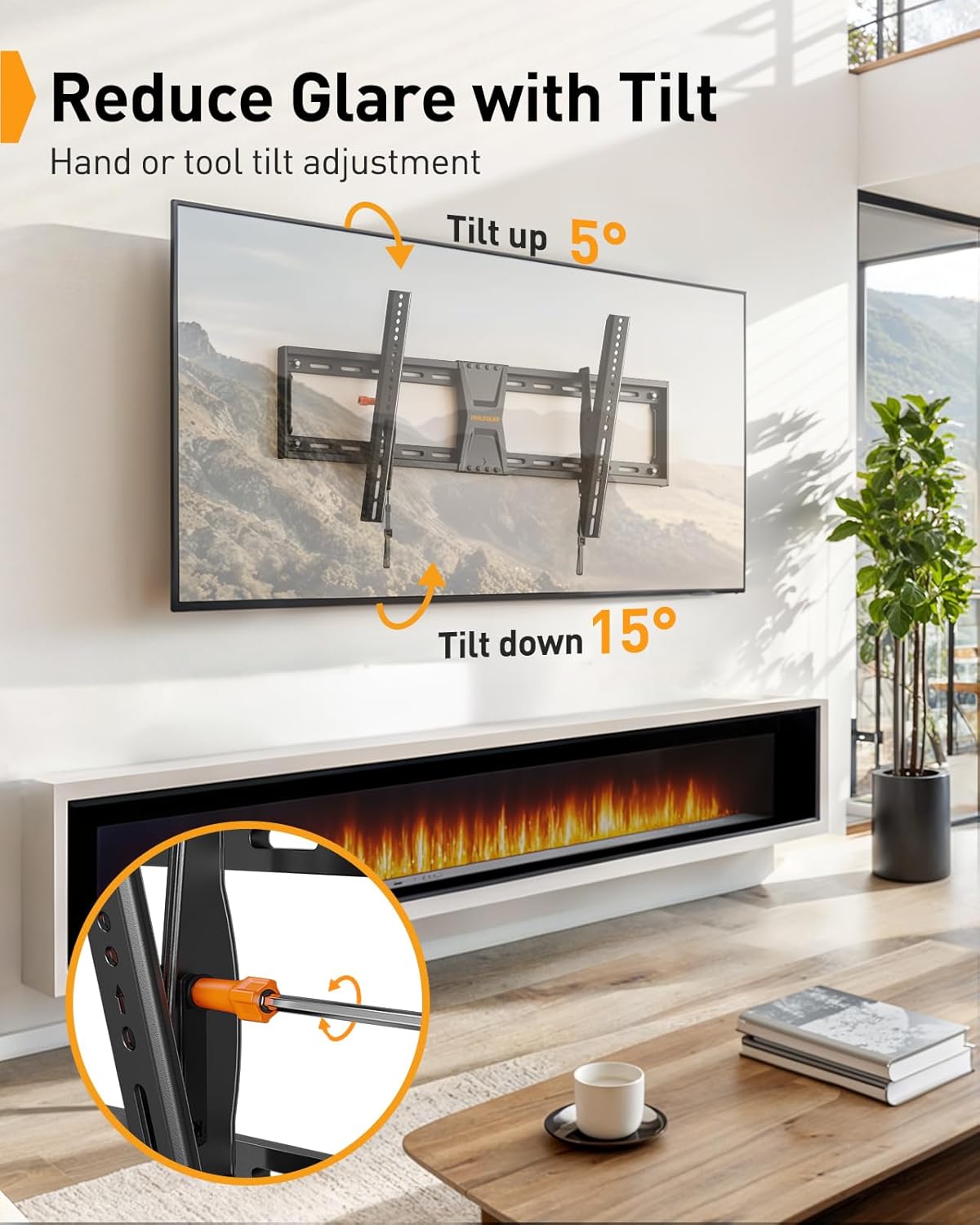
Image: A television mounted on the wall, demonstrating the +5° tilt up and -15° tilt down capabilities of the Perlegear mount, with an inset showing the orange knob for manual adjustment.
Ajuste de nivelación:
Fine-tune your TV's horizontal alignment even after installation with a ±2° leveling adjustment.
- Use the provided Allen wrench to adjust the leveling screws on the TV brackets.
- Rotate the screws until the TV is perfectly level.

Image: A television mounted on the wall, showing the ±2° leveling adjustment feature. An inset highlights the mechanism for fine-tuning the TV's horizontal alignment after installation.
Desplazamiento horizontal:
The TV can be shifted horizontally on the wall plate to center it for optimal viewEn.
- Gently slide the TV along the wall plate to achieve your desired centered position.
- The anti-drop edges on the wall plate prevent the TV from accidentally slipping off.
7. Mantenimiento
- Periodically check that all screws and connections are tight and secure.
- Limpie el soporte con un paño suave y seco. Evite los limpiadores abrasivos.
8. Solución de problemas
El televisor no está nivelado:
- Use the Allen wrench to adjust the leveling screws on the TV brackets (refer to Operating Instructions).
TV feels loose or unstable:
- Ensure all wall plate bolts are securely tightened into the wall studs or anchors.
- Verify that the TV brackets are properly hooked onto the wall plate and the quick-release straps are engaged and locked.
- Confirm your TV's weight does not exceed the 132 lbs (60 kg) maximum load capacity.
9. Garantía y soporte
This Perlegear TV Wall Mount comes with a Garantía del fabricante de 2 año.
For technical support, missing parts, or any questions, please contact Perlegear customer service:
- Correo electrónico: soporte@perlegear.com
- Teléfono (EE. UU./CA): 1-800-456-5231 (Mon-Fri, 8am-8pm CST)
- Teléfono (Reino Unido): 44-808-196-4165 (Mon-Fri, 2pm-10pm UTC)
- Websitio: www.perlegear.com