
Cello C2224WSF TRAV
Cello C2224WSF Traveller Smart/DVD TV User Manual
Model: C2224WSF TRAV
Producto terminadoview
The Cello C2224WSF Traveller Smart/DVD TV is a versatile entertainment solution designed for travel, including caravans, motorhomes, boats, and trucks. It combines a Full HD Smart TV powered by LG's WebOS Hub with an integrated DVD player, offering entertainment options even without a stable internet connection. This model features Pitch Perfect Sound technology for enhanced audio and flexible power options (12V DC and mains AC).
Its lightweight and frameless design makes it ideal for space-constrained environments and wall mounting.

Figure 1: Cello C2224WSF Traveller Smart/DVD TV with WebOS Hub interface and integrated DVD player.
Características principales
- Integrated Smart TV & DVD Player: Combines LG WebOS Hub for streaming apps (Netflix, Prime Video, Disney+, YouTube, BBC iPlayer, ITVX) with a built-in DVD player for offline entertainment.
- Pitch Perfect Sound: Patented Cello technology with a speaker enclosure below the TV for enhanced bass, clearer mids, and defined highs, providing an immersive audio experience.

Figure 2: Illustration of Cello's Pitch Perfect Sound technology, highlighting the speaker enclosure for improved audio.
- Sintonizador triple: Built-in DVB-C/-S2/-T2 tuner for crystal-clear HD resolution and access to digital channels. Supports USB recording (DVR) and media playback.
- Compatibilidad universal: Designed for 12V operation in caravans, motorhomes, boats, and trucks, with an integrated regulator for 10V to 27V DC input. Also operates on mains AC power.
- Conectividad Bluetooth: Allows easy connection to Bluetooth soundbars for enhanced audio without cables.
- Lightweight and Frameless Design: Compact dimensions (49 x 30 x 8 cm, 2.4 kg) and ultra-thin bezel for seamless integration and wall mounting in small spaces.

Figure 3: The Cello C2224WSF TV seamlessly integrated into a small living space, highlighting its compact design.
Guía de configuración
1 Desembalaje e inspección inicial
Retire con cuidado el televisor y todos los accesorios del embalaje. Compruebe si presenta daños. Conserve el embalaje para futuras reparaciones o transporte.
2. Opciones de montaje
The TV can be placed on its included stand or wall-mounted. Ensure the mounting surface is stable and can support the TV's weight (2.4 kg).
- Instalación de soporte: Attach the stand securely to the base of the TV using the provided screws.
- Montaje en pared: Use a VESA-compatible wall mount (not included). Refer to the wall mount's instructions for proper installation. Ensure adequate ventilation around the TV.
3. Conexión de alimentación
The TV supports both 12V DC and mains AC power.
- Alimentación de 12 V CC: Connect the supplied 12V power adapter cable to the TV's 12V input port and to your vehicle's 12V power source. The integrated regulator handles voltage fluctuations (10V to 27V DC).
- Mains AC Power: Connect the supplied AC power cable to the TV's AC input and then to a standard wall outlet.
4. Conexión de antena/cable
Connect your antenna or cable source to the RF input port on the TV for digital terrestrial (DVB-T2), satellite (DVB-S2), or cable (DVB-C) reception.
5. Asistente de configuración inicial
Al encenderlo por primera vez, el televisor le guiará a través de un asistente de configuración inicial. Este incluye:
- Selección de idioma
- Conexión de red (Wi-Fi o Ethernet)
- Channel scanning for DVB-T2/S2/C
- Configuración de fecha y hora
Instrucciones de funcionamiento
1. Funciones de control remoto
Familiarize yourself with the provided remote control. Key buttons include Power, Volume Up/Down, Channel Up/Down, Source, Home (for WebOS), Navigation (arrows, OK), and specific app buttons.
2. Smart TV (WebOS Hub) Usage
Presione el Hogar Botón en el control remoto para acceder a la WebOS Hub. This interface provides quick access to:
- Aplicaciones de transmisión: Netflix, Prime Video, Disney+, YouTube, etc. (requires internet connection).
- Catch-up TV: BBC iPlayer, ITVX (UK specific, requires internet connection).
- Web Navegador: For general internet browsing.
- Selección de entrada: Switch between TV, HDMI, USB, and DVD inputs.
- Ajustes: Configurar ajustes de imagen, sonido, red y sistema.
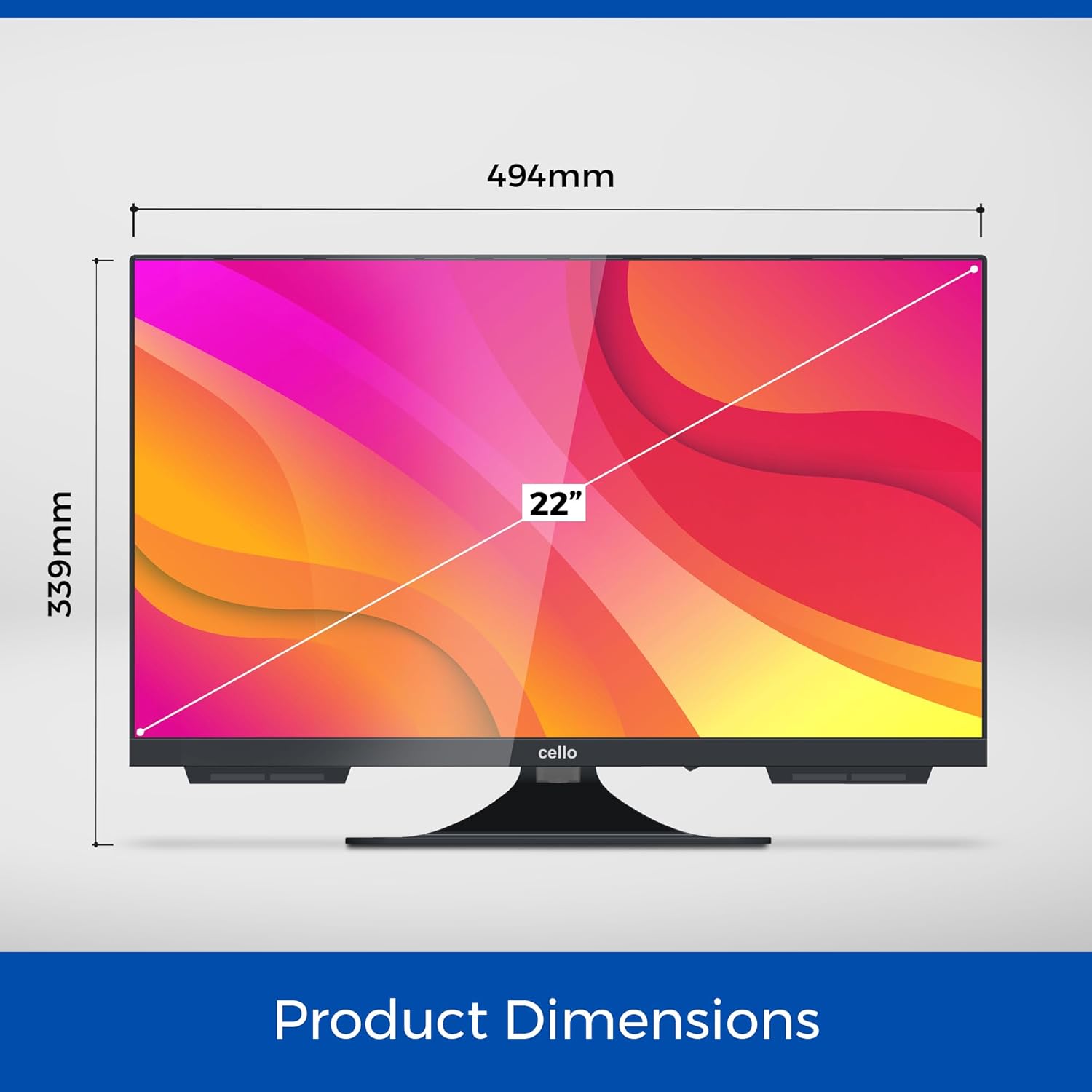
Figura 4: La WebOS Hub interface, showcasing available streaming applications and smart features.
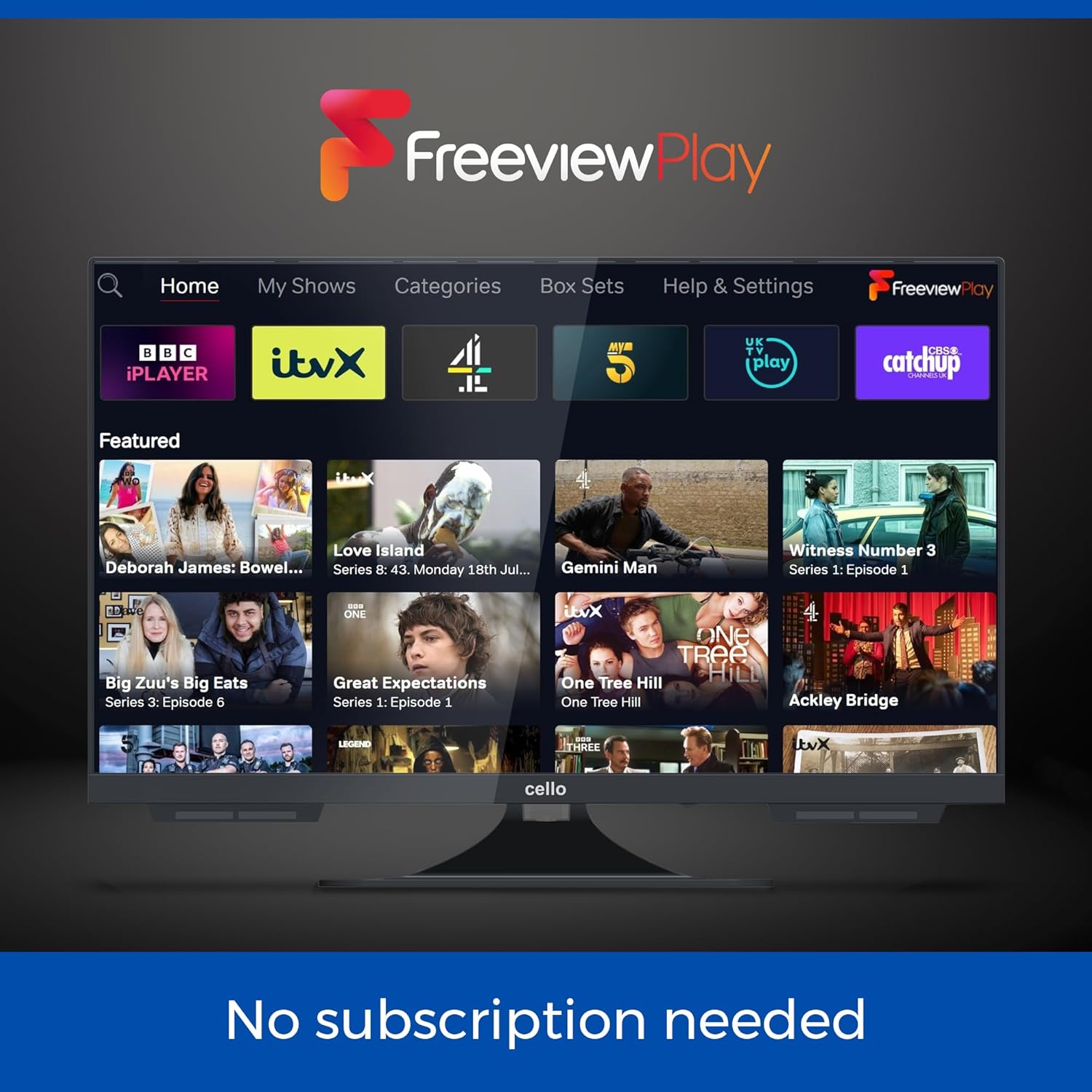
Figure 5: The Freeview Play interface, providing access to catch-up TV services without subscription.
3. Funcionamiento del reproductor de DVD
Insert a DVD disc into the slot on the side of the TV. The TV will automatically switch to the DVD input or prompt you to do so. Use the remote control for playback functions (Play, Pause, Stop, Skip, Fast Forward/Rewind).
4. Conexión de dispositivos externos
The TV is equipped with multiple ports:
- HDMI: 1 port for connecting devices like gaming consoles, set-top boxes, or laptops.
- USB: 2 ports for media playback (photos, videos, music) or USB recording (DVR).
- Óptico: 1 port for digital audio output to a sound system.
- RF: Para conexión de antena/cable.
- Ethernet: Para conexión a Internet por cable.
To switch inputs, press the Fuente button on the remote and select the desired input.
5 Audio Bluetooth
To connect a Bluetooth soundbar or headphones:
- Ir a Ajustes > Sonido > Bluetooth.
- Habilite Bluetooth y ponga su dispositivo de audio en modo de emparejamiento.
- Seleccione su dispositivo de la lista para emparejarlo.
Mantenimiento
1. Limpieza del televisor
Use a soft, dry cloth to clean the screen and cabinet. For stubborn marks, slightly dampLimpie el paño con agua o un limpiador de pantallas suave y no abrasivo. No utilice alcohol, benceno, disolventes ni otras sustancias volátiles.
2. Actualizaciones de software
El WebOS system may receive software updates. It is recommended to keep the TV connected to the internet to receive these updates, which can improve performance and add new features. You can check for updates in the Ajustes menú.
3. Cuidado del reproductor de DVD
Only insert clean, undamaged discs into the DVD player. Avoid touching the disc's playback surface. If the player experiences issues, try cleaning the disc or using a dedicated DVD lens cleaner disc.
Solución de problemas
| Problema | Posible causa | Solución |
|---|---|---|
| Sin poder | Power cable not connected; no power from outlet/12V source. | Check power connections. Ensure outlet/12V source is active. |
| No picture/sound from TV channels | Antenna/cable not connected; incorrect input selected; no channels scanned. | Check antenna/cable connection. Select correct input. Perform channel scan. |
| Sin conexión a Internet | Wi-Fi signal weak; incorrect Wi-Fi password; router issue. | Comprueba la intensidad de la señal Wi-Fi. Reinicia la contraseña. Reinicia el router. Prueba la conexión Ethernet por cable. |
| El DVD no se reproduce | Disc dirty/damaged; incorrect input selected. | Clean disc. Try another disc. Select DVD input. |
| Mala calidad de sonido | Volume too low; sound settings incorrect; external speakers not connected properly. | Adjust volume. Check sound settings (e.g., EQ, balance). Ensure external speakers/soundbar are connected and selected. |
| El control remoto no funciona | Batteries dead/incorrectly inserted; obstruction between remote and TV. | Replace batteries. Remove obstructions. Point remote directly at TV. |
Presupuesto
- Modelo: C2224WSF TRAV
- Tamaño de pantalla: 22 pulgadas
- Tecnología de visualización: CONDUJO
- Resolución: 1080p (Full HD)
- Frecuencia de actualización: 60 Hz
- Sistema operativo: WebOS Hub (by LG)
- Características integradas: DVD Player, Triple Tuner (DVB-C/-S2/-T2)
- Audio: Pitch Perfect Sound, Integrated Speaker
- Conectividad:
- Puerto 1 x HDMI
- 2 puertos USB
- 1 x Optical Port
- 1 x RF Port (Antenna/Cable)
- Ethernet
- Bluetooth
- Wifi
- Entrada de energía: 12V DC (10V-27V range) / Mains AC
- Dimensiones (Ancho x Alto x Profundidad): Approximately 49 cm x 30 cm x 8 cm (excluding stand)
- Peso: Aproximadamente 2.4 kg
- Características especiales: Frameless Design, USB Recording (DVR), Miracast, Web Navegador
- País natal: Reino Unido

Figure 6: Product dimensions of the Cello C2224WSF TV.
Garantía y soporte
This product comes with a standard manufacturer's warranty. For specific warranty terms and conditions, please refer to the warranty card included with your product or visit the official Cello websitio.
For technical support, troubleshooting assistance beyond this manual, or warranty claims, please contact Cello customer service. Contact details can typically be found on the manufacturer's websitio o en el embalaje del producto.
Please have your model number (C2224WSF TRAV) and purchase date available when contacting support.
Ask a question about this manual
Ask about setup, troubleshooting, compatibility, parts, safety, or missing instructions. Manuals+ will review the question and use this page’s manual context to help answer it.