
XTUGA IEM1100
Manual del usuario del sistema de monitorización intraauricular XTUGA IEM1100
Modelo: IEM1100
Introducción
Thank you for choosing the XTUGA IEM1100 UHF Single Channel In-Ear Monitor System. This manual provides comprehensive instructions for setting up, operating, and maintaining your new in-ear monitor system. Please read this manual thoroughly before using the product to ensure proper function and to maximize its performance and longevity.
Precauciones de seguridad
Para garantizar un funcionamiento seguro y óptimo, tenga en cuenta las siguientes precauciones:

Image: Text outlining important safety precautions for the in-ear monitor system.
- Please use in a ventilated environment, away from fire.
- Avoid contact with water when using the product.
- If the product is wireless, keep away from other interference sources.
- Please do not disassemble the equipment yourself. In case of problems, please contact us.
- Use the standard power supply if the device requires power supply. High voltagPodría dañar el dispositivo.
- Do not use sharp objects to scratch the shell and surface of the device.
Producto terminadoview
Componentes del sistema

Image: The complete XTUGA IEM1100 In-Ear Monitor System, including the main transmitter unit, the portable belt-pack receiver, and in-ear headphones.
The XTUGA IEM1100 system includes the following main components:
- Unidad transmisora: The main unit that sends the audio signal wirelessly.
- Belt-Pack Receiver: A portable receiver worn by the performer, which receives the audio signal.
- Auriculares intraaurales: For monitoring the audio signal from the receiver.
- Adaptador de corriente: For powering the transmitter unit.
- Antenas: Para transmisión y recepción de señales inalámbricas.
- Cables de audio: For connecting audio sources to the transmitter.
- Estuche de transporte: For convenient storage and transport of the system.
Componente detallado Views

Imagen: Detallada view of the transmitter unit, showing the LCD display, earphone output, volume knob, setting keys, power switch, DC power supply input, left and right channel inputs, and antenna interface.
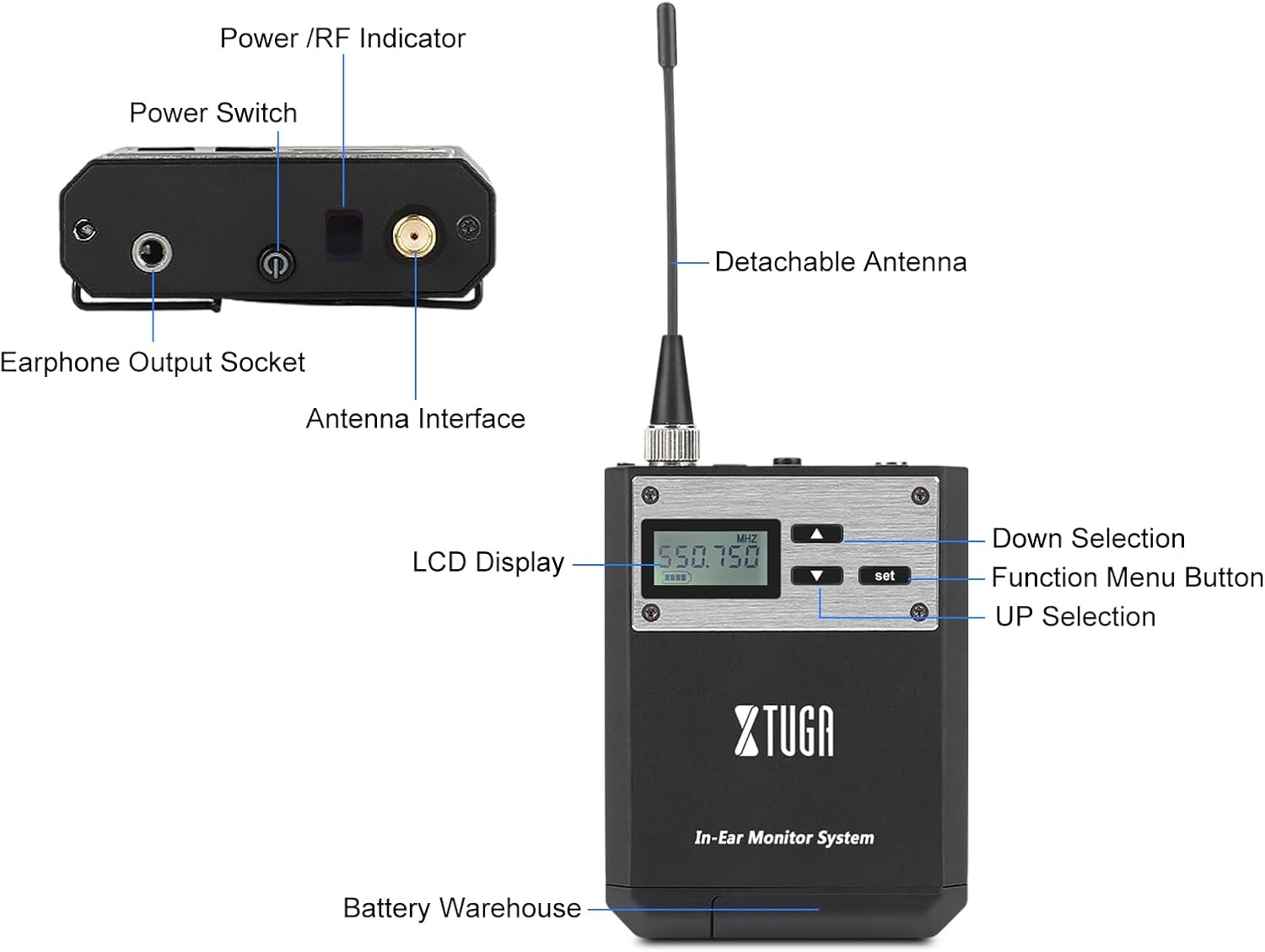
Imagen: Detallada view of the belt-pack receiver, highlighting the LCD display, power/RF indicator, power switch, earphone output socket, antenna interface, and battery compartment.
Características principales
- Whole Metal UHF Wireless System: Utilizes UHF band Phase Lock PLL technology with 40 selectable frequencies within a 32MHz band for flexible operation.
- Compact and Wireless Design: Offers tabletop stage monitoring with a wireless range of up to 250 feet (approx. 75 meters) and a frequency range of 550MHz-580Mhz. Designed to improve signal-to-noise ratio and dynamic range for optimal sound quality.
- Pantalla fácil de usar: Features a clear digital LCD front panel display on the receiver for easy monitoring, along with power and RF receiving indicator lamps.
- Energía eficiente: The belt-pack receiver uses two AA batteries with an efficient power circuit for long service time.
- Potente compatibilidad: One transmitter can connect to multiple receivers, making it suitable for group performances and various applications.
- Construcción duradera: The housing is made from tough metal material, ensuring system strength and reliability.

Image: The brushed metal construction of the system, highlighting its durable and premium build quality.

Image: Illustration of the system's anti-interference capabilities, ensuring stable signal transmission even in challenging environments.

Image: A visual representation of the system's long-distance transmission capability, reaching up to 75 meters.

Image: Diagram illustrating the auto-choose frequency function, allowing users to freely select from 40 available frequencies for optimal signal clarity.
Guía de configuración
Siga estos pasos para configurar su sistema XTUGA IEM1100:
- Connect Power and Antenna to Transmitter:
Connect the provided power adapter to the DC input on the rear of the transmitter unit. Screw the antenna securely into the antenna interface on the rear of the transmitter.
- Encender el transmisor:
Press the power button on the front panel of the transmitter to turn it on. The LCD display will illuminate.
- Install Batteries in Receiver:
Open the battery compartment on the belt-pack receiver and insert two AA batteries, ensuring correct polarity.
- Connect Antenna and Earphones to Receiver:
Screw the small antenna onto the antenna interface of the belt-pack receiver. Plug your in-ear headphones into the earphone output socket on the receiver.
- Coloque el clip para el cinturón (opcional):
For greater stability and convenience, attach the elastic back clip to the receiver.
Guía de configuración visual
Video: A comprehensive guide demonstrating the setup and basic operation of the XTUGA IEM1100 In-Ear Monitor System, including power connection, antenna installation, battery insertion, and earphone connection.
Instrucciones de funcionamiento
Una vez configurado el sistema, siga estos pasos para su funcionamiento:
- Adjusting Frequencies:
Both the transmitter and receiver allow for frequency adjustment. Use the "UP" and "DOWN" selection buttons on the units to cycle through the 40 available frequencies. Ensure both the transmitter and receiver are set to the same frequency for proper communication.
- Ajuste del volumen:
On the transmitter, use the earphone volume knob to adjust the monitoring level for connected headphones. On the belt-pack receiver, use the volume controls to set your desired listening level for the in-ear headphones. There are 20 adjustable capacity gears for precise volume control.
- Conexión de fuente de audio:
Connect your audio source (e.g., mixing console, instrument) to the Left Channel Input and Right Channel Input (XLR/TRS combo jacks) on the rear of the transmitter unit using appropriate audio cables.
- Monitoreo de audio:
With the audio source playing and both units powered on and tuned to the same frequency, you should hear the audio through your in-ear headphones connected to the receiver.
Solución de problemas
Si tiene problemas con su sistema XTUGA IEM1100, consulte los siguientes problemas y soluciones comunes:
| Problema | Posible causa | Solución |
|---|---|---|
| No hay sonido desde el receptor. |
|
|
| Interferencia o estática. |
|
|
| Volumen bajo o sonido distorsionado. |
|
|
If the problem persists, please contact XTUGA customer support for assistance.
Presupuesto
| Característica | Detalle |
|---|---|
| Marca | XTUGA |
| Número de modelo | IEM1100 |
| Tecnología de comunicación inalámbrica | RF (UHF band) |
| Rango de frecuencia | 550MHz-580Mhz (approx.) |
| Frecuencias seleccionables | 40 (within 32MHz band) |
| alcance inalámbrico | Hasta 250 pies (aprox. 75 metros) |
| Fuente de alimentación del receptor | 2 pilas AA |
| Fuente de alimentación del transmisor | CC 12 V-18 V |
| Colocación de orejas | En el oído |
| Factor de forma | En el oído |
| Dimensiones del paquete | 37 x 34 x 10 cm |
| Peso del artículo | 2.2 kilogramos |
Garantía y soporte
XTUGA products are designed for reliability and performance. For information regarding warranty coverage, technical support, or service inquiries, please refer to the warranty card included with your product or visit the official XTUGA website. You can also contact XTUGA customer service directly for assistance.
Para más productos e información, visite el Tienda XTUGA en Amazon.
Ask a question about this manual
Ask about setup, troubleshooting, compatibility, parts, safety, or missing instructions. Manuals+ will review the question and use this page’s manual context to help answer it.