
1. Introducción
This manual provides detailed instructions for the installation, operation, and maintenance of your Alarm.com ADC-VC728PF Pro Series 4MP Bullet PoE Camera. This camera is designed for both indoor and outdoor surveillance, offering advanced features such as a motorized varifocal lens, 4MP video resolution, and intelligent analytics for enhanced security monitoring.
Lea este manual detenidamente antes de intentar instalar u operar el dispositivo para garantizar su correcto funcionamiento y seguridad.
2. Contenido del paquete
Verifique que todos los artículos estén presentes en su paquete:
- Alarm.com ADC-VC728PF Camera
- Herrajes de montaje
- Weather Resistant RJ45 Cap
- Guía de instalación
- Llave Torx
3. Producto terminadoview
The Alarm.com ADC-VC728PF is a robust Power over Ethernet (PoE) bullet camera featuring a 4MP sensor and a motorized varifocal lens. This design allows for flexible installation and remote adjustment of the camera's field of view without compromising image quality. It supports 24/7 recording to an optional onboard microSD card or a Commercial-Grade Stream Video Recorder (CSVR126), and integrates advanced analytics for object detection and business activity tracking.
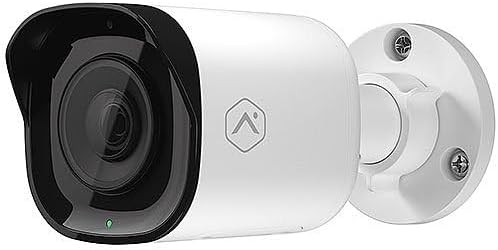
Frente view of the Alarm.com ADC-VC728PF Pro Series 4MP Bullet PoE Camera, showing the lens, LED indicator, and the adjustable mounting base.
Características principales:
- 4MP WDR and HDR Video: Delivers high-resolution video with Wide Dynamic Range and High Dynamic Range capabilities (4MP recording supported on Commercial SVR).
- Lente varifocal motorizada: Allows remote adjustment of the camera's field of view (3.2-9.8 mm).
- Alimentación a través de Ethernet (PoE): Simplifica la instalación al proporcionar energía y datos a través de un solo cable Ethernet.
- SD Card Local Storage: Supports optional onboard microSD card for 24/7 continuous recording.
- Visión nocturna IR: Provides clear video surveillance in low-light or no-light conditions.
- Perimeter Guard: Supports LED and Audio Alert features (requires firmware version 0.6.3.601+).
- Business Activity Analytics: Enables intelligent object detection and tracking for commercial applications.
- Uso en interiores y exteriores: Designed for versatile deployment in various environments.
4. Configuración e instalación
Follow these steps for proper installation of your camera.
4.1 Montaje de la cámara
- Selecciona una ubicación: Choose a suitable indoor or outdoor location for wall mounting. Ensure the area provides a clear field of view y está al alcance de su infraestructura de red.
- Prepare la superficie: Use the included mounting hardware to secure the camera base to the chosen surface. Drill pilot holes if necessary.
- Conecte la cámara: Securely attach the camera to the mounting base. The adjustable ball joint allows for flexible positioning.
4.2 Cableado y conectividad
- Conectar el cable Ethernet: Connect a standard Ethernet cable from your PoE-enabled network switch or injector to the camera's RJ45 port.
- Apply Weather Resistant Cap: For outdoor installations, use the included weather-resistant RJ45 cap to protect the Ethernet connection from environmental elements.
- Encendido: Once connected to a PoE source, the camera will power on automatically. The status LED on the camera will indicate its operational status.
- Configuración de la red: Access the Alarm.com platform or your network management interface to discover and configure the camera. Refer to the Alarm.com documentation for specific network setup procedures.
5. Operación
After successful installation and network configuration, you can begin operating your ADC-VC728PF camera.
5.1 Varifocal Lens Adjustment
- The motorized varifocal lens can be adjusted remotely through the Alarm.com app or web interfaz.
- Navigate to the camera settings to widen or narrow the field of view to optimize surveillance coverage.
5.2 SD Card Recording
- If an optional microSD card is installed, the camera supports 24/7 continuous recording.
- Acceder a foo grabadotage via the Alarm.com platform. Ensure the microSD card is properly formatted as per Alarm.com guidelines.
5.3 Analítica inteligente
- Configure object detection and business activity tracking settings within the Alarm.com platform.
- Utilize the Perimeter Guard feature for LED and audio alerts, if supported by your camera's firmware version.
6. Mantenimiento
El mantenimiento regular garantiza un rendimiento óptimo y la longevidad de su cámara.
- Limpieza: Limpie periódicamente la lente y la carcasa de la cámara con un paño suave.amp paño. Evite los limpiadores abrasivos.
- Actualizaciones de firmware: Ensure your camera's firmware is up to date. Firmware updates are typically managed through the Alarm.com platform and provide performance enhancements and new features.
- Inspección de cables: Regularly inspect all cables and connections for wear or damage, especially in outdoor environments.
7. Solución de problemas
Consulte la siguiente tabla para conocer los problemas más comunes y sus soluciones.
| Asunto | Posible causa | Solución |
|---|---|---|
| Sin energía / La cámara no enciende | No PoE connection; Faulty Ethernet cable; PoE switch issue. | Verify Ethernet cable connection; Ensure PoE source is active; Try a different cable or PoE port. |
| Sin transmisión de vídeo | Network connectivity issue; Incorrect camera configuration; Firewall blocking. | Check network connection; Verify camera settings in Alarm.com; Ensure network allows camera traffic. |
| Mala calidad de imagen | Dirty lens; Incorrect focus (varifocal); Low light conditions; Network bandwidth. | Clean the lens; Adjust varifocal lens remotely; Ensure adequate lighting or check IR functionality; Verify network bandwidth. |
| SD Card Recording Not Working | SD card not installed; SD card full or corrupted; Incorrect recording settings. | Install a compatible microSD card; Format or replace SD card; Check recording settings in Alarm.com. |
8. Especificaciones
Detailed technical specifications for the Alarm.com ADC-VC728PF camera.
| Característica | Especificación |
|---|---|
| Nombre del modelo | Alarm.com VC728PF |
| Resolución de imágenes fijas efectiva | 4 MP |
| Resolución de captura de video | 1080p, 1920p |
| Tipo de lente | Motorized Varifocal (3.2-9.8mm) |
| Tecnología de conectividad | Alámbrico (Ethernet) |
| Fuente de poder | PoE (Alimentación a través de Ethernet) |
| Uso en interiores y exteriores | Interior, exterior |
| Tipo de montaje | Montaje en pared |
| Factor de forma | Bala |
| Dimensiones (L x An x Al) | 6.8 x 3 x 3 pulgadas |
| Peso del artículo | 1.86 libras |
| Código Postal | 850010773322 |
| Características especiales | PoE, 4MP, WDR, HDR, IR Night Vision, Business Activity Analytics, Perimeter Guard |
9. Garantía y soporte
For warranty information, technical support, or service inquiries, please contact Alarm.com directly or refer to their official webSitio. Conserve su recibo de compra para validar la garantía.
- Soporte en línea: Visit the official Alarm.com support portal for FAQs, troubleshooting guides, and software downloads.
- Contacte con atención al cliente: Refer to your Alarm.com service provider for direct customer support.