
1. Introducción
The PAKITE 850 Wireless HDMI Receiver is designed to provide a seamless high-definition video and audio transmission experience. This additional receiver unit is intended for use with an existing PAKITE 850 transmitter, allowing you to extend your display to multiple locations. It supports long-range transmission, advanced dual-band Wi-Fi, full HD 1080P resolution with low latency, and convenient features like HDMI loop-out and IR remote control extension.
2. Producto terminadoview
2.1. Componentes e indicadores
The PAKITE 850 system consists of a Transmitter (TX) and one or more Receiver (RX) units. Each unit features various ports and indicator lights for easy setup and monitoring.
Figure 1: Transmitter (TX) and Receiver (RX) units with labeled ports and indicators. Key indicators include Power, Video, Link, Reset, IR-Out/In, HDMI Out/In, and USB-C 5V power supply.
- Indicador de encendido: Shows the power status of the unit.
- Indicador de vídeo: Se ilumina cuando se detecta una señal de vídeo.
- Indicador de enlace: Indicates a successful wireless connection between TX and RX.
- Botón de reinicio: Used to reset the device (press for 5 seconds).
- IR-Out (Transmitter): Connects to the IR emission cable to control the source device.
- IR-In (Receiver): Connects to the IR receiving cable to receive remote signals.
- HDMI In (Transmitter): Se conecta al dispositivo fuente HDMI.
- HDMI Out (Transmitter & Receiver): Connects to the display device.
- USB-C 5 V: Puerto de entrada de energía.
3. Configuración e instalación
Follow these steps to set up your PAKITE 850 Wireless HDMI Receiver with a compatible transmitter:
- Conectar antenas: Screw the provided antennas onto both the Transmitter (TX) and Receiver (RX) units.
- Conexión de energía: Plug the provided USB-C power cables into the USB-C 5V ports on both the TX and RX units, then connect them to power adapters and a power outlet.
- Transmitter (TX) Connection:
- Connect an HDMI cable from your video source (e.g., laptop, set-top box) to the Entrada HDMI port on the TX unit.
- If using the HDMI Loop-out feature, connect an HDMI cable from the Salida HDMI port on the TX unit to a local display.
- Receiver (RX) Connection: Conecte un cable HDMI desde el Salida HDMI port on the RX unit to your display device (e.g., TV, projector, monitor).
- IR Remote Extender Setup:
- Connect the IR emission cable to the Salida de infrarrojos port on the TX unit and place the emitter near the IR sensor of your source device.
- Connect the IR receiving cable to the IR-In port on the RX unit and place the receiver in a location where your remote control can easily send signals to it.
- Encendido: Ensure both TX and RX units are powered on. The units are designed for plug-and-play convenience and should automatically connect within 18-22 seconds. The Link indicator will light up when connected.
Video 1: Demonstrates the basic connection process for the transmitter and receiver units, including power and HDMI cables, and shows a successful connection to a display.
Video 2: Illustrates the setup and application of the Wireless HDMI Transmitter and Receiver 850, including IR remote control functionality and cross-room transmission.
Video 3: Shows how to connect a MacBook (iOS) to the wireless HDMI system using a USB-C to HDMI adapter, demonstrating both extended and mirror display modes.
Video 4: Demonstrates the 1 TX to 2 RXs capability, showing how to connect multiple receivers to a single transmitter for simultaneous display on two monitors.
Video 5: Illustrates two connection modes (SW and SP) for the wireless HDMI extender, showing how to set up the transmitter and receiver for auto streaming.
4. Instrucciones de funcionamiento
4.1. Transmisión inalámbrica
Once connected, the PAKITE 850 system automatically establishes a stable wireless link. It utilizes 5G/2.4GHz dual-band Wi-Fi for faster, more stable connections with anti-interference capabilities. The system supports Full HD 1080P 60Hz video playback with ultra-low latency.

Figure 2: Enjoy unlimited video freedom with wireless access to all your streaming devices in 1080P Full HD.
4.2. Extended Range and Through-Wall Capability
The system offers a transmission range of up to 657 feet (200m) in open spaces and up to 165 feet (50m) through walls, making it suitable for various home environments and even farm monitoring.
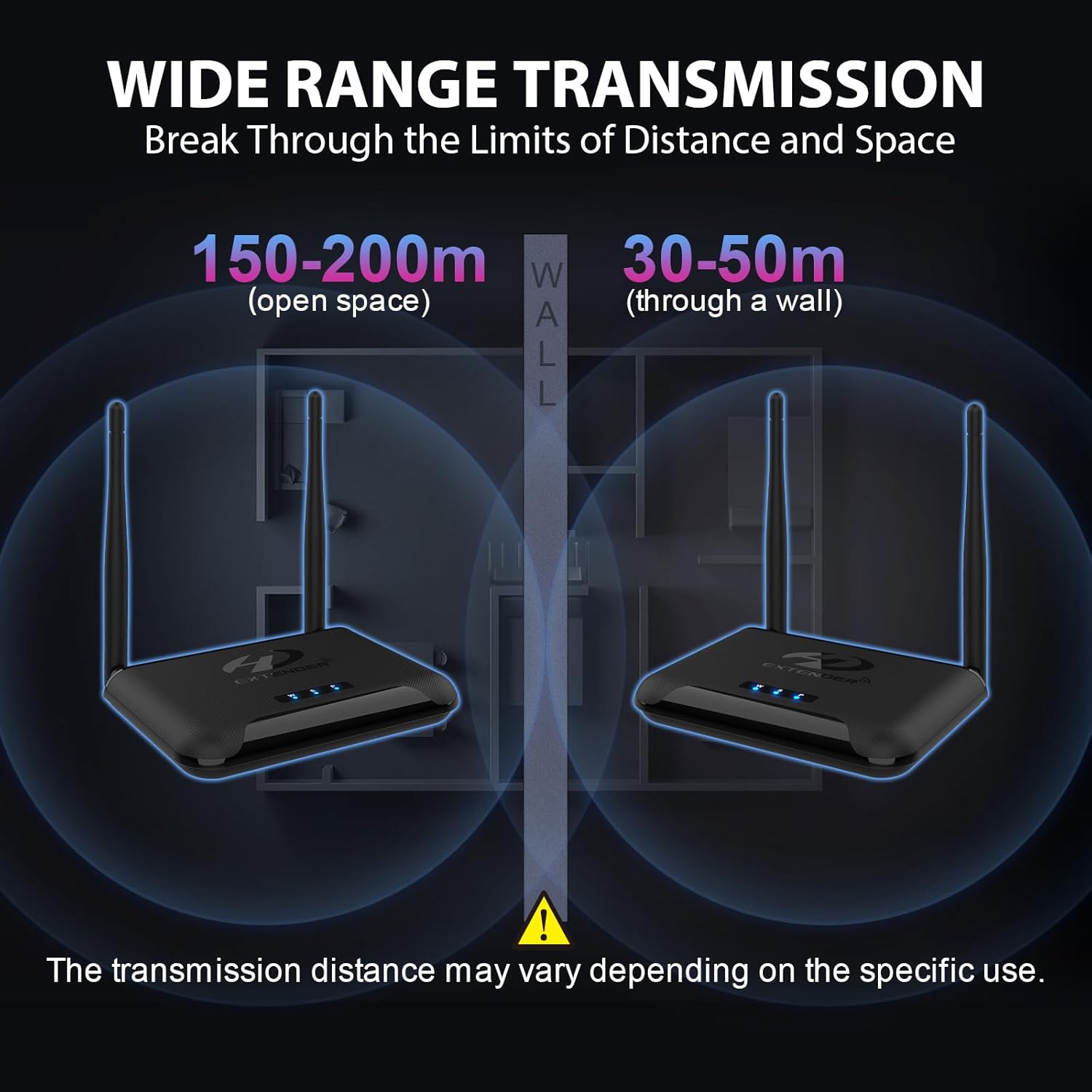
Figure 3: Wide range transmission capabilities, showing effective distances in open spaces and through walls. Note that actual transmission distance may vary based on environmental factors.
4.3. Multi-Receiver Support (1 TX to 4 RXs)
A single transmitter can connect to up to four receivers simultaneously, allowing you to duplicate or extend your screen to multiple rooms like the living room, bedroom, and kitchen.

Figure 4: Extend your vision by connecting one source to four screens wirelessly, ideal for multi-room viewing o presentaciones.
4.4. HDMI Loop-out
The transmitter features an HDMI loop-out port, enabling the source device (e.g., set-top box) to display video on a local monitor while simultaneously transmitting to other receivers.

Figure 5: HDMI Loop-out function allows you to add an extra screen for the transmitter, providing local viewing while broadcasting wirelessly.
4.5. Extensión del control remoto por infrarrojos
Control your source device from the receiver's location using the IR remote extension function. This allows you to change channels or navigate menus of your set-top box from another room.

Figure 6: IR Extend Function allows you to control your TV box or other source device from a different room using its original remote control.
5. Mantenimiento
To ensure optimal performance and longevity of your PAKITE 850 Wireless HDMI Receiver, follow these maintenance guidelines:
- Keep the devices in a cool, dry place, away from direct sunlight and excessive heat.
- Ensure proper ventilation around the units to prevent overheating. The design includes excellent heat dissipation features.
- Clean the devices with a soft, dry cloth. Avoid using liquid cleaners or aerosols.
- No bloquee los orificios de ventilación.
6. Solución de problemas
If you encounter issues with your PAKITE 850 Wireless HDMI Receiver, refer to the following common solutions:
- Sin señal/conexión:
- Ensure both the transmitter and receiver are powered on and their Link indicators are lit.
- Verify all HDMI cables are securely connected to the correct ports (HDMI In on TX, HDMI Out on RX).
- Check the signal source connection. If the display shows "Please check the signal source connection", ensure your source device is active and outputting a signal.
- Try resetting both units by pressing the Reset button for 5 seconds.
- No Picture/Incorrect Resolution:
- The device supports progressive scan resolutions up to 1080P (e.g., 1080P). It does not support interlaced resolutions such as 1080i. Ensure your source device is set to a supported progressive scan resolution.
- Verifique que su dispositivo de visualización esté configurado en la entrada HDMI correcta.
- El control remoto por infrarrojos no funciona:
- Ensure the IR emission cable is correctly positioned near the IR sensor of your source device.
- Ensure the IR receiving cable is connected to the RX unit and is in line-of-sight of your remote control.
- The IR function supports various infrared frequencies. If it does not work, try adjusting the IR frequency switch on the unit to select a matching frequency (e.g., 30KHz, 38KHz, 47KHz, 56KHz).
- Note: This function is not compatible with Bluetooth remotes.
- Mala señal/interferencia:
- Ensure the antennas on both units are securely attached and oriented correctly.
- Minimize obstacles (especially thick walls or metal objects) between the transmitter and receiver.
- Avoid placing the units near other wireless devices that might cause interference.
7. Especificaciones
| Característica | Descripción |
|---|---|
| Marca | PAKITA |
| Nombre del modelo | Transmisor y receptor inalámbrico HDMI |
| Número de modelo | BIN-850 |
| Tecnología de conectividad | HDMI, USB, Wi-Fi |
| Tipo de conector | HDMI |
| Resolución | 1080p |
| Resolución de salida de video | 1920x1080 |
| Códec de vídeo | H.264, H.265/HEVC |
| Característica especial | Chromecast |
| Servicios de Internet compatibles | Netflix, Hulu, YouTube |
| Tipo de controlador | Mando a distancia |
| Factor de forma | Caja de TV |
| Color | Negro |
| Dispositivos compatibles | Television, Personal Computer, Laptop, Tablet |
| Distancia de transmisión (área abierta) | 657 pies (200 m) |
| Transmission Distance (Through Walls) | 165 pies (50 m) |
| Dimensiones del artículo L x W x H | 4.72" de largo x 3.15" de ancho x 4.84" de alto |
8. Garantía y soporte
PAKITE stands behind its products with a comprehensive warranty and support:
- Reemplazo gratuito de 365 días: We offer a 365-day free replacement service for non-artificial damage.
- Política de devolución de 30 días: Disfrute de una política de devolución de 30 días sin preguntas.
- Garantía del fabricante: A 1-year free replacement warranty is provided.
For further assistance or technical support, please refer to the contact information provided with your product packaging or visit the official PAKITE websitio.