
Introducción
Thank you for choosing the Trueque Wireless Keyboard and Mouse Combo. This manual provides detailed instructions for setting up, operating, maintaining, and troubleshooting your new wireless peripheral set. Please read this manual carefully before use to ensure optimal performance and longevity of your product.
Contenido del paquete
Verifique que todos los artículos estén presentes en su paquete:
- Teclado inalámbrico 1 x
- Ratón inalámbrico 1 x
- 1 x Receptor USB (almacenado dentro del mouse)
- 1 x Manual de usuario

Producto terminadoview
The Trueque Wireless Keyboard and Mouse Combo is designed for comfort and efficiency, featuring an ergonomic design, a built-in phone holder, and quiet operation.
Características del teclado:
- Diseño ergonómico: Full-sized keyboard with a generous palm rest and adjustable tilt legs to reduce wrist strain.
- Soporte integrado para teléfono/tableta: A built-in cradle allows you to prop up your smartphone or tablet for easy viewEn.
- Escritura silenciosa: Soft membrane keys provide a smooth and quiet typing experience.
- Teclas de acceso rápido multimedia: Includes 6 dedicated hotkeys for quick access to common functions like web browsing and calculator.

Características del mouse:
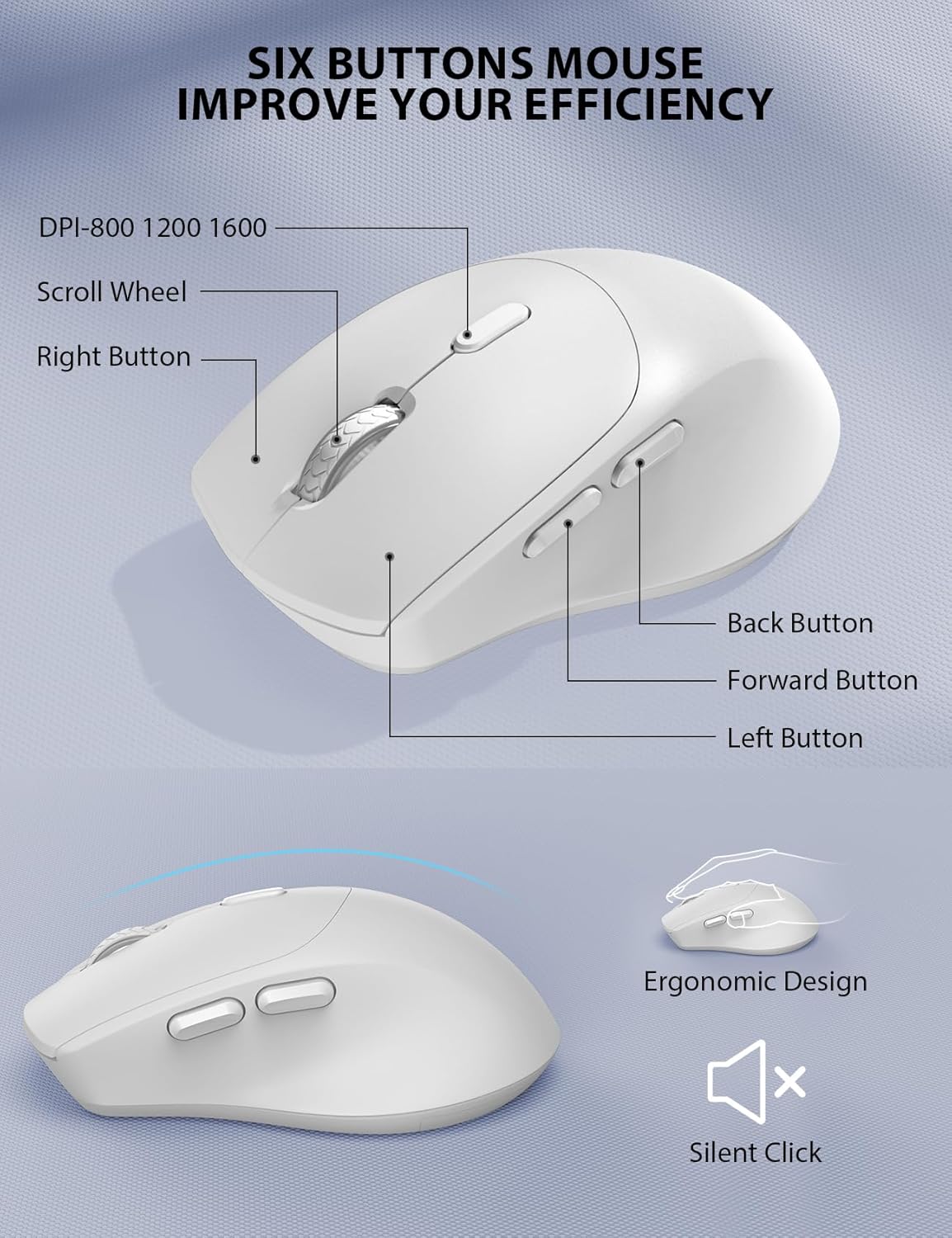
- Forma ergonómica: Contoured grips and a comfortable handshake angle for prolonged use.
- DPI ajustable: Three DPI settings (800/1200/1600) for customizable cursor sensitivity.
- Diseño de 6 botones: Includes left, right, scroll wheel, DPI button, and forward/backward buttons for enhanced navigation.
- Clics silenciosos: Designed to produce 95% less noise than standard mice.
Conectividad inalámbrica:
- Tecnología inalámbrica de 2.4 GHz: Provides a stable and reliable connection up to 33 feet (10 meters).
- Receptor USB único: One compact USB receiver connects both the keyboard and mouse to your device.

Configuración e instalación
Follow these steps to set up your Trueque Wireless Keyboard and Mouse Combo:
- Instale las baterías:
- Teclado: Open the battery compartment on the underside of the keyboard and insert two (2) AAA batteries (not included), ensuring correct polarity.
- Ratón: Open the battery compartment on the underside of the mouse and insert one (1) AA battery (not included), ensuring correct polarity. The USB receiver is typically stored in this compartment.

Image: The back of the keyboard and mouse, illustrating the battery compartments for 2xAAA (keyboard) and 1xAA (mouse), and the storage slot for the USB receiver. - Conecte el receptor USB:
- Retire el receptor USB del compartimiento de la batería del mouse.
- Conecte el receptor USB a un puerto USB disponible en su computadora o computadora portátil.
- Encendido:
- Ratón: Encienda el interruptor de encendido ubicado en la parte inferior del mouse.
- Teclado: The keyboard will activate automatically when you press any key.
Video: This video demonstrates how to install batteries and pair the mouse, which is helpful for initial setup and troubleshooting connection issues.
Operación
Uso del teclado:
- Mecanografía: The full-sized layout with a numeric keypad provides a familiar typing experience.
- Teclas de acceso rápido: Utilize the dedicated hotkeys (e.g., for web browser, calculator) located above the function keys for quick access to applications.
- Luces indicadoras: Observe the Num Lock, Caps Lock, and Power indicator lights to monitor keyboard status. The power light will blink when batteries are low.
Uso del ratón:
- Ajuste de PPP: Press the DPI button (usually located behind the scroll wheel) to cycle through 800, 1200, and 1600 DPI settings to adjust cursor speed.
- Botones de navegacion: Use the forward and backward buttons on the side of the mouse for quick web navegación de la página.
Gestión inteligente de la energía
The keyboard and mouse are equipped with a smart sleep mode to conserve battery life:
- Reposo del teclado: El teclado entrará en modo de suspensión después de 15 minutos de inactividad.
- Sueño del ratón: El mouse entrará en modo de suspensión después de 10 minutos de inactividad.
- Despierta: To wake up either device, simply press any button or key.
With smart power management, you can expect extended battery life, reducing the frequency of battery changes.
Compatibilidad
This wireless keyboard and mouse combo is widely compatible with various operating systems and devices:
- Sistemas operativos: Windows, Chrome OS, Mac OS.
- Dispositivos compatibles: PCs, Laptops, Desktops, Tablets (with appropriate USB-A port or adapter).

Solución de problemas
If you encounter issues with your wireless keyboard and mouse, please refer to the following common solutions:
- No Connection / Lag:
- Asegúrese de que las baterías estén correctamente instaladas y tengan suficiente carga. Reemplácelas si es necesario.
- Verifique que el receptor USB esté conectado correctamente a un puerto USB que funcione. Pruebe con otro puerto USB.
- Acerque el teclado y el mouse al receptor USB para descartar problemas de alcance.
- Re-pair the devices: For the mouse, press the scroll wheel and right button simultaneously for 5-8 seconds. For the keyboard, ensure it's powered on and try pressing a key.
- Las teclas no responden / el mouse no se mueve:
- Verifique los niveles de la batería y reemplácela si está baja.
- Asegúrese de que el interruptor de encendido del mouse esté en la posición "ENCENDIDO".
- Clean any debris around the mouse's optical sensor or under the keyboard keys.
- Interferencia:
- Other 2.4GHz wireless devices (e.g., Wi-Fi routers, cordless phones) may cause interference. Try to minimize their proximity.
Video: This video provides tips for troubleshooting common issues if your keyboard and mouse are not working properly, including battery installation and pairing.
Presupuesto
| Característica | Detalle |
|---|---|
| Marca | Trueque |
| Modelo | B0D4PJYJB8 |
| Color | Blanco |
| Tecnología de conectividad | 2.4GHz inalámbrica |
| Características especiales | Ergonomic, Wrist Rest, Phone Holder |
| Dispositivos compatibles | PC, Laptop, Desktop, Tablet |
| Detección de movimiento | Óptico |
| Batería del teclado | 2 pilas AAA (no incluidas) |
| Batería del ratón | 1 x AA battery (Not Included) |
| Fuente de poder | Funciona con pilas |
| Disposición del teclado | QWERTY |
| Número de llaves | 104 |
| Descripción del teclado | Membrana |
| Configuración de DPI del mouse | 800/1200/1600 |
| Sistemas operativos compatibles | Windows, Chrome OS, Mac OS |

Garantía y soporte
Your Trueque Wireless Keyboard and Mouse Combo comes with a garantía de reemplazo de un año from the date of purchase. If you experience any issues with your product, please contact our customer service team for assistance.
Correo electrónico de atención al cliente: truequeservice@outlook.com
Our professional customer service team is available to help resolve your problems promptly.
