
Información importante de seguridad
Lea atentamente todas las instrucciones antes de ensamblar y usar. Conserve este manual para futuras consultas.
- This product has a maximum weight recommendation of 350 libras (158 kg). Do not exceed this weight limit.
- Improper assembly or use may lead to instability or malfunction, potentially causing injury.
- To avoid health issues associated with prolonged sitting, take regular breaks and adjust your posture during extended use.
- Ensure all screws and connections are tightened securely before use and periodically check for looseness.
Contenido del paquete
Verifique que todos los componentes estén presentes antes de comenzar el ensamblaje. Si alguna pieza falta o está dañada, comuníquese con el servicio de atención al cliente.
- Apoyabrazos (2)
- Ruedas (5)
- Elevador de gas (1)
- Reposacabezas (1)
- Guía del usuario (1)
- Assembly Tools (1 set)
- Base de silla (1)
- Cojín de asiento (1)
- Respaldo (1)

Figura 1: Example of a caster wheel, part of the chair's base assembly.
Configuración y montaje
The FLEXISPOT OC4 Lite chair is designed for straightforward assembly. A detailed user manual with step-by-step instructions and all necessary tools are included in the package. Assembly can typically be completed in approximately 30 minutes.
- Desempaquetar componentes: Retire con cuidado todas las piezas del embalaje y colóquelas sobre una superficie limpia y plana.
- Fije las ruedas a la base: Insert the five caster wheels into the holes on the chair base until they click securely into place.
- Insertar elevador de gas: Coloque el cilindro de elevación de gas en el orificio central de la base de la silla.
- Ensamblar el asiento y el respaldo: Follow the specific instructions in the included user guide to attach the backrest to the seat cushion and then to the chair mechanism.
- Colocar el reposacabezas: Fije el reposacabezas a la parte superior del respaldo.
- Conectarse al elevador de gas: Coloque con cuidado el asiento y el respaldo ensamblados sobre el cilindro de elevación de gas.
- Comprobaciones finales: Asegúrese de que todas las conexiones estén bien ajustadas y que la silla esté estable antes de usarla.
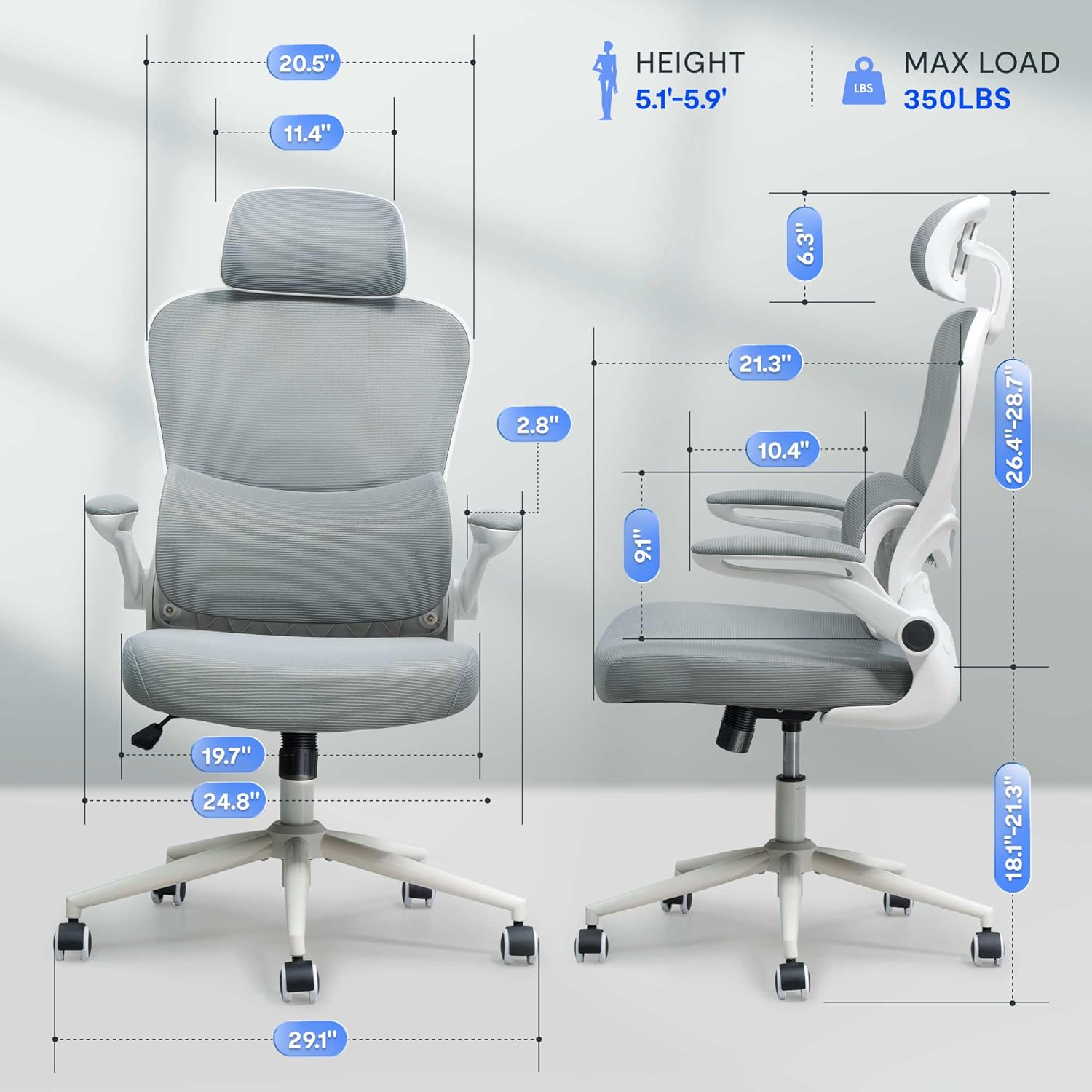
Figura 2: Assembled chair with key dimensions for reference.
Instrucciones de funcionamiento
The FLEXISPOT OC4 Lite chair offers multiple adjustment points to customize your seating experience for optimal comfort and support.
1. Ajuste de la altura del asiento
Para ajustar la altura del asiento, localice la palanca a la derecha, debajo del asiento. Tire de la palanca hacia arriba mientras está sentado para bajar el asiento, o hacia arriba mientras está de pie para subirlo. Suelte la palanca a la altura deseada.
2. Tilt Function and Tension Control
The chair features a tilt function allowing the backrest and seat to recline together. Use the lever on the left side beneath the seat to lock or unlock the tilt. The tilt tension knob, located at the front center beneath the seat, can be rotated to adjust the resistance of the tilt mechanism.

Figura 3: Adjusting the chair's tilt angle and tension.
3. Soporte lumbar ajustable
The chair includes adjustable lumbar support that adapts to your waist movement, providing dynamic support. The lumbar support can be adjusted vertically by sliding it up or down along the backrest frame to align with the natural curve of your spine.
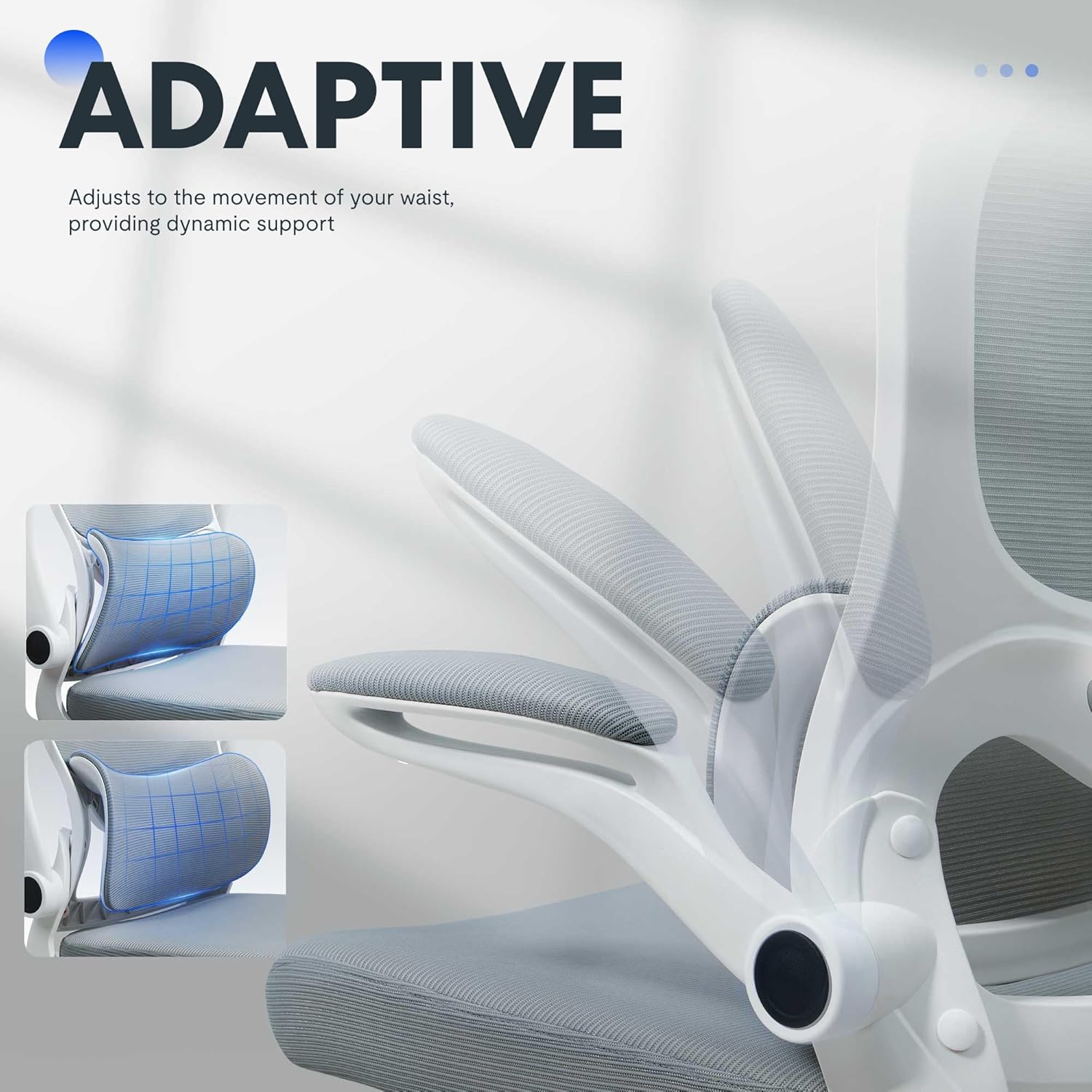
Figura 4: Adaptive lumbar support for personalized comfort.
4. Reposacabezas ajustable
The headrest can be adjusted for height and angle to provide optimal neck and head support. Gently push or pull the headrest to move it to your preferred position.
5. Apoyabrazos abatibles
The armrests can be flipped up to allow the chair to be pushed closer to a desk, saving space. To flip them up, lift the armrests until they lock into the vertical position. To return them, gently pull them down.

Figura 5: Chair with armrests flipped up for space-saving storage.
Mantenimiento
El cuidado adecuado prolongará la vida útil y la apariencia de su silla de oficina.
- Limpieza: Para la limpieza general, limpie las superficies con adamp cloth. For fabric areas, dry clean or wipe clean as needed. Avoid harsh chemical cleaners that may damage the material.
- Inspección: Revise periódicamente todos los pernos y tornillos para asegurarse de que estén bien apretados. Vuelva a apretarlos si es necesario para mantener la estabilidad y la seguridad.
- Cuidado de las ruedas: Mantenga las ruedas libres de pelos y residuos para garantizar un movimiento suave.
Solución de problemas
Si encuentra algún problema con su silla, consulte los problemas y soluciones comunes a continuación.
| Problema | Posible causa | Solución |
|---|---|---|
| La silla no ajusta la altura | Mal funcionamiento del elevador de gas o palanca no activada. | Asegúrese de que la palanca de ajuste de altura esté completamente enganchada. Si el problema persiste, es posible que sea necesario reemplazar el pistón de gas. Contacte con el servicio de atención al cliente. |
| La silla se tambalea o se siente inestable | Tornillos flojos o suelo irregular. | Revise y apriete todos los tornillos de montaje. Asegúrese de que la silla esté sobre una superficie plana y nivelada. |
| Las ruedas no giran con suavidad | Escombros en las ruedas o ruedas dañadas. | Retire cualquier pelo o residuo de las ruedas. Si están dañadas, es posible que sea necesario reemplazarlas. |
| Backrest does not tilt or lock | Mecanismo de inclinación bloqueado o tensión demasiado alta. | Ensure the tilt lock lever is disengaged. Adjust the tilt tension knob to a lower setting. |
Especificaciones del producto
| Marca | FLEXISPOT |
| Nombre del modelo | OC4-V2 |
| Color | Blanco |
| Material | Alloy Steel, Mesh, Nylon |
| Dimensiones del producto (Pr. x An. x Al.) | 29.1" x 29.1" x 50" (73.9 cm x 73.9 cm x 127 cm) |
| Peso del artículo | 32 libras (14.5 kg) |
| Recomendación de peso máximo | 350 libras (158 kg) |
| Profundidad del asiento | 21.3 pulgadas (54.1 cm) |
| Ancho del respaldo de la silla | 20.5 pulgadas (52.1 cm) |
| Estilo de espalda | Espalda de malla |
| Estilo de brazo | Brazos abatibles |
| Movimiento de la base del mueble | Girar |
| Montaje requerido | Sí |
| Certificaciones | BIFMA, SGS |
Garantía y soporte
The FLEXISPOT OC4 Lite Ergonomic Office Chair is rigorously tested and certified by BIFMA and SGS, ensuring durability and safety. The reinforced nylon base is capable of supporting significant weight, and the resilient mesh fabric is designed to maintain its shape over time.
For any questions, concerns, or assistance with assembly, operation, or troubleshooting, please contact our professional customer service team. Refer to the contact information provided with your purchase or visit the official FLEXISPOT websitio para detalles de soporte.