
1. Introducción
The Yankok HT-376 is a versatile modular plug crimper designed for network and telecommunication applications. This all-in-one tool integrates crimping, stripping, cutting, and cable testing functionalities, making it suitable for various connector types including RJ45 (8P8C), RJ12/RJ11 (6P6C, 6P4C, 6P2C), RJ10, and RJ9 (4P4C, 4P2C). It features a full-cycle ratcheting mechanism for precise crimps and a built-in cable tester for verifying wire connections.
2. Información de seguridad
- Always wear appropriate eye protection when using this tool.
- Keep fingers clear of cutting and crimping dies to prevent injury.
- Ensure the tool is clean and free of debris before and after each use.
- Guarde la herramienta en un lugar seco y seguro, fuera del alcance de los niños.
- No utilice la herramienta para fines distintos a los previstos.
- The built-in cable tester requires batteries (not included). Ensure correct battery insertion.
- Esta herramienta es NO for use on AMP/TYCO style plugs.
- This tool does NO crimp pass-through connectors.
3. Contenido del paquete
Verifique que todos los artículos estén presentes en el paquete:
- 1x Yankok HT-376 Cable Tester Crimper
- 1x Replacement Blade Set
- 1x Guía del usuario (este documento)
4. Características del producto
- All-in-one Modular Crimper: Crimps RJ45 (8P8C), RJ12/RJ11 (6P6C, 6P4C, 6P2C), RJ10, and RJ9 (4P4C, 4P2C) modular plugs.
- Built-in RJ45 Cable Tester: Integrated diode tester with LED lights to check wire connection status for UTP and STP cables (RJ45, RJ12, RJ11). Displays 8-pin wire configuration.
- Integrated Cable Stripper and Cutter: Strips and cuts Ethernet, paired-conductor, twisted pair, voice, and data cables. Features a blade guard for safety.
- Full-cycle Ratchet Mechanism: Ensures complete compression of the connector before release, providing reliable crimps.
- Construcción duradera: Crimping dies are precision ground from high-carbon steel. The tool body is steel with a black-oxide finish for durability.
- Característica de bloqueo: Allows for convenient storage after use.
5. Configuración
5.1. Battery Installation for Cable Tester
The built-in cable tester requires batteries (not included). Locate the battery compartment on the detachable tester unit. Insert the required batteries, ensuring correct polarity. Close the compartment securely.
5.2. Preparación de la herramienta
Before use, ensure the tool is clean and the blades are sharp. The tool is ready for immediate use out of the package for crimping, stripping, and cutting functions.
6. Instrucciones de funcionamiento
6.1. Cable Stripping
- Abra las manijas de la crimpadora.
- Locate the stripping blade section, typically marked "STRIP LENGTH" or with a blade guard.
- Insert the cable into the appropriate stripping slot (e.g., "12MM ROUND CABLE" for round cables).
- Rotate the tool around the cable 1-2 times to score the insulation.
- Carefully pull the stripped insulation off the cable, exposing the internal wires.

Figure 1: Cable stripping and cutting mechanism. The image highlights the quality blade for easy stripping and cutting, showing a cable being stripped and another being cut.
6.2. Cable Cutting
- Abra las manijas de la crimpadora.
- Locate the cutting blade section, typically marked "CUT".
- Place the cable into the cutting slot.
- Squeeze the handles firmly to cut the cable cleanly.
6.3. Modular Plug Crimping
- Prepare the cable by stripping the outer jacket to the appropriate length (refer to connector specifications).
- Arrange the individual wires according to the desired wiring standard (e.g., T568A or T568B for RJ45).
- Trim the wires evenly to the correct length for the connector.
- Insert the prepared wires into the modular plug, ensuring each wire reaches the end of its channel.
- Select the correct crimping die on the tool for your connector type (e.g., 8P for RJ45, 6P for RJ11/RJ12, 4P for RJ9/RJ10).
- Insert the modular plug with the cable into the chosen crimping die.
- Squeeze the handles firmly and completely until the ratcheting mechanism releases. This ensures a full and secure crimp.
- Retire el conector engarzado de la herramienta.
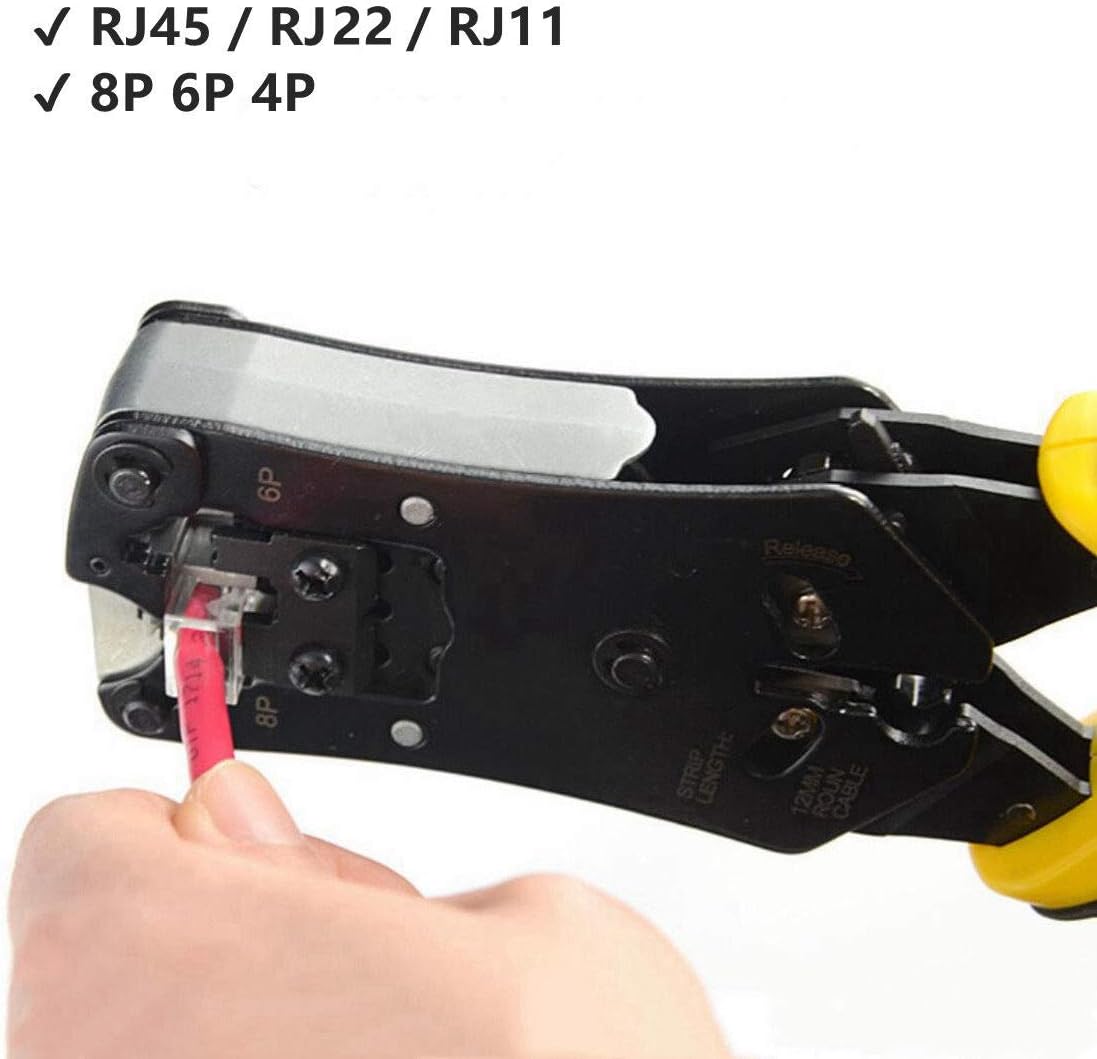
Figure 2: Crimping various modular plugs. The image illustrates the tool's capability to crimp RJ45, RJ22, and RJ11 connectors, indicating support for 8P, 6P, and 4P plugs.
6.4. Prueba de cables
- Separate the detachable cable tester unit from the main crimper body.
- Connect one end of the crimped cable to the RJ45 port on the main crimper unit.
- Connect the other end of the cable to the RJ45 port on the detachable tester unit.
- Turn on the tester unit (if it has a power switch).
- Observe the LED indicators on both units. The LEDs will light up sequentially (1-8) to indicate proper wire continuity.
- If there are issues (e.g., open circuits, shorts, mis-wires, reversals, split pairs), the corresponding LEDs will not light up correctly or will indicate the fault.
- The tester supports both UTP and STP cables.
- The tester has two modes: Single Test or Continuous Test. Refer to the tester unit for mode selection.
- An auto power-saving feature and low power indicator are included.

Figure 3: UTP/STP Cable Test Jack. This image displays the detachable cable tester unit and its RJ45 port, along with the LED indicators for testing cable continuity.
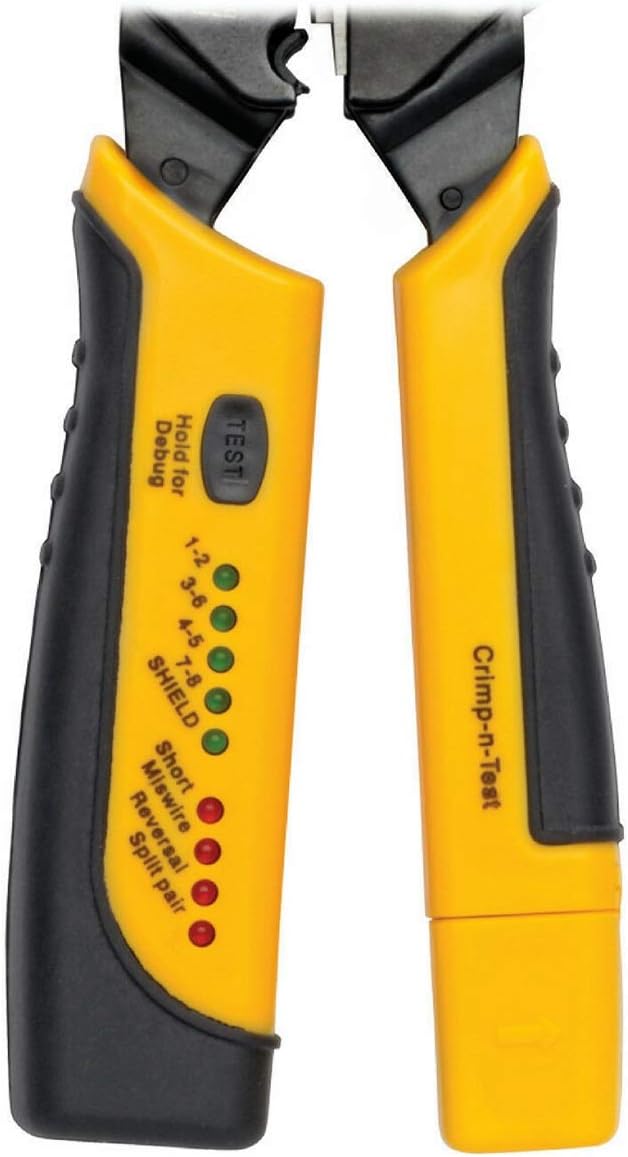
Figure 4: Cable Tester LED Indicators. A detailed view of the tester unit showing LEDs for 1-8 pins, Shield, Short, Miswire, Reversal, and Split Pair, along with the 'TEST' button.
7. Mantenimiento
- Limpieza: After each use, wipe the tool clean with a dry cloth to remove any debris or wire fragments.
- Reemplazo de cuchillas: The tool includes a replacement blade set. To replace the cutting or stripping blades, carefully loosen the retaining screws, remove the old blade, insert the new blade, and tighten the screws. Exercise caution as blades are sharp.
- Lubricación: Aplique periódicamente un aceite de máquina ligero en los puntos de pivote y las partes móviles para garantizar un funcionamiento suave.
- Almacenamiento: Utilize the locking feature to keep the handles closed for compact and safe storage. Store in a dry environment to prevent rust.
8. Solución de problemas
| Problema | Posible causa | Solución |
|---|---|---|
| Crimped connector is loose or wires pull out easily. |
|
|
| Cable tester LEDs do not light up or show incorrect sequence. |
|
|
| Cable jacket not stripping cleanly. |
|
|
9. Especificaciones
| Marca: | Yankok |
| Número de modelo: | YKNT-MDC-HT376 (HT-376) |
| Conectores compatibles: | RJ45 (8P8C), RJ12 (6P6C), RJ11 (6P4C, 6P2C), RJ10 (4P4C), RJ9 (4P2C) |
| Material del mango: | Acero con alto contenido de carbono |
| Tipo de agarre: | Ergonómico |
| Usos específicos: | Networking, Telecommunication, Data Cabling, Home Office, Professional Data Centers |
| Probador de cables: | Built-in, detachable, for UTP/STP (RJ45, RJ12, RJ11) |
| Power for Tester: | Pilas (no incluidas) |
10. Información de garantía
Yankok products are manufactured to high-quality standards. For specific warranty details, including coverage period and terms, please refer to the warranty card included with your purchase or visit the official Yankok webSitio. Conserve su comprobante de compra para cualquier reclamación de garantía.
11. Soporte
For technical assistance, troubleshooting, or product inquiries, please contact Yankok customer support. You can find contact information on the official Yankok websitio o a través del minorista donde se compró el producto.
Visita el Yankok Store on Amazon Para más productos e información.