
Introducción
This manual provides essential instructions for the safe and efficient use of your Aiwa AW-KF4 Portable Bluetooth Speaker. Please read this manual thoroughly before using the product and retain it for future reference.
The Aiwa AW-KF4 is a portable Bluetooth speaker designed for robust audio performance with dynamic LED lighting, a rechargeable battery, and resistance to water and dust (IPX6). It offers versatile connectivity options including Bluetooth, USB, and AUX input.
Contenido del paquete
Carefully unpack your speaker and ensure all items are present and in good condition. If any items are missing or damaged, please contact your retailer.
- Aiwa AW-KF4 Portable Bluetooth Speaker
- Cable de carga USB-C
- Manual de instrucciones

Image: The Aiwa AW-KF4 speaker in its retail packaging, showing the speaker and branding.
Producto terminadoview
The Aiwa AW-KF4 speaker features a compact, cylindrical design with integrated controls and dynamic LED lighting. It is built for portability and durability.
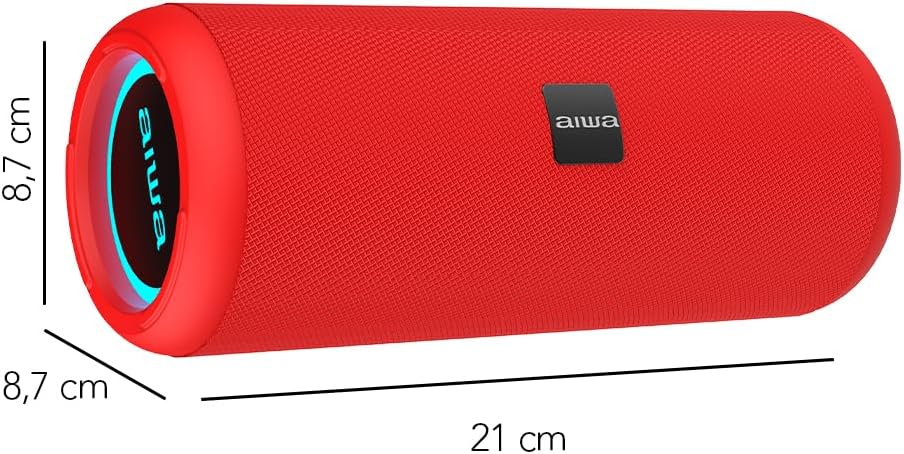
Image: A red Aiwa AW-KF4 speaker showing its approximate dimensions: 21 cm in length and 8.7 cm in diameter.

Image: Two Aiwa AW-KF4 speakers (red and black) illustrating key features: 20W output, LED lighting, TWS function, IPX6 water resistance, Bluetooth, USB, and SD card compatibility.

Image: A collage showing the Aiwa AW-KF4 speaker in various outdoor settings, emphasizing its IPX6 water resistance, up to 10 hours of battery life, and hands-free calling capability with an integrated microphone.
Configuración
1. Carga del altavoz
Before first use, fully charge the speaker. Use the provided USB-C cable to connect the speaker to a compatible USB power adapter (not included) or a computer's USB port.
- La luz indicadora de carga se iluminará durante la carga.
- Una carga completa tarda aproximadamente 3 horas.
- Una vez completamente cargada, la luz indicadora puede cambiar o apagarse.
A fully charged battery provides up to 10 hours of playback, depending on volume level and usage.
2. Encendido y apagado
- To power on: Press and hold the Power button for a few seconds until you hear an audible prompt and the LED lights activate.
- To power off: Press and hold the Power button for a few seconds until you hear an audible prompt and the LED lights turn off.
Instrucciones de funcionamiento
1. Emparejamiento Bluetooth
The speaker will automatically enter Bluetooth pairing mode when powered on for the first time or if no device is connected. The LED indicator will flash, indicating it's ready to pair.
- Asegúrese de que el altavoz esté encendido y en modo de emparejamiento.
- Habilite Bluetooth en su teléfono inteligente, tableta u otro dispositivo de audio.
- Buscar "AW-KF4" in the list of available Bluetooth devices.
- Select "AW-KF4" to connect. You will hear a confirmation sound once paired.
- The LED indicator will stop flashing and remain solid.
The speaker has a Bluetooth range of up to 10 meters (33 feet).
2. Función estéreo verdaderamente inalámbrico (TWS)
The TWS function allows you to pair two Aiwa AW-KF4 speakers together for a stereo sound experience.

Image: A visual representation of the TWS (True Wireless Stereo) function, showing two Aiwa AW-KF4 speakers being used together for synchronized sound.
- Ensure both AW-KF4 speakers are powered on and not connected to any Bluetooth device.
- On one speaker (this will be the primary speaker), press and hold the TWS button (if available, or a designated button as per specific model instructions) until you hear a pairing tone.
- Los dos altavoces se conectarán automáticamente. Una vez conectados, sonará un tono de confirmación.
- Now, connect your Bluetooth device to the primary speaker as described in the "Bluetooth Pairing" section.
Note: Refer to the specific button layout on your speaker for the exact TWS pairing button.
3. Reproducción USB y AUX
- Reproducción USB: Inserte una unidad flash USB que contenga audio fileConecte el cable al puerto USB. El altavoz detectará automáticamente la unidad y comenzará a reproducir música.
- Reproducción AUX: Connect an audio device using a 3.5mm AUX cable (not included) to the AUX input port. The speaker will switch to AUX mode.
4. luces LED
The speaker features dynamic LED lights. These lights typically activate automatically when the speaker is powered on. Specific controls for changing light modes or turning them off may be available via a dedicated button on the speaker (refer to your speaker's button layout).
5. Controles
The speaker features tactile controls for various functions:
- Botón de encendido: Mantenga presionado para encender/apagar.
- Botón de reproducción/pausa: Presione para reproducir o pausar la música.
- Subir volumen / Pista siguiente: Presione para aumentar el volumen. Mantenga presionado para la siguiente pista.
- Bajar volumen / Pista anterior: Presione para disminuir el volumen. Mantenga presionado para ir a la pista anterior.
- Botón de modo: Presione para cambiar entre los modos Bluetooth, USB y AUX.
- Botón de llamada (si corresponde): Pulse para responder o finalizar llamadas. Mantenga pulsado para rechazar llamadas.
Note: Button functions may vary slightly. Consult the diagrams in your physical manual for precise button identification.
Mantenimiento
To ensure the longevity and optimal performance of your Aiwa AW-KF4 speaker, follow these maintenance guidelines:
- Limpieza: Utilice un paño suave y seco para limpiar el exterior del altavoz. No utilice limpiadores abrasivos, disolventes ni productos químicos agresivos.
- Resistencia al agua (IPX6): The speaker is resistant to strong water jets. It is not designed for submersion. Ensure all port covers are securely closed before exposing the speaker to water or dust. After exposure to water, wipe the speaker dry before charging.
- Almacenamiento: Guarde el altavoz en un lugar fresco y seco, alejado de la luz solar directa y de temperaturas extremas.
- Cuidado de la batería: Para prolongar la vida útil de la batería, cargue el altavoz regularmente, incluso si no lo usa con frecuencia. Evite descargar la batería por completo durante periodos prolongados.

Image: The Aiwa AW-KF4 speaker positioned near a pool, illustrating its IPX6 water resistance feature, suitable for outdoor and poolside use.
Solución de problemas
Si tiene problemas con su altavoz, consulte los siguientes problemas y soluciones comunes:
| Problema | Posible causa / solución |
|---|---|
| El altavoz no se enciende. |
|
| No se puede emparejar a través de Bluetooth. |
|
| No hay sonido. |
|
| Distorsión de sonido. |
|
| El emparejamiento de TWS falla. |
|
Presupuesto
| Nombre del modelo | AW-KF4 (AWKF4B) |
| Marca | Aiwa |
| Potencia de salida del altavoz | 20 vatios RMS |
| Respuesta de frecuencia | 80 Hz (mínimo especificado) |
| Tecnología de conectividad | Bluetooth 5.0, USB, AUX |
| Modo de salida de audio | Estéreo |
| Material de la carcasa | Plástico |
| Tipo de altavoz | Altavoz de graves |
| Nivel de resistencia al agua | IPX6 (Resistente a fuertes chorros de agua) |
| Alcance de Bluetooth | Hasta 10 metros (33 pies) |
| Micrófonos | 1 (for hands-free calling) |
| Capacidad de la batería | 2000 mAh de iones de litio |
| Duración de la batería | Hasta 10 horas (varía según el volumen y el uso) |
| Tiempo de carga | Aproximadamente 3 horas |
| Vol de entradatage | 5 voltios |
| Impedancia | 4 ohmios |
| Método de control | Botones táctiles |
| Dimensiones (L x P) | Aprox. 21 cm x 8.7 cm |
| Dispositivos compatibles | Smartphones, tabletas |
| Origen | Porcelana |
Garantía y soporte
Your Aiwa AW-KF4 Portable Bluetooth Speaker comes with a Garantía del fabricante de 1 años A partir de la fecha de compra. Esta garantía cubre defectos de fabricación en condiciones normales de uso.
La garantía no cubre:
- Daños causados por mal uso, abuso, negligencia o accidente.
- Daños causados por reparaciones o modificaciones no autorizadas.
- Desgaste normal.
For warranty claims or technical support, please contact your retailer or the official Aiwa customer service in your region. Please have your proof of purchase and product model number (AW-KF4) ready when contacting support.