
1. Introducción
Thank you for choosing the GIFEHU J701 GPS Navigator. This device is designed to provide accurate and reliable navigation for various vehicle types, including cars, trucks, and RVs. It comes preloaded with the latest 2025 North American maps and offers advanced features such as customized routing, intelligent voice guidance, and comprehensive POI search capabilities. Please read this manual carefully to ensure proper use and optimal performance of your new GPS navigator.
2. Contenido del paquete
Al abrir el paquete, verifique que estén incluidos todos los siguientes elementos:
- GPS Navigator (J701)
- Cargador de coche
- Cable USB
- Soporte con ventosa
- Titular trasero
- Visera
- Manual de usuario (este documento)

Image: GIFEHU GPS Navigator with its accessories including the mount, car charger, USB cable, sunshade, and user manual.
3. Configuración
- Carga inicial: Before first use, fully charge the GPS navigator using the provided car charger or USB cable. This ensures stable operation and prevents screen flickering or freezing issues.
- Montaje: Attach the suction cup holder to your vehicle's dashboard or windshield. Securely place the GPS navigator onto the holder using the rear holder attachment. Ensure the device is positioned safely and does not obstruct your view Mientras conduce.
- Encendido: Press and hold the power button (usually located on the top edge) until the screen illuminates.
- Actualizaciones de mapas: The latest 2025 North American map (USA, Canada, Mexico) is preloaded. For other regions (UK, Europe, etc.), maps are downloadable. Our maps are updated free of charge for life. If you need to update your map, please contact our support team through Amazon.

Image: The GIFEHU GPS Navigator displaying a navigation route, mounted on a dashboard.
4. Instrucciones de funcionamiento
4.1 Customized Route Planning
The GPS navigator supports four route options: fast, green, short, and convenient. For truck drivers, the device allows you to customize routes based on vehicle weight, length, height, and width. This feature helps avoid roads with restrictions, ensuring a safe and efficient journey.
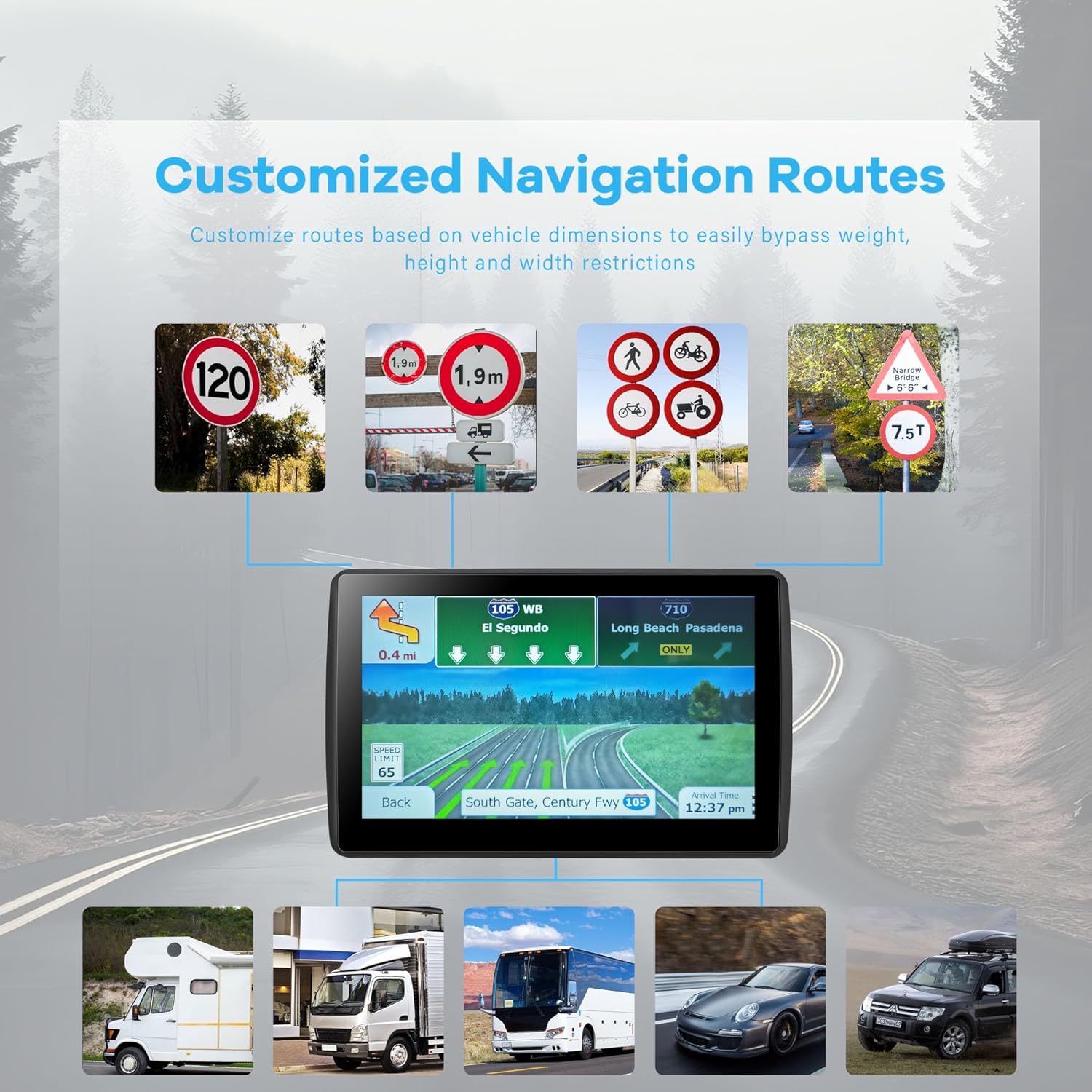
Image: Screen displaying customized navigation routes with options for different vehicle types and warnings for height/weight restrictions.
4.2 Intelligent Voice Guidance
The GPS navigation system provides clear voice prompts for turn-by-turn directions. It also includes features such as current speed camera reminders, broadcasting of road names, current speed display, and lane assistance. The device displays remaining distance and informs you of the estimated arrival time.

Image: A driver's perspective showing the GPS navigator screen with voice guidance prompts like "Speed camera ahead" and "Current speed is 75 km/h".
4.3 Funcionalidad GPS
The GPS supports various search methods including zip code, address, coordinates, favorites, and Points of Interest (POI). It features intelligent error correction, automatically generating a new route if you deviate from the planned path. The device relies on GPS signals to provide accurate navigation.

Image: Icons representing features such as 2D/3D view, IPS touch, POI & ZIP search, and smart route planning, highlighting the device's capabilities.
5. Mantenimiento
- Limpieza: Utilice un paño suave y seco para limpiar la pantalla y el exterior del dispositivo. Evite usar limpiadores abrasivos o disolventes.
- Almacenamiento: When not in use for extended periods, store the GPS navigator in a cool, dry place away from direct sunlight and extreme temperatures.
- Cuidado de la batería: Para prolongar la vida útil de la batería, evite descargarla por completo con frecuencia. Cargue el dispositivo regularmente, incluso si no lo usa constantemente.
- Actualizaciones de software: Keep your device's software updated to ensure optimal performance and access to the latest features.
6. Solución de problemas
Estos son algunos problemas comunes y sus soluciones:
- Screen flickers, freezes, and turns off?
This is often due to low battery. Please fully charge the device before use, and this issue should be resolved.
- How to download and update maps?
Our maps are updated free of charge for life. If you need to update your map, please contact us through Amazon for assistance.
- Why can't I search GPS signal outdoors?
Stable GPS signal cannot be received indoors due to the characteristics of GPS signal, the blockage of indoor building structure, and the interference of the indoor environment. Please ensure you are in an open outdoor area to acquire a GPS signal.
- Asuntos Generales:
If you encounter any other problems with the product, please contact our professional support team through Amazon for assistance.

Image: A text-based troubleshooting guide addressing common issues like screen problems, map updates, and GPS signal reception.
7. Especificaciones
| Característica | Detalle |
|---|---|
| Peso del artículo | 1.57 libras |
| Dimensiones del paquete | 8.39 x 5.87 x 3.5 pulgadas |
| Número de modelo del artículo | J701 |
| Baterías | Se requiere 1 batería de polímero de litio (incluida) |
| Tamaño de la pantalla | 7 pulgadas |
| Comando de voz | Pantalla táctil |
| Tipo de servicio del vehículo | Car, RV, Truck |
| Tecnología de conectividad | USB |
| Tipo de mapa | América del Norte (EE. UU., Canadá, México) |
| Resolución | 480 x 272 |
| Fabricante | GPS-HJX |
| Fecha de primera disponibilidad | 18 de junio de 2024 |
8. Garantía y soporte
The GIFEHU J701 GPS Navigator comes with a 1-year warranty from the date of purchase. We are committed to providing excellent after-sales service. If you require any assistance, have questions, or encounter issues not covered in this manual, please do not hesitate to contact our professional support team directly through your Amazon order page. We are here to help you.