
1. Introducción
This manual provides detailed instructions for the installation, operation, and maintenance of the Yitouniu EWeLink 2-Channel Smart WiFi Switch Relay. This device enables remote control of household appliances and electronic devices via a mobile application, RF remote control, and voice commands through smart assistants like Alexa and Google Home. It supports various operating modes and timing functions to enhance smart home automation.
2. Información de seguridad
- Asegúrese de que la energía esté desconectada antes de realizar la instalación o el mantenimiento para evitar descargas eléctricas.
- Installation should be performed by qualified personnel or under strict adherence to electrical safety guidelines.
- No exceda la corriente máxima y el vol.tage ratings specified for the device.
- Mantenga el dispositivo alejado del agua, la humedad y las temperaturas extremas.
- Verifique que todas las conexiones del cableado estén seguras y correctas antes de restablecer la energía.
3. Producto terminadoview
The Yitouniu EWeLink Smart WiFi Switch Relay is a compact, 2-channel device designed for integrating traditional appliances into a smart home system. It features WiFi and Bluetooth connectivity for app control and supports RF 433MHz for remote control.

Imagen 3.1: Frente view of the Yitouniu EWeLink Smart WiFi Switch Relay. The device is white with branding and connection labels visible.

Imagen 3.2: Primer plano view of the Yitouniu EWeLink Smart WiFi Switch Relay, showing input terminals (N, L), output terminals (NO, COM, NC), and model information.

Image 3.3: The compact size of the Yitouniu EWeLink Smart WiFi Switch Relay, held in a hand for scale.
4. Especificaciones
| Parámetro | Valor |
|---|---|
| Vol de entradatage | AC/DC 85-250V, Micro USB 5V input |
| Corriente maxima | 10A |
| Máxima potencia | 2200 W |
| WiFi estándar | WiFi 2.4GHz b/n/g + Bluetooth (IEEE 802.11b/g/n) |
| Temperatura de funcionamiento | -20°C a 70°C |
| Material | ABS retardante de llama |
| Dimensiones del producto | 2.76 x 1.77 x 1.1 pulgadas |
| Peso del artículo | 1.76 onzas |
| Tipo de contacto | Normalmente abierto |
| Calificación de protección internacional | IP65 |
| Proceso de dar un título | Comisión Federal de Comunicaciones (FCC) |
5. Configuración e instalación
5.1 Instrucciones de cableado
The device supports both AC/DC 85-250V input and Micro USB 5V input. Ensure correct wiring based on your application. The relay has Normally Open (NO), Common (COM), and Normally Closed (NC) contacts for controlling external devices.
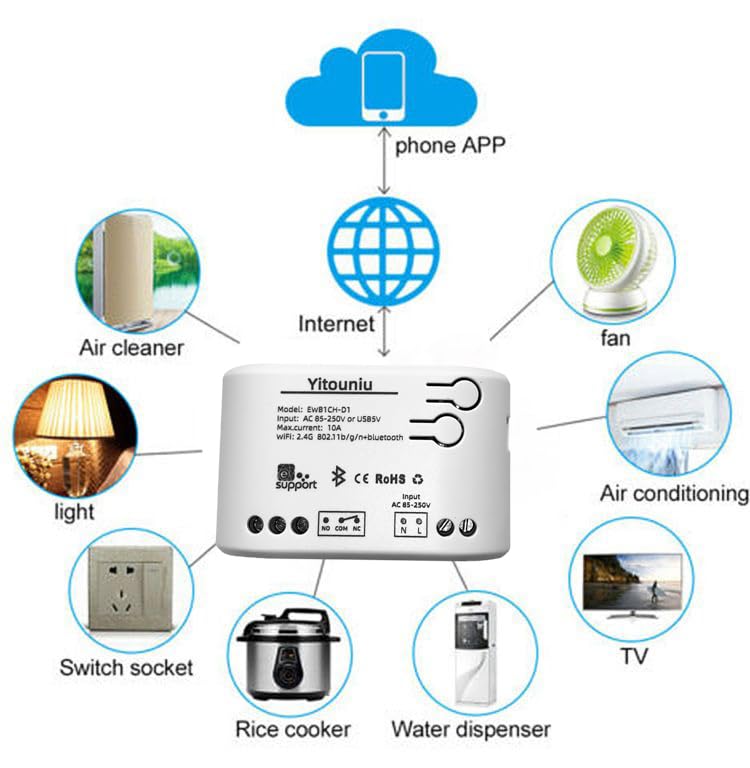
Image 5.1: Diagram illustrating the connectivity of the Yitouniu EWeLink Smart WiFi Switch Relay to various household appliances like lights, fans, and air conditioners, all controlled via a phone app and the internet.
5.2 Descarga y emparejamiento de la aplicación
- Descargar el Enlace electrónico aplicación desde Apple App Store o Google Play Store.
- Registre una cuenta e inicie sesión.
- Power on the Smart WiFi Switch Relay.
- Open the eWeLink app, tap the '+' icon to add a device.
- Follow the on-screen instructions to connect the device to your 2.4GHz WiFi network.

Image 5.2: Screenshots of the eWeLink app interface, showing controls for a garage door (ON/OFF) and a scheduling function for setting specific times.
6. Modos de funcionamiento
The device supports three operating modes: self-locking, interlocking, and inching (micromotion). These modes can typically be configured within the eWeLink app or via physical buttons on the device, depending on the specific model variant.
- Modo de autobloqueo: Each channel operates independently. Pressing the button (or app control) turns the relay ON, pressing it again turns it OFF.
- Interlocking Mode: When one channel is turned ON, all other channels are automatically turned OFF. This is useful for applications where only one device should be active at a time.
- Inching (Micromotion) Mode: The relay turns ON for a set duration (e.g., 0.5 seconds to 1 hour) and then automatically turns OFF. This is suitable for momentary actions like garage door openers or pulse controls.
7. Control de aplicaciones y control de voz
7.1 eWeLink App Features
The eWeLink app provides comprehensive control over your Smart WiFi Switch Relay:
- Encendido/apagado remoto: Controle los dispositivos conectados desde cualquier lugar con conexión a Internet.
- Funciones de temporización: Set schedules, countdowns, or recurring timers for automatic on/off operations.
- Control independiente: Each of the two channels can be controlled independently.
- Compartir dispositivo: Share control of your devices with family members.
- Control de grupo: Organize multiple smart devices into groups for simultaneous control.

Image 7.1: A user remotely controlling home lighting via the eWeLink mobile application, demonstrating the convenience of app-based control.

Image 7.2: Illustration of the eWeLink app's group control and sharing functions, allowing multiple users to manage devices across different rooms.

Image 7.3: The timing function interface within the eWeLink app, enabling users to set specific on/off times for connected appliances.
7.2 Integración del control por voz
The Yitouniu Smart WiFi Switch Relay is compatible with popular voice assistants, including Amazon Alexa and Google Home/Nest. To enable voice control:
- Ensure your Smart WiFi Switch Relay is successfully paired with the eWeLink app.
- Abra la aplicación Alexa o Google Home.
- Vaya a la sección “Habilidades” o “Trabaja con Google”.
- Buscar and enable the 'eWeLink Smart Home' skill/service.
- Vincula tu cuenta eWeLink cuando se te solicite.
- Discover devices. Your Smart WiFi Switch Relay should now be controllable via voice commands.
Exampcomandos le:
- "Alexa, enciende la luz de la sala".
- "Ok Google, apaga el ventilador."

Image 7.4: A user interacting with voice assistants like Amazon Alexa and Google Home to control smart devices, highlighting the voice control capability of the relay.
8. Mantenimiento
The Yitouniu Smart WiFi Switch Relay requires minimal maintenance. Follow these guidelines:
- Limpieza: Wipe the device with a dry, soft cloth. Do not use liquid cleaners or solvents.
- Verificación de conexión: Inspeccione periódicamente las conexiones del cableado para asegurarse de que permanezcan seguras.
- Actualizaciones de firmware: Keep the eWeLink app updated to receive the latest firmware for the device, which may include performance improvements and new features.
9. Solución de problemas
- El dispositivo no se conecta a WiFi:
- Asegúrese de que su red WiFi sea de 2.4 GHz. El dispositivo no admite redes de 5 GHz.
- Comprueba si la contraseña WiFi introducida en la aplicación es correcta.
- Acerque el dispositivo a su enrutador WiFi.
- Reinicie el dispositivo y su enrutador.
- Dispositivo sin conexión en la aplicación:
- Verifique que su conexión a Internet residencial esté activa.
- Compruebe si el dispositivo tiene energía.
- Reinicie el dispositivo.
- El control de voz no funciona:
- Confirm the eWeLink skill/service is enabled and linked in your Alexa or Google Home app.
- Ensure the device is named clearly in the eWeLink app and discovered by your voice assistant.
- Comprueba tu conexión a Internet.
- Device not responding to RF remote:
- Ensure the RF remote is paired with the switch. Refer to the RF pairing instructions (if applicable to your specific remote).
- Check the battery in the RF remote.
10. ¿Qué hay en la caja?
Al abrir el embalaje del producto, debe encontrar los siguientes elementos:
- 1 x Yitouniu Wifi 2-Channel Relay Switch
- 1 x Manual de instrucciones (este documento)
11. Garantía y soporte
This product comes with a standard manufacturer's warranty. For specific warranty terms, conditions, and duration, please refer to the documentation included with your purchase or contact Yitouniu customer support. For technical assistance or further inquiries, please visit the official Yitouniu websitio o comuníquese con sus canales de atención al cliente.