
Mytrix G901
Mytrix Tac Master Wireless Gaming Headset User Manual
Modelo: G901
Introducción
The Mytrix Tac Master Wireless Gaming Headset is designed to provide a high-quality audio experience for gaming across multiple platforms. Featuring 2.4GHz lossless wireless technology, Bluetooth 5.3, and a 3.5mm wired connection, this headset offers versatile connectivity, low latency, and immersive surround sound. The detachable noise-canceling microphone ensures clear communication, while the ergonomic design and long battery life provide comfort for extended use.
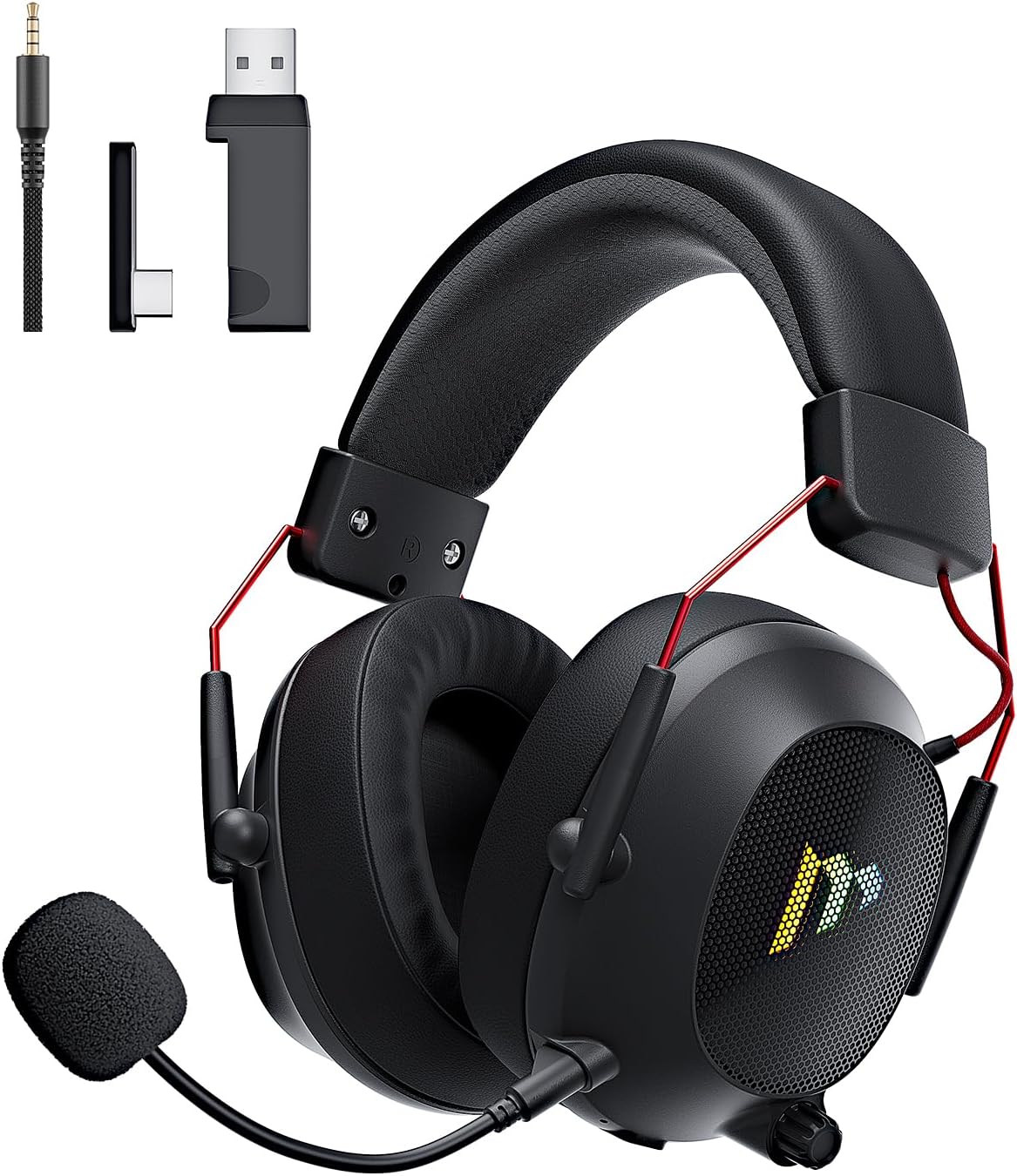
Image: The Mytrix Tac Master Wireless Gaming Headset, showcasing its sleek black design with red accents, detachable microphone, and included USB dongle and Type-C adapter.
Contenido del paquete
Verifique que todos los artículos enumerados a continuación estén incluidos en su paquete:
- Mytrix Tac Master Wireless Gaming Headset
- Micrófono desmontable con cancelación de ruido
- Dongle inalámbrico USB-A de 2.4 GHz
- USB Type-C Transmitter
- Cable de audio de 3.5 mm
- Cable de carga USB (USB-A a USB-C)
- Manual de usuario (este documento)
Headset Controls and Components
Familiarize yourself with the various controls and components of your Mytrix Tac Master headset:

Image: Diagram illustrating the location and function of controls on the Mytrix Tac Master headset, including power button, volume wheel, microphone mute button, and mode switch.
- Botón de encendido: Press and hold for 3 seconds to turn on/off. Single press to pause/play audio.
- Botón de modo (M): Single press to toggle microphone on/off. Double press to switch between Bluetooth and 2.4G wireless modes. Press and hold for 3 seconds to turn RGB lights on/off.
- Rueda de volumen: Gire hacia arriba para aumentar el volumen, gire hacia abajo para disminuirlo.
- Puerto de micrófono: Para fijar el micrófono desmontable.
- Conector de audio de 3.5 mm: Para conexión por cable.
- Puerto de carga USB-C: Para cargar los auriculares.
- Iluminación RGB: Located on the earcups.
Configuración
1. Cargar los auriculares
Before first use, fully charge the headset. Connect the USB charging cable to the headset's USB-C port and the other end to a USB power source (e.g., computer USB port, USB wall adapter). The LED indicator will show charging status and turn off when fully charged. A full charge takes approximately 3 hours and provides up to 48 hours of battery life.

Image: Visual representation of the headset's long-lasting battery life, indicating approximately 50 hours of use and a 3-hour charging time.
2. Conexión del micrófono
Insert the detachable microphone into the microphone port on the left earcup. Ensure it is securely seated. The microphone is flexible and omni-directional, allowing for angle adjustment.
3. Opciones de conectividad
The Mytrix Tac Master headset offers multiple connection methods for broad compatibility:

Image: Diagram illustrating the four connection modes: 2.4GHz Dongle (USB-A and USB-C), Bluetooth 5.3, and 3.5mm Wired, along with compatible devices for each mode.
3.1. 2.4GHz Wireless Connection (Recommended for PC, PS4, PS5, Switch Docked Mode)
- Identify the appropriate dongle for your device:
- For devices with a USB-A port (PC, PS4, PS5, Switch Docked): Use the 2.4GHz USB-A dongle.
- For devices with a USB-C port (Switch Handheld, Laptops, Tablets): Use the USB Type-C transmitter.
- Plug the selected 2.4GHz dongle/transmitter into an available USB port on your device.
- Encienda el auricular manteniendo presionado el botón de encendido durante 3 segundos.
- Ensure the headset is in 2.4GHz mode. If not, double-press the 'M' button to switch modes until the headset connects to the dongle. The headset will automatically pair with the dongle.
- En su dispositivo, seleccione los auriculares como dispositivo de entrada y salida de audio.
3.2. Bluetooth 5.3 Connection (Recommended for Mobile Phones, Tablets, Laptops)
- Encienda el auricular manteniendo presionado el botón de encendido durante 3 segundos.
- Double-press the 'M' button to switch the headset to Bluetooth pairing mode. The LED indicator will flash, indicating it's ready to pair.
- On your device, enable Bluetooth and search for "Mytrix Tac Master" in the list of available devices.
- Select "Mytrix Tac Master" to connect. Once connected, the LED indicator will stop flashing.
3.3. 3.5mm Wired Connection (Recommended for Xbox, Game Console Controllers, Devices without USB/Bluetooth)
- Conecte un extremo del cable de audio de 3.5 mm al conector de 3.5 mm del auricular.
- Connect the other end of the 3.5mm audio cable to the audio jack on your device (e.g., Xbox controller, phone).
- In wired mode, the headset's microphone and RGB lighting functions are not active.
Instrucciones de funcionamiento
Encendido/apagado
- Para encender: Press and hold the Power button for approximately 3 seconds until the headset powers on.
- Para apagar: Press and hold the Power button for approximately 3 seconds until the headset powers off.
Control de volumen
- Aumenta el volumen: Rotate the Volume wheel upwards.
- Disminuir volumen: Rotate the Volume wheel downwards.
Control de micrófono
- Silenciar/activar micrófono: Single press the 'M' button.
- The detachable microphone features noise cancellation for clear voice chat.
Control de iluminación RGB
- Turn RGB Lights On/Off: Press and hold the 'M' button for approximately 3 seconds.
Control de reproducción de audio
- Reproducir/Pausar audio: Presione una vez el botón de encendido.
Sonido envolvente
The headset features 7.1 stereo surround sound for an immersive audio experience, allowing for precise positioning of sound details in games.

Imagen: Una explosión view of the headset's 50mm drivers, illustrating the components that contribute to its 7.1 stereo surround sound capability.
Mantenimiento
- Limpieza: Utilice un paño suave y seco para limpiar los auriculares. No utilice limpiadores abrasivos ni disolventes. Para los auriculares, límpielos suavemente con agua.amp paño y dejar secar al aire completamente antes de usar.
- Almacenamiento: Guarde los auriculares en un lugar fresco y seco, alejados de la luz solar directa y de temperaturas extremas. Si los va a guardar durante un periodo prolongado, asegúrese de que la batería esté parcialmente cargada (alrededor del 50 %) para conservar su buen estado.
- Cuidado de la batería: Avoid fully discharging the battery frequently. Charge the headset regularly, even if not in constant use, to maintain battery longevity.
- Cuidado del micrófono: Handle the detachable microphone gently. Avoid excessive bending or twisting.
Solución de problemas
| Problema | Posible causa | Solución |
|---|---|---|
| No hay sonido en los auriculares. | Headset not powered on, low battery, incorrect audio output selected, connection issue. | Ensure headset is powered on and charged. Check device's audio settings to confirm "Mytrix Tac Master" is selected as output. Re-establish 2.4GHz or Bluetooth connection. For wired mode, ensure cable is fully inserted. |
| El micrófono no funciona. | Microphone muted, not properly attached, incorrect audio input selected, wired mode limitation. | Single press the 'M' button to unmute. Ensure microphone is securely attached. Check device's audio settings to confirm "Mytrix Tac Master" is selected as input. Note: Microphone does not function in 3.5mm wired mode. |
| No se puede conectar mediante conexión inalámbrica de 2.4 GHz. | Dongle not recognized, headset not in 2.4GHz mode, interference. | Ensure dongle is fully inserted into a working USB port. Double-press 'M' button to switch headset to 2.4GHz mode. Try a different USB port. Move closer to the dongle to reduce interference. |
| No se puede conectar a través de Bluetooth. | Los auriculares no están en modo de emparejamiento, Bluetooth está desactivado en el dispositivo y ya están conectados a otro dispositivo. | Double-press 'M' button to enter Bluetooth pairing mode (LED flashes). Ensure Bluetooth is enabled on your device. Disconnect from other Bluetooth devices if necessary. |
| Las luces RGB no funcionan. | Lights turned off, low battery, wired mode limitation. | Press and hold the 'M' button for 3 seconds to toggle RGB lights. Ensure headset has sufficient battery. Note: RGB lights do not function in 3.5mm wired mode. |
Presupuesto
| Característica | Detalle |
|---|---|
| Nombre del modelo | Gaming Headset (G901) |
| Tecnología de conectividad | Conexión inalámbrica de 2.4 GHz, Bluetooth 5.3, cable de 3.5 mm |
| Toma de auriculares | 3.5 mm Jack |
| alcance inalámbrico | Up to 50 feet (in open spaces) |
| Estado latente | ≤20 ms (2.4 GHz) |
| Tipo de controlador de audio | Controladores dinámicos de 50 mm |
| Características de sonido | 7.1 Stereo Surround Sound |
| Micrófono | Detachable, Omni-directional, Noise-Canceling |
| Duración de la batería | Hasta 48 horas |
| Tiempo de carga | Aproximadamente 3 horas |
| Tipo de batería | 1 batería de iones de litio (incluida) |
| Forma del auricular | Sobre la oreja |
| Características especiales | Ergonomic Design, RGB Lighting, Foldable & Portable |
| Dimensiones del producto | 5.91 x 3.94 x 5.91 pulgadas |
| Peso del artículo | 13.4 onzas |
| Fabricante | Mytrix |
Garantía y soporte
Mytrix products are manufactured to high quality standards. For information regarding warranty coverage, technical support, or service inquiries, please refer to the warranty card included with your product or visit the official Mytrix website. You may also contact Mytrix customer support directly for assistance with your Tac Master Gaming Headset.
Para obtener más ayuda, visite el sitio web Mytrix Store on Amazon.
Información importante de seguridad
- No exponga los auriculares a temperaturas extremas, humedad o líquidos.
- Evite dejar caer o someter los auriculares a impactos fuertes.
- No intente desmontar ni reparar los auriculares usted mismo. Esto anulará la garantía.
- Escuche a un volumen moderado para evitar daños auditivos. La exposición prolongada a sonidos fuertes puede causar pérdida auditiva permanente.
- Mantener fuera del alcance de los niños.
Ask a question about this manual
Ask about setup, troubleshooting, compatibility, parts, safety, or missing instructions. Manuals+ will review the question and use this page’s manual context to help answer it.