
Introducción
Thank you for choosing the T&G Wireless Speaker TG619C. This manual provides essential information for setting up, operating, and maintaining your new portable speaker. Please read this manual carefully before use to ensure optimal performance and longevity of your device.
The T&G Wireless Speaker TG619C is designed to deliver rich, immersive audio with the convenience of wireless connectivity. It features a 1200mAh battery for extended playtime and supports various audio sources including Bluetooth, memory cards, and USB drives.
Información de seguridad
- No exponga el altavoz al agua, la humedad o temperaturas extremas.
- Evite dejar caer o someter el altavoz a impactos fuertes.
- No intente desmontar, reparar ni modificar el altavoz usted mismo. Contacte con personal de servicio técnico cualificado si es necesario.
- Mantenga el altavoz alejado de fuentes de calor, luz solar directa y materiales inflamables.
- Use only the provided or a certified charger cable for charging.
- Mantener fuera del alcance de los niños.
Contenido del paquete
Por favor, revise el contenido del paquete al abrirlo. Si falta algún artículo o está dañado, contacte con su vendedor.
- 1 x T&G Wireless Speaker TG619C
- 1 x Cable de carga
Producto terminadoview
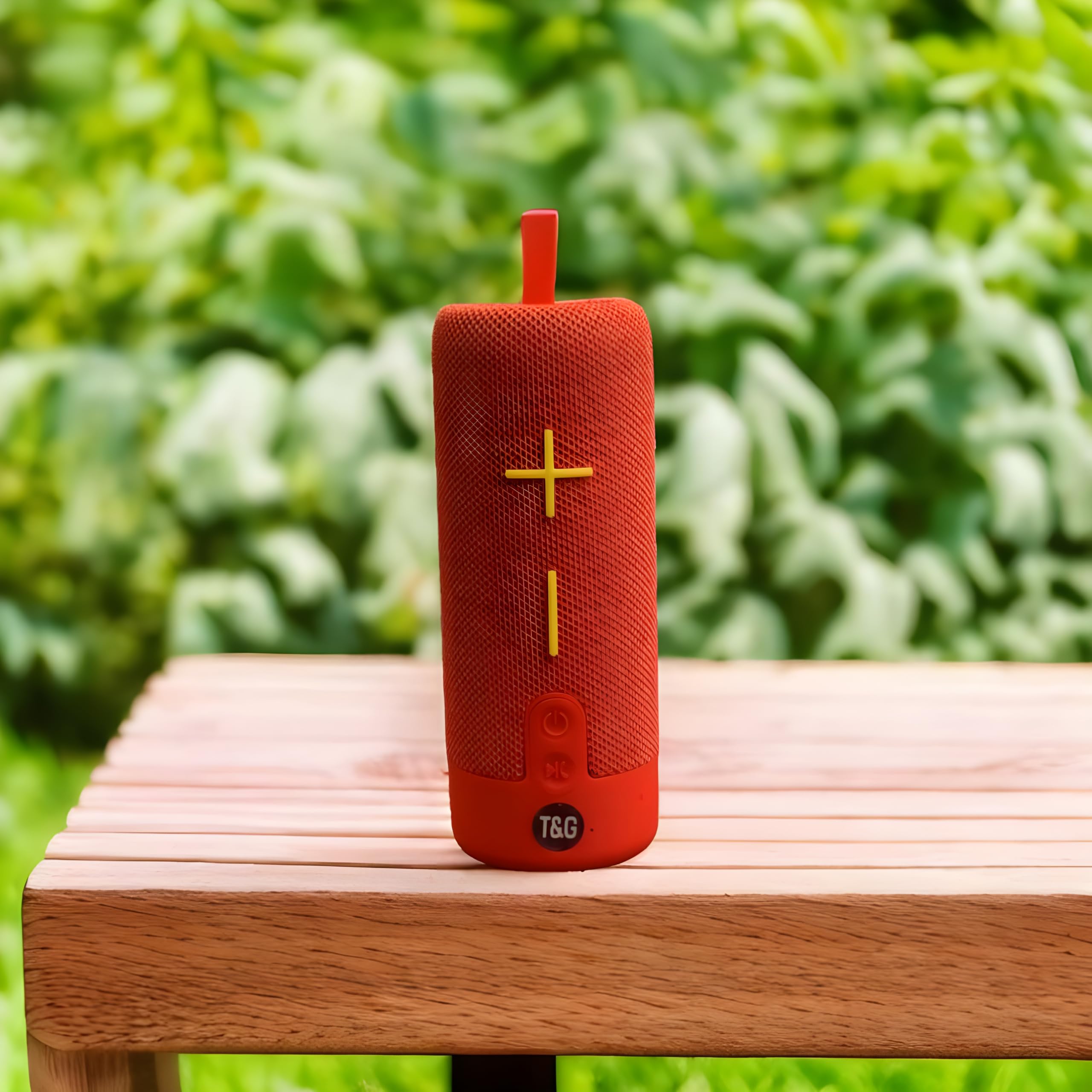
This image displays the T&G Wireless Speaker in red, highlighting its compact, cylindrical design. Visible features include the speaker grille and a control panel with buttons for power, volume, and mode selection.
The T&G Wireless Speaker TG619C is a portable audio device designed for ease of use and versatility. It features a robust speaker grille, intuitive control buttons for power, volume adjustment, track navigation, and mode switching. Input ports for charging, USB drives, and memory cards are typically located on the side or rear of the unit.
Configuración
Carga del altavoz
Before first use, fully charge the speaker. Connect the provided charger cable to the speaker's charging port and the other end to a USB power adapter (not included) or a computer's USB port. The charging indicator light will illuminate during charging and turn off or change color when fully charged.
Encendido/apagado
To power on the speaker, press and hold the power button for a few seconds until you hear an audible prompt or see an indicator light. To power off, press and hold the power button again.
Emparejamiento Bluetooth
- Asegúrese de que el altavoz esté encendido y en modo de emparejamiento Bluetooth (generalmente indicado por un LED parpadeante).
- En su teléfono inteligente, tableta u otro dispositivo con Bluetooth habilitado, vaya a la configuración de Bluetooth.
- Buscar available devices and select "T&G Speaker" (or similar name) from the list.
- Once paired, the speaker will emit a confirmation sound, and the LED indicator will typically stop flashing.
Instrucciones de funcionamiento
Tocando música
After successful Bluetooth pairing, you can stream audio from your connected device. Use your device's media player to control playback (play/pause, skip tracks).
Control de volumen
Press the '+' button to increase volume and the '-' button to decrease volume. You can also adjust the volume from your connected device.
Selección de modo
Press the 'M' (Mode) button to switch between available input modes: Bluetooth, Memory Card (TF card), and USB drive. The speaker will announce the current mode.
Using Memory Card/USB Drive
Insert a compatible memory card (TF card) or USB drive into the respective slot. The speaker will automatically detect the storage device and begin playing audio files. Use the track navigation buttons on the speaker to skip songs.
Mantenimiento
- Limpie el altavoz con un paño suave y seco. No utilice limpiadores abrasivos ni disolventes.
- Guarde el altavoz en un lugar fresco y seco cuando no esté en uso.
- Para prolongar la vida útil de la batería, evite descargarla por completo con frecuencia y cárguela regularmente, incluso si no la utiliza durante períodos prolongados.
- Mantenga los puertos libres de polvo y residuos.
Solución de problemas
| Problema | Solución |
|---|---|
| El altavoz no se enciende. | Ensure the battery is charged. Connect the charger cable and try again. |
| No sale sonido del altavoz. | Check the volume level on both the speaker and your connected device. Ensure the speaker is correctly paired via Bluetooth or the correct input mode is selected. |
| No se puede emparejar a través de Bluetooth. | Ensure the speaker is in Bluetooth pairing mode (flashing LED). Turn off and on Bluetooth on your device. Move the speaker closer to your device. Clear previous Bluetooth connections on your device. |
| Memory card/USB drive not playing. | Ensure the speaker is in the correct mode (Memory Card/USB). Check that the files on the card/drive are compatible audio formats. Ensure the card/drive is inserted correctly. |
Presupuesto
| Característica | Detalle |
|---|---|
| Marca | T&g |
| Nombre del modelo | TG619C |
| Tipo de altavoz | Portátil |
| Color | Rojo |
| Capacidad de la batería | 1200 mAh |
| Conectividad | Wireless (Bluetooth), Memory Card (TF), USB |
| Dimensiones del producto (Pr. x An. x Al.) | 6.9D x 6.6W x 17.8H centímetros |
| Componentes incluidos | Cable cargador |
| País natal | Porcelana |
Garantía y soporte
Este producto viene con SIN GARANTÍA Según las especificaciones del fabricante.
For any support inquiries, technical assistance, or issues not covered in this manual, please contact the seller or retailer where the product was purchased. Please retain your proof of purchase for any potential service requests.