
1. Producto terminadoview
The Nikon Z6III Mirrorless Camera is designed for professionals in photography and filmmaking. It features a 24.5MP partially-stacked CMOS sensor and the EXPEED 7 image processor, delivering high-quality stills and internal 6K60 and 4K120 video recording. The camera offers precise autofocus, a bright 5.76M-dot electronic viewfinder, and a durable, weather-sealed magnesium alloy body.

Figura 1.1: Frente view of the Nikon Z6III Mirrorless Camera, showcasing the Z-mount and the partially-stacked CMOS sensor.
2. ¿Qué hay en la caja?
Your Nikon Z6III Mirrorless Camera bundle includes the following items:
- Nikon Z6III Mirrorless Camera Body
- Nikon NIKKOR Z MC 105mm f/2.8 VR S Macro Lens
- Nikon EN-EL15c Rechargeable Lithium-Ion Battery
- Tarjeta de memoria 64GB
- Cable USB-A a USB-C
- Cable HDMI
- Correa de mano
- Sujeta-tapas de lentes
- Kit de limpieza
- Cartera para tarjetas de memoria
- Lector de tarjetas USB (SD/microSD)
- Trípode de vídeo de 72 pulgadas
- Trípode flexible para vlogs
- Photo, Video, & Art Suite Deluxe Software
- 62mm Filter Kit
- Bolsa de viaje
- Wireless Shutter Release - Universal
3. Configuración inicial
3.1. Carga de la batería
Before first use, fully charge the Nikon EN-EL15c Lithium-Ion Battery using the provided USB-A to USB-C cable and a compatible USB power adapter (not always included, check packaging). The charging indicator on the camera or charger will show the charging status.
3.2. Inserción de tarjetas de memoria
The Z6III supports SD and SDXC memory cards. Open the memory card slot cover, insert the 64GB memory card until it clicks into place. Ensure the card is inserted correctly to avoid damage.

Figura 3.1: Memory card slots on the Nikon Z6III, showing insertion of SD cards.
3.3. Colocación de la lente
Align the mounting mark on the NIKKOR Z MC 105mm f/2.8 VR S Macro Lens with the mounting mark on the camera body. Rotate the lens clockwise until it clicks into place. To remove, press the lens release button and rotate counter-clockwise.
4. Operación de la cámara
4.1. Encendido y apagado
Para encender la cámara, gire el interruptor de encendido, ubicado alrededor del obturador, a la posición "ON". Para apagarla, gírelo a la posición "OFF".

Figura 4.1: Arriba view of the Nikon Z6III, highlighting the power switch and mode dial.
4.2. Sensor and Image Processing
The Z6III features a 24.5MP partially-stacked CMOS sensor, which allows for faster data readout, reduced rolling shutter, and improved noise performance. Coupled with the EXPEED 7 image processor, it ensures rapid performance for both stills and video.
4.3. Enfoque automático y disparo continuo
The camera utilizes an enhanced 493-point phase-detection AF system covering the full sensor area for fast and accurate focusing. It supports continuous shooting at up to 20 fps in raw, 60 fps in full-frame JPEG, and 120 fps in DX crop mode with full AF/AE. The Pre-Release Capture function records frames up to 120 fps just before the shutter is fully pressed.
The autofocus system can detect 9 subject types and offers reliable performance even in backlit scenes, detecting human faces in silhouettes. It also features small face detection for video tracking.
4.4. Video Recording Capabilities
The Z6III supports internal 6K60 and 4K120 video recording with full pixel readout. It offers 12-bit N-RAW and ProRes RAW formats for maximum post-production flexibility, along with ProRes and H.265 10-bit recording for professional color grading. Full HD/240p in 10-bit H.265 allows for dramatic 10x slow-motion effects.
Vídeo 4.1: Presentación oficial del producto en vídeoasing the Nikon Z6III's advanced features, including sensor technology, autofocus, and video capabilities. This video highlights the camera's performance in various shooting scenarios.
4.5. Electrónico Viewfinder (EVF) and LCD
The camera features a bright 5.76M-dot electronic viewfinder, offering a clear and sharp view of details, even in bright outdoor conditions (4000 cd/m²). It also includes a four-axis tilting touchscreen LCD for flexible shooting angles.

Figura 4.2: Trasero view of the Nikon Z6III, showing the tilting touchscreen LCD and control layout.
4.6. Portrait Shooting Features
The Z6III includes Rich Tone Portrait Picture Control for radiant and beautiful rendering of skin textures. Skin softening features smoothen skin while keeping hair and eyes sharp. Combined with NIKKOR Z prime lenses, these features enhance portrait photography.
4.7. Durability and Weather Sealing
The robust magnesium alloy body is cold-resistant down to -10°C/14°F and offers excellent dust- and drip-resistant performance, making it suitable for challenging outdoor environments.
4.8. Connectivity and Image Transfer
The camera features Wi-Fi connectivity for direct and automatic image transfer to cloud storage services via Nikon Imaging Cloud. It also includes USB-C and HDMI ports for versatile connectivity.
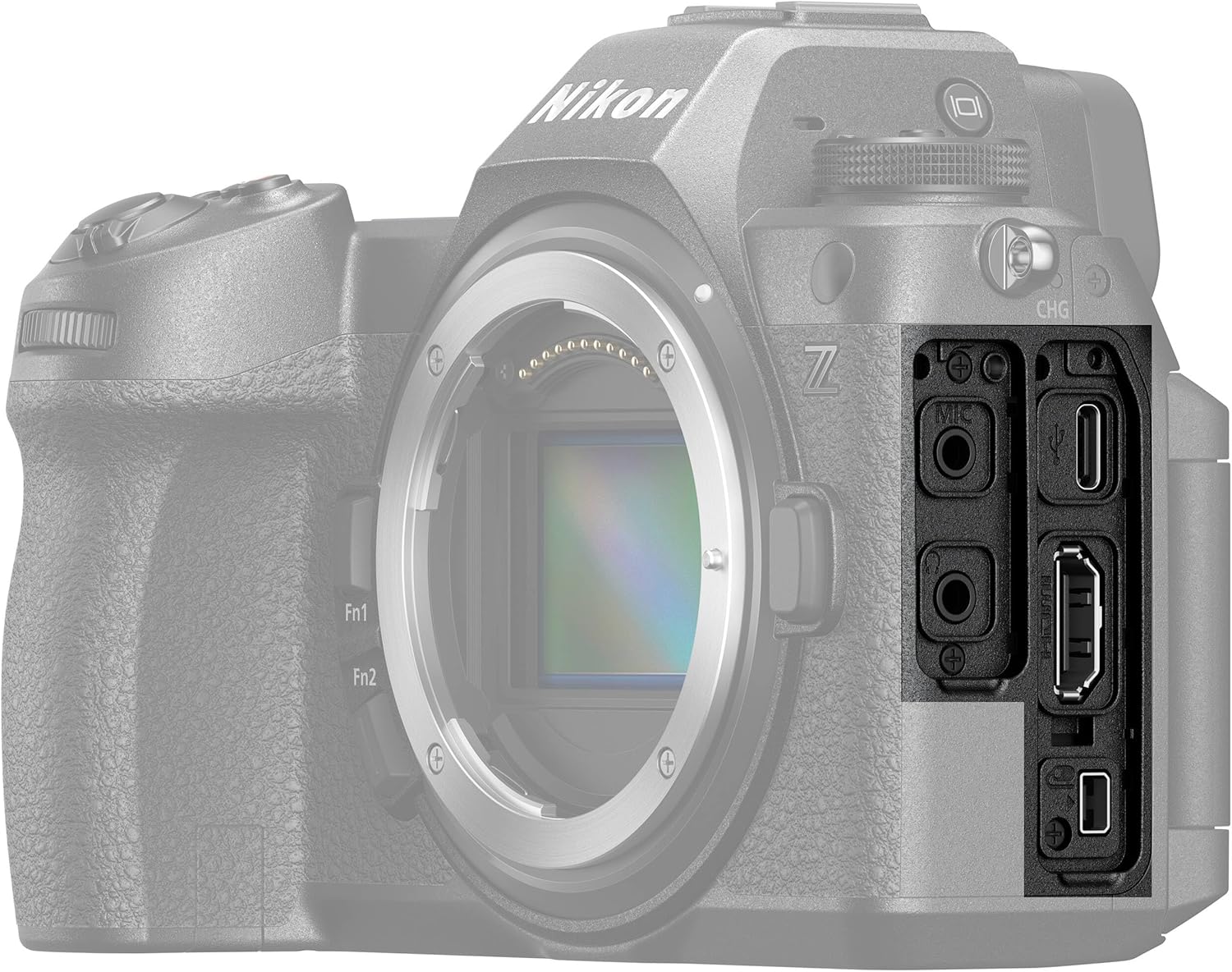
Figura 4.3: Lado view of the Nikon Z6III, showing the various input/output ports.
4.9. Estabilización de imagen
The Z6III incorporates sensor-shift image stabilization. It also features Electronic VR for handheld video shooting and 8.0-stop in-camera VR (when using specific lenses like the NIKKOR Z 24-120mm f/4 S) to expand shooting opportunities in low-light conditions.
5. Mantenimiento
To ensure the longevity and optimal performance of your Nikon Z6III camera, follow these maintenance guidelines:
- Limpieza del cuerpo de la cámara: Utilice un paño suave y seco para limpiar el cuerpo de la cámara. Para la suciedad difícil, limpie ligeramenteampen the cloth with water or a specialized camera cleaning solution.
- Limpieza de la lente: Use a lens brush to remove dust, then gently wipe with a microfiber lens cloth. For smudges, use a lens cleaning solution. Avoid touching the lens glass directly.
- Limpieza del sensor: If dust spots appear on images, the sensor may need cleaning. This is a delicate procedure; it is recommended to have it performed by a professional Nikon service center.
- Cuidado de la batería: Store batteries in a cool, dry place. Do not expose them to extreme temperatures. Fully charge batteries before extended storage and recharge every six months to maintain battery health.
- Almacenamiento: When not in use, store the camera in a dry, dust-free environment, preferably in a camera bag or case. Remove the battery if storing for long periods.
6. Solución de problemas
If you encounter issues with your Nikon Z6III, refer to the following common troubleshooting tips:
- La cámara no se enciende:
- Asegúrese de que la batería esté completamente cargada y correctamente insertada.
- Compruebe si los contactos de la batería están limpios.
- Las imágenes están borrosas:
- Verifique que la lente esté correctamente colocada y limpia.
- Verifique la configuración del enfoque automático y asegúrese de que la cámara esté enfocando al sujeto deseado.
- Increase shutter speed in low light or use image stabilization.
- Error de tarjeta de memoria:
- Vuelva a insertar la tarjeta de memoria.
- Pruebe con una tarjeta de memoria diferente y compatible.
- Formatee la tarjeta de memoria (nota: esto borrará todos los datos).
- Problemas de grabación de vídeo:
- Ensure sufficient memory card speed and capacity for the selected video format.
- Check video settings (resolution, frame rate).
- Connectivity Problems (Wi-Fi/USB):
- Reinicie tanto la cámara como el dispositivo conectado.
- Ensure Wi-Fi settings are correctly configured on both devices.
- Pruebe con un cable o puerto USB diferente.
Para problemas más complejos, consulte el manual de usuario completo disponible en el soporte de Nikon. websitio o póngase en contacto con el servicio de atención al cliente de Nikon.
7. Especificaciones
| Característica | Especificación |
|---|---|
| Nombre del modelo | Nikon Z6III |
| Resolución de imágenes fijas efectiva | 24.5 MP |
| Tipo de sensor | BSI CMOS (Partially-Stacked) |
| Procesador de imágenes | EXPEED 7 |
| Puntos de enfoque automático | Detección de fase de 493 puntos |
| Disparo continuo | Up to 120 FPS (DX crop), 60 FPS (full-frame JPEG), 20 FPS (RAW) |
| Resolución de vídeo | 6K60, 4K120, 2160p |
| Formato de captura de video | N-RAW, ProRes RAW, MP4 |
| Estabilización de imagen | Sensor-shift (5-axis), Electronic VR |
| Electrónico Viewbuscador (EVF) | 5.76M-dot, 4000 cd/m² brightness |
| Tamaño de pantalla | 3.2 Inches (Tilting Touchscreen LCD) |
| Montajes compatibles | Nikon Z |
| Capacidad de almacenamiento de memoria | 64 GB (incluido) |
| Tecnología de conectividad | Wi-Fi, USB-C, HDMI |
| Nivel de resistencia al agua | Water Resistant (Dust- and Drip-resistant) |
| Peso del artículo | 7.9 libras (aprox.) |
| Número de modelo | 1890-AG2 |
| Código Postal | 703670501791 |
8. Garantía y soporte
8.1. Información de garantía
The Nikon Z6III Mirrorless Camera comes with a 90-day limited warranty. Please retain your proof of purchase for warranty claims. For detailed terms and conditions, refer to the warranty card included in your product packaging or visit the official Nikon websitio.
8.2. Atención al cliente
For technical assistance, troubleshooting, or service inquiries, please contact Nikon customer support through their official website or the contact information provided in your product documentation. Online resources, including FAQs and software downloads, are also available on the Nikon support portal.