
1. Introducción
Thank you for choosing the YESIDO YSP13 Bluetooth Ear Hook Earphones. This manual provides essential information for the proper setup, operation, and maintenance of your device. Please read it carefully before use to ensure optimal performance and longevity.
The YSP13 features an air conduction design, eliminating the need to insert earbuds directly into the ear canal, which can enhance comfort and ear health. It utilizes Bluetooth 5.3 for stable connectivity and delivers HiFi sound quality, making it suitable for music and sports activities.
2. Contenido del paquete
Por favor revise el paquete para ver los siguientes artículos:
- YESIDO YSP13 Bluetooth Ear Hook Earphones (Left and Right)
- Estuche de carga
- Cable de carga
- Manual de usuario
- Bolsa de almacenamiento

Image: Contents of the YESIDO YSP13 package, including the earphones, charging case, charging cable, and a small storage pouch.
3. Producto terminadoview
The YESIDO YSP13 earphones feature a rotatable ear hook design for a secure and comfortable fit during various activities. The charging case includes a digital display to indicate battery levels.
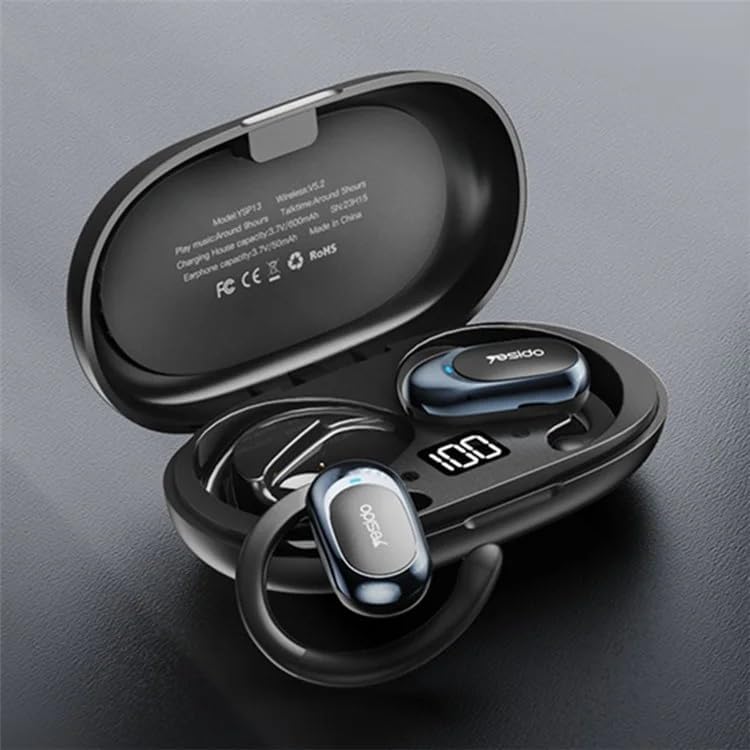
Image: The YESIDO YSP13 earphones resting in their charging case, which features a digital battery level indicator.

Image: A user wearing the YESIDO YSP13 earphone, illustrating how the ear hook design fits securely around the ear.

Image: An exploded diagram of the YESIDO YSP13 earphone, showcasing its internal structure and components responsible for HiFi sound reproduction.
4. Configuración
4.1 Carga de los auriculares y el estuche
- Coloque los auriculares en el estuche de carga. Asegúrese de que estén correctamente colocados.
- Conecte el cable de carga al puerto de carga del estuche y a una fuente de alimentación USB.
- The digital display on the charging case will show the charging status.
- Charging time for earphones is approximately 1 hour. Charging time for the case is approximately 2.5 hours.
- Una vez que esté completamente cargado, desconecte el cable de carga.
4.2 Emparejamiento Bluetooth
- Asegúrese de que los auriculares estén cargados.
- Abre el estuche de carga. Los auriculares entrarán automáticamente en modo de emparejamiento.
- En su dispositivo (teléfono inteligente, tableta, etc.), habilite Bluetooth.
- Buscar available Bluetooth devices and select "YESIDO YSP13" from the list.
- Una vez conectado, escuchará un tono de confirmación y los auriculares estarán listos para usar.
- Los auriculares se volverán a conectar automáticamente al último dispositivo emparejado cuando se saquen del estuche, si Bluetooth está habilitado en el dispositivo.
5. Instrucciones de funcionamiento
5.1 Cómo usar los auriculares
Gently place the ear hook over your ear, positioning the earphone speaker near your ear canal. Adjust the rotatable ear hook for a comfortable and secure fit.
5.2 Funciones básicas
- Encendido: Abra el estuche de carga, los auriculares se encienden automáticamente.
- Apagado: Place earphones back into the charging case and close the lid, earphones power off automatically.
- Reproducir/Pausa: Single tap on either earphone's touch control area.
- Pista siguiente: Double tap on the right earphone's touch control area.
- Pista anterior: Double tap on the left earphone's touch control area.
- Responder/Finalizar llamada: Single tap on either earphone's touch control area during an incoming call.
- Rechazar llamada: Press and hold either earphone's touch control area for 2 seconds during an incoming call.
- Activar asistente de voz: Triple tap on either earphone's touch control area.
Note: Specific touch control functions may vary slightly. Refer to the quick start guide included in your package for detailed diagrams if available.
6. Mantenimiento
- Limpieza: Utilice un paño suave, seco y sin pelusa para limpiar los auriculares y el estuche de carga. No utilice productos químicos agresivos ni materiales abrasivos.
- Resistencia al agua: The earphones are designed to be resistant to splashes. However, they are not waterproof. Do not submerge them in water.
- Almacenamiento: Cuando no los utilice, guarde los auriculares en su estuche de carga para protegerlos y mantenerlos cargados.
- Temperatura: Evite exponer el dispositivo a temperaturas extremas (calor o frío) o alta humedad.

Image: The YESIDO YSP13 earphones shown with water splashes, illustrating their resistance to sweat and light rain.
7. Solución de problemas
| Problema | Posible solución |
|---|---|
| Los auriculares no se emparejan |
|
| Sin sonido |
|
| El estuche de carga no carga |
|
| Conexión intermitente |
|
8. Especificaciones
| Característica | Detalle |
|---|---|
| Número de modelo | YSP13 |
| Versión de Bluetooth | BT8926B2 V5.3 |
| Capacidad de la batería del auricular | 50mAh x 2 |
| Capacidad de la batería del estuche de carga | 600 mAh |
| Música/Tiempo de llamada | Aproximadamente 6 horas |
| Tiempo de carga de auriculares | Aproximadamente 1 hora |
| Tiempo de carga del estuche de carga | Aproximadamente 2.5 horas |
| Material | PC+ABS+Electroplating UV |
| Conectividad | Inalámbrico (Bluetooth) |
| Características adicionales | Microphone Included, Air Conduction Design, Rotatable Ear Hook |
9. Garantía y soporte
9.1 Información de garantía
Este producto viene con un Garantía de 6 meses from the date of purchase. The warranty covers manufacturing defects and malfunctions under normal use. It does not cover damage caused by misuse, accidents, unauthorized modifications, or normal wear and tear.
Conserve su comprobante de compra para reclamos de garantía.
9.2 Atención al cliente
For technical assistance, warranty claims, or any questions regarding your YESIDO YSP13 earphones, please contact your retailer or the manufacturer's customer support. Refer to the packaging or the retailer's websitio para detalles de contacto.