
1. Introducción
The BUSICOM PC-SeaV15c is a 15-inch Windows IoT touch panel PC designed for commercial and industrial applications. This manual provides essential information for the safe and efficient setup, operation, and maintenance of your device. Please read this manual thoroughly before using the product and retain it for future reference.
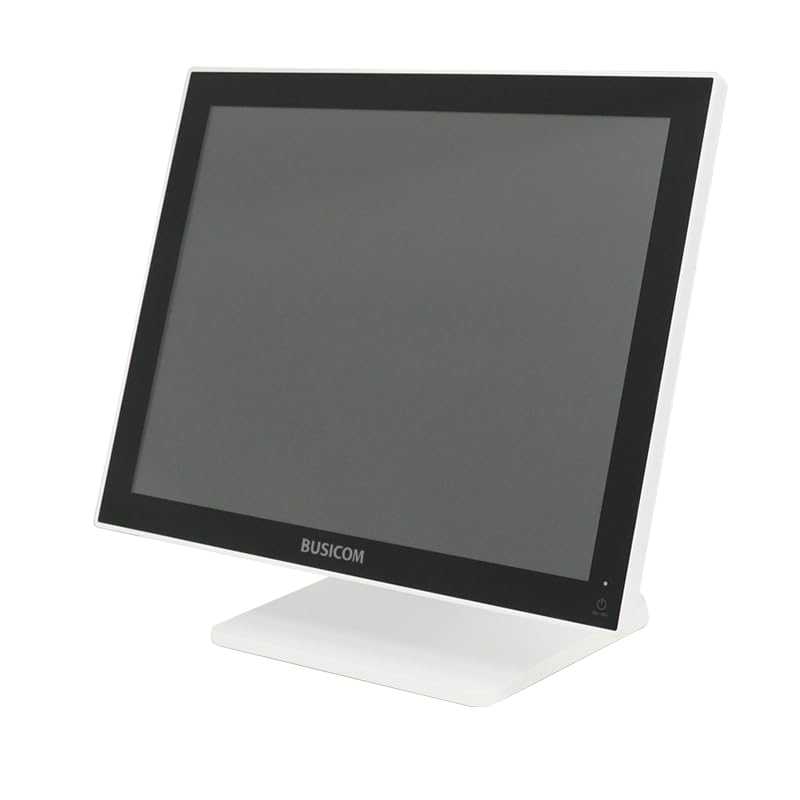
Figura 1: Frente view of the BUSICOM PC-SeaV15c Touch Panel PC.
2. Producto terminadoview
2.1 Características principales
- Diseño avanzado: Features an ultra-thin bezel and a highly durable 7H reinforced display for enhanced aesthetics and protection.
- Rendimiento superior: Equipped with Microsoft Windows 10 IoT Enterprise, ensuring long-term support and reliable operation.
- Panel táctil intuitivo: Utilizes a capacitive touch method, offering a familiar and responsive touch experience similar to smartphones and tablets.
- Fácil mantenimiento: Designed for simple RAM and SSD replacement, facilitating upgrades and servicing.
- Versatile Interfaces: Provides a wide range of connectivity options to integrate with various peripherals.
- Almacenamiento eficiente: SSD storage ensures fast processing speeds, quiet operation, and excellent shock resistance.
2.2 Componentes
The package typically includes the BUSICOM PC-SeaV15c unit and a power adapter. Additional accessories may vary.

Figura 2: Perfil frontal y lateralfile of the PC-SeaV15c unit.

Figura 3: Posterior view showing access panels for RAM and SSD components.
3. Instrucciones de configuración
3.1 Desembalaje
- Carefully remove the PC-SeaV15c from its packaging.
- Compruebe si hay daños visibles. Si los hay, contacte con su proveedor inmediatamente.
- Asegúrese de que todos los componentes enumerados estén presentes.
3.2 Conexión de periféricos
Refer to the interface diagram below for port locations and types.

Figure 4: Detailed diagram of the PC-SeaV15c's rear and bottom interfaces.
- Conexión de energía: Connect the provided power adapter to the DC In port and then to a power outlet.
- Dispositivos USB: Use the USB 2.0 (4 ports) and USB 3.0 (2 ports) for connecting keyboards, mice, printers, and other USB peripherals.
- Conexión de red: Connect an Ethernet cable to the LAN port for wired network access.
- Salida de audio: Connect external speakers or headphones to the Audio Out port.
- Serial Ports (RJ45): Utilize COM1, COM2, COM3, and COM6 for connecting specialized POS peripherals such as barcode scanners or receipt printers.
- Cash Drawer (RJ11): Connect a compatible cash drawer to the RJ11 port.
- Pantalla externa: If an external monitor is required, connect it to the Mini DisplayPort.
- USB tipo C: Para dispositivos compatibles.
3.3 Encendido / Apagado
- Encendido: Press the power button located on the upper right side of the display bezel or the power mark on the rear panel.
- Apagado: To safely shut down the system, use the standard Windows shutdown procedure. Avoid direct power disconnection during operation to prevent data loss.
4. Instrucciones de funcionamiento
4.1 Windows 10 IoT Enterprise
The PC-SeaV15c operates on Windows 10 IoT Enterprise 2021. Familiarize yourself with the Windows operating system for basic navigation, application management, and system settings.
4.2 Touch Panel Usage
The capacitive touch screen supports multi-touch gestures.
- Grifo: Equivalente a un clic del ratón.
- Doble toque: Equivalente a un doble clic.
- Mantener presionado: Equivalente a un clic derecho.
- Golpe fuerte: Para desplazarse o navegar.
- Pellizcar para hacer zoom: Utilice dos dedos para acercar o alejar la imagen.
5. Mantenimiento
5.1 Limpieza del dispositivo
- Siempre apague y desenchufe el dispositivo antes de limpiarlo.
- Utilice un paño suave y sin pelusa ligeramente seco.ampLimpiar con agua o un limpiador de pantalla no abrasivo.
- Do not spray liquids directly onto the screen or device.
- Evite utilizar productos químicos agresivos, disolventes o materiales abrasivos.
5.2 RAM and SSD Replacement
The PC-SeaV15c is designed for easy replacement of RAM and SSD components. Refer to Figure 3 for the access panel location. For detailed instructions on component replacement, consult a qualified technician or the BUSICOM support websitio.
6. Solución de problemas
Esta sección proporciona soluciones a problemas comunes que puede encontrar.
- El dispositivo no se enciende:
- Asegúrese de que el adaptador de corriente esté conectado de forma segura tanto al dispositivo como a una toma de corriente que funcione.
- Verifique que la toma de corriente funcione enchufando otro dispositivo.
- La pantalla táctil no responde:
- Reinicie el dispositivo.
- Asegúrese de que la pantalla esté limpia y libre de obstrucciones.
- Sin pantalla:
- Compruebe si el dispositivo está encendido.
- If an external display is connected, ensure the correct input source is selected on the external display.
- Periférico no detectado:
- Ensure the peripheral is correctly connected to the appropriate port (USB, LAN, COM).
- Intente conectar el periférico a un puerto diferente.
- Check the peripheral's own power supply, if applicable.
For further assistance, please contact BUSICOM customer support.
7. Especificaciones
| Característica | Detalle |
|---|---|
| Marca | BUSICOM |
| Nombre del modelo | PC-SeaV15c |
| Color | Blanco |
| Tamaño de pantalla | 15 pulgadas |
| Resolución | 1024x768 |
| Sistema operativo | Windows 10 IoT Empresa 2021 |
| Marca de CPU | Intel |
| Zócalo del procesador | Intel® N97 |
| Velocidad de la CPU | 3.6 GHz |
| Tipo de memoria | DDR4 |
| RAM instalada | 4 GB |
| Tipo de disco duro | Unidad de estado sólido |
| Capacidad SSD | 128 GB (según el título del producto) |
| Tipo de tarjeta gráfica | Integrado |
| Tipo de VRAM | Memoria SDRAM DDR4 |
| Capacidad de VRAM | 4 GB |
| Puertos USB 2.0 | 4 |
| Puertos USB 3.0 | 2 |
| Unidad óptica | Ninguno |
| Peso del producto | 6 kilogramos |
| Altura (aprox.) | 307.5 mm (as per dimension diagram) |

Figura 5: Posterior view of the PC-SeaV15c with approximate height dimension.
8. Garantía y soporte
For warranty information and technical support, please refer to the warranty card included with your product or visit the official BUSICOM webSitio. Conserve su recibo de compra como comprobante para reclamaciones de garantía.
BUSICOM Official Websitio: BUSICOM Store on Amazon.co.jp