
Introducción
This manual provides detailed instructions for the installation, operation, and maintenance of your darkFlash DB330M Micro-ATX PC Case. Please read this manual thoroughly before beginning assembly to ensure proper setup and safe usage. The DB330M case features a 270° panoramic tempered glass panel, pre-installed PWM ARGB fans, and a high-speed I/O panel.
Información de seguridad
- Desconecte siempre la fuente de alimentación de la toma de pared antes de instalar o realizar mantenimiento a cualquier componente dentro del gabinete del PC.
- Handle tempered glass panels with care to prevent breakage. Avoid impacts or sharp objects.
- Use guantes antiestáticos o use una muñequera antiestática para evitar daños por descarga electrostática (ESD) en componentes sensibles.
- Mantenga las piezas pequeñas y los tornillos fuera del alcance de los niños.
- Asegúrese de que haya una ventilación adecuada alrededor de la carcasa de la PC para evitar el sobrecalentamiento.
Contenido del paquete
Verifique que todos los artículos estén presentes en el paquete:
- darkFlash DB330M Micro-ATX PC Case
- 3 ventiladores PWM ARGB preinstalados
- Caja de accesorios (tornillos, bridas, etc.)
- Manual de usuario (este documento)
Características másview
- 270° Panoramic Tempered Glass: Proporciona una amplia view de componentes internos e iluminación RGB.
- High-Speed I/O Panel: Includes USB 3.0 and Type-C ports for fast data transfer.
- Vertical Airflow Cooling: Optimized design with pre-installed fans for efficient heat dissipation.
- Filtros de polvo magnéticos: Located on top and bottom to keep components clean.
- Fácil instalación: User-friendly design for hassle-free assembly and maintenance.
Presupuesto
| Característica | Especificación |
|---|---|
| Nombre del modelo | DB330M PC CASE |
| Dimensiones (LxAnxAl) | 8.58" de profundidad x 13.11" de ancho x 15.75" de alto (218 mm x 333 mm x 400 mm) |
| Compatibilidad de la placa base | Micro ATX, ITX |
| Tipo de caso | Torre Midi |
| Material | Plástico, vidrio templado |
| Ventiladores preinstalados | 3 ventiladores PWM ARGB de 120 mm |
| Altura máxima del enfriador de CPU | 180 mm |
| Espacio libre máximo para la GPU | 305 mm |
| Soporte del radiador (superior) | Hasta 240 mm |
| Tipo de montaje de la fuente de alimentación | Bottom Mount (Max 140mm PSU length) |
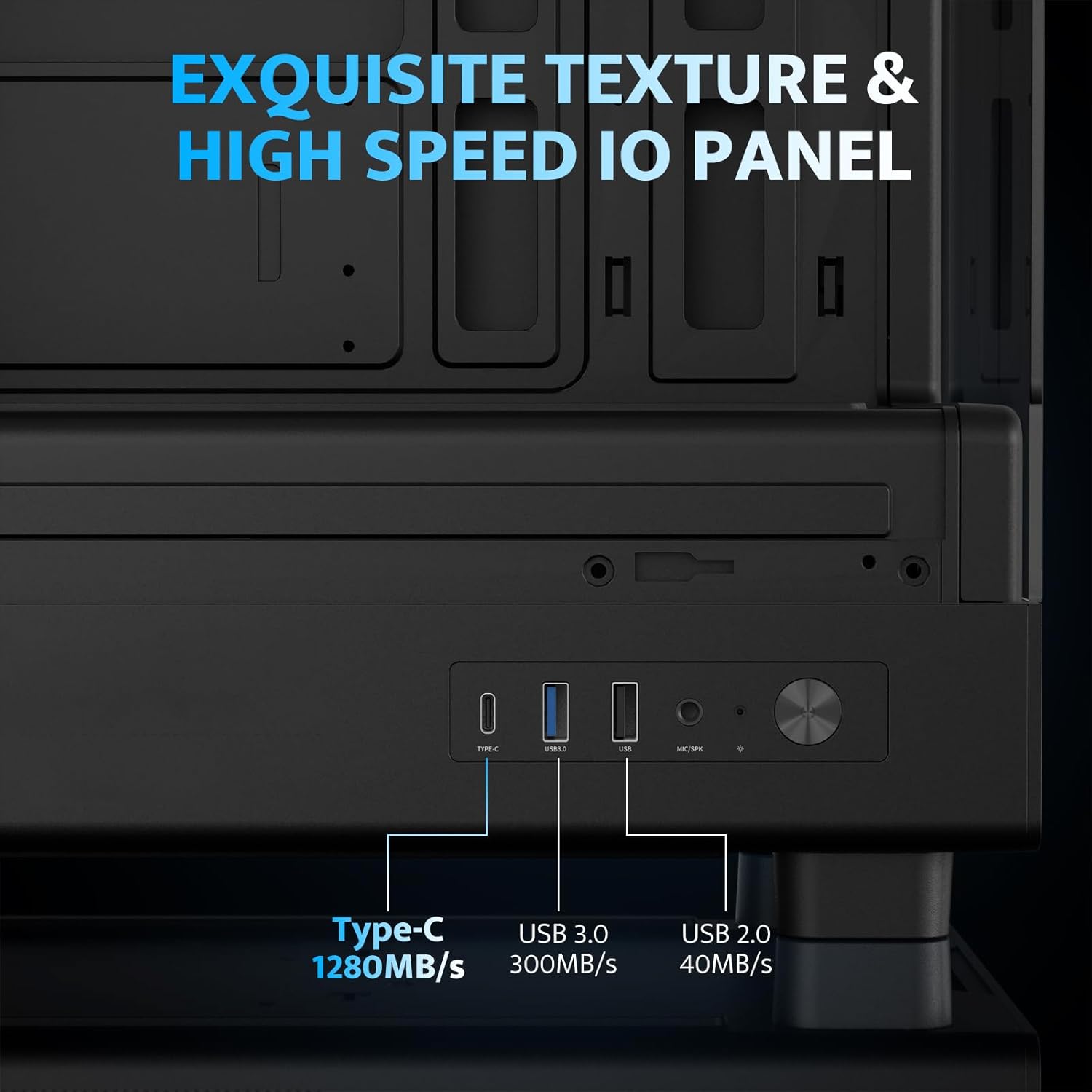
| Puertos de E/S | 1 x USB 3.0, 1 x Type-C, Audio In/Out |
Configuración e instalación
1. Accessing the Interior (Quick Release Design)
The darkFlash DB330M features a quick-release design for easy access to internal components. The tempered glass panels can be removed by gently pulling them away from the chassis. The top panel also detaches for fan/radiator installation.

2. Instalación de la placa base
Install your Micro-ATX or ITX motherboard into the designated area. Ensure standoffs are correctly aligned and secured. The case supports CPU coolers up to 180mm in height and GPUs up to 305mm in length.

3. Instalación del ventilador y del sistema de refrigeración
The case comes with three pre-installed 120mm PWM ARGB fans. Two fans are located at the top, and one at the rear. Additional fan mounts are available at the bottom (up to 2 x 120mm) for enhanced airflow. The case supports a 240mm AIO radiator on the top panel.
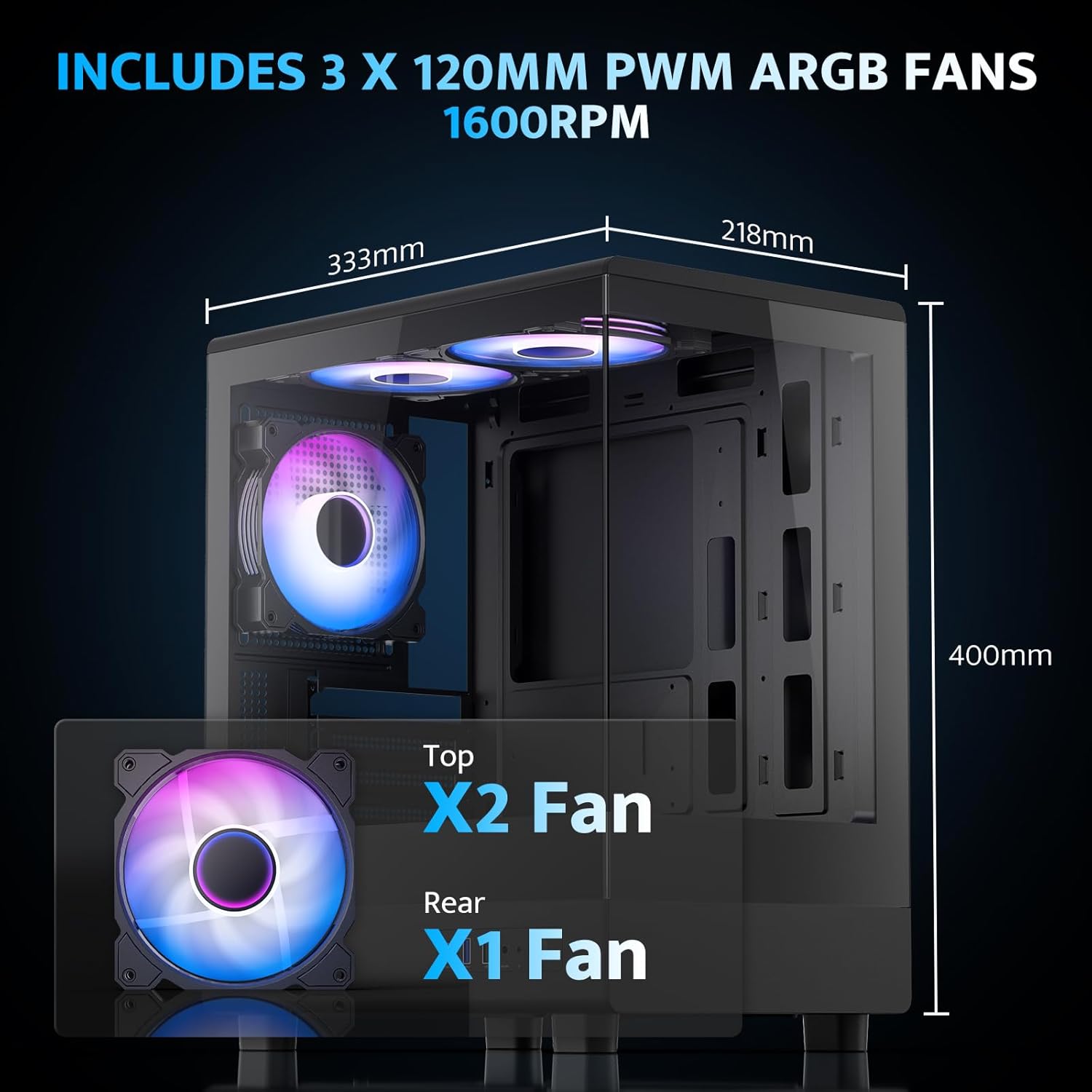
The pre-installed fans are PWM ARGB type, offering speed adjustment and rich lighting modes with motherboard synchronization. Note: An RGB hub controller is not included.

4. Power Supply and Storage Installation
Install your power supply unit (PSU) in the bottom mount. The case supports PSUs up to 140mm in length. Utilize the standard hard drive cage for storage devices.
5. Conexión del panel frontal de E/S
Connect the front I/O panel cables to your motherboard. The panel includes a Type-C port, USB 3.0 port, and USB 2.0 port for various connectivity needs.
6. Gestión de cables
Utilize the cable routing options and tie-downs behind the motherboard tray to ensure clean cable management. This improves airflow and aesthetics.
Instrucciones de funcionamiento
1. Encendido
After all components are securely installed and connected, plug in the power cable to your PSU and press the power button on the front I/O panel to start your system.
2. Control del ventilador ARGB
The pre-installed ARGB fans can be controlled via compatible motherboard software (if connected to an ARGB header) to customize lighting effects and fan speeds. Refer to your motherboard manual for specific software instructions.
3. Configuración del flujo de aire
The DB330M is designed with optimized airflow channels. The pre-installed fans facilitate vertical airflow, with the fan above the PSU directing air towards the graphics card. Ensure no obstructions block the airflow paths.


Mantenimiento
1. Limpieza del filtro de polvo
Regularly clean the magnetic dust filters located on the top and bottom of the case. Gently remove the filters and clean them with compressed air or a soft brush. Reattach them securely after cleaning.
2. Limpieza General
Use a soft, dry cloth to wipe down the exterior of the case. For tempered glass panels, use a glass cleaner and a microfiber cloth. Avoid abrasive cleaners or solvents.
Solución de problemas
- La PC no enciende:
- Ensure the power supply is properly connected to the wall and the PSU switch is in the 'ON' position.
- Verifique que todos los cables de alimentación de la fuente de alimentación estén conectados de forma segura a la placa base y a los componentes.
- Verifique la conexión del interruptor de encendido del panel frontal a la placa base.
- Los ventiladores no giran/el RGB no funciona:
- Confirme que los cables de alimentación del ventilador estén conectados a la placa base o al controlador del ventilador.
- Ensure ARGB cables are connected to a compatible ARGB header on the motherboard or an ARGB controller.
- Check motherboard software settings for fan speed and RGB control.
- Los puertos USB no funcionan:
- Verify the front panel USB 3.0 and Type-C cables are correctly plugged into the corresponding headers on your motherboard.
- Asegúrese de que los controladores de la placa base estén actualizados.
Garantía y soporte
darkFlash provides a Garantía de 1 años for this computer case. For technical support, warranty claims, or further assistance, please contact darkFlash customer service through their official webSitio web o al minorista donde compró el producto. Conserve su comprobante de compra para validar la garantía.
Official darkFlash Websitio: www.darkflash.com