
VEVOR BX-20
VEVOR 88-Key Foldable Digital Piano
Model: BX-20 User Manual
1. Introducción
Thank you for choosing the VEVOR 88-Key Foldable Digital Piano. This manual provides detailed instructions for the setup, operation, and maintenance of your new instrument. Please read this manual thoroughly before use to ensure proper functionality and to maximize your musical experience.
The VEVOR BX-20 is a portable 88-key foldable piano designed for musicians of all levels. Its compact and lightweight design makes it ideal for practice, performance, and travel.
2. Características del producto
- Ultra-Thin and Foldable Design: The 88-key portable piano features an ultra-thin body and a lightweight, 180° foldable design, making it incredibly easy to store and transport.
- 128 Standard Tones & Easy Teaching: Explore the world of music with the piano's ability to produce 128 different tones and international standard rhythms, along with 21 demonstration songs.
- Sonido envolvente inmersivo: Equipped with dual-channel stereo speakers, providing rich and layered tones that faithfully reproduce the full spectrum of musical nuances.
- Adjustable, Stable Stand: Experience greater stability with the evenly balanced stand, designed to minimize the risk of the portable piano shaking or tipping.
- MIDI Function & Bluetooth 5.0 Connectivity: Effortlessly connect to your devices for seamless music editing. Use Bluetooth 5.0 to wirelessly connect to applications such as Pop Piano and GarageBand.
3. Contenido del paquete
Verifique el contenido del paquete al desembalarlo para asegurarse de que todos los elementos estén presentes:
- 1 x Portable Piano (Model: BX-20)
- 1 x Piano Stand
- 1 pedal de sustain
- 1 x Bolsa práctica
- 1 x cable MIDI (con función de carga tipo C)
- 1 x Atril para partituras
- 1 x Auriculares
- 1 x Clip para partituras
- 1 x cubierta antipolvo
- 1 x pegatina de piano
- 1 x Manual de usuario

Image 1: VEVOR 88-Key Foldable Digital Piano with included accessories, including the piano, stand, pedal, bag, and various cables.
4. Instrucciones de configuración
4.1 Despliegue del piano
- Carefully remove the piano from its packaging.
- Coloque el piano plegado sobre una superficie plana y estable.
- Gently unfold the two halves of the piano until it lies flat and the locking mechanism engages. Ensure it is fully extended and stable before proceeding.

Image 2: The VEVOR 88-Key Digital Piano in its folded, compact state, demonstrating its portability.
4.2 Montaje del soporte del piano
- Unpack the piano stand components.
- Follow the assembly instructions provided with the stand to connect the base and upright supports.
- Adjust the height of the stand to your preferred playing position. The stand is adjustable from 21.3 inches (540 mm) to 31.5 inches (800 mm).
- Place the unfolded piano securely on the assembled stand, ensuring it is centered and stable.
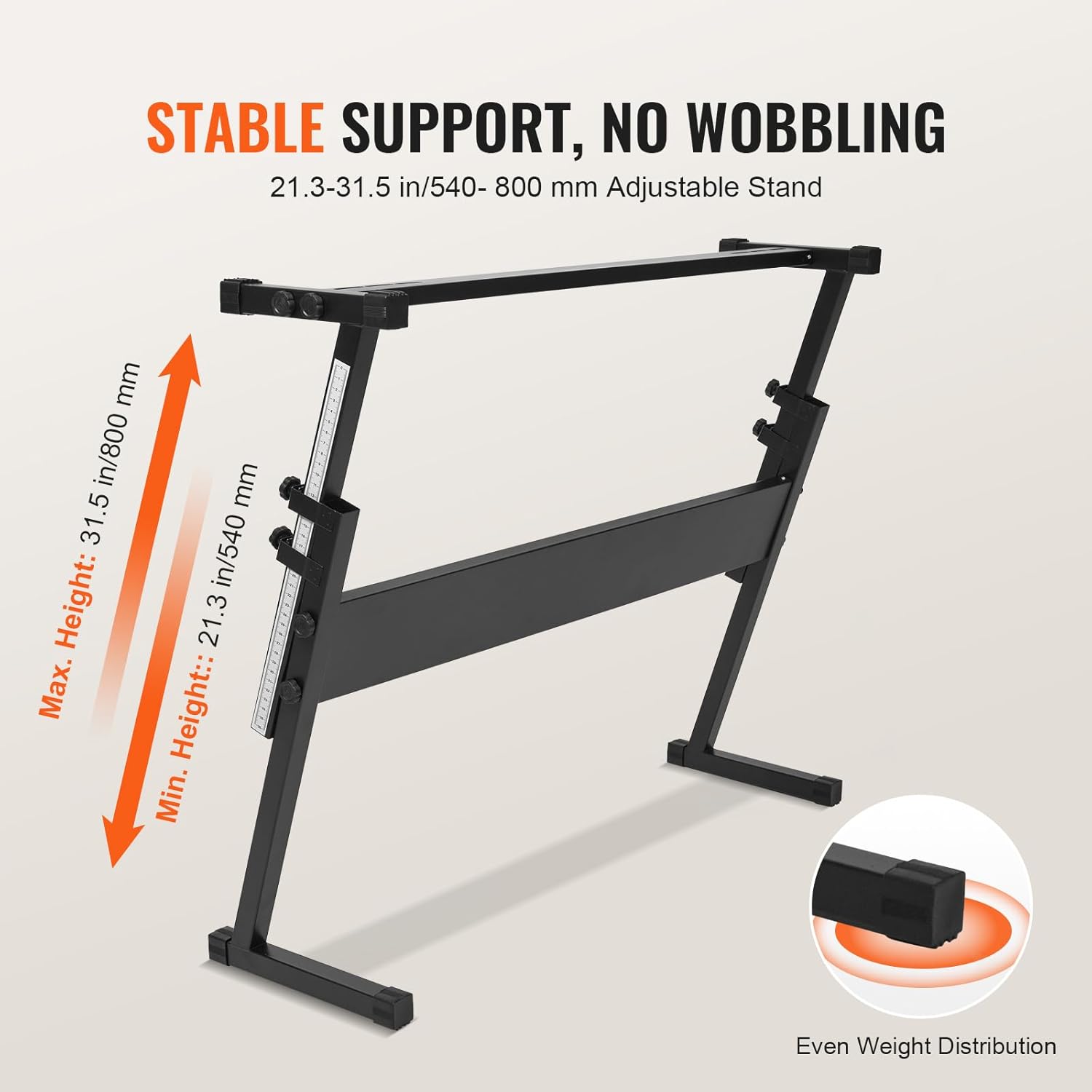
Image 3: The adjustable piano stand, illustrating its minimum and maximum height settings for ergonomic playing.
4.3 Conexión de periféricos
The piano features various input/output ports:
- Puerto del pedal de sustain: Connect the included sustain pedal to the 1/4" (3.5 mm) sustain pedal port.
- Puerto de entrada de audio: Use the 1/4" (3.5 mm) audio input port to connect external audio sources.
- Puerto de auriculares: Connect headphones to the 1/4" (3.5 mm) headphone port for private practice.
- Puerto de micrófono: Connect a microphone to the 1/4" (3.5 mm) microphone port.
- Puerto Tipo-C: Use the Type-C port for charging the piano and for MIDI transmission.

Imagen 4: Detallada view of the piano's various input/output ports, including connections for sustain pedal, audio input, microphone, headphones, and USB Type-C.
5. Instrucciones de funcionamiento
5.1 Encendido / Apagado
Locate the power button on the control panel. Press and hold to turn the piano ON or OFF.
5.2 Ajuste del volumen
Use the volume controls (usually '+' and '-' buttons) on the control panel to adjust the output volume of the piano's speakers or connected headphones.
5.3 Selección de tonos y ritmos
The piano offers 128 different tones and rhythms. Refer to the control panel and display for navigation. Typically, there are dedicated buttons or a dial to cycle through available tones and rhythms.

Image 5: A child playing the VEVOR 88-Key Digital Piano, highlighting its features such as 88 keys, 128 tones, 128 rhythms, and 21 demo songs.
5.4 Using Demonstration Songs
The piano includes 21 demonstration songs. Press the "Demo" button on the control panel to start playback. Use the navigation buttons to select different demo songs.
5.5 Conectividad Bluetooth
- Asegúrese de que Bluetooth esté habilitado en su dispositivo inteligente (teléfono, tableta, computadora).
- On the piano, activate Bluetooth pairing mode (refer to the display or specific button for Bluetooth).
- On your device, search for available Bluetooth devices and select "VEVOR BX-20" (or similar name).
- Once paired, you can connect to music applications like Pop Piano or GarageBand for enhanced functionality.

Image 6: The piano's control panel, illustrating its Bluetooth 5.0 connectivity and compatibility with popular music apps like GarageBand and Pop Piano.
5.6 Funcionalidad MIDI
The Type-C port supports MIDI transmission, allowing you to connect the piano to a computer or other MIDI-compatible devices for recording, composing, or using virtual instruments.
- Connect the piano to your computer using the provided Type-C to USB cable.
- Your computer should recognize the piano as a MIDI device.
- Open your preferred Digital Audio Workstation (DAW) or music software and select the VEVOR BX-20 as your MIDI input device.
6. Mantenimiento
6.1 Limpieza
- Wipe the piano's surface with a soft, dry cloth.
- Para marcas difíciles, ligeramente dampen the cloth with water and a mild, non-abrasive cleaner. Avoid excessive moisture.
- Do not use harsh chemicals, solvents, or abrasive cleaning materials, as they may damage the finish.
- Regularly clean the keys to prevent dirt buildup, which can affect playability.
6.2 Almacenamiento
- When not in use, fold the piano and store it in the provided convenient bag to protect it from dust and scratches.
- Store the piano in a cool, dry place, away from direct sunlight, extreme temperatures, and high humidity.
- Avoid placing heavy objects on top of the piano.
6.3 Carga de la batería
The piano is rechargeable. Use the provided Type-C cable to charge the internal battery. Connect the Type-C end to the piano and the USB end to a compatible USB power adapter (not included) or computer USB port.
A full charge typically provides several hours of playtime. Charge the piano when the battery indicator shows low power.
7. Solución de problemas
| Problema | Posible causa | Solución |
|---|---|---|
| El piano no se enciende. | La batería está agotada. | Connect the piano to a power source using the Type-C cable and allow it to charge. |
| No hay sonido en los altavoces/auriculares. | El volumen es demasiado bajo o silenciado. Los auriculares no están completamente enchufados. Salida incorrecta seleccionada (si corresponde). | Aumentar el volumen. Asegúrese de que los auriculares estén completamente insertados en el conector de 3.5 mm. Check piano settings for output selection. |
| Problemas de conexión Bluetooth. | Piano not in pairing mode. El Bluetooth del dispositivo está apagado. Interferencia. | Ensure piano Bluetooth is active and in pairing mode. Encienda el Bluetooth en su dispositivo. Move closer to the piano and away from other wireless devices. |
| Las teclas no responden o están pegadas. | Polvo o residuos debajo de las teclas. Damage to key mechanism. | Gently clean around the keys with a soft brush or compressed air. If problem persists, contact customer support. |
8. Especificaciones
| Característica | Detalle |
|---|---|
| Número de modelo | BX-20 |
| Número de llaves | 88 |
| Polifonía | 32 |
| Transmisión Bluetooth | 5.0 |
| Tipos de interfaz | 1/4" (3.5 mm) Sustain Pedal Port, 1/4" (3.5 mm) Audio Input Port, 1/4" (3.5 mm) Headphone Port, 1/4" (3.5 mm) Microphone Port, Type-C Charging/MIDI Transmission |
| Material principal | Plástico ABS |
| Dimensiones del producto (desplegado) | 49.6 x 10.2 x 32.7 inches / 1260 x 260 x 830 mm (L x W x H, with stand) |
| Peso neto | 15.1 libras/6.85 kg |
| Fuente de poder | Batería |
| Software compatible | Pop Piano, GarageBand (via Bluetooth/MIDI) |

Imagen 7: Másview of the VEVOR 88-Key Digital Piano, showing its dimensions and a summary of its key specifications and package contents.
9. Garantía y soporte
VEVOR products come with a standard warranty. For detailed warranty information, please refer to the warranty card included in your package or visit the official VEVOR websitio.
If you encounter any issues or have questions regarding your VEVOR 88-Key Foldable Digital Piano, please contact VEVOR customer support. Have your model number (BX-20) and purchase details ready for faster service.
VEVOR Oficial Websitio: www.vevor.com
Ask a question about this manual
Ask about setup, troubleshooting, compatibility, parts, safety, or missing instructions. Manuals+ will review the question and use this page’s manual context to help answer it.