
1. Introducción
Gracias por la compraasing the RCA SP550BT Portable Speaker. This manual provides important information regarding the setup, operation, and maintenance of your new speaker. Please read it thoroughly before use and keep it for future reference.
The RCA SP550BT is a versatile portable speaker featuring 50W output, Bluetooth connectivity, USB playback, FM radio, AUX input, True Wireless Stereo (TWS) function, LED lights, and a microphone input for an enhanced audio experience.
2. Contenido del paquete
Por favor revise el paquete para ver los siguientes artículos:
- RCA SP550BT Portable Speaker
- Mando a distancia
- Cable de alimentación
- Manual de usuario (este documento)
3. Producto terminadoview
Familiarize yourself with the main components and features of your RCA SP550BT speaker.

Figura 3.1: Frente view of the RCA SP550BT portable speaker. This image displays the speaker in an upright position, highlighting the top control panel and the three prominent speaker cones with red illumination.

Figura 3.2: Lado view of the RCA SP550BT portable speaker. This perspective shows the depth of the speaker and the integrated handle for portability.

Figura 3.3: Horizontal view of the RCA SP550BT portable speaker. This image illustrates the speaker's design when placed on its side, emphasizing the speaker grille and LED lighting.
3.1 control remoto
El control remoto incluido permite operar cómodamente el altavoz a distancia.
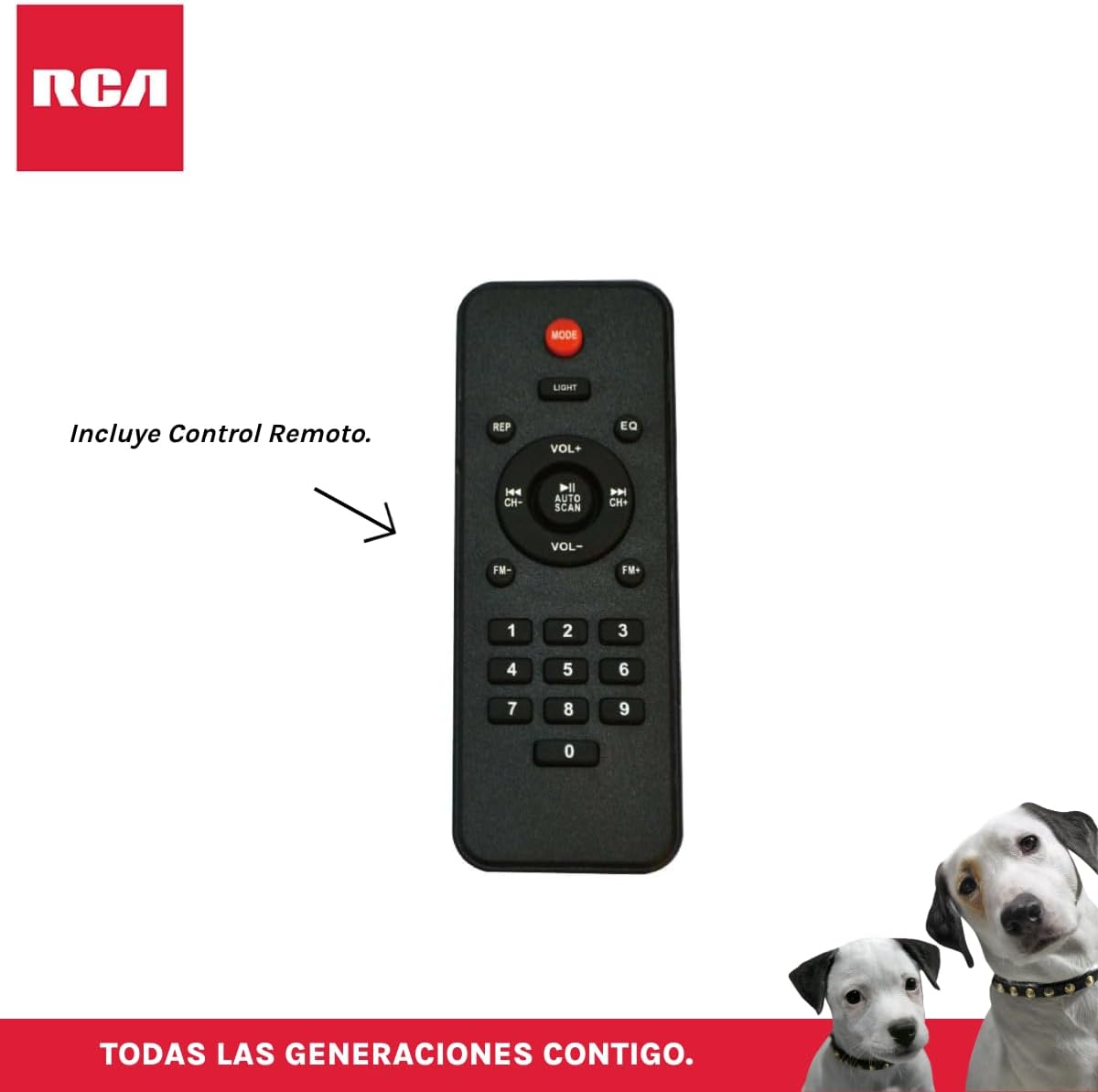
Figura 3.4: RCA SP550BT Remote Control. This image displays the full layout of the remote control, including buttons for power, mode selection, volume adjustment, track navigation, equalizer settings, and a numeric keypad.
4. Configuración
4.1 Conexión de alimentación
- Asegúrese de que el altavoz esté colocado sobre una superficie plana y estable.
- Connect the power cable to the speaker's power input port.
- Plug the other end of the power cable into a standard electrical outlet (AC 100-240V, 50/60Hz).
- Press the power button on the speaker or remote control to turn it on.
5. Instrucciones de funcionamiento
5.1 Encendido y apagado
- Para encender el altavoz, presione el botón FUERZA botón en el panel de control o en el control remoto.
- To turn off the speaker, press the FUERZA botón de nuevo.
Selección de 5.2 modos
Presione el MODO button on the control panel or remote control to switch between Bluetooth, USB, FM, and AUX input modes.
5.3 Emparejamiento Bluetooth
- Encienda el altavoz y seleccione el modo Bluetooth usando el MODO button. The display will show "BLUE" and a pairing indicator will flash.
- Habilite Bluetooth en su dispositivo móvil (teléfono inteligente, tableta, etc.).
- Buscar "RCA SP550BT" in your device's Bluetooth list and select it to pair.
- Una vez emparejado, el altavoz emitirá un sonido de confirmación y el indicador de Bluetooth dejará de parpadear.
- Ahora puedes reproducir audio desde tu dispositivo a través del altavoz.
Reproducción USB 5.4
- Inserte una unidad flash USB (formato FAT32, máximo 32 GB) que contenga audio MP3 files en el puerto USB.
- El altavoz cambiará automáticamente al modo USB y comenzará a reproducir la primera pista. De lo contrario, presione el botón MODO botón para seleccionar el modo USB.
- Utilice el REPRODUCIR/PAUSA, ANTERIOR, y PRÓXIMO buttons on the control panel or remote to control playback.
5.5 Radio FM
- Turn on the speaker and select FM mode using the MODO botón.
- Mantenga pulsado el REPRODUCIR/PAUSA botón (o AUTO ESCÁNER en el control remoto) para escanear y guardar automáticamente las estaciones de FM disponibles.
- Utilice el ANTERIOR y PRÓXIMO Botones para navegar a través de las estaciones guardadas.
5.6 entrada auxiliar
- Connect an external audio device (e.g., MP3 player, laptop) to the speaker's AUX input port using a 3.5mm audio cable (not included).
- Seleccione el modo AUX usando el MODO botón.
- Controle la reproducción y el volumen desde su dispositivo conectado.
5.7 Función TWS (estéreo inalámbrico verdadero)
The TWS function allows you to connect two RCA SP550BT speakers wirelessly for a stereo sound experience.
- Ensure both SP550BT speakers are powered on and in Bluetooth mode, but not yet paired with any device.
- En uno de los altavoces, mantenga pulsado el botón TWS button (if available, or a dedicated TWS pairing button) until you hear a confirmation tone. The speakers will attempt to pair with each other.
- Once successfully paired, one speaker will act as the master (left channel) and the other as the slave (right channel).
- Ahora, empareje su dispositivo móvil con el altavoz principal a través de Bluetooth como se describe en la sección 5.3.
5.8 Luces LED
Presione el LUZ button on the control panel or remote control to cycle through different LED light modes or to turn them off.
5.9 Uso del micrófono
Connect a wired microphone (not included) to the microphone input port on the speaker. Adjust the microphone volume using the dedicated knob (if available) or the main volume control.
6. Mantenimiento
- Limpieza: Utilice un paño suave y seco para limpiar el exterior del altavoz. No utilice limpiadores abrasivos ni disolventes.
- Almacenamiento: Cuando no utilice el altavoz durante períodos prolongados, guarde el altavoz en un lugar fresco y seco, alejado de la luz solar directa y de temperaturas extremas.
- Exposición al agua: Este altavoz no es resistente al agua. Evite exponerlo al agua o a la humedad excesiva.
7. Solución de problemas
Si tiene problemas con su altavoz, consulte los siguientes problemas y soluciones comunes:
| Problema | Posible causa | Solución |
|---|---|---|
| Sin poder | Power cable not connected; Power outlet not working; Speaker off. | Check power cable connection; Try a different outlet; Press the POWER button. |
| Sin sonido | Volumen demasiado bajo; Modo incorrecto seleccionado; Dispositivo no conectado correctamente. | Increase volume; Select correct input mode (Bluetooth, USB, AUX); Reconnect device. |
| El emparejamiento de Bluetooth falla | Speaker not in pairing mode; Device Bluetooth off; Speaker already paired. | Ensure speaker is in Bluetooth pairing mode; Turn on device Bluetooth; Disconnect from other devices. |
| La reproducción USB no funciona | USB drive format incompatible; Corrupt files; USB drive not inserted correctly. | Asegúrese de que el USB tenga formato FAT32; Verificar file integrity; Reinsert USB drive. |
| Mala recepción de radio FM | Señal débil; Interferencia. | Relocate speaker; Extend antenna (if applicable). |
8. Especificaciones
| Característica | Especificación |
|---|---|
| Modelo | SP550BT |
| Marca | RCA |
| Potencia de salida del altavoz | 50 vatios (máximo) |
| Tecnología de conectividad | Bluetooth, USB, AUX |
| Tecnología inalámbrica | Bluetooth |
| Modo de salida de audio | Estéreo |
| Tipo de altavoz | Portátil, para exteriores |
| Tipo de montaje | Montaje de mesa |
| Método de control | Mando a distancia |
| Tamaño del altavoz | 6.5 pulgadas |
| Diámetro del woofer | 6.5 pulgadas |
| Capacidad de la batería | 4400 miliamp Horas |
| Fuente de poder | Cable eléctrico |
| Dispositivos compatibles | Portátil, reproductor de MP3, teléfono inteligente, tableta |
| GTIN/UPC | 044476152061 |
9. Garantía y soporte
This product comes with a limited warranty. Please refer to the warranty card included in your package for specific terms and conditions. For technical support or service inquiries, please contact RCA customer service through their official websitio o la información de contacto proporcionada con su compra.
Note: Warranty terms may vary by region. Keep your proof of purchase for warranty claims.