
Bienvenido
Thank you for choosing the BYTECH BICONIC True Wireless Earbuds. This manual provides essential information on how to set up, operate, maintain, and troubleshoot your new earbuds. Please read this manual thoroughly before use to ensure optimal performance and longevity of your device.
Instrucciones de seguridad importantes
- No exponga los auriculares ni el estuche de carga a temperaturas extremas, humedad o líquidos.
- Evite dejar caer, golpear o desmontar el dispositivo.
- Do not use abrasive cleaners or harsh chemicals to clean the earbuds or case.
- Escuche a un volumen moderado para evitar daños auditivos. La exposición prolongada a sonidos fuertes puede causar pérdida auditiva irreversible.
- Mantener fuera del alcance de los niños y las mascotas.
- Dispose of the device responsibly according to local regulations. Do not dispose of with household waste.
Qué incluye
Verifique el contenido del paquete para asegurarse de que todos los artículos estén presentes:
- BYTECH BICONIC True Wireless Earbuds (Left and Right)
- Estuche de carga
- Cable de carga
- Manual de usuario
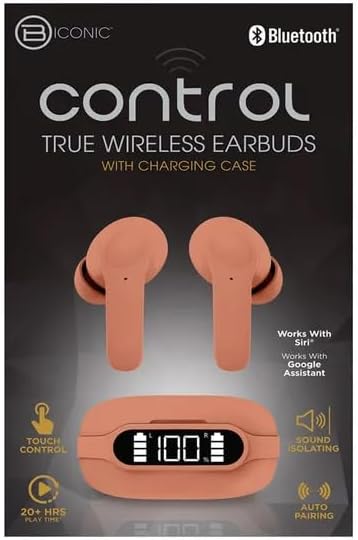
Producto terminadoview
Familiarize yourself with the components of your BYTECH BICONIC True Wireless Earbuds.

Empezando
Cargar los auriculares y el estuche
The BYTECH BICONIC earbuds come with a rechargeable battery in both the earbuds and the charging case. Ensure both are fully charged before first use.
- Coloque los auriculares en el estuche de carga, asegurándose de que estén correctamente colocados en sus respectivas ranuras (L para izquierdo, R para derecho).
- Conecte el cable de carga provisto al puerto de carga del estuche y el otro extremo a una fuente de alimentación USB (por ejemplo, puerto USB de computadora, adaptador de pared).
- La pantalla digital del estuche de carga mostrará el nivel de batería. Espere el tiempo suficiente para una carga completa.
- Una vez que esté completamente cargado, desconecte el cable de carga.
Emparejamiento Bluetooth
Siga estos pasos para emparejar sus auriculares con su dispositivo habilitado con Bluetooth:
- Asegúrese de que los auriculares estén cargados y dentro del estuche de carga.
- Abre el estuche de carga. Los auriculares entrarán automáticamente en modo de emparejamiento y una luz indicadora parpadeará.
- En su dispositivo (teléfono inteligente, tableta, etc.), vaya a la configuración de Bluetooth y active Bluetooth.
- Buscar available devices. You should see "BYTECH BICONIC" or a similar name appear in the list.
- Select "BYTECH BICONIC" to connect. Once connected, a voice prompt will confirm the successful pairing, and the indicator lights on the earbuds will stop flashing.
- Los auriculares se volverán a conectar automáticamente al último dispositivo emparejado cuando se saquen del estuche, siempre que el Bluetooth esté habilitado en el dispositivo.
Instrucciones de funcionamiento
Controles táctiles
The BYTECH BICONIC earbuds feature intuitive touch controls for easy management of your audio and calls.
| Acción | Función |
|---|---|
| Un solo toque (auricular izquierdo/derecho) | Reproducir / Pausar música, Responder / Finalizar llamada |
| Doble toque (auricular derecho) | Pista siguiente |
| Doble toque (auricular izquierdo) | Pista anterior |
| Triple toque (auricular izquierdo/derecho) | Activar Asistente de voz (Siri/Asistente de Google) |
| Pulsación larga (auricular izquierdo/derecho) | Rechazar llamada |
Encendido y apagado
- Encendido: Los auriculares se encenderán automáticamente cuando se retiren del estuche de carga.
- Apagado: Vuelve a colocar los auriculares en el estuche de carga y cierra la tapa. Se apagarán automáticamente y comenzarán a cargarse.
Mantenimiento y cuidado
Proper care will extend the life of your BYTECH BICONIC True Wireless Earbuds.
- Limpieza: Use a soft, dry, lint-free cloth to clean the earbuds and charging case. Do not use liquids or aerosol cleaners.
- Almacenamiento: Cuando no los utilices, guarda siempre los auriculares en su estuche de carga para protegerlos y mantenerlos cargados.
- Evite condiciones extremas: Do not expose the device to extreme heat, cold, or direct sunlight.
- Resistencia al agua: Estos auriculares no son resistentes al agua. Evite el contacto con el agua o la humedad excesiva.
Solución de problemas
Si tiene algún problema con sus auriculares, consulte las siguientes soluciones comunes:
| Problema | Solución |
|---|---|
| Los auriculares no se emparejan | Asegúrate de que los auriculares estén cargados. Desactiva y activa el Bluetooth en tu dispositivo. Olvídalo en la configuración de Bluetooth y vuelve a emparejarlo. |
| Solo funciona un auricular | Vuelve a colocar ambos auriculares en el estuche de carga, cierra la tapa, espera unos segundos y sácalos. Asegúrate de que ambos estén cargados. |
| Sin sonido | Check volume levels on both your device and the earbuds. Ensure earbuds are properly connected. Try playing different audio. |
| El estuche de carga no carga | Asegúrate de que el cable de carga esté bien conectado tanto al estuche como a la fuente de alimentación. Prueba con otro puerto USB o adaptador de corriente. |
Especificaciones técnicas
Detailed specifications for your BYTECH BICONIC True Wireless Earbuds:
| Característica | Detalle |
|---|---|
| Número de modelo | BC-AU-BE-144-TN |
| Tecnología de conectividad | Inalámbrico (Bluetooth) |
| Factor de forma | En el oído (Intraurales) |
| Color | Cafetería |
| Características especiales | Rechargeable Battery, Touch Control, Sound Isolating, Auto Pairing |
| Componentes incluidos | Cable |
| Tiempo estimado de juego | 20+ Hours (with charging case) |
Información de garantía y atención al cliente
BYTECH products are designed and manufactured to the highest quality standards. For information regarding warranty coverage, please refer to the warranty card included with your purchase or visit the official BYTECH websitio.
If you require further assistance or have questions not covered in this manual, please contact BYTECH customer support through their official channels. Please have your model number (BC-AU-BE-144-TN) and purchase details ready when contacting support.