
Introducción
Thank you for choosing the ANALOI Kids Sleep Training Alarm Clock. This manual provides detailed instructions for setting up, operating, and maintaining your new alarm clock. Please read this manual thoroughly before use to ensure proper function and to maximize your child's sleep training experience.
Configuración
Before first use, ensure all components are present and connect the device to a power source.
Contenido del paquete:
- ANALOI Kids Sleep Training Alarm Clock
- Cargador 5V1A
- Cable USB tipo C
- Manual de instrucciones (este documento)
Conexión de energía:
- Connect the Type-C USB cable to the power connector on the back of the alarm clock.
- Plug the 5V1A charger into a standard wall outlet.
- The alarm clock is designed for an input power of 5V/1A or 5V/2A.
- A CR2032 memory battery is included to retain settings during power outages.

Figure 1: Alarm Clock and Accessories
Instrucciones de funcionamiento
The ANALOI Kids Sleep Training Alarm Clock features intuitive controls for various functions. Refer to the button layout below for quick identification.
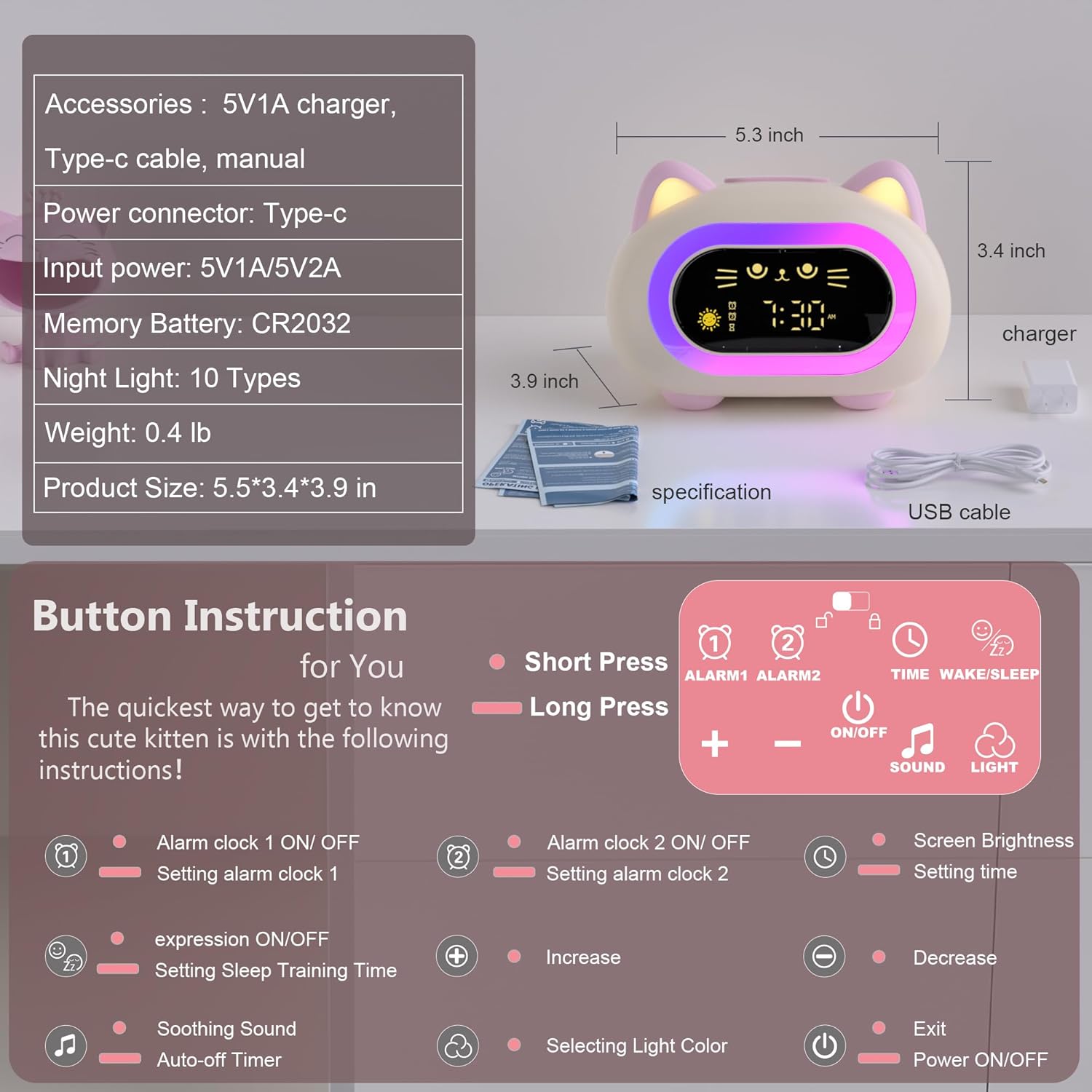
Figure 2: Button Functions and Product Dimensions
Controles básicos:
- Prensa breve: Activates a function briefly.
- Pulsación larga: Holds down a button for a few seconds to access settings or advanced functions.
Configuración de hora y alarmas:
- Tiempo de fraguado: Mantenga pulsado el TIME/WAKE/SLEEP Botón para entrar en el modo de ajuste de la hora. Utilice el + y - buttons to adjust hours and minutes. Short press TIME/WAKE/SLEEP para confirmar y pasar al siguiente ajuste.
- Configuración de alarma 1: Mantenga pulsado el ALARM1 botón. Usar + y - to set the desired alarm time. Short press ALARM1 to confirm. Short press ALARM1 again to toggle Alarm 1 ON/OFF.
- Configuración de alarma 2: Follow the same steps as Alarm 1, using the ALARM2 botón.
- Función de repetición: When an alarm sounds, short press any button on the top of the clock to activate snooze for 9 minutes.

Figure 3: Dual Alarm and Snooze Functionality
Sleep Training Feature:
The clock uses visual cues to help children understand when it's time to wake up and go to bed.
- Setting Sleep Training Time: Mantenga pulsado el TIME/WAKE/SLEEP button until the sleep training icon flashes. Use + y - to set the desired wake-up and bedtime.
- Wake-Up Cue: An open-eyed smiley face with a green light indicates it's time to wake up.
- Bedtime Cue: A closed-eye emoji with a red light indicates it's time for bed.

Figure 4: Sleep Training Visual Cues
Night Light and Sounds:
The clock offers various light and sound options to create a calming atmosphere.
- Luz de noche: Presione brevemente el LUZ button to cycle through 10 different color modes. Long press LUZ to adjust the brightness (Low, Medium, High).
- Sonidos relajantes: Presione brevemente el SONIDO button to cycle through 7 soothing sounds and 6 ringtones. Long press SONIDO para ajustar el volumen.
- Temporizador de apagado automático: The night light and soothing sounds can be set with an automatic shutoff timer (15, 30, or 60 minutes). Refer to the button diagram for setting the auto-off timer.

Figure 5: Night Light Colors and Brightness

Figure 6: Available Soothing Sounds and Ringtones
Mantenimiento
To ensure the longevity and proper functioning of your ANALOI Kids Sleep Training Alarm Clock, follow these simple maintenance guidelines:
- Limpieza: Wipe the surface of the clock with a soft, dry cloth. Do not use abrasive cleaners, solvents, or harsh chemicals, as these can damage the finish.
- Evite el agua: This device is not waterproof. Keep it away from water and high humidity environments to prevent damage to internal components.
- Batería: The CR2032 memory battery is designed for long-term use. If the clock consistently loses time or settings after a power disconnection, the memory battery may need replacement. Consult the support section for assistance.
- Almacenamiento: When not in use for extended periods, store the clock in a cool, dry place.
Solución de problemas
If you encounter any issues with your ANALOI Kids Sleep Training Alarm Clock, please refer to the following common problems and solutions:
| Problema | Posible causa | Solución |
|---|---|---|
| El reloj no se enciende. | No está conectado a la corriente o el adaptador/cable de corriente está defectuoso. | Ensure the Type-C cable is securely connected and the charger is plugged into a working outlet. Try a different USB cable or charger if available. |
| La alarma no suena. | La alarma no está configurada o está apagada. El volumen está demasiado bajo. | Verify that Alarm 1 or Alarm 2 is activated (indicated by an icon on the display). Increase the alarm volume using the SOUND button. |
| Sleep training light/icon not changing. | Sleep training feature is not enabled or times are incorrectly set. | Long press the TIME/WAKE/SLEEP button to enter sleep training settings and ensure the feature is active and times are correctly configured. |
| Night light is not working or stuck on one color. | Light function is off or a specific color mode is selected. | Short press the LIGHT button to cycle through colors. Long press LIGHT to adjust brightness. |
| Settings are lost after power disconnection. | Memory battery (CR2032) is depleted or not properly installed. | Ensure the CR2032 battery is correctly installed. If the issue persists, the battery may need to be replaced. Contact support for guidance. |
If the problem persists after attempting these solutions, please contact ANALOI customer support for further assistance.
Presupuesto
| Característica | Detalle |
|---|---|
| Marca | ANALÓGICO |
| Número de modelo | CAT-NEW |
| Color | Powder Pink |
| Tipo de pantalla | Digital |
| Características especiales | Adjustable Brightness, Dual Alarm, Night Light, Sleep Training, Snooze |
| Dimensiones del producto (An x Al) | 5.51" x 3.93" |
| Peso del artículo | 0.29 kilogramos |
| Fuente de poder | Electrical (via Type-C USB) |
| Vol de entradatage | 5 voltios |
| Batería de memoria | 1 CR2032 (incluido) |
| Tipo de material | Plástico, Silicona |
| Modos de luz nocturna | 10 opciones de color |
| Sonidos | 7 Soothing Sounds, 6 Ringtones |
| Tipo de habitación | Bedroom, Kid's Room, Living Room, Study Room |
| Compatibilidad con hogares inteligentes | Not Smart Home Compatible |
Información de garantía
ANALOI offers a 2 año de garantía de reemplazo gratuito for this product. This warranty covers functional defects, quality problems, and missing parts under normal use conditions.
Conserve su comprobante de compra para reclamos de garantía.
Atención al cliente
For any questions, concerns, or assistance with your ANALOI Kids Sleep Training Alarm Clock, please do not hesitate to contact our customer support team. We provide 24-hour after-sales service to ensure your satisfaction.
Información del contacto: Please refer to the contact details provided on the product packaging or the official ANALOI websitio.