
1. Producto terminadoview
The LiNKFOR 6-Channel Audio Mixer is an ultra-compact device designed to combine up to six line-level signal sources into a single output channel. It is suitable for connecting various electronic instruments and audio equipment such as microphones, guitars, basses, keyboards, and phones, making it ideal for small clubs, bars, or personal stage setups. This mixer features individual volume controls for each input and the main output, along with mono/stereo switching capabilities. Its robust all-metal shell ensures durability and reduces electromagnetic interference for a purer sound experience.

Figure 1: LiNKFOR 6-Channel Audio Mixer, showcasing su diseño compacto y disposición de controles.
2. Información de seguridad
- Asegúrese de que la fuente de alimentación voltage coincide con los requisitos del dispositivo (5 V CC).
- No exponga el dispositivo al agua, la humedad o temperaturas extremas.
- Evite desmontar o modificar el dispositivo, ya que esto puede anular la garantía y causar daños.
- Mantenga el dispositivo alejado de campos magnéticos fuertes.
- Utilice únicamente el adaptador de corriente y los cables proporcionados o recomendados.
3. Contenido del paquete

Figura 2: Contenido incluido en el paquete del producto.
Verifique que todos los artículos estén presentes en su paquete:
- LiNKFOR 6-Channel Audio Mixer (Model 6-IN-1-OUT)
- Fuente de alimentación de 5 V
- USB Type-C Power Cable with Magnetic Ring
- Cable de audio de 6.35 mm
- Manual de usuario
4. Características del producto
- Diseño ultracompacto: Mixes up to 6 line signal sources into 1 channel for headphones or speakers.
- Compatibilidad versátil: Suitable for microphones, guitars, basses, keyboards, phones, and other stagy equipo.
- Control independiente: Each input and the main output feature independent volume control.
- Stereo/Mono Switching: Supports switching between stereo and mono modes with a single key.
- Rendimiento de ruido ultrabajo: Designed for impressive audio experience without interference.
- Fuente de alimentación estable: Certified 5V power supply and power cable with magnetic ring ensure stable performance.
- Specific Power Switch: Easy to operate on/off switch, eliminating frequent unplugging.
- Construcción duradera: All-metal shell reduces electromagnetic interference and provides a purer sound. Non-slip pads prevent movement during use.
Vídeo 1: Terminadoview of a 6-channel stereo audio mixer, highlighting its inputs and controls. This video demonstrates the compact design, 6.35mm input interfaces, independent volume adjustments, and mono/stereo switching capabilities.
5. Configuración
Follow these steps to set up your LiNKFOR 6-Channel Audio Mixer:
- Conexión de energía: Connect the provided USB Type-C power cable to the mixer's 5V DC input port. Plug the other end into a compatible 5V USB power source (e.g., wall adapter, computer USB port, power bank).
- Encender: Press the power switch located on the mixer. The power indicator light will illuminate.
- Conexiones de entrada: Connect your audio sources (microphones, instruments, phones, etc.) to the INPUT 1-6 jacks using 6.35mm TRS/TS cables.
- Conexión de salida: Connect your headphones or amplifier to the OUTPUT jack using a 6.35mm TRS/TS cable.
- Ajuste de volumen inicial: Set all LEVEL knobs (1-6) and the main OUTPUT knob to their minimum position before playing any audio to avoid sudden loud sounds.

Figure 3: Connecting the Type-C power supply.
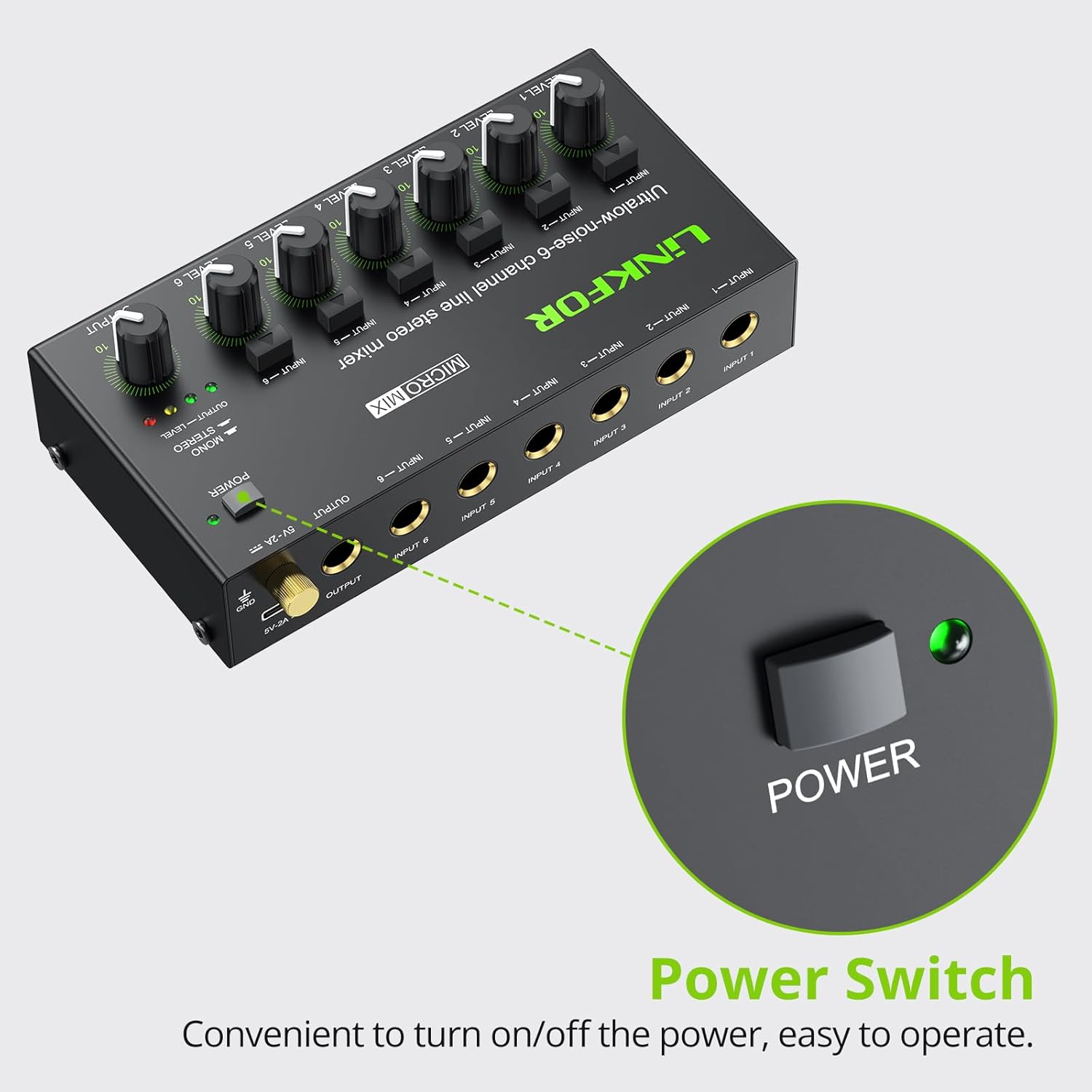
Figura 4: Ubicación del interruptor de encendido.
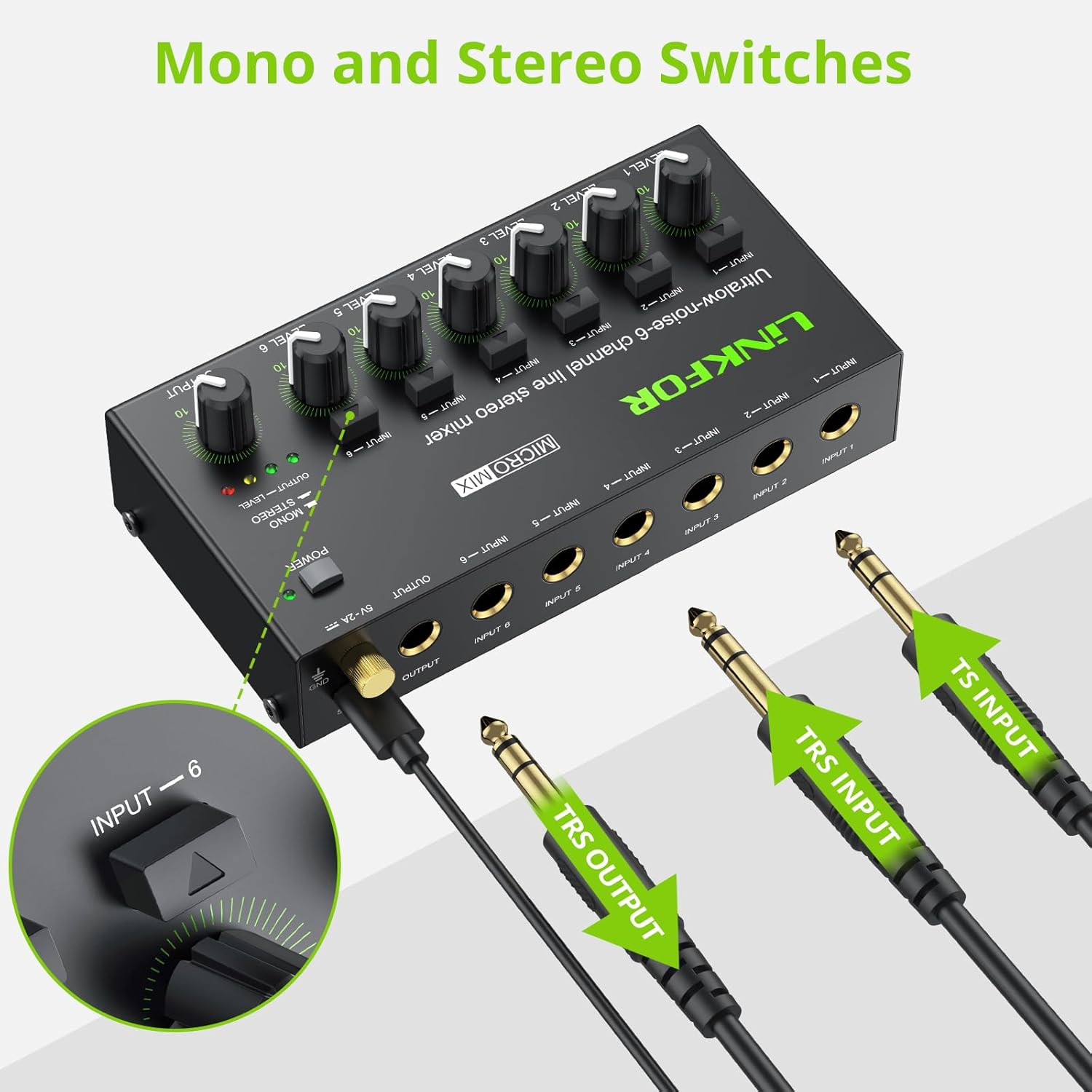
Figure 5: Input and output interfaces.

Figure 6: Connection diagram for inputs and outputs.
6. Instrucciones de funcionamiento
Once your mixer is set up, follow these instructions for operation:
- Ajuste de los niveles de entrada: Gradually turn up the LEVEL knob for each active input channel (LEVEL 1-6) until the desired volume is achieved for that specific source.
- Ajuste del nivel de salida: Slowly increase the main OUTPUT knob to control the overall volume of the mixed audio sent to your headphones or amplifier. Monitor the OUTPUT LEVEL indicator lights (green, yellow, red) to prevent clipping (red light indicates signal is too high).
- Conmutación mono/estéreo: Each input channel has a dedicated button to switch between mono and stereo modes. Press the button above the respective input to toggle between modes as needed for your audio source.
- Mixing Multiple Sources: Adjust the individual LEVEL knobs for each input to create a balanced mix of all connected audio sources.
Video 2: Official LiNKFOR video demonstrating the 6-Channel Audio Mixer's features. This video highlights the specific power switch, separate volume controls for each channel, stereo/mono switching, and ultra-low noise performance during operation.

Figura 7: Example of mixer in use with guitar and laptop.
7. Mantenimiento
- Limpieza: Utilice un paño suave y seco para limpiar el exterior de la batidora. No utilice limpiadores líquidos ni disolventes.
- Almacenamiento: Guarde el dispositivo en un lugar fresco y seco, alejado de la luz solar directa y de temperaturas extremas cuando no esté en uso.
- Cuidado de cables: Ensure all cables are connected securely and are not bent or kinked excessively to prevent damage.
8. Solución de problemas
| Problema | Posible causa | Solución |
|---|---|---|
| No hay salida de sonido | Power not connected or turned on; Volume knobs too low; Incorrect cable connections. | Check power supply and switch; Increase LEVEL and OUTPUT knobs; Verify all audio cables are correctly and securely connected. |
| Sonido distorsionado | Volume levels too high (clipping); Faulty cables or audio sources. | Reduce LEVEL and/or OUTPUT knobs until red indicator light disappears; Test with different cables or audio sources. |
| Hissing/Buzzing noise | Ground loop interference; Poor quality cables; Nearby electronic interference. | Ensure proper grounding; Use high-quality shielded cables; Move the mixer away from other electronic devices. |
| Un canal no funciona | Faulty input cable or source; Input level too low. | Test the input with a different cable and source; Increase the specific channel's LEVEL knob. |
9. Especificaciones

Figura 8: Dimensiones del producto.
| Característica | Detalle |
|---|---|
| Marca | Enlace para |
| Número de modelo | 6 ENTRADA 1 SALIDA |
| Número de canales | 6 |
| Tecnología de conectividad | 6.35 mm |
| Fuente de poder | Eléctrico con cable |
| Volumentage | 5 voltios |
| Dimensiones del producto | 32 mm de profundidad x 75 mm de ancho x 32 mm de alto (1.26" de profundidad x 2.95" de ancho x 1.26" de alto) |
| Peso del artículo | 8.5 onzas (240 gramos) |
10. Garantía y soporte
For warranty information and technical support, please refer to the documentation included with your purchase or visit the official LiNKFOR webSitio. Los términos específicos de la garantía pueden variar según la región y el minorista.