
Introducción
This manual provides comprehensive instructions for the safe and efficient use of your DALI SUB C-8 D Powered Subwoofer. The SUB C-8 D is designed to integrate seamlessly into various audio setups, enhancing bass performance for both surround sound systems and compact stereo configurations. Please read this manual thoroughly before installation and operation to ensure optimal performance and longevity of your device.
Instrucciones de seguridad importantes
- Fuente de energía: Conecte el subwoofer únicamente a una fuente de alimentación del tipo descrito en este manual o marcado en la unidad.
- Ventilación: Asegúrese de que haya una ventilación adecuada. No obstruya ninguna abertura de ventilación. Instale el producto según las instrucciones del fabricante.
- Calor: No lo instale cerca de fuentes de calor como radiadores, rejillas de calefacción, estufas u otros aparatos (incluidos ampificadores) que producen calor.
- Agua y humedad: No utilice este aparato cerca del agua ni lo exponga a goteos o salpicaduras.
- Limpieza: Limpiar únicamente con un paño seco.
- Servicio: No intente reparar este producto usted mismo. Refiera todo el servicio a personal de servicio calificado.
- Colocación: Place the subwoofer on a stable, level surface to prevent tipping. Avoid placing it in direct sunlight or in areas with high humidity.
Contenido del paquete
Por favor, compruebe que todos los artículos estén presentes en el paquete:
- DALI SUB C-8 D Powered Subwoofer
- Cable de alimentación
- Guía de inicio rápido
Configuración
1 Colocación
The DALI SUB C-8 D is designed for floor standing placement. Its compact size allows for flexible positioning within your listening environment. For optimal bass response, experiment with different locations in your room. Generally, placing the subwoofer in a corner can enhance bass output, while placing it along a wall can provide a more balanced sound. Ensure the subwoofer is placed on a stable, level surface.
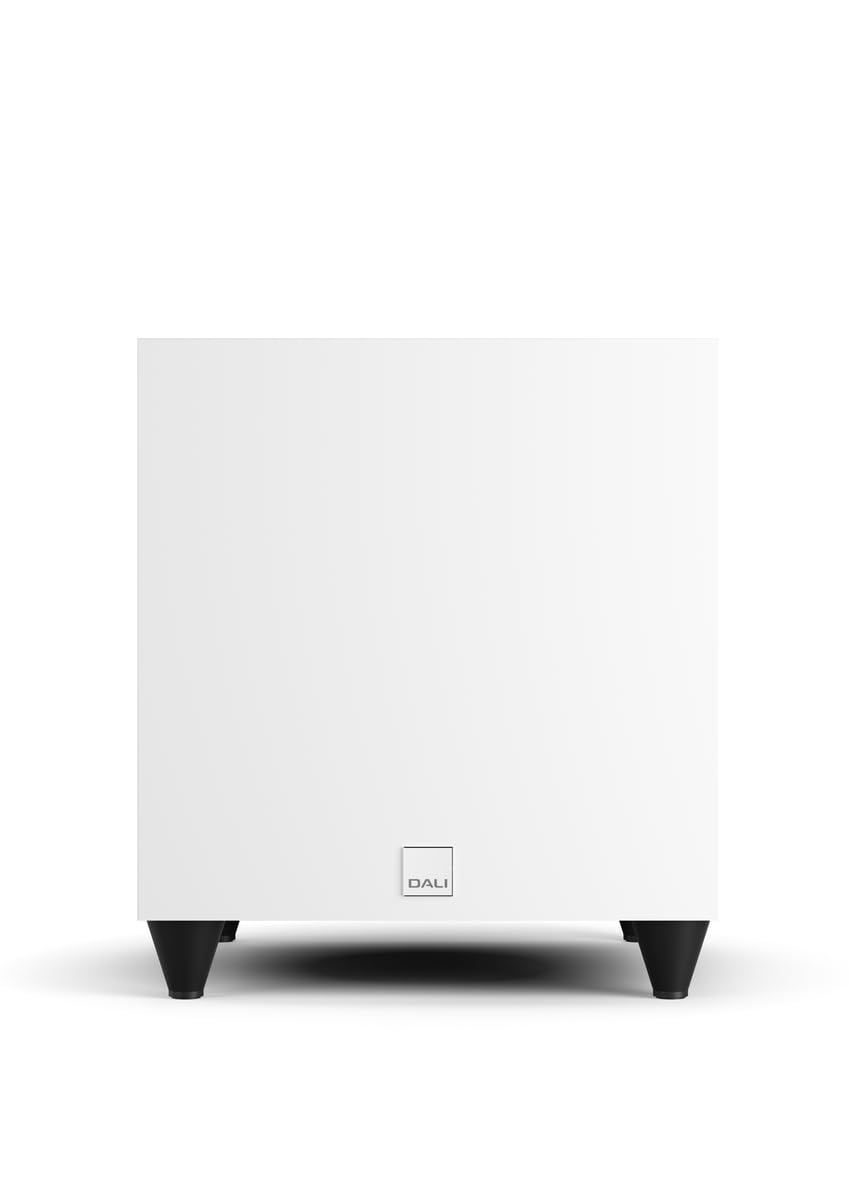
Imagen: Frente view of the DALI SUB C-8 D Powered Subwoofer, showcasing its compact white cabinet and four black feet.
2. Conexiones
Connect the subwoofer to your audio system using the appropriate cables. The SUB C-8 D features RCA connectivity for line input.
- Entrada de línea (RCA): Connect the RCA output from your amplifier or AV receiver to the "LINE INPUT" (LFE or Stereo) on the subwoofer's rear panel.
- Conexión de energía: Connect the supplied power cable to the AC inlet on the subwoofer's rear panel, then plug it into a suitable wall outlet.
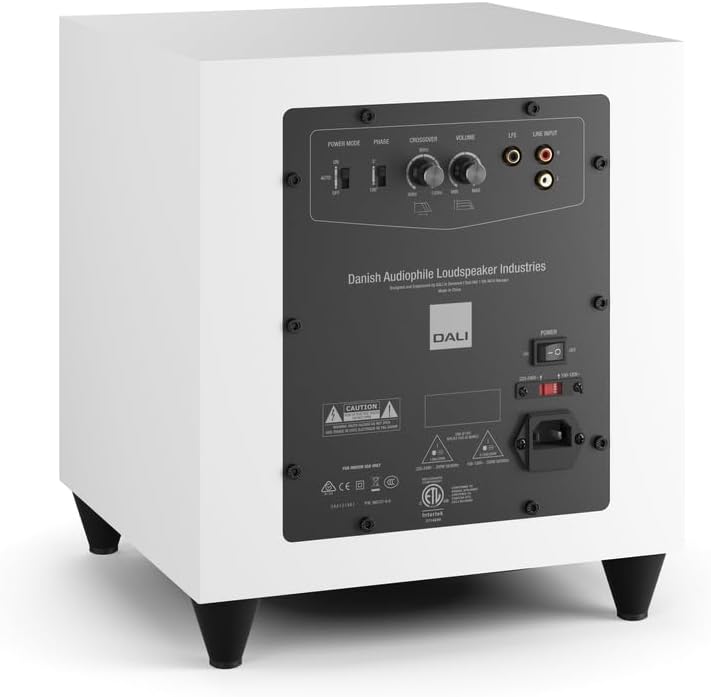
Image: Rear panel of the DALI SUB C-8 D Subwoofer, showing the power switch, AC inlet, RCA line inputs, and control knobs for Power Mode, Phase, Crossover, and Volume.
3. Ajustes iniciales
Before powering on, set the initial controls on the rear panel:
- Modo de energía: Set to "AUTO" for automatic power on/off with signal detection, or "ON" for continuous operation.
- Fase: Start with "0°". Adjust later if bass sounds thin or out of sync with main speakers.
- Transversal: Set to a starting point based on your main speakers' low-frequency capabilities. A common starting point is 80 Hz.
- Volumen: Set to a low level (e.g., 1/4 or 1/3 of the way up) to avoid sudden loud bass when first powering on.
Operación
Encendido/apagado
Once connected, flip the main power switch on the rear panel to the "ON" position. If "Power Mode" is set to "AUTO", the subwoofer will power on automatically when an audio signal is detected and enter standby mode when no signal is present for a period.
Ajuste de la configuración de sonido
- Volumen: Adjust the volume knob to balance the subwoofer's output with your main speakers. The bass should be felt, not overtly heard as a separate speaker.
- Transversal: Fine-tune the crossover frequency. This determines the point at which the subwoofer takes over from your main speakers. If your main speakers are small, a higher crossover frequency (e.g., 100-120 Hz) may be appropriate. For larger speakers, a lower frequency (e.g., 60-80 Hz) might be better.
- Fase: If the bass sounds weak or hollow, try switching the phase between 0° and 180°. The correct setting will result in the most impactful and coherent bass.
Make small adjustments and listen to various types of audio content to find the optimal settings for your room and preferences.
Mantenimiento
To ensure the longevity and optimal performance of your DALI SUB C-8 D subwoofer, follow these simple maintenance guidelines:
- Limpieza: Dust the cabinet regularly with a soft, dry cloth. Avoid using abrasive cleaners, solvents, or chemical sprays, as these can damage the finish.
- Ventilación: Ensure that the ventilation openings on the subwoofer are not obstructed by dust or other objects.
- Ambiente: Keep the subwoofer away from direct sunlight, excessive heat, and high humidity.
- cables: Revise periódicamente todas las conexiones de cables para asegurarse de que estén seguras y libres de daños.
Solución de problemas
If you experience issues with your DALI SUB C-8 D, refer to the following common problems and solutions:
- Sin sonido:
- Ensure the subwoofer is plugged in and the main power switch is "ON".
- Check if the "Power Mode" is set correctly (e.g., "AUTO" and an audio signal is present).
- Verify that the RCA audio cables are securely connected to both the subwoofer and your amplevantador / receptor.
- Increase the volume level on the subwoofer and your amplevantador / receptor.
- Distorted or Unclear Bass:
- Reduce the volume level on the subwoofer.
- Adjust the "Crossover" frequency. It might be set too high or too low for your main speakers.
- Experiment with the "Phase" switch (0° or 180°) to ensure proper integration with your main speakers.
- Verifique si hay conexiones sueltas o cables dañados.
- Subwoofer Not Powering On Automatically (in AUTO mode):
- Ensure an audio signal is being sent to the subwoofer.
- Check the sensitivity of your amplifier's output or try increasing the volume slightly.
- If the issue persists, switch the "Power Mode" to "ON" for continuous operation.
If these steps do not resolve the issue, please contact DALI customer support or your authorized dealer.
Presupuesto
| Marca | Dalí |
| Número de modelo | SUB C-8 D |
| Tipo de altavoz | Altavoz de subgraves |
| Tamaño del altavoz | 8 pulgadas |
| Diámetro del woofer | 20 centímetros |
| Potencia máxima de salida del altavoz | 220 vatios |
| Tecnología de conectividad | RCA |
| Modo de salida de audio | Rodear |
| Tipo de montaje | Piso de pie |
| Método de control | Touch (knobs/switches) |
| Usos específicos del producto | Sistemas de entretenimiento para el hogar |
| Cantidad de canales de audio | 5.1 |
| Dispositivos compatibles | Desktop, Gaming Console, Home Theater, Laptop, Projector, Television |
| Dimensiones del artículo (Pr. x An. x Al.) | 13" de profundidad x 12" de ancho x 11" de alto |
| Peso del artículo | 21.8 libras |
| Fuente de poder | Eléctrico con cable |
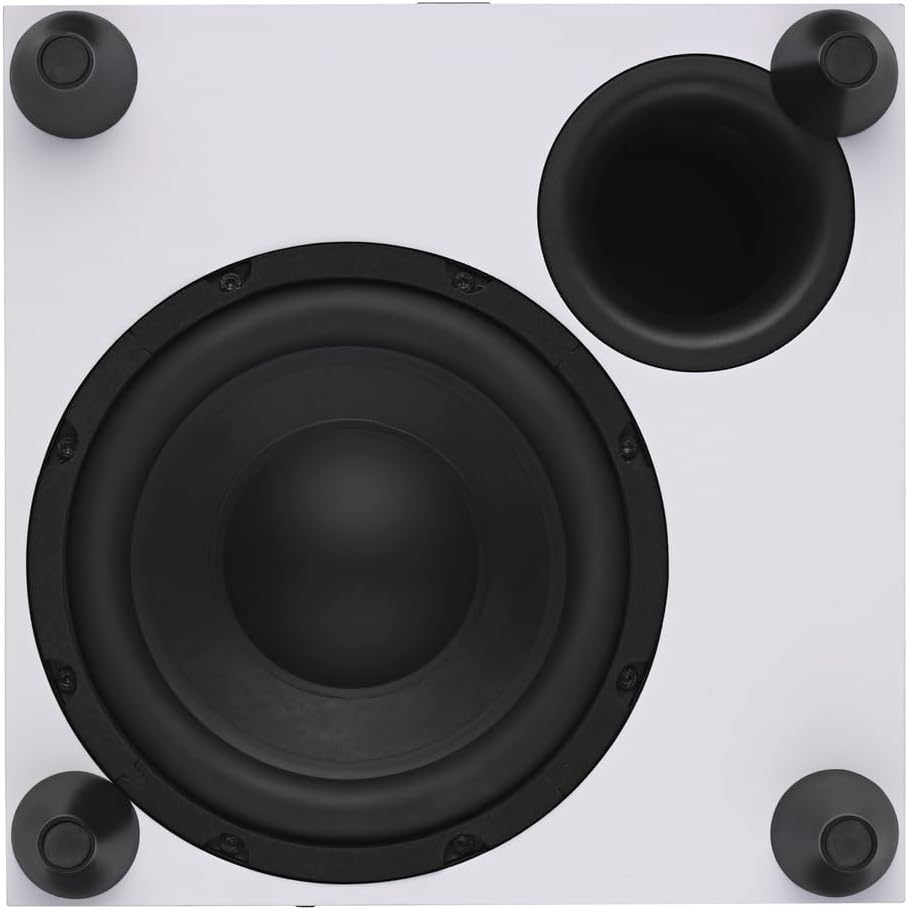
Imagen: de arriba hacia abajo view of the DALI SUB C-8 D Subwoofer, showing the 8-inch woofer and bass port.
Información de garantía
The DALI SUB C-8 D Powered Subwoofer comes with a Garantía limitada de 1 año from the date of purchase. This warranty covers manufacturing defects in materials and workmanship under normal use. It does not cover damage caused by misuse, accident, unauthorized modifications, or improper installation.
For detailed warranty terms and conditions, please refer to the documentation included with your product or visit the official DALI websitio.
Apoyo
For technical assistance, troubleshooting beyond this manual, or warranty claims, please contact DALI customer support or your authorized DALI dealer.
You can find more information and contact details on the official DALI websitio: www.dali-speakers.com