
Introducción
The Linsoul Kiwi Ears Allegro Mini is a compact and portable Digital-to-Analog Converter (DAC) and amplifier designed to elevate your audio experience. It provides high-fidelity sound for your in-ear monitors (IEMs) and headphones, connecting seamlessly to various devices via USB-C. This manual will guide you through the setup, operation, and maintenance of your Allegro Mini to ensure optimal performance.

Image: The Kiwi Ears Allegro Mini, a compact silver DAC with a USB-C connector and audio output ports.
¿Qué hay en la caja?
- Kiwi Ears Allegro Mini Portable IEM DAC
- Manual de usuario
Configuración
- Conectar al dispositivo: Insert the USB-C connector of the Allegro Mini into the USB-C port of your smartphone, tablet, or computer. Ensure a secure connection.
- Connect Headphones/IEMs: Plug your 3.5mm single-ended or 4.4mm balanced headphones/IEMs into the corresponding output port on the Allegro Mini.
- Reconocimiento automático: Most modern Android devices (version 5.1 and above), PCs, and other compatible devices will automatically recognize the Allegro Mini as an external audio output device. No additional drivers are typically required for basic functionality.
- Ajuste de volumen: Adjust the volume using your connected device's volume controls.
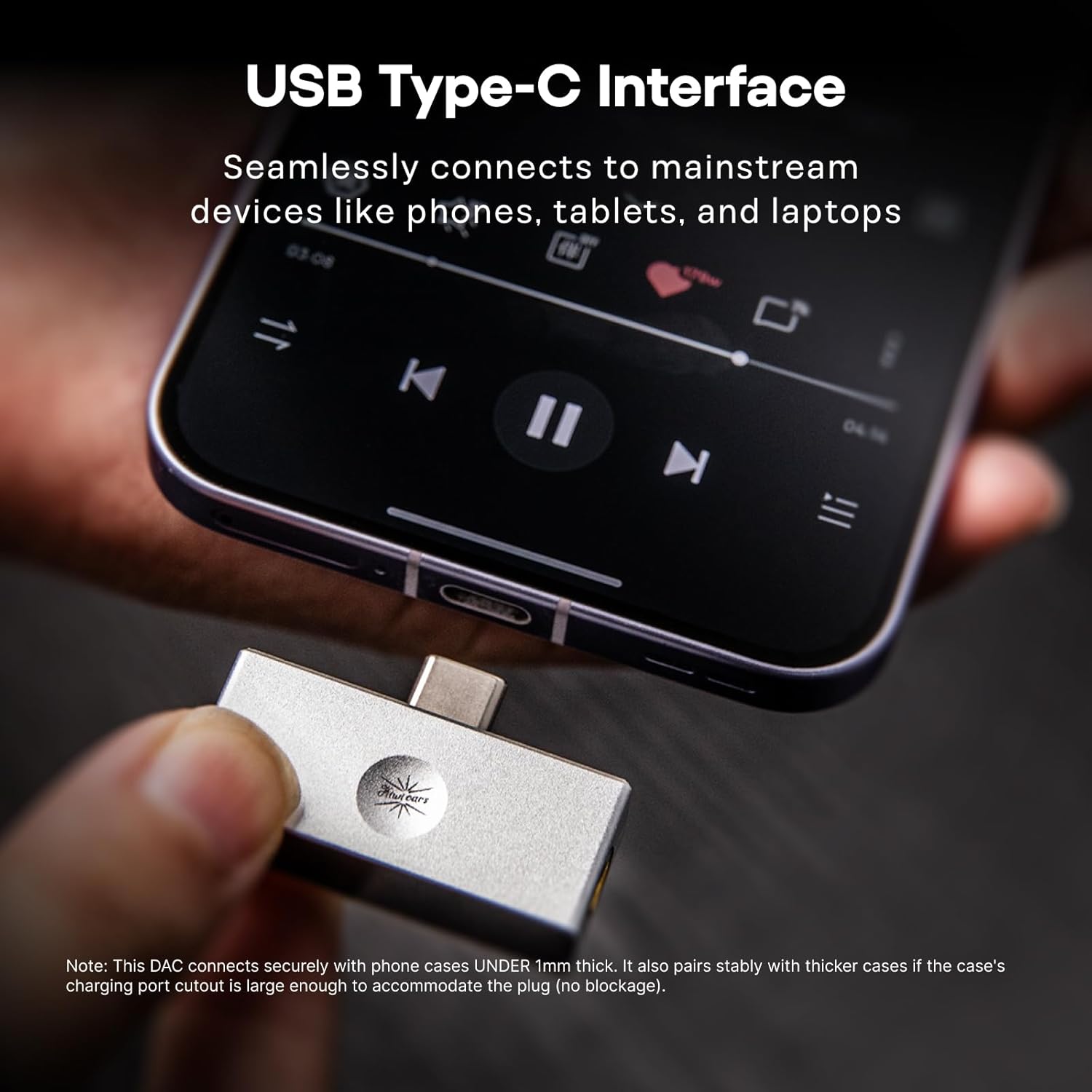
Image: The Allegro Mini connected to a smartphone via its USB-C port, with an IEM cable plugged into the 3.5mm output.
Instrucciones de funcionamiento
- Conectar y usar: The Allegro Mini is designed for immediate use. Simply connect it to your source device and audio output.
- Reproducción de audio: Begin playing audio from your device. Sound will be routed through the Allegro Mini to your connected headphones or IEMs.
- Control de volumen: Use the volume buttons on your connected smartphone, tablet, or computer to adjust the playback volume.
- Opciones de salida: The Allegro Mini features both 3.5mm single-ended and 4.4mm balanced output ports. Choose the appropriate port for your headphones or IEMs. The 4.4mm balanced output may offer improved sound quality and power for compatible headphones.

Image: The Allegro Mini connected to a smartphone, demonstrating its plug-and-play functionality for audio playback.
Características
- Diseño compacto y portátil: Inspired by the original Allegro, the Mini version offers high-fidelity sound in a smaller, all-aluminum alloy body for enhanced durability and a minimalist aesthetic.
- Flexible Output Options: Equipped with both 4.4mm balanced and 3.5mm single-ended outputs to accommodate a wide range of headphones and IEMs.
- High-Resolution Audio Performance: Supports PCM up to 32bit/384kHz and DSD up to DSD128, ensuring detailed and clear audio reproduction.
- Compatibilidad universal: Features a USB Type-C interface for seamless plug-and-play connection with most modern Android devices (version 5.1 and above), as well as PCs and other compatible devices.
- Claridad de audio superior: Achieves an ultra-low THD+N of 0.004% at 32 Ohms, providing pure, undistorted sound with a wide frequency response and excellent signal-to-noise ratio.

Image: The Allegro Mini highlighting its 3.5mm single-ended and 4.4mm balanced output options.
Presupuesto
| Atributo | Valor |
|---|---|
| Marca | Alma linólea |
| Nombre del modelo | Kiwi Ears Allegro Mini |
| Color | Plata |
| Tecnología de conectividad | Wired (USB Type-C input) |
| Puertos de salida | 3.5 mm de un solo extremo, 4.4 mm equilibrado |
| Soporte PCM | Hasta 32 bits/384 kHz |
| Compatibilidad con DSD | Hasta DSD128 |
| Distorsión armónica total (THD) + ruido | 0.004% (at 32 Ohms) |
| Factor de forma | Mini portátil |
| Fabricante | Alma linólea |
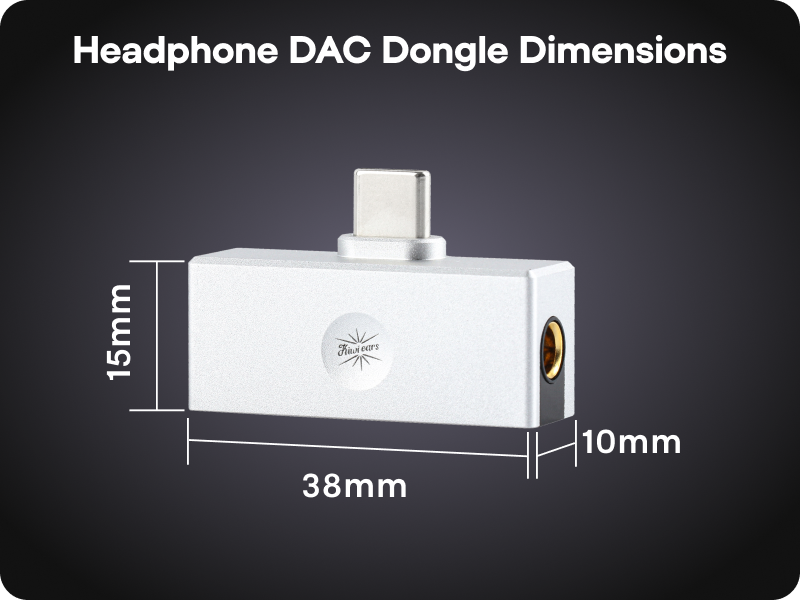
Image: A diagram illustrating the compact dimensions of the Kiwi Ears Allegro Mini.
Mantenimiento
- Limpieza: Use a soft, dry cloth to wipe the exterior of the Allegro Mini. Avoid using liquid cleaners or abrasive materials.
- Almacenamiento: Guarde el dispositivo en un lugar fresco y seco, alejado de la luz solar directa y de temperaturas extremas.
- Tratar con cuidado: Si bien es duradero, evite dejar caer el dispositivo o someterlo a impactos fuertes.
- Protección portuaria: When not in use, consider using dust caps for the USB-C and audio ports to prevent dust and debris accumulation.
Solución de problemas
- Sin salida de sonido:
- Ensure the Allegro Mini is securely connected to both your source device and headphones/IEMs.
- Verifique la configuración de volumen de su dispositivo y asegúrese de que no esté silenciado.
- Verify that your source device recognizes the Allegro Mini as the active audio output. This can usually be checked in your device's sound settings.
- Test with different headphones/IEMs to rule out an issue with your audio output device.
- Volumen bajo o sonido distorsionado:
- Aumente el volumen en su dispositivo fuente.
- Ensure your headphones/IEMs are fully plugged into the Allegro Mini. A partial connection can cause distortion or sound only in one channel.
- If using a phone case, ensure it does not obstruct the USB-C connection, as this can prevent a full connection.
- For optimal performance, especially with demanding headphones, use the 4.4mm balanced output if your headphones support it.
- Dispositivo no reconocido:
- Disconnect and reconnect the Allegro Mini.
- Try connecting to a different USB-C port or a different compatible device to isolate the issue.
- Asegúrese de que el sistema operativo de su dispositivo esté actualizado.
Vídeos oficiales de productos
Linsoul Kiwi Ears Allegro Mini Portable IEM DAC Overview
Vídeo: Un funcionario sobreview of the Linsoul Kiwi Ears Allegro Mini Portable IEM DAC, showcasing sus características y diseño.
Linsoul Kiwi Ears In-Ear Monitor Manufacturing Process
Video: A detailed look into the manufacturing process of Linsoul Kiwi Ears in-ear monitors, demonstrating the craftsmanship and quality control.
Garantía y soporte
The Linsoul Kiwi Ears Allegro Mini comes with a 1 año de garantía A partir de la fecha de compra. Esta garantía cubre defectos de fabricación y problemas derivados del uso normal.
For technical support, warranty claims, or any questions regarding your product, please contact Linsoul Audio customer service through their official webSitio web o al minorista donde compró el producto. Conserve su comprobante de compra para validar la garantía.
You can visit the Linsoul Store for more information: Tienda oficial de Linsoul