
leapwell CD201W
Manual de usuario del reproductor de CD portátil Leapwell
Model: CD201W
Introducción
Thank you for choosing the Leapwell Portable CD Player. This device is designed to provide a versatile and high-quality audio experience, supporting multiple playback modes and featuring a classic design. Please read this manual thoroughly to understand the product's functions and ensure proper operation and maintenance.
¿Qué hay en la caja?
Por favor, revise el contenido de su paquete. Si falta algún artículo o está dañado, contacte con atención al cliente.
- Reproductor de CD portátil Leapwell
- Mando a distancia
- Auriculares
- Cable AUX de 3.5 mm
- Cable de carga USB-C
- Manual de usuario

Image: The Leapwell Portable CD Player shown with its remote control, earphones, AUX cable, USB-C charging cable, and user manual, all neatly arranged next to its packaging box.
Producto terminadoview
The Leapwell Portable CD Player combines classic design with modern functionality. It features a top-loading CD mechanism with a translucent dust cover, integrated speakers, and a control panel with a rotary knob for volume and various buttons for mode selection and playback control.

Image: A white Leapwell Portable CD Player with its top lid open, revealing a CD. The front speakers are illuminated with a blue glow, and control buttons are visible on the right side.
Características principales:
- Multi-Functional Playback: Supports CD Play, Bluetooth, FM Radio, USB, AUX, AB Repeat, and Optical Mode.
- Sistema de altavoces HiFi: Features independent sound cavity design and inner magnetic speaker unit for enhanced sound detail and bass.
- Batería recargable: Built-in USB-C fast rechargeable battery provides 4-5 hours of playback.
- Diseño clásico: Retro square design with an elegant volume knob and translucent CD dust cover.
- Conectividad versátil: Includes 3.5mm audio, USB, and optical interfaces for external connections.
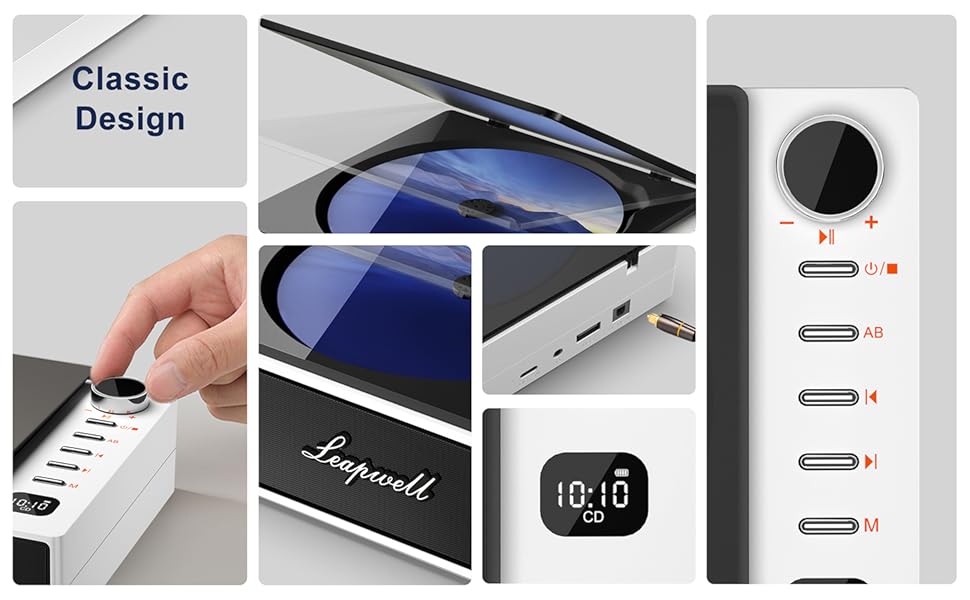
Imagen: Un collage muestraasing various design elements and features of the CD player, including the volume knob, the open CD lid, the USB-C and optical ports, and the digital display.
Configuración
1. Carga del dispositivo
Before first use, fully charge the CD player. Connect the provided USB-C charging cable to the USB-C port on the device and the other end to a 5V-2A power adapter (not included) or a computer's USB port. A blinking white light indicates charging. The light will become solid when fully charged. Charging typically takes 3.5 hours for 4-5 hours of playback.

Image: The portable CD player is shown outdoors, emphasizing its built-in rechargeable battery and portability, with icons indicating 4.5 hours playback and 3.5 hours charging time.
2. Encendido / apagado
Press and hold the power button (usually indicated by a power symbol) to turn the device on or off.
Modos de funcionamiento
The Leapwell CD Player supports multiple audio sources. Use the 'M' (Mode) button on the device or remote control to switch between modes.

Image: A circular diagram illustrating the six different operating modes of the CD player: CD Mode, BT Mode (Bluetooth), FM Mode, USB Mode, AB Repeat, and Optical Mode.
1. CD Play Mode
- Open the translucent dust cover on top of the player.
- Coloque con cuidado un CD en el eje, asegurándose de que esté colocado correctamente.
- Cierre la cubierta antipolvo.
- Select "CD" mode using the 'M' button. The CD will begin playing automatically.
- Use the play/pause, skip forward/backward buttons, and volume knob to control playback.

Image: The Leapwell Portable CD Player with its top lid open, ready for a CD to be inserted. The internal mechanism is visible.
2. Modo Bluetooth
The CD player can connect to Bluetooth headphones or a mobile phone to play music.
- Switch the player to "BT" (Bluetooth) mode. The display will show "BT" and an indicator will blink, signifying pairing mode.
- On your Bluetooth device (e.g., smartphone, headphones), enable Bluetooth and search for "Leapwell CD Player".
- Select the device to pair. Once connected, the Bluetooth indicator on the CD player will stop blinking.
- You can now play audio from your connected device through the CD player's speakers or connected Bluetooth headphones.

Image: A person's hands are shown interacting with a smartphone and the CD player, illustrating the Bluetooth connection process. Bluetooth icons float between the devices.
3. Modo de radio FM
- Switch the player to "FM" mode.
- Use the skip forward/backward buttons to scan for radio stations.
- Ajuste el volumen utilizando el botón giratorio.
4. Modo USB
- Inserte una unidad flash USB que contenga audio files en el puerto USB.
- Switch the player to "USB" mode.
- El reproductor detectará automáticamente y comenzará a reproducir audio. files de la unidad USB.
5. Modo AUX
Connect external audio devices (e.g., smartphone, MP3 player) using the provided 3.5mm AUX cable.
- Connect one end of the 3.5mm AUX cable to the AUX-in port on the CD player.
- Conecte el otro extremo al conector de auriculares o a la salida de audio de su dispositivo externo.
- Switch the player to "AUX" mode.
- Reproduce audio desde tu dispositivo externo. El sonido se reproducirá a través de los altavoces del reproductor de CD.
6. Modo óptico
For high-fidelity audio output, connect the CD player to an external decoder or speaker system via an optical cable (not included).
- Connect an optical cable to the optical output port on the CD player.
- Connect the other end to the optical input of your compatible audio system.
- Switch the player to "Optical" mode.
- Audio from the CD player will now be transmitted digitally to your external system.
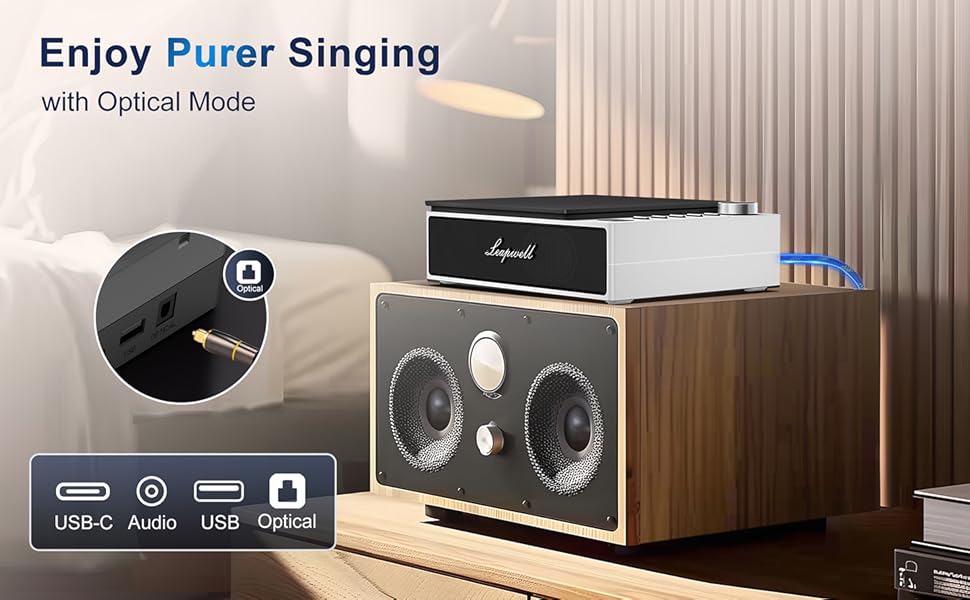
Image: The CD player is shown connected to a larger external speaker system using an optical cable, highlighting its capability for high-quality audio output.
7. AB Repeat Mode
This mode allows you to repeat a specific section of an audio track (CD or USB).
- During playback, press the "AB" button once to set the starting point (A).
- Press the "AB" button again to set the ending point (B). The section between A and B will now repeat.
- Press the "AB" button a third time to cancel the repeat function.
Mantenimiento
- Limpieza: Utilice un paño suave y seco para limpiar el exterior del reproductor. Para la lente de CD, utilice un limpiador especializado. No utilice limpiadores abrasivos ni disolventes.
- Guardapolvo: Keep the translucent dust cover closed when not in use to protect the optical drive from dust and debris.
- Almacenamiento: Guarde el reproductor en un lugar fresco y seco, alejado de la luz solar directa y de temperaturas extremas.
- Cuidado de la batería: Para prolongar la vida útil de la batería, evite descargarla por completo con frecuencia. Cargue el dispositivo regularmente, incluso si no lo usa constantemente.
Solución de problemas
| Problema | Posible causa / solución |
|---|---|
| El dispositivo no se enciende. | Battery might be depleted. Connect to power adapter and charge. Ensure the power button is pressed and held sufficiently. |
| El CD no se reproduce o salta. | CD might be dirty or scratched. Clean the CD. Ensure the CD is properly seated. The player has anti-shake protection, but excessive movement can still cause skips. |
| No hay sonido de los altavoces. | Volume might be too low. Increase volume using the knob. Ensure correct mode is selected. Check if external headphones or speakers are connected and functioning. |
| Problemas de conexión Bluetooth. | Ensure the player is in Bluetooth pairing mode. Make sure the external Bluetooth device is discoverable and within range. Try unpairing and re-pairing the devices. |
| El control remoto no funciona. | Check if the remote control's battery needs replacement. Ensure there are no obstructions between the remote and the player's IR receiver. |
| Slow charging via computer USB. | Charging via a computer's USB port will be slower. It is recommended to use a 5V-2A adapter for faster charging. |
Presupuesto
| Característica | Detalle |
|---|---|
| Dimensiones del producto | 7.3 x 5.8 x 2.2 pulgadas (18.5 x 14.7 x 5.6 cm) |
| Peso del artículo | 1.4 libras (0.63 kg) |
| Número de modelo | CD201W |
| Tipo de batería | 1 batería de iones de litio (incluida) |
| Modos de reproducción | CD, Bluetooth, FM Radio, USB, AUX, AB Repeat, Optical |
| Tecnología de conectividad | Auxiliary, Bluetooth, Optical, USB, USB-C |
| Características especiales | Anti-Skip Protection, Built-In Speaker, Portable, Rechargeable |
| Tecnología de sintonizador | FM |
| Fuente de poder | Funciona con pilas |
Garantía y soporte
Leapwell CD Players come with lifelong technical support and 24/7 professional customer service. For any inquiries, issues, or warranty claims, please contact Leapwell customer support through the retailer's platform or the contact information provided in your product packaging.
Ask a question about this manual
Ask about setup, troubleshooting, compatibility, parts, safety, or missing instructions. Manuals+ will review the question and use this page’s manual context to help answer it.