Introducción
Thank you for choosing the Intelligent Touch Screen Open Bluetooth Earphones. This manual provides essential information for the proper use, setup, and maintenance of your new earphones. Please read it thoroughly before use to ensure optimal performance and longevity.
These true wireless open-ear earbuds feature Bluetooth 5.4 connectivity, double noise reduction, and a touch screen for intuitive control. They are designed for comfort and functionality during various activities, including fitness, running, and cycling.
Contenido del paquete
Al desempaquetar, verifique que estén presentes todos los elementos enumerados a continuación:
- Headphones with hanging ears (Earbuds)
- Cable de carga tipo C
- Estuche protector
- Manual de instrucciones del producto (este documento)

Image: The Intelligent Touch Screen Open Bluetooth Earphones, showing the earbuds and their charging case with a digital display.
Configuración
1. Carga inicial
Before first use, fully charge the earphones and the charging case. Connect the provided Type-C charging cable to the charging port on the case and plug the other end into a USB power source (e.g., computer USB port, wall adapter). The charging time is approximately 1.5 hours.
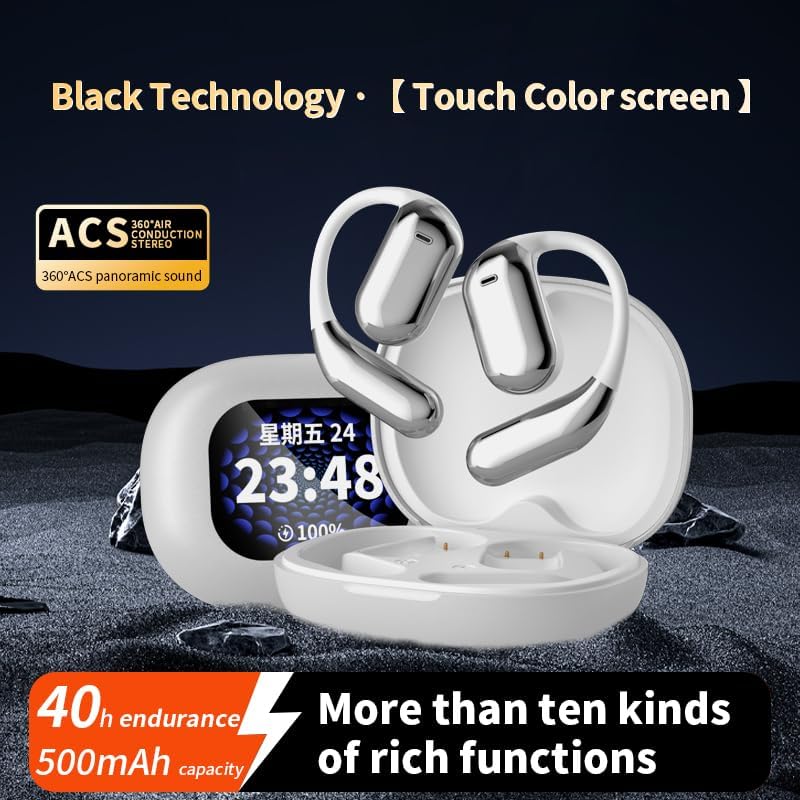
Image: The earbuds and charging case, highlighting the 40-hour endurance and 500mAh battery capacity.
2. Emparejamiento con un dispositivo Bluetooth
- Asegúrese de que los auriculares estén cargados y dentro del estuche de carga.
- Abre el estuche de carga. Los auriculares entrarán automáticamente en modo de emparejamiento.
- En su dispositivo con Bluetooth habilitado (teléfono inteligente, tableta, etc.), vaya a la configuración de Bluetooth.
- Buscar available devices and select "YYK-Q16 Pro" (or similar name) from the list.
- Una vez conectado, un sonido o indicador de confirmación significará que el emparejamiento fue exitoso.
The transmission range is approximately 10 meters (barrier-free).
Instrucciones de funcionamiento
Control de pantalla táctil
The earphones feature an LCD full-color touch screen on the charging case for easy control of various functions.

Image: The smart touch screen interface on the charging case, displaying various control options such as equalizer, spatial audio, and music playback.
- Reproducción de música: Control play/pause, skip tracks directly from the touch screen.
- Configuración de reducción de ruido: Adjust Active Noise Cancellation (ANC) modes.
- Equalizer Options: Cambiar entre diferentes profesionales de sonidofiles (Bass, Jazz, Vocals, Balanced).
- Audio espacial: Activate spatial audio features for an immersive experience.
Cancelación activa de ruido (ANC)
The earphones incorporate intelligent broadband deep noise cancellation technology, capable of blocking up to 99.44% of external noise. This feature allows for a quieter listening experience in noisy environments.
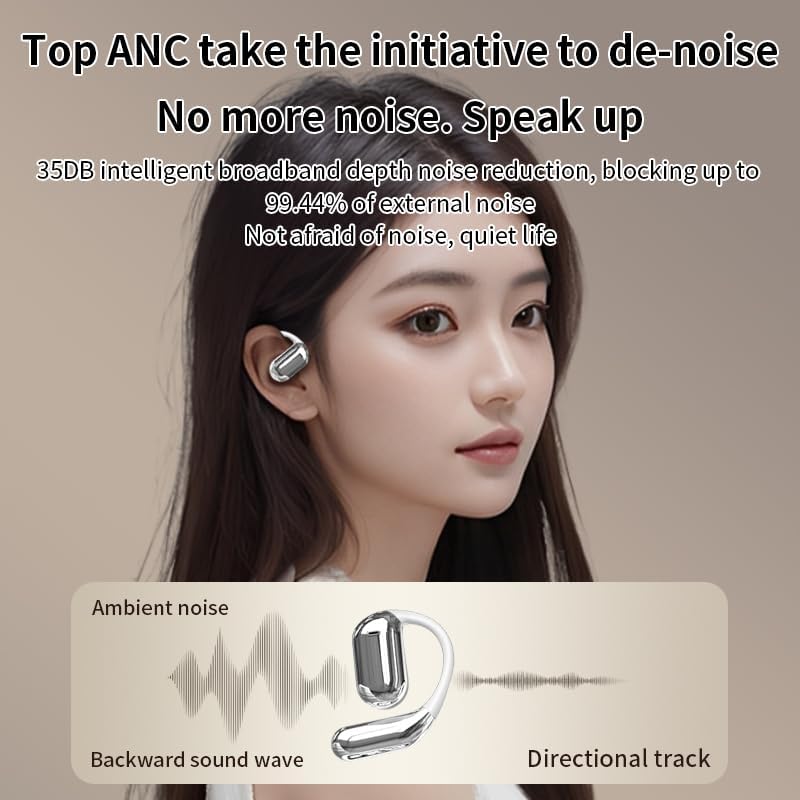
Image: Diagram illustrating how Active Noise Cancellation works by counteracting ambient noise with a backward sound wave.
Comodidad y ajuste
Designed as open-ear earphones, they provide a comfortable fit without entering the ear canal, making them suitable for extended wear and physical activities. Each earbud weighs approximately 8 grams.

Image: A person wearing the open-ear earphones, demonstrating their comfortable and secure fit.
Mantenimiento y cuidado
- Limpieza: Utilice un paño suave, seco y sin pelusa para limpiar los auriculares y el estuche de carga. No utilice limpiadores abrasivos ni disolventes.
- Almacenamiento: When not in use, store the earphones in their protective case to prevent damage and keep them clean.
- Resistencia al agua: The product description mentions IPX5 waterproof rating. While this offers protection against splashes and sweat, avoid submerging the earphones in water.
- Cuidado de la batería: Para prolongar la vida útil de la batería, evite descargarla por completo con frecuencia. Cárguela regularmente, especialmente si no la usa durante períodos prolongados.
Solución de problemas
| Problema | Posible causa | Solución |
|---|---|---|
| Los auriculares no se emparejan | Low battery; Out of range; Device Bluetooth off; Already paired with another device. | Charge earphones; Move closer to device; Enable Bluetooth; Disconnect from other devices and re-pair. |
| Sin sonido | Volume too low; Earphones not connected; Media not playing. | Increase volume on device and earphones; Reconnect earphones; Start media playback. |
| Mala calidad de sonido | Interference; Earphones too far from device; Obstructions. | Move away from sources of interference; Reduce distance to device; Ensure no major obstructions. |
| La pantalla del estuche de carga no funciona | Batería del estuche agotada. | Cargue el estuche de carga. |
Presupuesto
| Característica | Detalle |
|---|---|
| Modelo del producto | Q16 Pro headphones with hanging ears (YYK-Q16 Pro) |
| Versión de Bluetooth | V5.4 |
| Rango de frecuencia | 2.4 GHz ~ 2.48 GHz |
| Rango de transmisión | >=10m (Barrier free) / 32.8 Feet |
| Capacidad de la batería (estuche) | 500 mAh |
| Endurance Time (Total) | 40 horas |
| Endurance Time (Single Use) | 10 horas |
| Tiempo de carga | Unas 1.5 horas |
| Interfaz de carga | Tipo C |
| Control de ruido | Cancelación activa de ruido (ANC) |
| Tipo de control | Touch Control (LCD Full-Color Touch Screen) |
| Forma del auricular | Oído abierto |
| Impedancia | 16 ohmios |
| Resistencia al agua | IPX5 (from product description) |
Garantía y soporte
Para obtener información sobre la garantía y atención al cliente, consulte los datos de contacto proporcionados por su distribuidor o el sitio web oficial del fabricante. webSitio. Conserve su recibo de compra como comprobante de compra para cualquier reclamación de garantía.
For further assistance or technical inquiries, please contact customer service.


