
1. Introducción
This manual provides detailed instructions for the setup, operation, maintenance, and troubleshooting of your Trueque 2 Pack Backlit Wireless Full-Sized Ergonomic Keyboard and Mouse Combo. Please read this manual thoroughly before use to ensure optimal performance and longevity of your devices.
Contenido del paquete:
- Wireless Keyboard (x1)
- Ratón inalámbrico (x1)
- Receptor USB (x1)
- Type-C Adapter (x1)
- Manual de usuario (este documento)
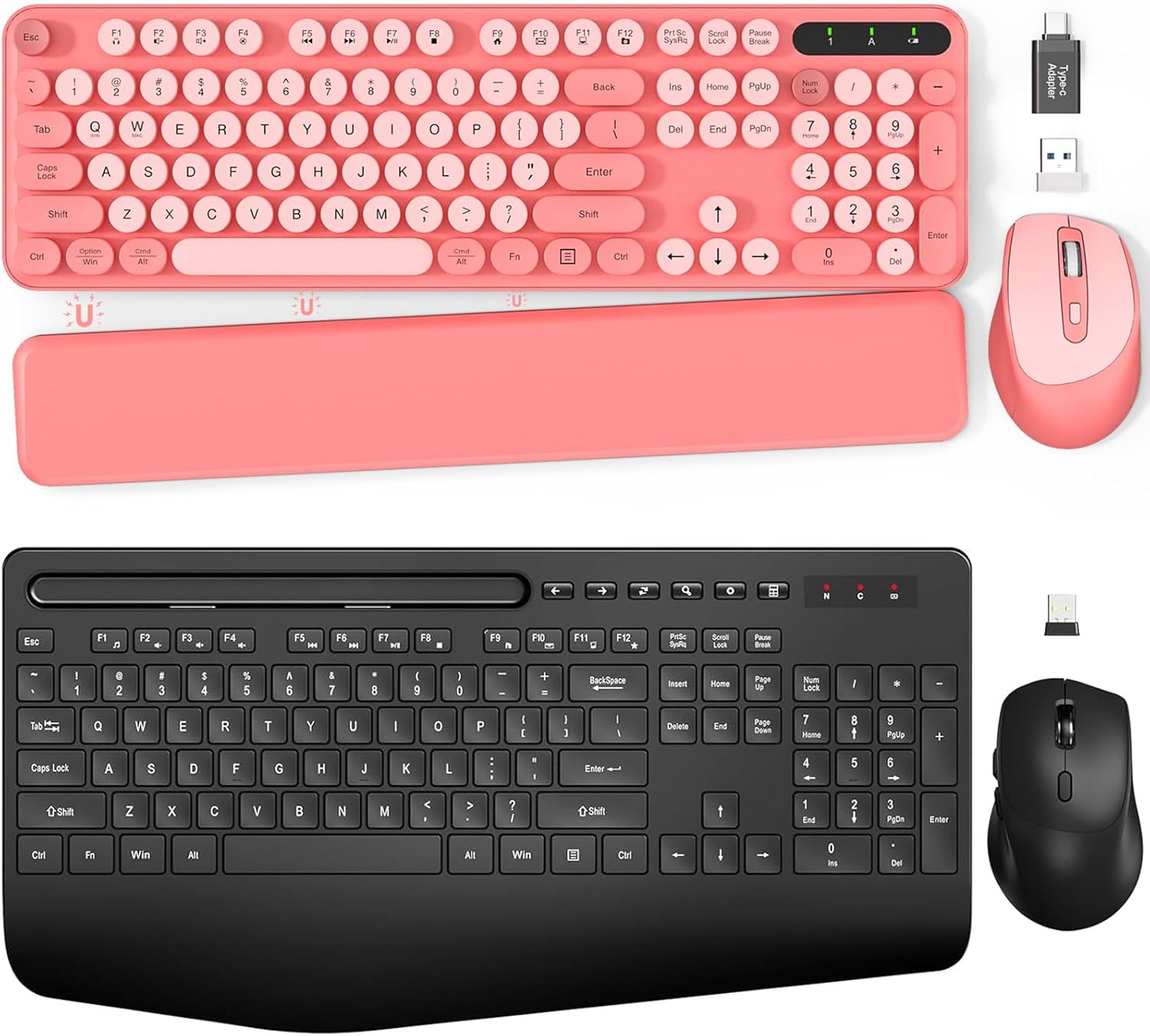
Imagen 1.1: Másview of the Trueque Wireless Keyboard and Mouse Combo (Pink version).
2. Configuración
2.1 Instalación de la batería
The keyboard requires two (2) AAA batteries, and the mouse requires one (1) AA battery (batteries are not included).
- Para el teclado: Locate the battery compartment on the underside of the keyboard. Open the cover, insert two AAA batteries according to the polarity indicators (+/-), and close the cover.
- Para el ratón: Locate the battery compartment on the underside of the mouse. Open the cover, insert one AA battery according to the polarity indicators (+/-), and close the cover.

Image 2.1: Battery compartments and ON/OFF switches for the keyboard and mouse.
2.2 Conexión del receptor USB
The keyboard and mouse share a single 2.4GHz USB receiver for wireless connectivity.
- Locate the USB receiver, typically stored in the mouse's battery compartment or packaged separately.
- Plug the USB receiver into an available USB port on your computer (PC or Laptop). If your computer only has USB-C ports, use the provided Type-C adapter.
- Turn on the keyboard and mouse using their respective ON/OFF switches. The devices should automatically connect to your computer.

Image 2.2: USB receiver and Type-C adapter for wireless connection.
3. Instrucciones de funcionamiento
3.1 Características del teclado
- Teclas retroiluminadas: The keyboard features backlighting for improved visibility in low-light conditions. Refer to the keyboard's function keys for backlight control (e.g., Fn + specific key for brightness adjustment or on/off toggle).
- Teclas redondas retro: The keyboard is equipped with detachable round keycaps, offering a distinct tactile experience and ease of cleaning.
- Soporte integrado para teléfono/tableta: A built-in cradle allows you to prop up your smartphone or tablet (under 11.9 inches) for convenient viewmientras trabajas.

Image 3.1: Keyboard with a tablet securely placed in the integrated holder.
- Patas plegables: The keyboard includes foldable legs on the underside, allowing you to adjust the typing angle for improved ergonomics.
- Magnetic Palm Rest: A detachable magnetic palm rest is provided to reduce wrist fatigue during extended use. It can be positioned to suit individual preferences.

Image 3.2: Foldable stands and magnetic palm rest for ergonomic adjustment.
3.2 Características del ratón
- Diseño ergonómico: The mouse is contoured to fit the hand comfortably, promoting a natural grip and reducing strain.

Image 3.3: Ergonomic design of the keyboard and mouse for comfortable use.
3.3 Modo de ahorro de energía
Para conservar la vida útil de la batería, tanto el teclado como el mouse cuentan con un modo de suspensión automático:
- Teclado: Enters sleep mode after 15 minutes of inactivity. Press any key to reactivate.
- Ratón: Enters sleep mode after 10 minutes of inactivity. Double-click any button to reactivate.

Image 3.4: Details on smart power saving for extended battery life.
4. Mantenimiento
4.1 Limpieza
Para limpiar el teclado y el ratón:
- Turn off both devices and disconnect the USB receiver from your computer.
- Utilice un paño suave, seco y sin pelusa para limpiar las superficies del teclado y el mouse.
- For the keyboard, the retro round keycaps are detachable for easier cleaning. Gently pull them off, clean as needed, and then firmly press them back into place.
- Evite utilizar productos químicos agresivos, limpiadores abrasivos o humedad excesiva, ya que pueden dañar los dispositivos.
4.2 Reemplazo de batería
Replace batteries when performance degrades or devices become unresponsive. Follow the battery installation steps in Section 2.1. Always use new batteries of the specified type (AAA for keyboard, AA for mouse) and dispose of old batteries responsibly.
5. Solución de problemas
If you encounter issues with your Trueque wireless keyboard and mouse combo, please refer to the following common solutions:
| Problema | Posible solución |
|---|---|
| El teclado/ratón no responde |
|
| Conexión intermitente o con retraso |
|
| La retroiluminación del teclado no funciona |
|
6. Especificaciones
| Característica | Detalle |
|---|---|
| Marca | Trueque |
| Número de modelo | B0DFGXN2JX |
| Tecnología de conectividad | 2.4 GHz inalámbrico (receptor USB) |
| alcance inalámbrico | Hasta 33 pies (10 metros) |
| Batería del teclado | 2 x AAA (no incluido) |
| Batería del ratón | 1 pilas AA (no incluidas) |
| Dispositivos compatibles | Computadora portátil, computadora personal (sistema operativo Windows) |
| Características especiales | Ergonomic Design, Foldable Legs, Wrist Rest, Backlit, Phone/Tablet Holder, Retro Round Keycaps |
7. Garantía y soporte
For warranty information or technical support, please refer to the contact details provided with your purchase or visit the official Trueque webSitio. Conserve su recibo de compra como comprobante de compra para cualquier reclamación de garantía.