
MageGee LIGHT87
Manual de usuario del teclado mecánico inalámbrico MageGee LIGHT87
Modelo: LIGHT87
Guía completa de configuración, funcionamiento y mantenimiento.
1. Producto terminadoview
The MageGee LIGHT87 is a versatile 87-key wireless mechanical keyboard designed for gaming and productivity. It features a gasket-mounted structure for a creamy typing sound, hot-swappable switches, vibrant RGB backlighting, and multiple connectivity options including 2.4GHz wireless, Bluetooth 5.0, and USB-C wired mode. It is equipped with an 8000mAh battery and durable side-printed PBT keycaps.

Figura 1: De arriba hacia abajo view of the MageGee LIGHT87 Wireless Mechanical Keyboard, showcasing its 87-key layout and RGB backlighting.

Figura 2: Sobreview of the MageGee LIGHT87's key features, including 8000mAh battery, PBT keycaps, Win/Mac dual system support, gasket mount, 5 layers of silencing foams, 16.8 million RGB backlight, triple mode connection, custom hot-swappable switches, and 87-key anti-ghosting.
2. Contenido del paquete
Antes de comenzar, asegúrese de que todos los artículos estén presentes en el paquete:
- MageGee LIGHT87 Wireless Mechanical Keyboard
- Cable USB-C a USB-A
- Receptor USB de 2.4GHz
- Extractor de teclas
- Extractor de interruptores
- Manual de usuario (este documento)

Figure 3: Contents of the MageGee LIGHT87 keyboard package, including the keyboard, USB cable, keycap puller, switch puller, and user manual.
3. Configuración y conectividad
The MageGee LIGHT87 keyboard offers three connection modes: USB-C wired, 2.4GHz wireless, and Bluetooth 5.0.
3.1 Carga del teclado
Before first use, it is recommended to fully charge the keyboard. Connect the provided USB-C cable to the keyboard's USB-C port and the other end to a USB power source (e.g., computer USB port, wall adapter). The keyboard features an 8000mAh large-capacity battery.

Figure 4: Illustration of the 8000mAh battery capacity, providing approximately 53 hours with RGB backlight on and 400 hours with RGB backlight off.

Figure 5: Detailed battery life estimates: 53 hours with backlight on, 400 hours with backlight off, and 450 hours of sleep standby time.
3.2 Modos de conexión
The keyboard supports seamless switching between wired, 2.4GHz, and Bluetooth modes.
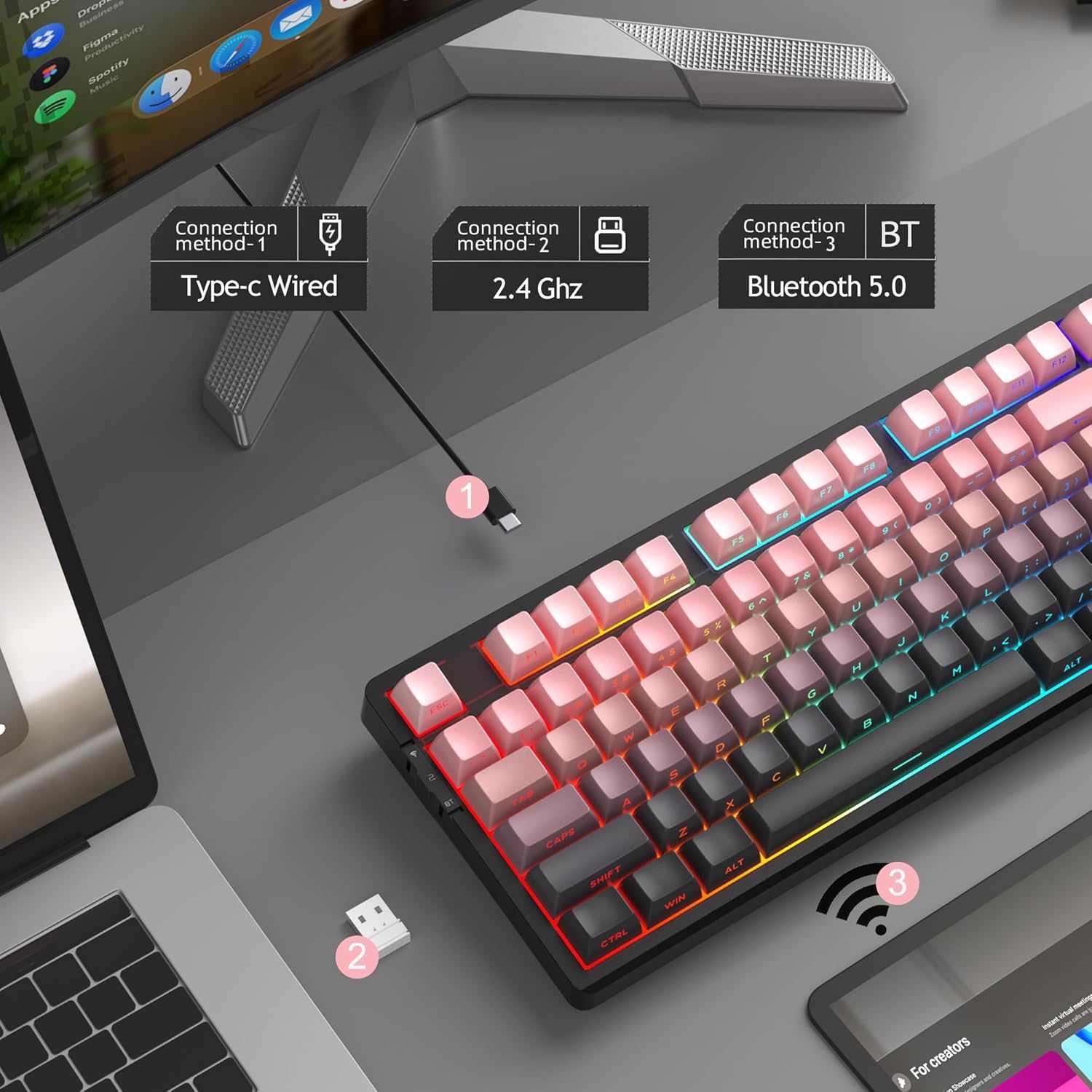
Figure 6: Visual representation of the three connection methods: Type-C Wired, 2.4 GHz Wireless, and Bluetooth 5.0.

Figure 7: Detailed instructions for switching between 2.4GHz, Bluetooth 5.0, and Type-C wired modes using the toggle switch and Fn key combinations.
3.2.1 Modo cableado USB-C
- Conecte el cable USB-C al teclado y al puerto USB de su computadora.
- Toggle the switch on the keyboard to the "2" position (wired mode).
- El teclado será reconocido automáticamente por su sistema.
3.2.2 Modo inalámbrico de 2.4 GHz
- Localice el receptor USB de 2.4 GHz (normalmente se guarda en un compartimento del teclado).
- Conecte el receptor USB a un puerto USB disponible en su computadora.
- Toggle the switch on the keyboard to the "wifi" icon position (2.4G wireless mode).
- Prensa Fn + 4 to activate 2.4GHz mode. The keyboard should connect automatically.
3.2.3 Modo Bluetooth 5.0
El teclado puede conectarse a hasta tres dispositivos Bluetooth.
- Toggle the switch on the keyboard to the "BT" position (Bluetooth mode).
- Mantenga pulsado Fn + 1, Fn + 2, o Fn + 3 for 3-5 seconds to enter pairing mode for the desired channel. The indicator light will flash rapidly.
- On your device (PC, laptop, tablet, smartphone), enable Bluetooth and search for "MageGee LIGHT87".
- Seleccione el teclado que desea emparejar. Una vez conectado, la luz indicadora dejará de parpadear.
- Para cambiar entre dispositivos Bluetooth emparejados, simplemente presione Fn + 1, Fn + 2, o Fn + 3.
4. Instrucciones de funcionamiento
4.1 Control de retroiluminación RGB
The MageGee LIGHT87 features 16.8 million cool RGB backlight options with various effects.
- Fn + Entrar:Alterna entre aproximadamente 20 modos/efectos de luz de fondo diferentes.
- Fn + ←: Adjust light direction (for certain effects).
- Fn + →: Adjust light color (for static modes or color cycling).
- Fn + ↑: Aumenta el brillo de la luz de fondo.
- Fn + ↓:Disminuye el brillo de la luz de fondo.
- Fn + =+: Increase backlight speed (for dynamic effects).
- Fn + -_: Decrease backlight speed (for dynamic effects).
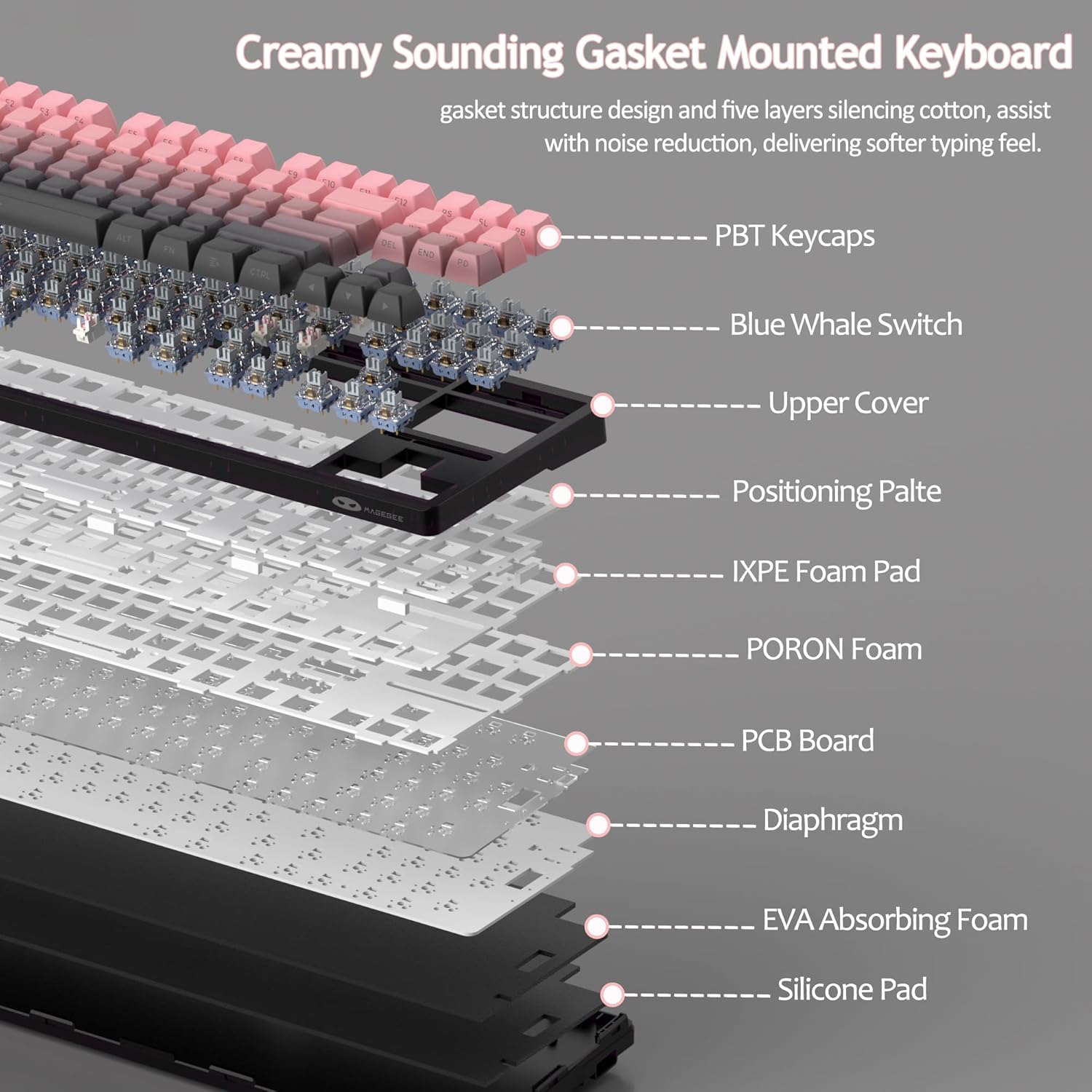
Figure 8: Visual guide to RGB backlight control key combinations.

Figure 9: Table summarizing RGB backlight functions and their corresponding Fn key combinations.
4.2 Conmutadores intercambiables en caliente
The LIGHT87 keyboard features hot-swappable sockets, allowing you to change switches without soldering. It supports both 3-pin and 5-pin mechanical switches. The keyboard comes pre-installed with quiet linear Blue Whale switches.

Figure 10: Diagram illustrating the hot-swappable switch mechanism, showing compatibility with 3-pin and 5-pin switches and the pre-lubed Blue Whale switch.

Figure 11: Specifications of the Blue Whale Switch, including linear type, conduction stroke, total travel, operating force, material, and lifespan.
To Replace Switches:
- Retire con cuidado la tecla utilizando el extractor de teclas proporcionado.
- Utilice el extractor de interruptores para sujetar con cuidado los clips superior e inferior del interruptor.
- Tire del interruptor hacia arriba para quitarlo de la PCB.
- Alinee los pines del nuevo interruptor con los orificios de la PCB.
- Press the new switch firmly into place until it clicks. Ensure it is seated properly and not bent.
- Reemplace la tecla.
4.3 Estructura y sonido de la junta Dampuno
The LIGHT87 utilizes a gasket-mounted design, which provides a softer, more flexible typing feel and contributes to a "creamy thock" sound profile. Additionally, it incorporates five layers of sound-absorbing foams to effectively reduce noise and improve typing comfort.

Figura 12: Explosión view of the keyboard's internal components, highlighting the gasket structure and various foam layers (IXPE Foam Pad, PORON Foam, EVA Absorbing Foam, Silicone Pad) for sound dampening
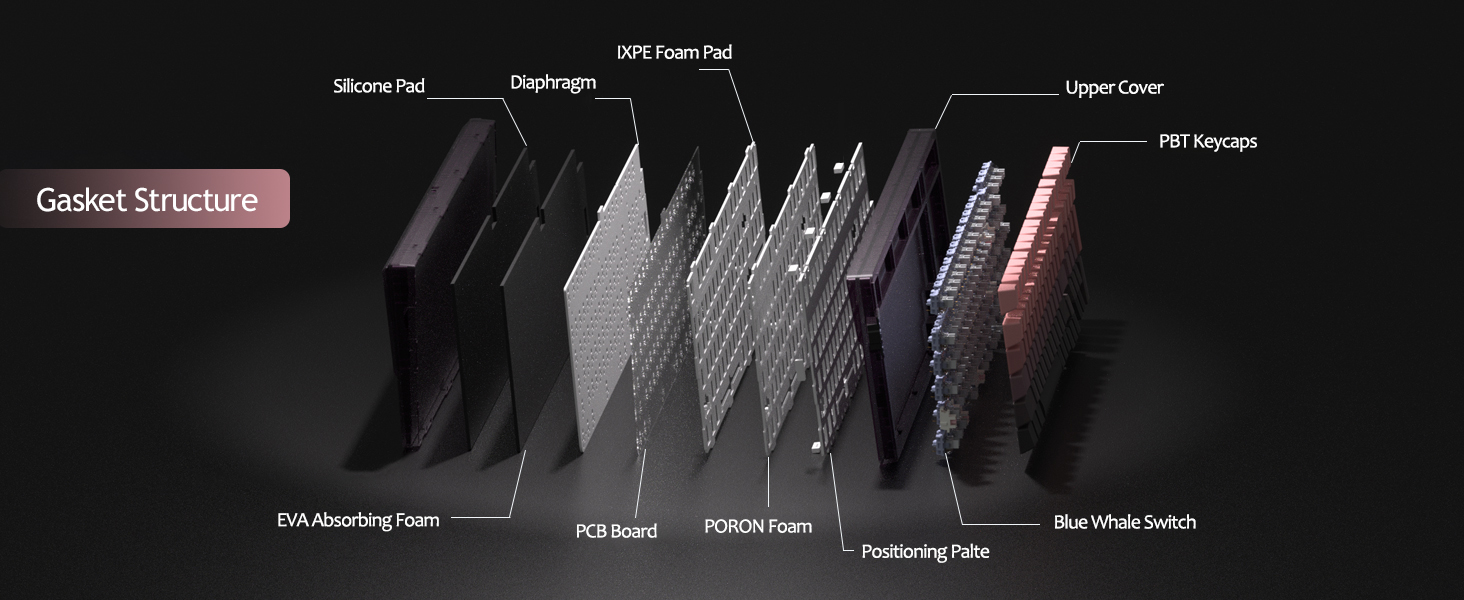
Figure 13: Detailed diagram of the gasket structure, showing how the plate is isolated from the case by gaskets, along with the various foam layers.
4.4 Teclas PBT
The keyboard is equipped with durable PBT keycaps, known for their resistance to shine and wear over time. The legends are side-printed for a clean top surface aesthetic.
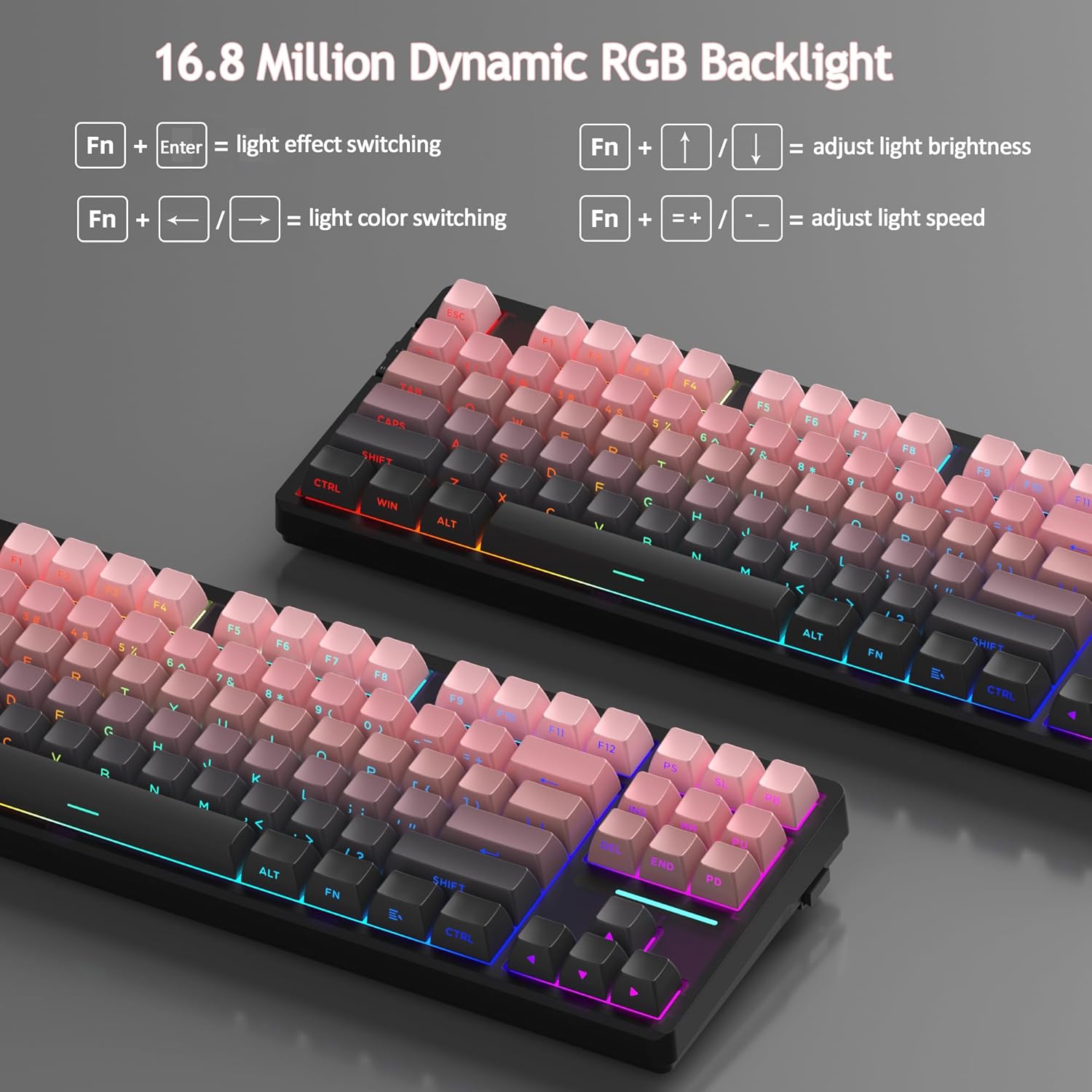
Figura 14: Primer plano view of the keyboard's side-printed PBT keycaps.
4.5 Layout and Compatibility
The LIGHT87 features a compact 80% (TKL) layout with 87 keys, saving desktop space while retaining essential function and arrow keys. It supports both Windows and Mac operating systems, and all 87 keys feature 100% anti-ghosting for accurate input during intense gaming or typing sessions.
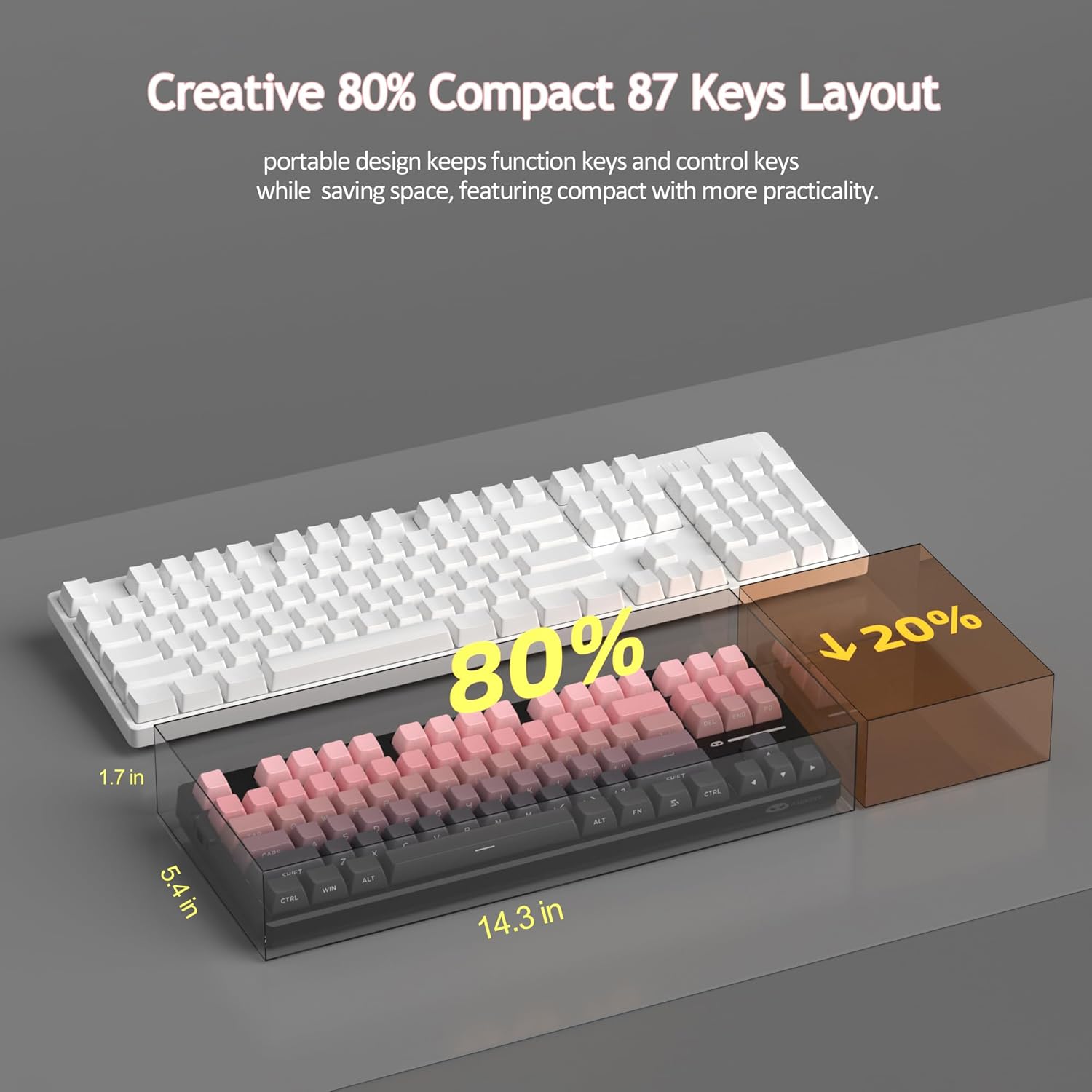
Figure 15: Comparison illustrating the compact 80% layout of the LIGHT87 keyboard compared to a full-size keyboard, highlighting space savings.

Figure 16: The MageGee LIGHT87 keyboard integrated into a desktop setup, demonstrating its use with a computer and monitor.
5. Mantenimiento
5.1 Limpieza del teclado
To maintain the performance and appearance of your keyboard, regular cleaning is recommended.
- Desconecte el teclado de su computadora antes de limpiarlo.
- Utilice un cepillo suave o aire comprimido para eliminar el polvo y los residuos entre las teclas.
- For stubborn dirt, you can carefully remove keycaps using the provided keycap puller and clean the surface underneath with a slightly damp, lint-free cloth. Ensure the cloth is not dripping wet.
- Wipe the keycaps and keyboard surface with a dry, soft cloth.
- No utilice productos químicos agresivos, limpiadores abrasivos ni sumerja el teclado en líquidos.

Figure 17: Image showing keycaps being removed from the keyboard, useful for cleaning or switch replacement.
5.2 Ajuste del ángulo del teclado
The keyboard features adjustable feet to customize your typing angle for ergonomic comfort.

Figure 18: Image demonstrating the adjustable feet on the underside of the keyboard for tilt customization.

Figura 19: Perfil lateralfile of the keyboard illustrating its ergonomic keycap profile Para escribir cómodamente.
6. Solución de problemas
| Problema | Posible causa | Solución |
|---|---|---|
| El teclado no responde en modo cableado. | Loose cable connection, incorrect mode selected, faulty USB port. | Ensure USB-C cable is securely connected. Check if the keyboard switch is set to "2" (wired mode). Try a different USB port on your computer. |
| 2.4GHz wireless not connecting. | USB receiver not plugged in, incorrect mode, low battery. | Ensure the 2.4GHz USB receiver is plugged in. Set the keyboard switch to "wifi" icon and press Fn + 4. Cargue el teclado. |
| Bluetooth pairing failed or connection unstable. | Incorrect pairing procedure, interference, device Bluetooth issues, low battery. | Ensure keyboard switch is set to "BT". Press and hold Fn + 1/2/3 to re-enter pairing mode. Forget the device on your computer/device and re-pair. Move closer to the device. Charge the keyboard. Restart your device's Bluetooth. |
| La luz de fondo no funciona o está atascada. | Backlight turned off, low battery, software glitch. | Prensa Fn + ↑ to increase brightness. Charge the keyboard. Try cycling through backlight modes with Fn + Entrar. |
| Algunas teclas no responden. | Interruptor flojo o defectuoso, residuos debajo de la tecla. | Remove the keycap and check for debris. If hot-swappable, try reseating the switch or replacing it with a known working switch. |
7. Especificaciones
| Característica | Detalle |
|---|---|
| Modelo | LIGHT87 |
| Marca | MageGee |
| Conectividad | Conexión inalámbrica de 2.4 GHz, Bluetooth 5.0, cable USB-C |
| Disposición | 87-key (80% TKL) |
| Interruptores | Hot-swappable (3-pin/5-pin compatible), Blue Whale Linear Switches |
| Teclas | Side-printed PBT |
| Iluminar desde el fondo | 16.8 Million RGB |
| Capacidad de la batería | 8000 mAh |
| Battery Life (RGB ON) | Aproximadamente 53 horas |
| Duración de la batería (RGB desactivado) | Aproximadamente 400 horas |
| Dispositivos compatibles | PC, portátil, tableta, teléfono inteligente, consola de juegos |
| Compatibilidad con sistemas operativos | Ventanas, MacOS |
| Anti-efecto fantasma | Las 87 teclas |
| Dimensiones (paquete) | 15.91 x 7.17 x 2.6 pulgadas |
| Peso del artículo | 2.72 libras |
8. Garantía y soporte
MageGee products are designed for reliability and performance. For warranty information and customer support, please refer to the official MageGee websitio o contacte directamente al vendedor a través de su plataforma de compra.
You can visit the official MageGee store on Amazon for more information and product updates: MageGee Amazon Store