
1. Introducción
Gracias por la compraasing the STN-28 Colorful Cat Ear Luminous Bluetooth Headset. This headset combines wireless audio technology with a unique luminous cat ear design, offering a comfortable and immersive listening experience. This manual provides essential information on how to set up, operate, and maintain your new headset.
2. Información de seguridad
- No exponga los auriculares a temperaturas extremas, humedad o sustancias corrosivas.
- Evite dejar caer o someter los auriculares a impactos fuertes.
- No desmonte ni intente reparar los auriculares usted mismo. Esto anulará la garantía.
- Limpie los auriculares con un paño suave y seco. No utilice productos químicos agresivos ni materiales abrasivos.
- Escuchar el volumen alto durante mucho tiempo puede causar daños auditivos. Ajuste el volumen a un nivel seguro.
3. Contenido del paquete
- STN-28 Wireless Headset Body
- Cable de carga USB
- Manual de usuario (este documento)
4. Producto terminadoview y controles
Familiarícese con los componentes y los botones de control del auricular.
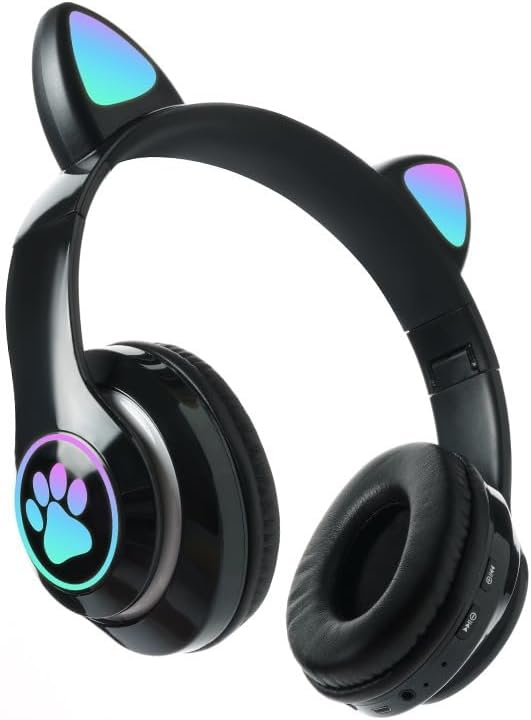
Imagen: Frente view of the STN-28 headset in black, showcasing the luminous cat ears and paw print design on the earcups.

Image: Two STN-28 headsets, one in purple and one in pink, displayed on a wooden stand, highlighting their colorful design and cat ear feature.
Control Buttons (Typical Layout - Refer to your specific model for exact placement):
- Botón de encendido: On/Off, Play/Pause, Answer/End Call.
- Subir volumen (+): Aumentar volumen, Siguiente pista (pulsación larga).
- Bajar volumen (-): Disminuir volumen, pista anterior (pulsación larga).
- Botón de modo (M): Switch between Bluetooth and TF Card mode.
- Puerto de carga USB: Para cargar los auriculares.
- Ranura para tarjetas TF: Insert external TF card for music playback.
- Luz indicadora LED: Shows power, connection, and charging status.
5. Configuración
5.1 Carga de los auriculares
- Conecte el cable de carga USB al puerto de carga USB del auricular.
- Conecte el otro extremo del cable a una fuente de alimentación USB (por ejemplo, puerto USB de computadora, adaptador de pared USB).
- The LED indicator light will show a red light during charging.
- A full charge takes approximately 2 hours. The red light will turn off when fully charged.
Note: Ensure the headset is fully charged before first use for optimal battery life.
5.2 Encendido / Apagado
- Para encender: Press and hold the Power button for a few seconds until the LED indicator lights flash red and blue.
- Para apagar: Press and hold the Power button for a few seconds until the LED indicator light turns off.
5.3 Emparejamiento Bluetooth
- Asegúrese de que los auriculares estén completamente cargados y apagados.
- Press and hold the Power button until the LED indicator lights flash red and blue alternately. This indicates the headset is in pairing mode.
- En su dispositivo (teléfono inteligente, tableta, computadora portátil), habilite Bluetooth y busque los dispositivos disponibles.
- Select "STN-28" or "LX-B39C" from the list of found devices.
- Once successfully paired, the LED indicator light on the headset will flash blue slowly.
Note: The headset supports Bluetooth 5.0+EDR for stable and efficient connection.
6. Instrucciones de funcionamiento
6.1 Reproducción de música (modo Bluetooth)
- Reproducir/Pausa: Presione brevemente el botón de encendido.
- Sube el volumen: Presione brevemente el botón "+".
- Bajar volumen: Presione brevemente el botón "-".
- Pista siguiente: Mantenga presionado el botón "+".
- Pista anterior: Mantenga presionado el botón "-".
6.2 Llamadas telefónicas
- Responder llamada: Presione brevemente el botón de encendido cuando suene una llamada entrante.
- Finalizar llamada: Presione brevemente el botón de encendido durante una llamada.
- Rechazar llamada: Mantenga presionado el botón de encendido cuando suene una llamada entrante.
Reproducción de tarjeta TF de 6.3
- Inserte una tarjeta TF (MicroSD) con audio MP3 files en la ranura para tarjeta TF.
- The headset will automatically switch to TF card playback mode, or you may need to short press the "M" (Mode) button to switch.
- Use the Play/Pause, Volume Up/Down, and Next/Previous Track buttons as described in section 6.1.
6.4 Luminous Cat Ear Feature
The cat ears and paw print on the earcups feature luminous accents. This feature is typically activated automatically when the headset is powered on. There is no specific control mentioned for this feature, implying it's always on when the headset is active.
7. Mantenimiento y cuidado
- Limpieza: Wipe the headset regularly with a soft, dry, lint-free cloth. Do not use liquid cleaners or sprays.
- Almacenamiento: Cuando no esté en uso, guarde los auriculares en un lugar fresco y seco, alejado de la luz solar directa y de temperaturas extremas.
- Cuidado de la batería: Para prolongar la vida útil de la batería, evite descargarla por completo con frecuencia. Cargue los auriculares regularmente, incluso si no los usa durante períodos prolongados.
- Resistencia al agua: The headset is listed as "Waterproof". While it offers protection against water, avoid submerging it in water or exposing it to heavy rain for prolonged periods to prevent damage.
8. Solución de problemas
| Problema | Posible causa | Solución |
|---|---|---|
| El auricular no se enciende. | Batería baja. | Cargue completamente los auriculares (aproximadamente 2 horas). |
| No se puede emparejar con el dispositivo. | Los auriculares no están en modo de emparejamiento; el Bluetooth del dispositivo está desactivado; el dispositivo está demasiado lejos. | Ensure headset is flashing red/blue; enable Bluetooth on device; keep devices within 10 meters. Try forgetting the device on your phone and re-pairing. |
| No hay sonido o volumen bajo. | El volumen es demasiado bajo en los auriculares o el dispositivo; los auriculares no están conectados. | Increase volume on both headset and connected device. Ensure headset is properly paired. |
| La tarjeta TF no se reproduce. | Tarjeta no insertada correctamente; no compatible file format; headset not in TF card mode. | Reinsert TF card; ensure files are MP3; press 'M' button to switch to TF card mode. |
9. Especificaciones
| Modelo | STN-28 / LX-B39C |
| Método de uso | Head-mounted folding |
| Versión de Bluetooth | Bluetooth 5.0+EDR |
| Supported Bluetooth Modes | A2DP 1.2, AVRCP 1.0, HSP, HSF 1.5 |
| Capacidad de la batería | 400mAh Polymer A-grade Lithium Battery |
| Speaker Size / Impedance | 40 mm / 32 Ω |
| Rango de transmisión | ≤10 meters (33 feet) |
| Tiempo de carga | Aproximadamente 2 horas |
| Tiempo de reproducción de música | ≤6 horas |
| Tiempo de conversación | ≤6 horas |
| Tiempo de espera | 200 horas |
| Rango de frecuencia | 20 Hz - 20,000 Hz |
| Nivel de resistencia al agua | Impermeable |
| Tipo de control | Media Control, Touch (via buttons) |
| Características especiales | Luminous Cat Ears, TF Card Playback |
10. Garantía y soporte
This product comes with a standard manufacturer's warranty. For specific warranty terms, conditions, and duration, please refer to the warranty card included with your purchase or contact the retailer where you purchased the product.
For technical support or inquiries, please contact your retailer or the manufacturer directly. Keep your purchase receipt as proof of purchase for warranty claims.


