
1. Producto terminadoview
The AZIJYV M2 Heads Up Display (HUD) is a digital speedometer designed to project essential driving information directly onto your vehicle's windshield. Utilizing a GPS+Beidou dual-mode chip, it provides real-time speed data with rapid refresh rates. Its design prioritizes clarity and ease of use, featuring a large font display and automatic brightness adjustment for optimal visibility in various lighting conditions. The M2 HUD is compatible with all vehicle types, including new energy, hybrid, fuel vehicles, motorcycles, buses, and trucks.

Image 1: The AZIJYV M2 Heads Up Display unit.
2. Características principales
- Chip de modo dual GPS+Beidou: Ensures fast and accurate speed data refresh.
- Pantalla de fuente grande: Provides clear and easily readable speed information.
- Detección automática de luz: Adapts display brightness to ambient light, ensuring clarity during the day and preventing glare at night.
- Integrated Shading Design: Reduces glare from the display during night driving.
- Diseño Premium: Features metal wire drawing technology, a circular groove design, and fine polishing.
- Interfaz tipo C: Conexión eléctrica moderna y cómoda.
- Operación automática: Turns on and off automatically with your vehicle's ignition.
- Compatibilidad universal: Suitable for all vehicle types.
- Mile Speed Unit: Displays speed exclusively in miles per hour (MPH).

Image 2: The M2 HUD projecting speed onto the windshield.
3. Configuración e instalación
The M2 HUD offers a non-destructive, plug-and-play installation process.
- Conexión de energía: Insert the provided USB cable into your vehicle's cigarette lighter interface (using the included adapter if necessary) or an on-board USB (5V) port.
- Enrutamiento de cables: Carefully route the USB cable into the A-pillar sealing strip to conceal it and prevent interference with driving.
- HUD Placement: Connect the other end of the USB cable to the M2 HUD. Place the HUD unit in a suitable position on your dashboard where the projected display is clearly visible on the windshield without obstructing your view del camino.
- Película reflectante (opcional): If the projection on your windshield is not clear or appears as a double image, apply the included reflective film to the desired area of the windshield. Clean the area thoroughly before application.

Image 3: Visual guide for M2 HUD installation steps.
Video 1: Demonstration of the AZIJYV M2 Heads Up Display installation and operation in a vehicle.
4. Instrucciones de funcionamiento
Once installed and powered, the M2 HUD will automatically turn on and off with your vehicle. It will begin searching for satellite signals to acquire speed data.
- Satellite Signal Acquisition: When the small icon on the product flashes continuously, it indicates that the device is collecting satellite signals. Speed will only be displayed once the device successfully locks onto satellites.
- Visualización de velocidad: Your current speed will be projected onto the windshield in large, clear digits.
- Brillo automático: The display brightness will automatically adjust based on ambient light conditions for optimal visibility.
- Unidad de velocidad: The M2 HUD displays speed exclusively in miles per hour (MPH). It does not support kilometer units.

Image 4: Comparison of M2 HUD display clarity during day and night with automatic light sensing.
5. Solución de problemas
- No Speed Display / Flashing Icon: If the small icon on the product is flashing continuously and no speed is displayed, the device is still searching for satellite signals. Speed will appear once a stable satellite connection is established.
- Slow Satellite Acquisition / Inaccurate Speed:
- Factores ambientales: Satellite signal acquisition and accuracy may be affected in areas such as garages, underpasses, dense urban environments with tall buildings, or areas with heavy tree cover.
- Multiple GPS Devices: Having another GPS device installed in your car close to the M2 HUD can interfere with its signal acquisition. Ensure adequate separation.
- Metal Film on Windshield: Certain metallic window films can block or weaken GPS signals, impacting the HUD's performance.
- Pantalla no clara / Imagen doble: Ensure the HUD is placed correctly. If issues persist, apply the included reflective film to the windshield where the display is projected.
- Incorrect Speed Unit: The M2 HUD is designed to display speed only in miles per hour (MPH). It does not have an option to switch to kilometers per hour (KM/H).
- Sin energía: Check the USB cable connection to both the HUD and the vehicle's power source (USB port or cigarette lighter adapter). Ensure the vehicle's ignition is on.
6. Mantenimiento
- Limpieza: Wipe the exterior of the HUD unit with a soft, dry cloth. Avoid using abrasive cleaners or solvents, as these may damage the surface.
- Almacenamiento: When not in use for extended periods, disconnect the HUD from power and store it in a cool, dry place away from direct sunlight and extreme temperatures.
- Cuidado de cables: Ensure the USB cable is not kinked, pinched, or subjected to excessive tension, which could damage the wiring.
7. Especificaciones
| Característica | Especificación |
|---|---|
| Número de modelo | M2 |
| Dimensiones del producto (L x An x Al) | 3.5 x 1.77 x 1.4 pulgadas (9.0 x 4.5 x 3.5 cm) |
| Peso del artículo | 1.06 onzas (30 gramos) |
| Fuente de alimentación | On-board USB (5V) or cigarette lighter to USB |
| Unidad de velocidad | Miles per hour (MPH) only |
| Compatibilidad | Universal for all vehicle models |
8. ¿Qué hay en la caja?
- M2 Host Unit
- Reflexivo Cine
- Cable USB de 2.5 m
- Almohadilla adhesiva 3M
- Manual de instrucciones
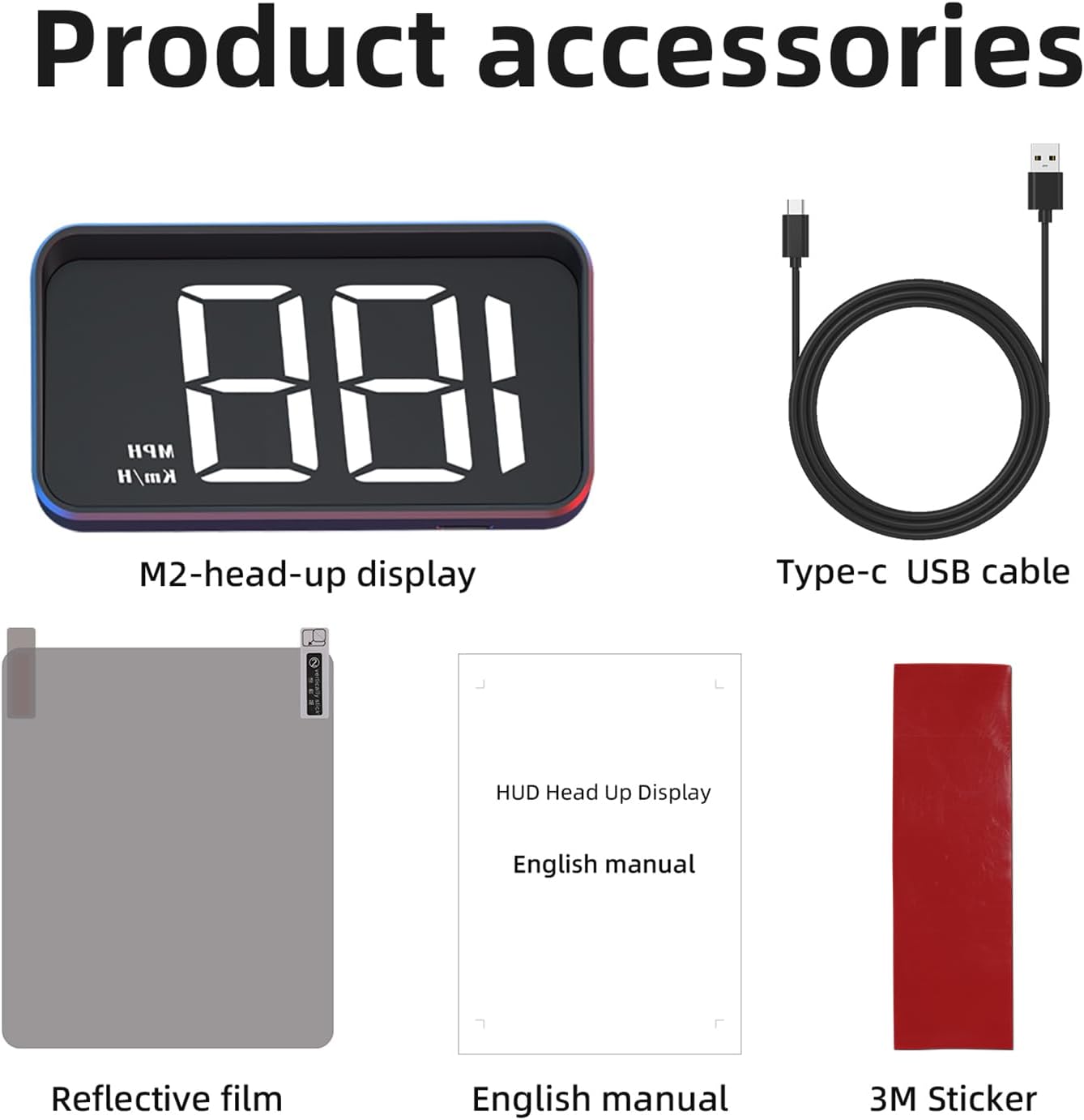
Image 5: All items included in the M2 HUD package.
9. Garantía y soporte
The AZIJYV M2 Digital Heads Up Display comes with a standard manufacturer's warranty. For specific warranty details, please refer to the warranty card included in your product packaging or contact AZIJYV customer support.
For technical assistance, troubleshooting, or any product-related inquiries, please contact our customer support team through the retailer's platform or the contact information provided on the product packaging.