
Introducción
Thank you for choosing the Fixwal L-Shaped Gaming Desk. This manual provides detailed instructions for assembly, operation, maintenance, and troubleshooting to ensure optimal use of your new desk. Please read this manual thoroughly before assembly and retain it for future reference.
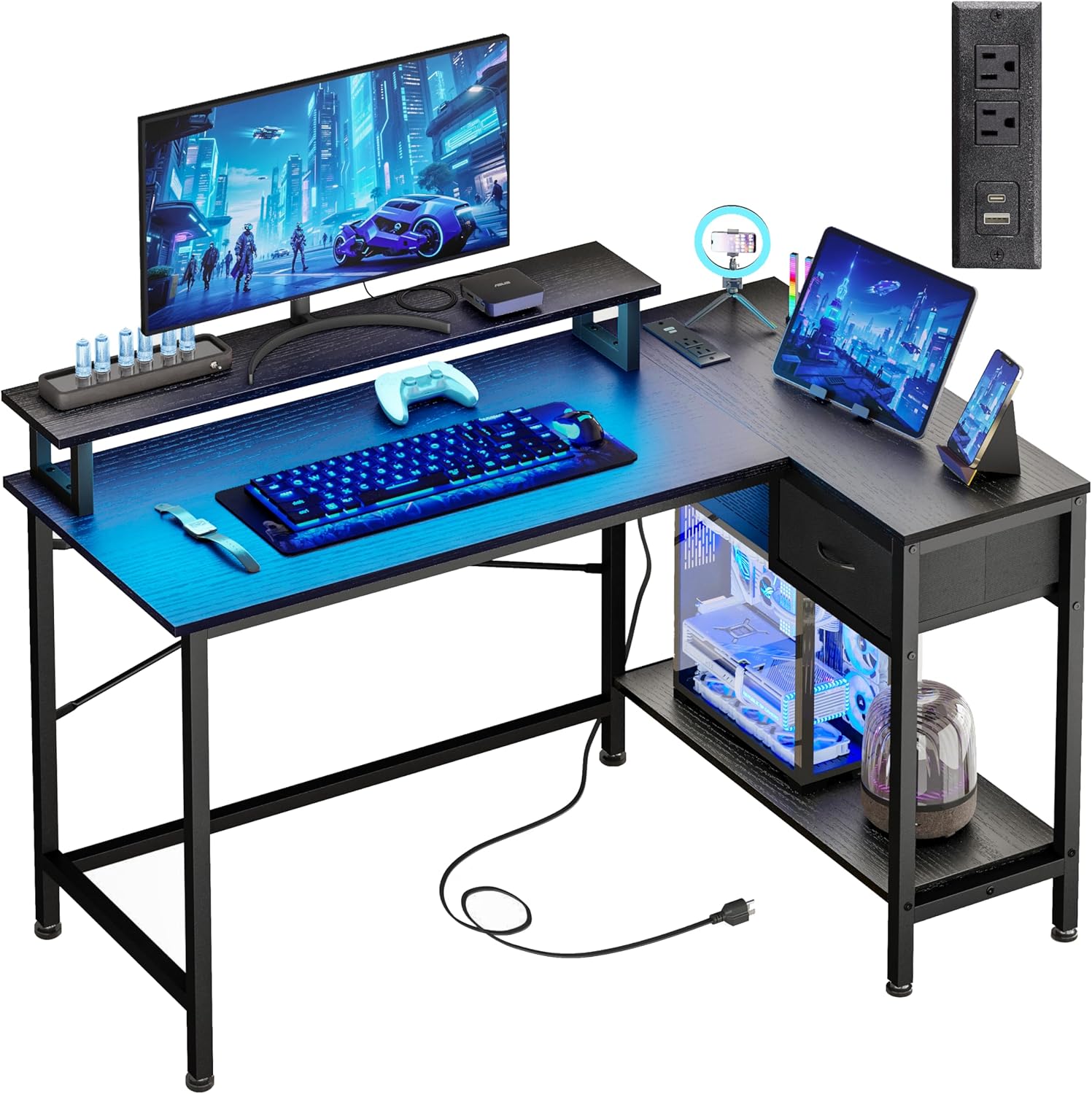
Image: The Fixwal L-Shaped Gaming Desk, showcasing its design and functionality in a typical user environment.
Información de seguridad
Para evitar lesiones o daños al producto, tenga en cuenta las siguientes pautas de seguridad:
- Do not exceed the maximum weight capacity of 150 lbs (68 kg) for the desk surface.
- Asegúrese de que todos los tornillos y sujetadores estén bien apretados durante el montaje y verifique periódicamente que no estén flojos.
- Keep liquids away from the power outlets and LED light strip to prevent electrical hazards.
- Monte el escritorio sobre una superficie suave y limpia para evitar rayar los componentes.
- This L-shaped desk is not reversible; the drawer can only be installed on the right side.
Warning: This desk should not be loaded beyond 150 lbs to ensure safety and stability.
Contenido del paquete
Antes de comenzar el montaje, verifique que todos los componentes estén presentes y sin daños. Si alguna pieza falta o está dañada, póngase en contacto con atención al cliente.
- Desk Panels (Main desktop, L-extension, monitor stand, drawer panels, bottom shelf)
- Componentes del marco de metal (patas, barras de soporte)
- Hardware Kit (Screws, bolts, Allen wrench)
- LED Strip Light Kit (LED strip, controller, remote)
- Power Outlet Unit (2 AC outlets, 1 USB-A, 1 USB-C port, power cord)
- Almohadillas para pies ajustables
- Manual de instrucciones de montaje
Instrucciones de instalación y montaje
Assembly typically takes 30-60 minutes. Follow the included step-by-step instructions carefully. It is recommended to have two people for assembly.
Consejos para el montaje de llaves:
- Identify all parts: Lay out all components and hardware, matching them with the parts list in the separate assembly guide.
- Do not overtighten screws initially: Hand-tighten screws during initial assembly, then fully tighten once the entire structure is aligned.
- Install the monitor stand: The monitor stand is designed to accommodate two 21-24 inch monitors and supports up to 50 lbs.
- Ensure stability: The desk features cross-bracing for enhanced stability. Ensure these are correctly installed.
- Adjust foot pads: Use the adjustable anti-slip foot pads to level the desk on uneven surfaces and protect your floor.

Image: A detailed diagram illustrating the dimensions and weight capacities for different sections of the desk, including the main desktop (150 lbs), monitor stand (50 lbs), and drawer (20 lbs).

Imagen: Un primer plano view of the X-shaped cross-bracing, highlighting the structural support for enhanced desk stability.
Instrucciones de funcionamiento
Tiras de luces LED:
The integrated LED strip lights offer customizable ambiance for your workspace or gaming setup.
- Métodos de control: The LED lights can be controlled via a physical switch control or a Bluetooth control application on your smartphone.
- Opciones de color: Choose from 12 static RGB colors.
- Brillo: Ajuste entre 6 niveles de brillo.
- Modos dinámicos: Explore various dynamic lighting modes.
- Función de memoria: The lights retain your last setting when powered off and on.

Image: A smartphone displaying the Bluetooth application interface for controlling the desk's LED lights, showing color and mode selection.

Image: An infographic highlighting the RGB LED light strip's capabilities, such as 20 dynamic modes, a built-in microphone for sound reactivity, music synchronization, and a timing function.
Enchufes de electricidad:
The integrated power strip provides convenient access to charging ports.
- Tomas de corriente CA: Two standard 120V/12A AC outlets for powering devices like monitors or laptops.
- Puertos USB: One USB-A charging port and one USB-C charging port (5V/2A) for mobile devices, power banks, and gaming accessories.
- Cable de alimentación: The unit includes a 4.9-foot power cord for connection to a wall outlet.

Imagen: Un primer plano view of the desk's integrated power strip, showing two AC outlets, a USB-A port, and a USB-C port, with a smartphone charging.

Image: An infographic illustrating the technical specifications of the built-in power outlets, including voltage, amperage, and USB port output.
Mantenimiento
Regular maintenance will help prolong the life and appearance of your Fixwal desk.
- Limpieza: Limpie las superficies del escritorio con un paño suave y húmedo.amp paño. Evite productos químicos agresivos o limpiadores abrasivos que puedan dañar el acabado.
- Limpiar el polvo: Regularly dust the LED strip and power outlets to ensure proper function and prevent dust buildup.
- Comprobación del hardware: Revise periódicamente todos los tornillos y pernos para asegurarse de que estén bien apretados. Vuelva a apretarlos si es necesario.
- Sistema de organización de cables: Organize cables to prevent tangles and reduce strain on the power outlets.
Solución de problemas
Si tiene problemas con su escritorio, consulte los siguientes problemas y soluciones comunes:
| Problema | Posible causa | Solución |
|---|---|---|
| El escritorio es inestable | Loose screws; uneven floor; incorrect assembly of cross-bracing. | Ensure all screws are fully tightened. Adjust the foot pads to level the desk. Verify cross-bracing is installed correctly. |
| Las luces LED no funcionan | Power not connected; faulty connection; remote battery dead. | Check if the LED strip is properly plugged into its power source. Ensure connections are secure. Replace remote battery if applicable. |
| Las tomas de corriente no suministran energía | Desk power cord unplugged; circuit breaker tripped; device not properly plugged in. | Ensure the desk's main power cord is securely plugged into a working wall outlet. Check your home's circuit breaker. Verify devices are fully inserted into the outlets. |
| Las piezas no se alinean durante el montaje | Orientación incorrecta de las piezas; defecto de fabricación. | Double-check the assembly instructions and part numbers. If parts are still misaligned, contact customer support for assistance. |
Presupuesto
| Característica | Detalle |
|---|---|
| Marca | Fixwal |
| Número de modelo | L Shaped Desk 0002 |
| Dimensiones del producto (Pr. x An. x Al.) | 19.7" de profundidad x 43" de ancho x 30.1" de alto |
| Color | Negro |
| Tipo de material superior | Metal, MDF Board |
| Material base | Acero aleado |
| Recomendación de peso máximo | 150 libras |
| Numero de cajones | 1 |
| Número de estantes | 1 (estante inferior) |
| Características especiales | LED Strip Lights, Built-in Power Outlets (2 AC, 1 USB-A, 1 USB-C), Monitor Stand, Utility Drawer, CPU Tower Space |
| Especificaciones de la toma de corriente | AC: 120V/12A; USB: 5V/2A |
| Longitud del cable de alimentación | 4.9 pies |
| Requiere ensamblaje | Sí |
Información de garantía
The Fixwal L-Shaped Gaming Desk comes with a limited warranty. Please refer to the warranty card included in your package for specific terms, conditions, and duration of coverage. This warranty typically covers manufacturing defects under normal use.
Atención al cliente
If you have any questions, require assistance with assembly, or need to report missing/damaged parts, please contact Fixwal customer support. Refer to the contact information provided in your product packaging or visit the official Fixwal store on Amazon: