
Introducción
This instruction manual provides essential information for the safe and effective use of your Sony PXW-Z200 4K XDCAM Camcorder. The PXW-Z200 is designed for professional video production, offering UHD 4K60 HDR footage with advanced features like AI-powered autofocus, 20x optical zoom, and versatile recording formats. Please read this manual thoroughly before operating the camcorder and retain it for future reference.
Configuración
1. Desembalaje y comprobación del contenido
Desempaque con cuidado todos los artículos de la caja. Asegúrese de que estén presentes los siguientes componentes:
- Videocámara Sony PXW-Z200 4K con sensor CMOS de 1" y XDCAM
- Adaptador de CA
- Cable de alimentación
- Cargador de batería
- BP-U35 Battery Pack (2 included in bundle)
- Parasol para LCD
- Parasol
- Ocular
- Soporte para micrófono
- Kit de zapata fría
- Tarjeta de memoria 64GB
- Estuche grande
- Lente telefoto
- Lector de tarjetas de memoria
- Kit de filtro
- Wide Angle Lens Attachment
- Cartera para tarjetas de memoria
- Sujeta-tapas de lentes
- Kit de limpieza
- Cable HDMI
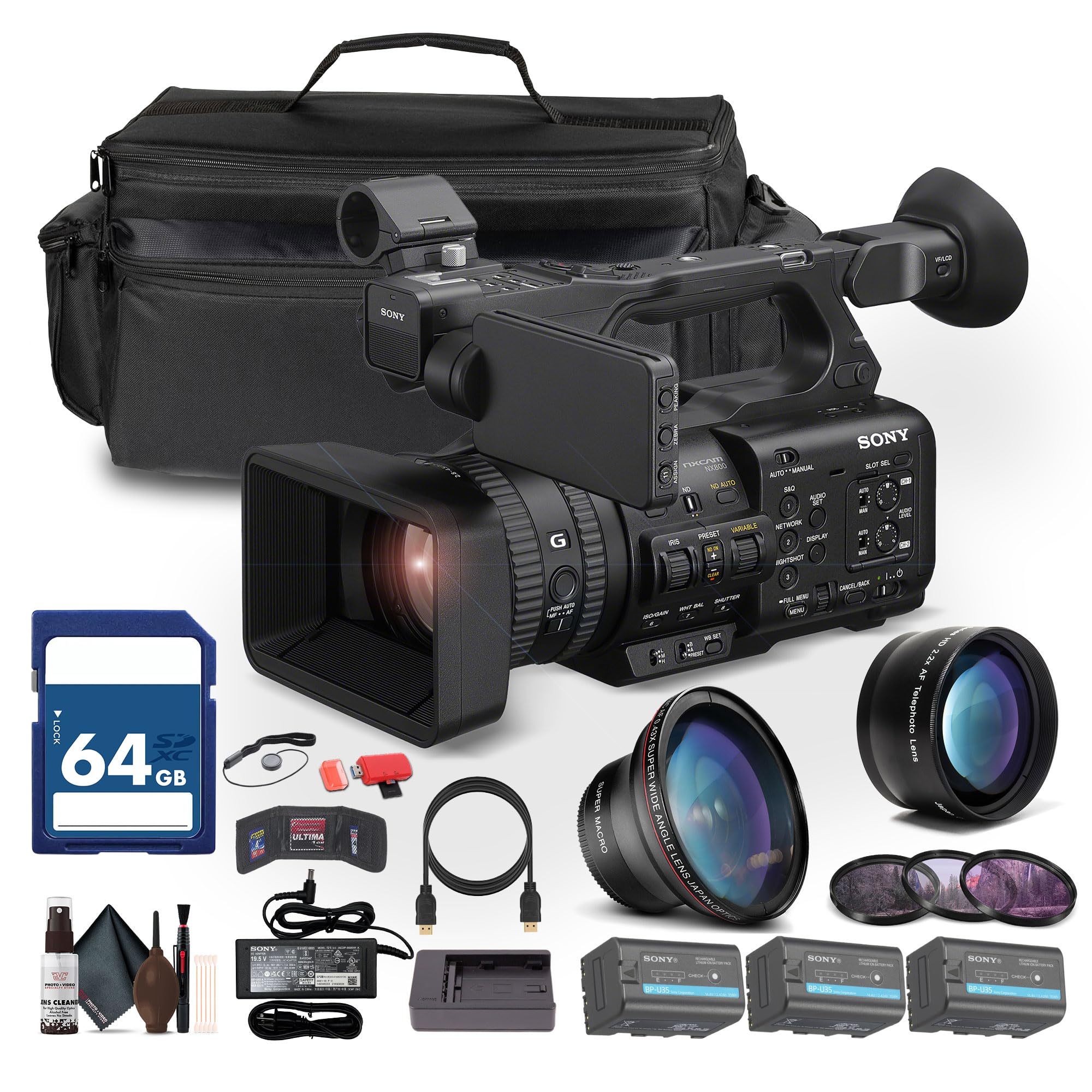
Figure 1: Sony PXW-Z200 4K XDCAM Camcorder (main unit).
2. Colocación del parasol y el ocular
- Attach the provided lens hood to the front of the camcorder's lens to reduce glare and protect the lens.
- Attach the eyecup to the viewBuscador para mayor comodidad viewEn.
3. Instalación y carga de la batería
- Insert the BP-U35 battery pack into the battery slot on the rear of the camcorder until it clicks into place.
- Connect the AC adapter to the camcorder's DC IN jack and plug it into a power outlet. The battery will begin charging.
- Alternatively, use the external battery charger to charge the BP-U35 battery packs.
- Asegúrese de que la batería esté completamente cargada antes del uso inicial.
4. Insertar una tarjeta de memoria
The PXW-Z200 supports dual CFexpress Type-A/SD card slots.
- Abra la tapa de la ranura de la tarjeta de memoria.
- Insert a compatible CFexpress Type-A or SD card into the designated slot with the label facing the correct direction until it clicks.
- Cierre la tapa de la ranura para tarjetas de memoria.
- Format the memory card in the camcorder's menu before first use to ensure optimal performance.
Operación de la videocámara
1. Encendido / apagado
- Para encender, deslice el interruptor POWER a la posición ON.
- Para apagar, deslice el interruptor POWER a la posición OFF (APAGADO).
2. Grabación básica
- Inicio/detención de grabación: Press the REC START/STOP button to begin or end recording.
- Formatos de grabación: The camcorder supports XAVC S-I, HS-L, S-L, and HD/QFHD recording formats. Select your desired format via the menu.
- Tasas de cuadro: Capture high frame rate footage at 4K120 and 1080p240 for slow-motion effects.
- Alto rango dinámico (HDR): The camcorder supports UHD 4K60 HDR with HLG (Hybrid Log-Gamma) for high dynamic range content.
3. Focus and Zoom Control

Figure 2: AUTO/MANUAL switch for focus and exposure control.
- Autofoco: The camcorder features AI-driven autofocus and auto-framing for precise tracking of subjects. Engage AUTO mode using the switch (refer to Figure 2).
- Enfoque manual: For precise control, switch to MANUAL mode and adjust the focus ring on the lens.
- Zoom óptico: Utilize the 20x optical zoom for clear magnification.
- Zoom de imagen clara: In 4K, the camcorder offers a 30x Clear Image Zoom, extending your reach without significant loss of quality.
4. Configuración de audio
The PXW-Z200 includes 4-channel audio input.
- Connect external microphones to the XLR inputs for professional audio capture.
- Adjust audio levels using the dedicated audio controls on the camcorder body or via the menu.
- Monitoree el audio a través de auriculares conectados al conector de auriculares.
5. Networking and Streaming
The camcorder supports integrated dual-band 2.4/5 GHz Wi-Fi and Ethernet for live streaming and file transferir.
- Connect to a Wi-Fi network or an Ethernet cable.
- Utilize RTMP/RTMPS, SRT, and FTP protocols for direct live streaming and file transferencias.
- Configure network settings and streaming parameters through the camcorder's menu.
6. Color Profiles
The PXW-Z200 supports various color profiles for creative flexibility and matching with other Sony Cinema Line cameras.
- Select from S-Cinetone, ITU709, 709tone, and HLG profiles in the menu to achieve your desired look.
7. Using the Sony Monitor & Control App
Download and install the Sony Monitor & Control app on a compatible smartphone or tablet to remotely control and monitor the camcorder.
- Connect your device to the camcorder via Wi-Fi.
- Use the app for remote control of recording, zoom, focus, and other settings, as well as for monitoring live footage.

Figure 3: Sony PXW-Z200 camcorder in a typical usage scenario.
Mantenimiento
1. Limpieza de la videocámara
- Use the provided cleaning kit to gently clean the lens and camcorder body.
- For the lens, use a soft, lint-free cloth and lens cleaning solution. Avoid harsh chemicals.
- For the body, wipe with a dry, soft cloth.
- No utilice disolventes ni limpiadores abrasivos.
2. Cuidado de la batería
- Guarde las baterías en un lugar fresco y seco cuando no las utilice.
- Evite descargar completamente las baterías con frecuencia para prolongar su vida útil.
- Charge batteries using only the specified Sony charger or the camcorder's AC adapter.
3. Almacenamiento
- When storing the camcorder for extended periods, remove the battery.
- Store the camcorder in a dry, dust-free environment, preferably in the large case provided.
- Evite temperaturas extremas y humedad alta.
Solución de problemas
If you encounter issues with your Sony PXW-Z200, refer to the following common problems and solutions.
| Problema | Posible causa | Solución |
|---|---|---|
| La videocámara no se enciende. | Battery is not charged or not inserted correctly. AC adapter is not connected. | Ensure battery is fully charged and properly inserted. Verify AC adapter connection. |
| Cannot record footage. | Memory card is full, not inserted, or not formatted. Recording mode is incorrect. | Check memory card status, insert/format if necessary. Verify recording settings. |
| Autofocus is not working correctly. | Camcorder is in Manual Focus mode. Subject is too close or lacks contrast. | Switch to AUTO focus mode. Ensure adequate lighting and distance to subject. |
| No se grabó audio. | Microphone is disconnected or audio levels are too low. | Check microphone connections. Adjust audio input levels. |
| Cannot connect to Wi-Fi/Stream. | Incorrect network settings. Out of range. | Verify Wi-Fi password and network settings. Move closer to the access point. |
Para una solución de problemas más detallada, consulte el soporte oficial de Sony. websitio o póngase en contacto con el servicio de atención al cliente.
Presupuesto
Key technical specifications for the Sony PXW-Z200 4K XDCAM Camcorder:
| Característica | Detalle |
|---|---|
| Marca | Sony |
| Nombre del modelo | PXW-Z200 |
| Tipo de sensor | 1" Exmor RS CMOS |
| Resolución de captura de video | UHD 4K (3840 Pixels), 720p, 480p |
| Zoom óptico | 20x |
| Clear Image Zoom (4K) | 30x |
| Apertura máxima | f/1.8 |
| Distancia focal máxima | 154.21 milímetros |
| Formato de captura de video | XAVC S-I, HS-L, S-L, HD/QFHD |
| Formato de audio compatible | Dolby Digital/AC-3 |
| Tamaño de pantalla | 1 inch (LCD Hood included) |
| Tecnología de conectividad | HDMI, 12G-SDI, Wi-Fi (2.4/5 GHz), Ethernet |
| Características especiales | AI-Driven Autofocus, Auto-Framing, 4K HDR Capture (HLG), High Frame Rates (4K120, 1080p240), Direct Live Streaming (RTMP/RTMPS, SRT, FTP), S-Cinetone |
| Medios de almacenamiento | Dual CFexpress Type-A/SD card slots |
| Peso del artículo | 4.3 libras |
| Nivel de resistencia al agua | No resistente al agua |
| Estabilización de imagen | No |
Garantía y soporte
The Sony PXW-Z200 Camcorder is manufactured by Sony. For detailed warranty information, including terms, conditions, and registration, please refer to the warranty card included with your product or visit the official Sony support websitio.
For technical support, service, or to download the latest firmware and software, please visit: Soporte de Sony Websitio.


