
1. Producto terminadoview
The VCHOO SL02 Keyless Entry Door Lock is an advanced smart lock system designed to enhance the security and convenience of your home, hotel, or rental property. It offers multiple unlocking methods, including app control, user codes, one-time codes, and physical keys. This manual provides detailed instructions for installation, operation, maintenance, and troubleshooting.

Image: VCHOO SL02 Keyless Entry Door Lock with its mobile application interface.

Imagen: Más alláview of the VCHOO SL02 smart lock's key features, including various unlocking methods and security functions.
2. Guía de instalación
2.1. Contenido del paquete
Antes de comenzar la instalación, asegúrese de que todos los componentes estén presentes:
- Deadbolt Front/Rear Lock x 1
- Door Handle Front/Rear Lock x 1
- Clave x 2
- Lock Latch x2
- Paquete de accesorios de tornillo x 2
- Hole Opening Diagram x 1
- Installation Tutorial Card x 2
- Instrucciones x1
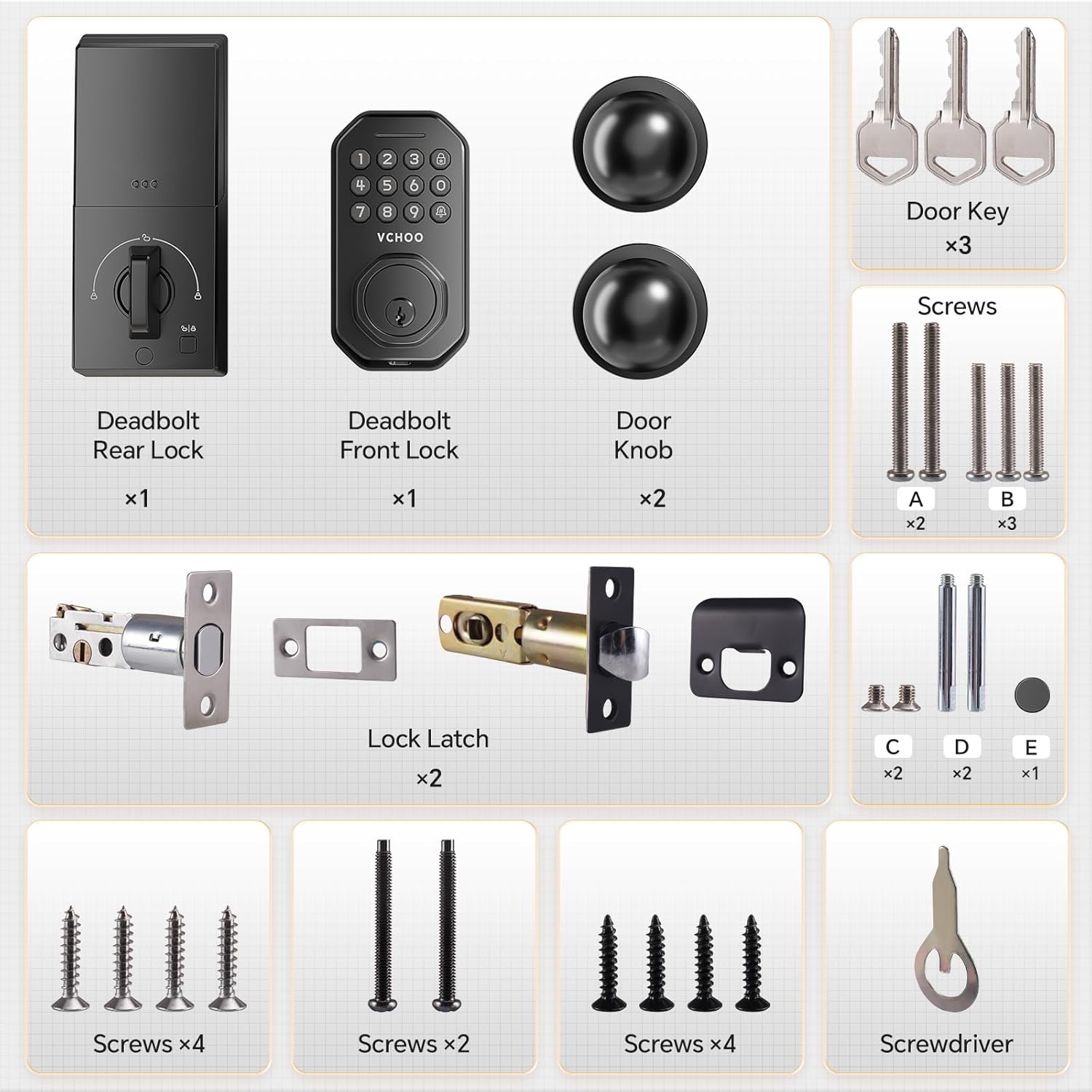
Image: All components included in the VCHOO SL02 Keyless Entry Door Lock package.
2.2. Compatibilidad de puertas
The VCHOO SL02 lock is compatible with US left and right-hand standard doors. Verify your door's dimensions and latch hole type before installation.
- Door thickness range: 1.31" - 2.16" (35-55mm)
- Backset: 2-3/8in or 2-3/4in (60 or 70mm)
- Suitable for chiseled and non-chiseled latch holes.
- Compatible with single cylinder doors. Not compatible with Mortise, Integrated, or Rim Cylinder lock types.

Image: Detailed measurements and compatibility checks for door size and latch hole type.

Image: Visual guide for checking door compatibility, including latch hole and lock types.
2.3. Pasos de instalación
Installation typically takes 10-15 minutes with a screwdriver. Follow the detailed instructions provided in the included 'Installation Tutorial Card' and 'Hole Opening Diagram'.

Image: Illustration of the easy installation process for the VCHOO SL02 lock.
3. Instrucciones de funcionamiento
3.1. Métodos de desbloqueo
The VCHOO SL02 offers multiple convenient ways to unlock your door:
- Control de la aplicación: Manage and unlock the door remotely via the Smart Life app.
- Códigos de usuario: Programe hasta 100 códigos de usuario únicos para acceso regular.
- Códigos de un solo uso: Generate temporary codes for visitors, maintenance workers, or deliveries.
- Claves físicas: Use the included physical keys for traditional unlocking or as a backup.

Image: Visual representation of multiple unlocking methods and their suitability for different users.

Image: Practical tips for assigning and using different unlocking methods based on user needs.
3.2. Control inteligente de aplicaciones
The Smart Life app allows comprehensive management of your lock:
- Set and manage secure passwords.
- Manage access rights for different users.
- View comprehensive access logs.
- Generate one-time passwords.
- Monitor lock status (locked/unlocked) in real-time.
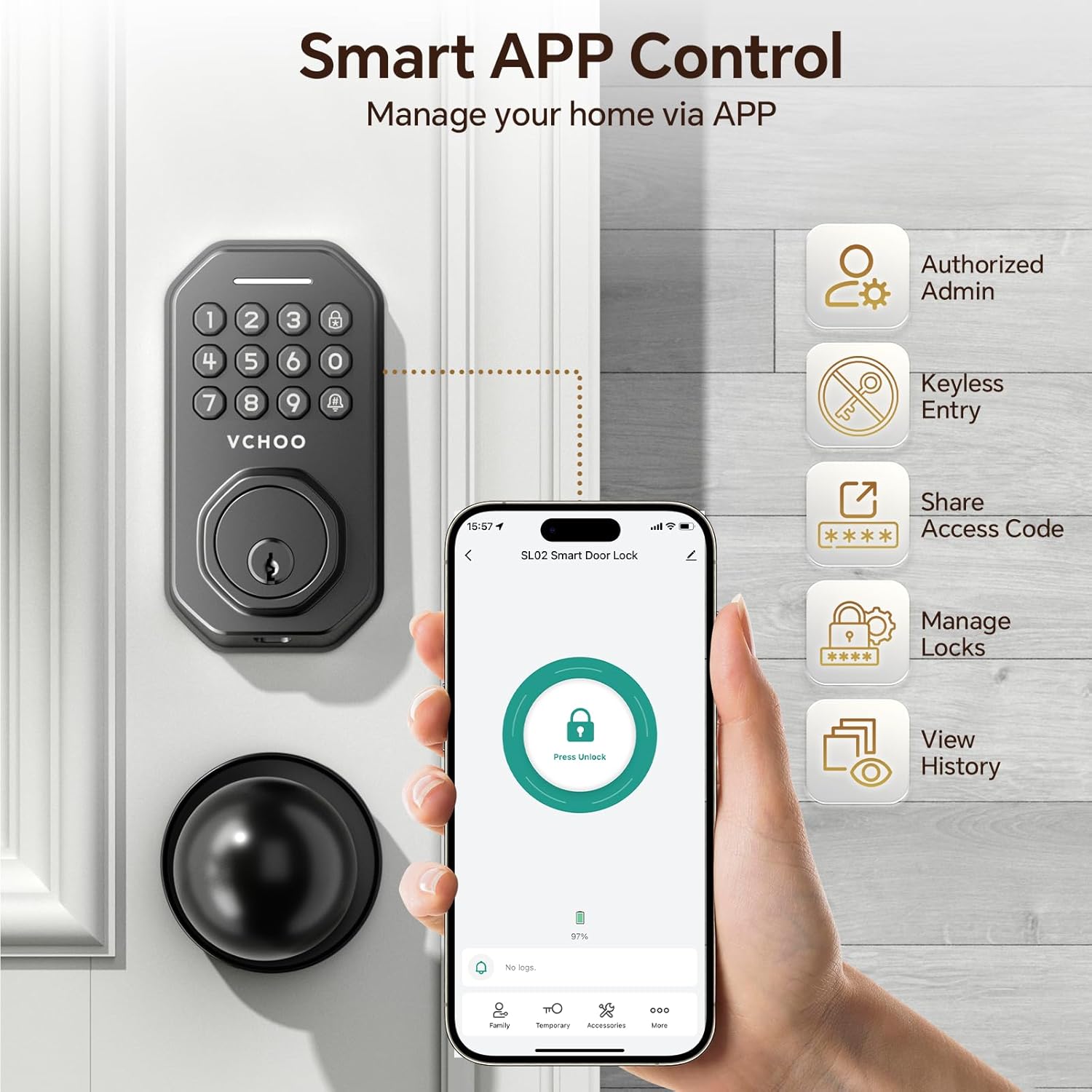
Image: The Smart Life app interface demonstrating various control and management features for the VCHOO SL02 lock.

Image: Real-time monitoring and control of the smart lock via the mobile application.

Image: Illustration of how to enable remote functions via a gateway (sold separately).
3.3. Bloqueo automático y bloqueo de un toque
The lock features an auto-lock function, which can be set to automatically lock the door after 10-30 seconds. Additionally, a one-touch lock function allows instant locking with a single press.

Image: The auto-lock feature of the VCHOO SL02 lock, designed for effortless security.

Image: Explanation of the auto-lock and one-touch lock features for simplified security.
3.4. Contraseña anti-mirones
To enhance security, the anti-peeping password feature allows you to enter random digits before or after your actual code. This prevents others from guessing your password by observing your input.

Image: How the anti-peeping keypad works to protect your password from onlookers.
3.5. Auto Lock Setting Video
Watch this official video for a step-by-step guide on setting up the auto-lock feature.
Video: VCHOO SL02 Keyless Entry Door Lock Auto Lock Setting. This video demonstrates how to configure the automatic locking feature on your smart lock.
4. Mantenimiento
4.1. Battery Replacement and Alerts
The lock operates on 4 AA batteries (not included). The lock will indicate a low battery status with a green light. Replace batteries promptly when this alert appears. In emergencies, a TYPE-C charging port is available for temporary power to unlock the door.

Image: Details on battery replacement, low battery alerts, and the emergency Type-C charging port.
4.2. Durabilidad y resistencia a la intemperie
The VCHOO SL02 is constructed from sturdy zinc alloy and is designed for durability. It is IP54 weatherproof, ensuring reliable operation in various weather conditions, from -4°F to +140°F (-20°C to 60°C).

Image: Internal structure and durability test results for the VCHOO SL02 lock, highlighting its robust construction.

Image: The IP54 weatherproof design of the VCHOO SL02 lock, showing its resistance to water.

Image: The VCHOO SL02 lock's ability to withstand various weather conditions.
5. Solución de problemas
5.1. Problemas comunes y soluciones
| Asunto | Posible causa | Solución |
|---|---|---|
| Lock not responding to keypad input. | Baterías bajas. | Replace 4 AA batteries. Use Type-C for emergency power if needed. |
| El bloqueo automático no se activa. | Auto-lock feature is disabled or setting is incorrect. | Check auto-lock settings in the Smart Life app or re-enable via keypad (refer to section 3.5). |
| No se puede conectar a la aplicación. | Bluetooth/Wi-Fi issue, app not updated, or gateway not connected. | Ensure Bluetooth is on, update app, check gateway connection (if applicable), or restart lock. |
| El teclado no se ilumina. | Completely drained batteries. | Use the emergency Type-C charging port to provide temporary power and then replace batteries. |
6. Especificaciones
| Característica | Detalle |
|---|---|
| Marca | VCHOO |
| Nombre del modelo | SL02 |
| Tipo de bloqueo | Cerradura de combinación, cerrojo, teclado |
| Características especiales | Anti-Peeping Password, Auto-Lock, One-Touch Lock |
| Material | Zinc |
| Color | Negro mate |
| Dimensiones del artículo (largo x ancho x alto) | 2.8 x 2.3 x 5.8 pulgadas |
| Peso del artículo | 3.36 libras |
| Fuente de poder | 4 pilas AA (no incluidas) |
| Energía de emergencia | Puerto de carga de tipo C |
| Protocolo de conectividad | APP Control (Bluetooth, Gateway for Wi-Fi) |
| Rango de espesor de puerta | 1.31" - 2.16" |
| Contracorriente | 2-3/8in or 2-3/4in |
| Temperatura de funcionamiento | -4 ° F a + 140 ° F (-20 ° C a 60 ° C) |
| Clasificación de impermeabilidad | IP54 |
| Código Postal | 768556861741 |
7. Garantía y soporte
For warranty information and customer support, please refer to the contact details provided with your product packaging or visit the official VCHOO websitio. Guarde su recibo de compra para reclamos de garantía.