
1. Introducción
The Inseego MiFi X Pro M3000 is a powerful and secure mobile hotspot designed to provide reliable 5G and 4G LTE connectivity. Equipped with Wi-Fi 6 technology, it supports up to 32 Wi-Fi enabled devices, offering a virtually lag-free connected experience. This manual provides essential information for setting up, operating, and maintaining your device.
¿Qué hay en la caja?
- Inseego MiFi X Pro M3000 Hotspot Device
- Cable USB tipo C
- Power Adapter (if included with your specific package)
- Guía de inicio rápido (este documento)
2. Configuración
2.1 Inserción de la tarjeta SIM y la batería
- Asegúrese de que el dispositivo esté apagado.
- Carefully remove the back cover of the MiFi X Pro.
- Insert your activated Nano SIM card into the designated SIM card slot. Ensure correct orientation as indicated on the device.
- Inserte la batería en su compartimento.
- Vuelva a colocar la cubierta posterior, asegurándose de que encaje firmemente en su lugar.
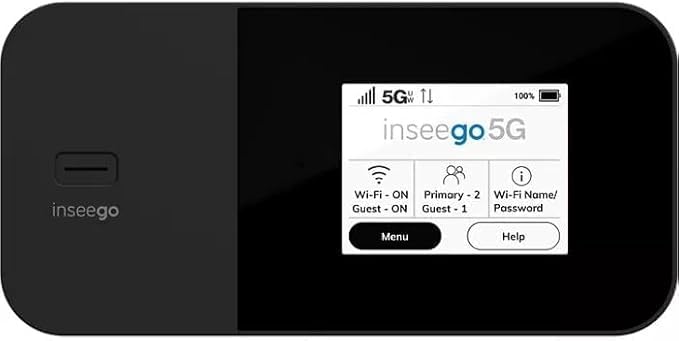
Figura 1: Frente view of the Inseego MiFi X Pro M3000, showing the display with network status, Wi-Fi, and menu options.
2.2 Encendido y configuración inicial
- Mantenga presionado el botón de encendido (generalmente ubicado en el costado o en la parte superior) hasta que la pantalla se ilumine.
- Follow the on-screen prompts to complete the initial setup, which may include setting a device password and Wi-Fi network name (SSID) and password.
- Alternatively, you can manage settings via the Inseego Mobile app or a web interface by connecting a device to the hotspot and navigating to the device's IP address (typically 192.168.1.1).
3. Operando
3.1 Conexión de dispositivos
- En su dispositivo con Wi-Fi habilitado (teléfono inteligente, tableta, computadora portátil), busque redes Wi-Fi disponibles.
- Select the Wi-Fi network name (SSID) displayed on your MiFi X Pro screen.
- Enter the Wi-Fi password displayed on your MiFi X Pro screen.
- Su dispositivo ahora debería estar conectado a Internet.
3.2 Managing Wi-Fi Networks and Connections
- The MiFi X Pro supports simultaneous dual-band Wi-Fi 6 with primary and guest networks.
- Access the device's menu (via the touchscreen or web interface) to view connected devices, monitor data usage, and configure network settings.
- Guest networks can be enabled or disabled and configured with separate passwords for enhanced security.

Figura 2: Lado view of the Inseego MiFi X Pro M3000, highlighting the USB-C port for charging and data, and the power button.
4. Mantenimiento
4.1 Cuidado y carga de la batería
- Charge the MiFi X Pro using the provided USB Type-C cable and power adapter.
- The device features fast-charging capabilities.
- For 24/7 operation, utilize the proprietary battery preservation mode when connected to AC power.
- Avoid exposing the device to extreme temperatures or direct sunlight for prolonged periods to preserve battery life.
4.2 Restablecimiento del dispositivo
If you experience persistent issues, a factory reset may resolve them. Refer to the device's on-screen menu or web interface for instructions on performing a factory reset. This will erase all custom settings and return the device to its default state.
5. Solución de problemas
- Sin conexión a Internet:
- Asegúrese de que su tarjeta SIM esté correctamente insertada y activada con un plan de datos.
- Check the signal strength indicator on the device screen. Move to an area with better network coverage if necessary.
- Restart the MiFi X Pro and the connected device.
- Verify that your data plan has not been exceeded.
- Velocidades lentas:
- Reducir el número de dispositivos conectados.
- Ensure you are within optimal Wi-Fi range (up to 35 feet).
- Verifique la congestión de la red en su área.
- El dispositivo no se enciende:
- Asegúrese de que la batería esté cargada. Conecte el dispositivo a una fuente de alimentación.
- Si la batería está completamente agotada, puede tomar algunos minutos de carga antes de que el dispositivo pueda encenderse.
6. Especificaciones
| Característica | Detalle |
|---|---|
| Nombre del modelo | Inseego MiFi X Pro (M3000) |
| Conectividad | 5G, 4G LTE, Wi-Fi 6 (802.11ax) |
| Clase de banda de frecuencia | Doble banda |
| Máximo de dispositivos conectados | Hasta 32 |
| Puertos | 1 Gbps Ethernet port, USB-C port |
| Características de seguridad | Enterprise-grade security, Open VPN, VPN pass-through, static IP support, Wi-Fi privacy separation, WPA3 |
| Característica especial | WPS (configuración protegida de Wi-Fi) |
| Batería | Long-lasting, fast-charging, proprietary battery preservation mode |
| Color | Negro |
| Peso del artículo | 13.4 onzas |
| Dimensiones del paquete | 6.69 x 4.37 x 2.32 pulgadas |
7. Garantía y soporte
For warranty information and technical support, please refer to the official Inseego website or contact your product retailer. Keep your purchase receipt for warranty claims.
This product is offered as an Amazon Renewed item, which typically includes a separate Amazon Renewed Guarantee. Please consult the Amazon Renewed Guarantee details for specific coverage and support related to your purchase.