
1. Introducción
This manual provides detailed instructions for the installation, operation, and maintenance of your INQMEGA 2.4G WiFi 20X Optical Zoom 6MP Solar Security Camera. This outdoor camera features dual lenses, 20X optical zoom, 6MP resolution, color night vision, and is powered by a solar panel for continuous operation. Please read this manual thoroughly before use to ensure proper setup and functionality.

Imagen 1.1: Másview of the INQMEGA Solar Security Camera system.
2. Componentes del producto
Carefully unpack the box and verify that all the following components are included:
- 1 x INQMEGA Solar Security Camera
- 1 x Panel solar
- 1 x Soporte de montaje
- 1 x cable de alimentación (USB)
- 1 x cable de extensión
- 1 x Manual de usuario (impreso)
- Set of Mounting Screws and Wall Plugs

Imagen 2.1: Todos los componentes incluidos en el paquete.
3. Configuración
3.1 Identificación de componentes
Familiarize yourself with the camera's parts before installation.
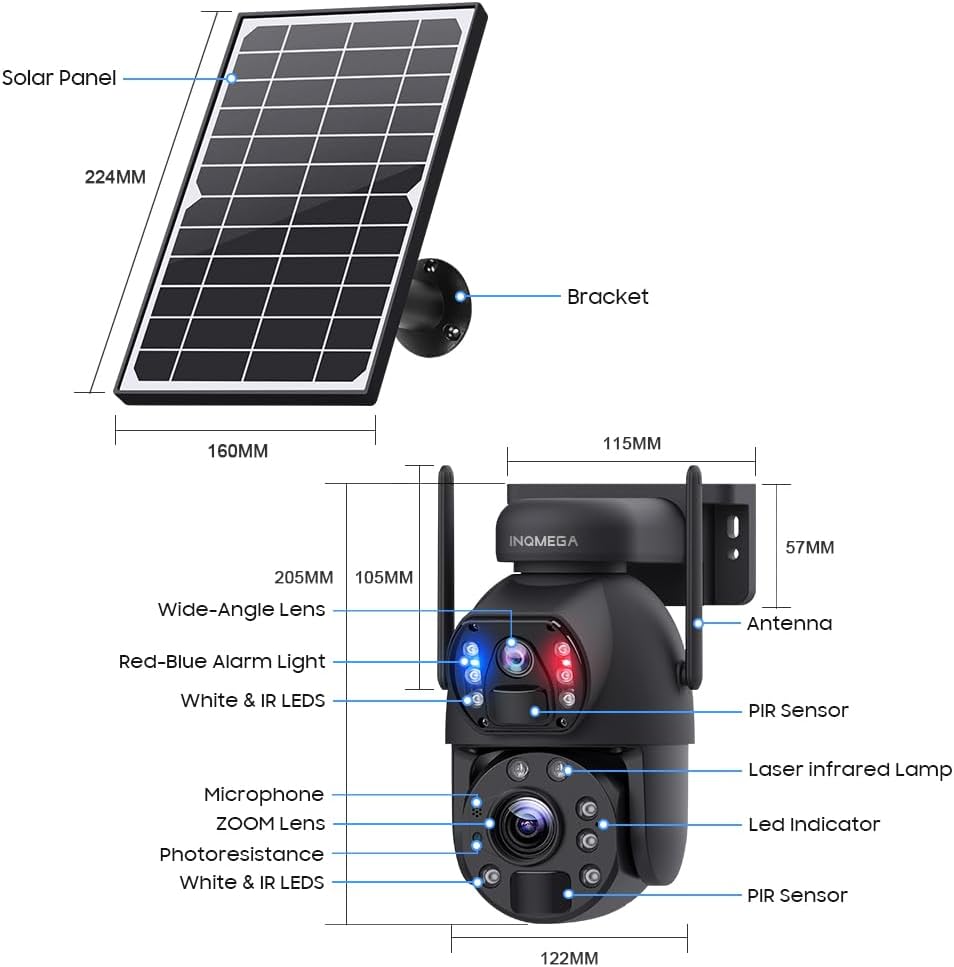
Image 3.1: Camera and Solar Panel Dimensions and Key Components.
3.2 Carga inicial
Before first use, ensure the camera's internal battery is fully charged. Connect the solar panel to the camera and place the solar panel in direct sunlight for several hours. Alternatively, you can use the provided power cable to charge the camera via a USB power adapter (not included).
3.3 Descarga de la aplicación y creación de una cuenta
- Descargar el UBOX aplicación desde la tienda de aplicaciones de su teléfono inteligente (iOS App Store o Google Play Store).
- Open the UBOX app and follow the on-screen instructions to create a new account or log in if you already have one.
3.4 Emparejamiento de cámaras
- Asegúrese de que su teléfono inteligente esté conectado a un Red Wi-Fi 2.4GHzEsta cámara no es compatible con Wi-Fi de 5 GHz.
- Power on the camera. The camera will enter pairing mode, indicated by a specific LED status (refer to the app for exact indications).
- In the UBOX app, tap the "Add Device" or "+" icon.
- Follow the app's instructions to scan the QR code on the camera or manually select the device type.
- Ingrese el nombre de su red Wi-Fi de 2.4 GHz (SSID) y la contraseña cuando se le solicite.
- The camera will attempt to connect to your Wi-Fi network. Once connected, the app will confirm successful pairing.
3.5 Métodos de instalación
The camera supports both wall mounting and ceiling hanging. Choose the method that best suits your installation environment.

Imagen 3.2: Examples of Ceiling Hanging and Wall Mounting installations.
- Selecciona una ubicación: Choose an outdoor location with good Wi-Fi signal strength and sufficient direct sunlight exposure for the solar panel.
- Montaje del soporte: Use the provided screws and wall plugs to securely attach the mounting bracket to the desired surface.
- Conecte la cámara: Fije firmemente la cámara al soporte de montaje.
- Colocar el panel solar: Adjust the solar panel's angle to maximize sunlight exposure throughout the day. Ensure the cable connecting the solar panel to the camera is securely fastened and protected from the elements.
4. Instrucciones de funcionamiento
4.1 en vivo View y pantalla dual
Open the UBOX app and select your camera to access the live view. The camera features a dual-lens system, allowing for a dual-screen display within the app to monitor different areas simultaneously.
4.2 Control de panorámica, inclinación y zoom (PTZ)
The camera supports 355° horizontal pan and 90° vertical tilt. Use the controls within the UBOX app to adjust the camera's viewing angle. The camera also features a Zoom óptico 20X, allowing you to magnify distant objects without significant loss of clarity.

Image 4.1: Demonstration of 20X Optical Zoom capability.
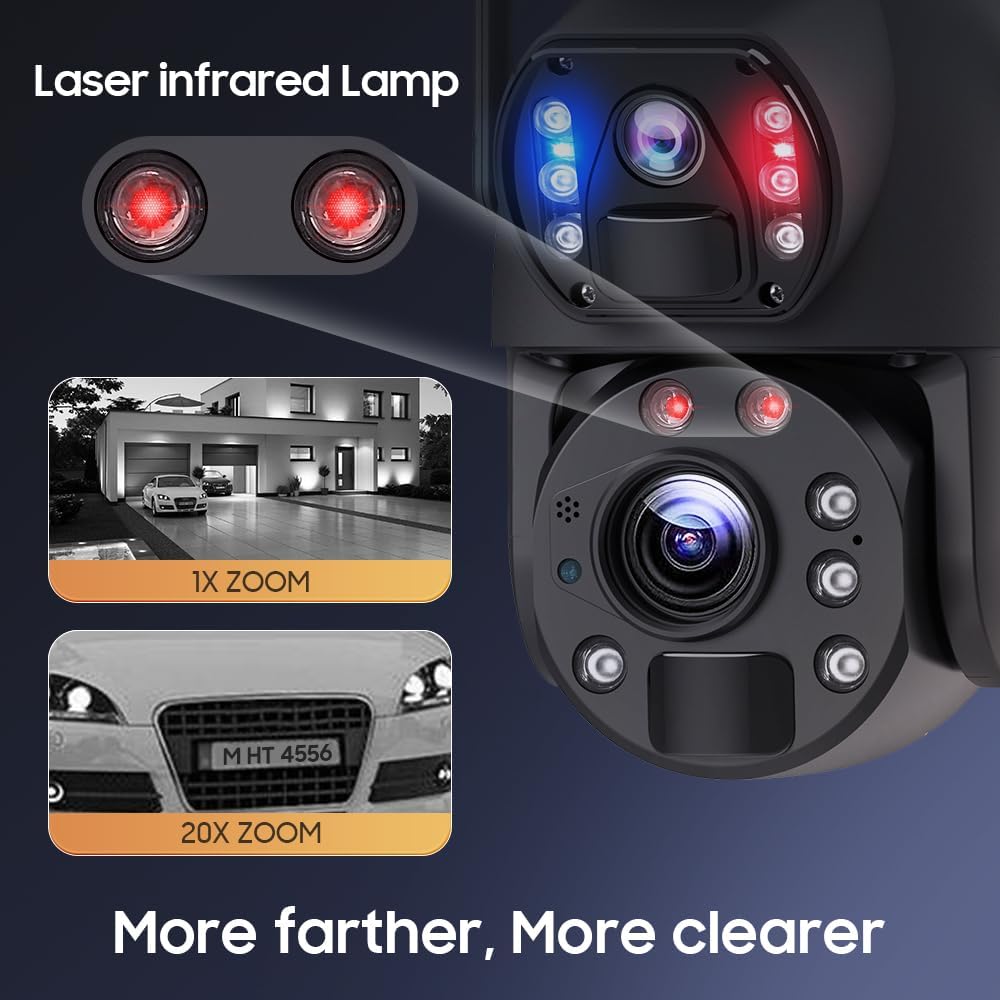
Image 4.2: Enhanced clarity with 20X zoom and laser infrared lamps.
4.3 Modos de visión nocturna
La cámara ofrece tres modos de visión nocturna:
- Visión nocturna infrarroja: Proporciona imágenes nítidas en blanco y negro en condiciones de poca luz.
- Visión nocturna a todo color: Utilizes built-in white lights to provide full-color video even in darkness.
- Visión nocturna inteligente: Cambia automáticamente entre los modos infrarrojo y a todo color según el movimiento detectado o las condiciones de iluminación.
4.4 Detección de movimiento y alertas
The camera features PIR (Passive Infrared) human detection. When motion is detected, the camera will:
- Send an alert notification to your smartphone via the UBOX app.
- Begin recording a short video clip (continuous recording is not supported to conserve battery).
- Activate the siren alarm (if enabled in settings).
You can adjust the sensitivity of motion detection and customize alert settings within the app.
4.5 Audio bidireccional
Utilize the built-in microphone and speaker to communicate with visitors or deter intruders directly through the UBOX app.
4.6 Grabación y almacenamiento
Recorded video clips are stored on a local TF card (up to 128GB, not included) or in the Amazon Cloud (subscription may be required). The camera records only when motion is detected to optimize battery life.
4.7 Preset Points and Guards
You can set specific preset points within the app to quickly navigate the camera to important areas. The 'Guards' function allows the camera to patrol between these preset points.

Image 4.3: Setting preset points for monitoring specific areas.
5. Mantenimiento
5.1 Limpieza
- Lentes de cámara: Gently wipe the camera lenses with a soft, clean, lint-free cloth. Avoid abrasive materials or harsh chemicals.
- Panel solar: Periodically clean the surface of the solar panel to remove dust, dirt, or debris that may reduce charging efficiency. Use a soft cloth and water if necessary.
- Cuerpo de cámara: Limpie el cuerpo de la cámara con publicidad.amp paño para eliminar la suciedad acumulada.
5.2 Cuidado de la batería
The camera is equipped with a built-in 12000mAh battery. To maximize battery life:
- Asegúrese de que el panel solar reciba suficiente luz solar directa diariamente.
- Minimize unnecessary live view access and frequent motion detections if not critical, as these consume battery power.
- In prolonged periods of low sunlight, consider manually charging the camera via USB if battery levels become critically low.
5.3 actualizaciones de firmware
Check the UBOX app periodically for available firmware updates. Keeping your camera's firmware up-to-date ensures optimal performance, security, and access to new features.
6. Solución de problemas
- La cámara no se conecta al Wi-Fi:
- Asegúrese de que su red Wi-Fi sea de 2.4 GHz. La cámara no es compatible con Wi-Fi de 5 GHz.
- Verifique que la contraseña de Wi-Fi sea correcta.
- Check the camera's proximity to the Wi-Fi router (within 15m range).
- Reinicie el enrutador y la cámara. - Mala calidad de imagen:
- Limpiar las lentes de la cámara.
- Asegúrese de que no haya obstrucciones en el campo de visión de la cámara. view.
- Check your Wi-Fi signal strength; a weak signal can affect streaming quality. - La detección de movimiento no funciona o es demasiado sensible:
- Adjust PIR sensitivity settings in the UBOX app.
- Ensure the camera's PIR sensor is not obstructed.
- Avoid placing the camera in areas with constant movement (e.g., tree branches swaying in the wind) if false alarms are an issue. - La batería no se carga:
- Ensure the solar panel is clean and receiving direct sunlight.
- Check the connection cable between the solar panel and the camera.
- Verify the solar panel is not shaded by trees or buildings. - Siren alarm not activating:
- Check if the siren alarm feature is enabled in the UBOX app settings.
- Ensure the camera has sufficient battery power. - No continuous video recording:
- This camera is designed for event-based recording (motion detection) to conserve battery power. Continuous recording is not supported. - Sin seguimiento automático:
- The camera supports motion detection alerts but does not feature automatic object tracking. Pan and tilt adjustments must be made manually via the app.
7. Especificaciones
| Característica | Especificación |
|---|---|
| Número de modelo | ST-598-6M-20X-WIFI-914 |
| Uso en interiores y exteriores | Exterior |
| Resolución de captura de video | 6MP |
| Zoom óptico | 20x |
| Tecnología de conectividad | Inalámbrico (Wi-Fi 2.4G) |
| Fuente de poder | Solar Powered (with 12000mAh Lithium Ion battery) |
| Tipo de controlador | UBOX App |
| Tipo de montaje | Montaje en pared |
| Ángulo Pan / Tilt | 355 ° Horizontal, Vertical ° 90 |
| Visión nocturna | Infrared, Full Color, Intelligent Night Color |
| Detección de movimiento | PIR Human Detection (Max 12M) |
| Almacenamiento | TF Card (Max 128GB, not included), Amazon Cloud |
| Nivel de resistencia al agua | IP66 |
| Material | Metal |
| Peso del artículo | 0.16 onzas |
8. Información de garantía
Please refer to the warranty card included with your product or contact INQMEGA customer support for detailed warranty terms and conditions. Typically, products are covered against manufacturing defects for a specified period from the date of purchase.
9. Soporte
If you encounter any issues or have questions not covered in this manual, please contact INQMEGA customer support through the following channels:
- Correo electrónico: Refer to your product packaging or the INQMEGA official webSitio para direcciones de correo electrónico de soporte.
- Recursos en línea: Visit the INQMEGA official webSitio para preguntas frecuentes, guías de solución de problemas y descargas de software.
- Soporte en la aplicación: Some support options may be available directly within the UBOX application.