
Introducción
This manual provides detailed instructions for the installation, operation, and maintenance of your Ciro GEN 2 Cybercharger Phone Holder with Offset Perch Mount. This device is designed to securely hold and wirelessly charge Qi-enabled smartphones on motorcycles, utilizing a GEN 2 ball and socket assembly for versatile positioning.
Producto terminadoview
Características principales:
- Compatible with iOS and Android Qi-enabled devices.
- Supports up to 15-watt wireless fast charging.
- Waterproof electronics for durability.
- Soft rubber-lined foot and arms provide stability and prevent slipping.
- Expandable from 2-3/8" to 4" wide to accommodate various phone sizes.
- Mechanical grip ensures a firm and secure hold.
- Quickly lock and release your phone with one finger.
- Simple wire harness included, connects directly to any 12V battery with an in-line fuse.
- Ball mount system allows for a broad range of placement and angle adjustment.
- Compatible only with the GEN 2 ball mounting system.
¿Qué hay en la caja?
- GEN 2 Cybercharger Assembly
- Arnés de alimentación de batería
- GEN 2 Perch Mount Kit
- Kit de hardware
- Note: Indian Pursuit models may require additional hardware.

Image: The complete Ciro GEN 2 Cybercharger Phone Holder assembly, including the phone holder unit, the perch mount, and various screws and spacers from the hardware kit.
Configuración e instalación
Estimated installation time is approximately 30 minutes. No drilling is required for standard installations.
- Prepare la ubicación de montaje: Identify a suitable location on your motorcycle's handlebars or perch where the GEN 2 Perch Mount Kit can be securely attached. Ensure it does not obstruct controls or gauges.
- Install the Perch Mount:

Imagen: Un primer plano view of the chrome GEN 2 Perch Mount, showing its ball joint and mounting points.
Attach the perch mount to your motorcycle using the provided hardware kit. Ensure all bolts are tightened securely according to your motorcycle's specifications and the mount's instructions. The ball mount system allows for flexible positioning.
Image: Various screws, spacers, and the perch mount components laid out, indicating the hardware included for installation.
- Attach the Cybercharger Assembly: Connect the GEN 2 Cybercharger Assembly to the ball joint of the installed perch mount. Adjust the angle and orientation for optimal viewing and access. Secure the assembly firmly.
- Conectar el arnés de alimentación: Route the simple wire harness from the Cybercharger to your motorcycle's 12V battery. Connect the harness directly to the battery terminals, ensuring the in-line fuse is properly installed and accessible. Verify all connections are secure and insulated to prevent short circuits.
- Funcionalidad de prueba: After installation, turn on your motorcycle's ignition and place a Qi-enabled smartphone into the holder to confirm it powers on and begins charging.
Instrucciones de funcionamiento
- Insertar su teléfono: Gently expand the arms of the Cybercharger Phone Holder. Place your Qi-enabled smartphone into the holder, ensuring it sits flush against the charging surface. The soft rubber-lined foot and arms will provide a stable grip.
- Cómo proteger su teléfono: The mechanical grip will automatically adjust to securely hold your phone. For additional security, ensure the quick-lock mechanism (if present on your specific model) is engaged.
- Carga inalámbrica: Once your phone is properly seated and the motorcycle's power is on, wireless charging will begin automatically for compatible devices. The Cybercharger supports up to 15-watt fast charging.
- Quitar el teléfono: To remove your phone, use one finger to quickly release the mechanical grip. The arms will expand, allowing you to safely retrieve your device.

Image: A smartphone displaying a map application, securely mounted and charging in the Ciro Cybercharger on a motorcycle's handlebars.
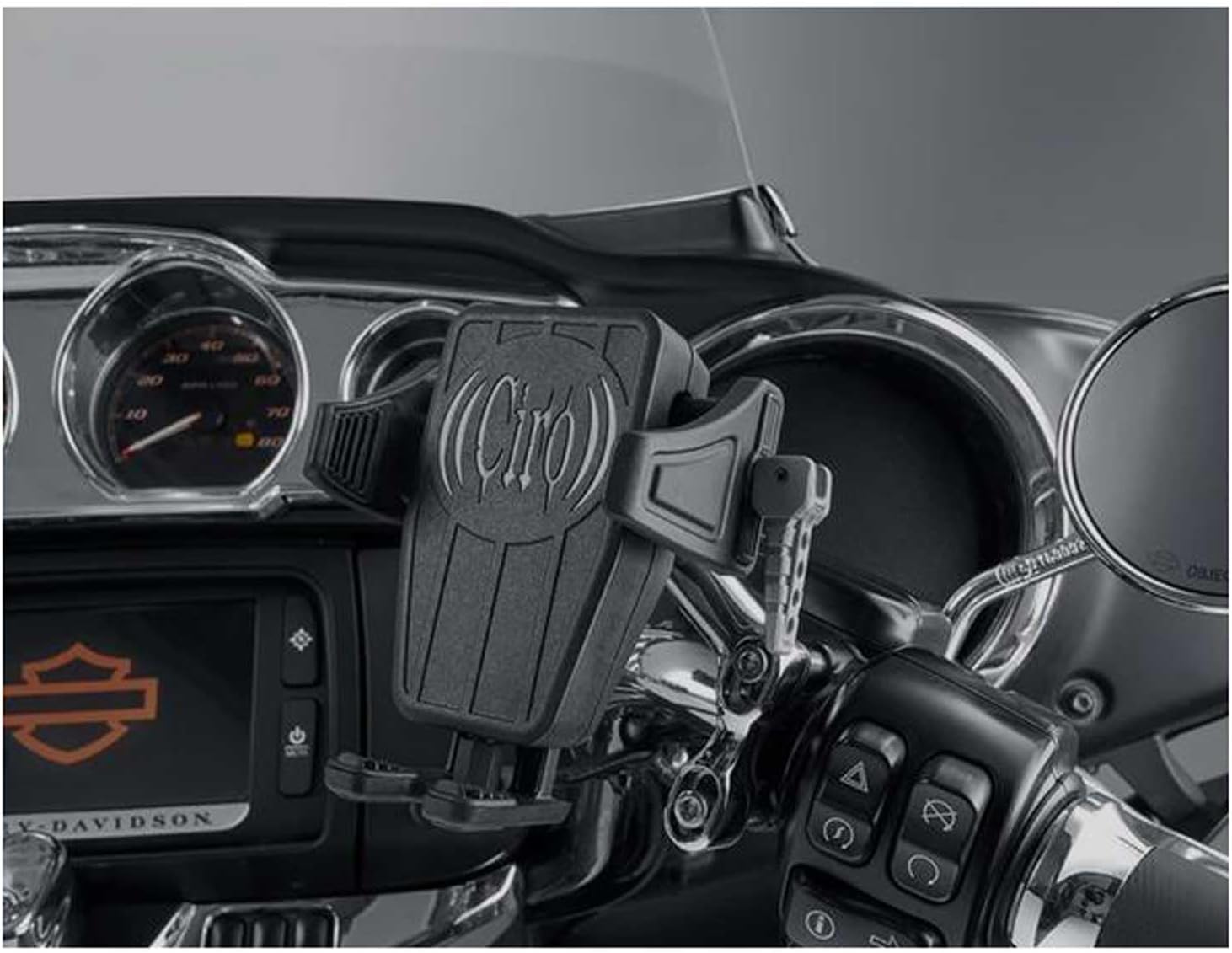
Image: The Ciro Cybercharger Phone Holder, empty and ready for a device, mounted on the handlebars of a motorcycle, showcasing its position and design.
Mantenimiento
The Ciro GEN 2 Cybercharger features waterproof electronics, designed for durability in various weather conditions. Regular maintenance is minimal:
- Periodically inspect all mounting hardware for tightness. Vibrations from motorcycle operation can loosen fasteners over time.
- Keep the charging surface and rubber grips clean from dust and debris to ensure optimal charging efficiency and secure phone retention. Use a soft, damp Paño para limpieza.
- Check the wiring harness for any signs of wear, fraying, or damage, especially where it connects to the battery or passes through tight spaces.
Solución de problemas
| Problema | Posible causa | Solución |
|---|---|---|
| El teléfono no se carga de forma inalámbrica. |
|
|
| Phone arm contacts camera button. | Specific phone models (e.g., iPhone 16 Pro Max) may have camera button placement that interferes with the holder's arm. |
|
| Battery drain when motorcycle is off. | Small parasitic draw from the charger when directly connected to the battery. |
|
| Holder feels loose or unstable. | Mounting hardware has loosened. |
|
Presupuesto
| Número de modelo: | 55310 |
| Dimensiones del producto: | 7.5 x 5 x 4.25 pulgadas |
| Peso del artículo: | 1.05 libras |
| Salida de carga inalámbrica: | Hasta 15 vatios |
| Dispositivos compatibles: | Teléfonos inteligentes compatibles con Qi |
| Compatibilidad de ancho de teléfono: | 2-3/8" to 4" wide |
| Tipo de montaje: | GEN 2 ball mounting system, Offset Perch Mount |
| Características especiales: | Quick Release, Waterproof Electronics, Wireless Charging |
| Conexión de energía: | Direct to 12V battery with in-line fuse (or switched accessory circuit) |
Garantía y soporte
For warranty information or technical support, please refer to the official CIRO website or contact CIRO customer service directly. Keep your purchase receipt for warranty claims.
Fabricante: Ciro