
Introducción
Thank you for choosing the Ninestars 13 Gallon Automatic Motion Sensor Trash Can. This touchless trash bin is designed for convenience and hygiene in various indoor environments such as kitchens, bedrooms, living rooms, offices, and hotels. Featuring a motion sensor for hands-free operation and a durable stainless steel body, this D-shaped trash can offers a large 13-gallon (50-liter) capacity.
This manual provides detailed instructions for setup, operation, maintenance, and troubleshooting to ensure optimal performance and longevity of your product. Please read it carefully before use and retain it for future reference.
¿Qué hay en la caja?
Desembale con cuidado todos los componentes y asegúrese de haber recibido los siguientes artículos:
- Cuerpo del bote de basura
- Trash Can Lid (with motion sensor)
- Anillo de revestimiento
Configuración
1. Instalación de la batería
The trash can operates on 2 D-sized batteries (not included). For optimal performance, use new, high-quality alkaline batteries.
- Localice el compartimiento de la batería en la parte inferior de la tapa.
- Abra la tapa del compartimiento de la batería.
- Insert 2 D-sized batteries, ensuring the correct polarity (+/-) as indicated inside the compartment.
- Cierre bien la tapa del compartimento de la batería.

Image: Battery compartment for 2 D-sized batteries, located on the lid.
2. Instalación de bolsas de basura
Follow these steps to properly install a trash bag using the liner ring:
- Retire la tapa del cuerpo del bote de basura.
- Place the trash bag into the trash can body.
- Fit the top edge of the trash bag over the liner ring, ensuring it is securely held in place.
- Insert the liner ring with the trash bag into the trash can body, tucking any excess bag material neatly.
- Place the lid back onto the trash can body, aligning it properly.

Image: Step-by-step guide for trash bag installation.
Instrucciones de funcionamiento
Funcionamiento del sensor de movimiento
The Ninestars trash can features an infrared motion sensor for hands-free operation.
- When an object or hand is within 10 inches (25 cm) of the sensor window, the lid will automatically open.
- The lid will remain open as long as the object is within the sensor range.
- Once the object moves away from the sensor range, the lid will close automatically after approximately 3-5 seconds.
- The lid features a soft-closing mechanism for quiet operation.
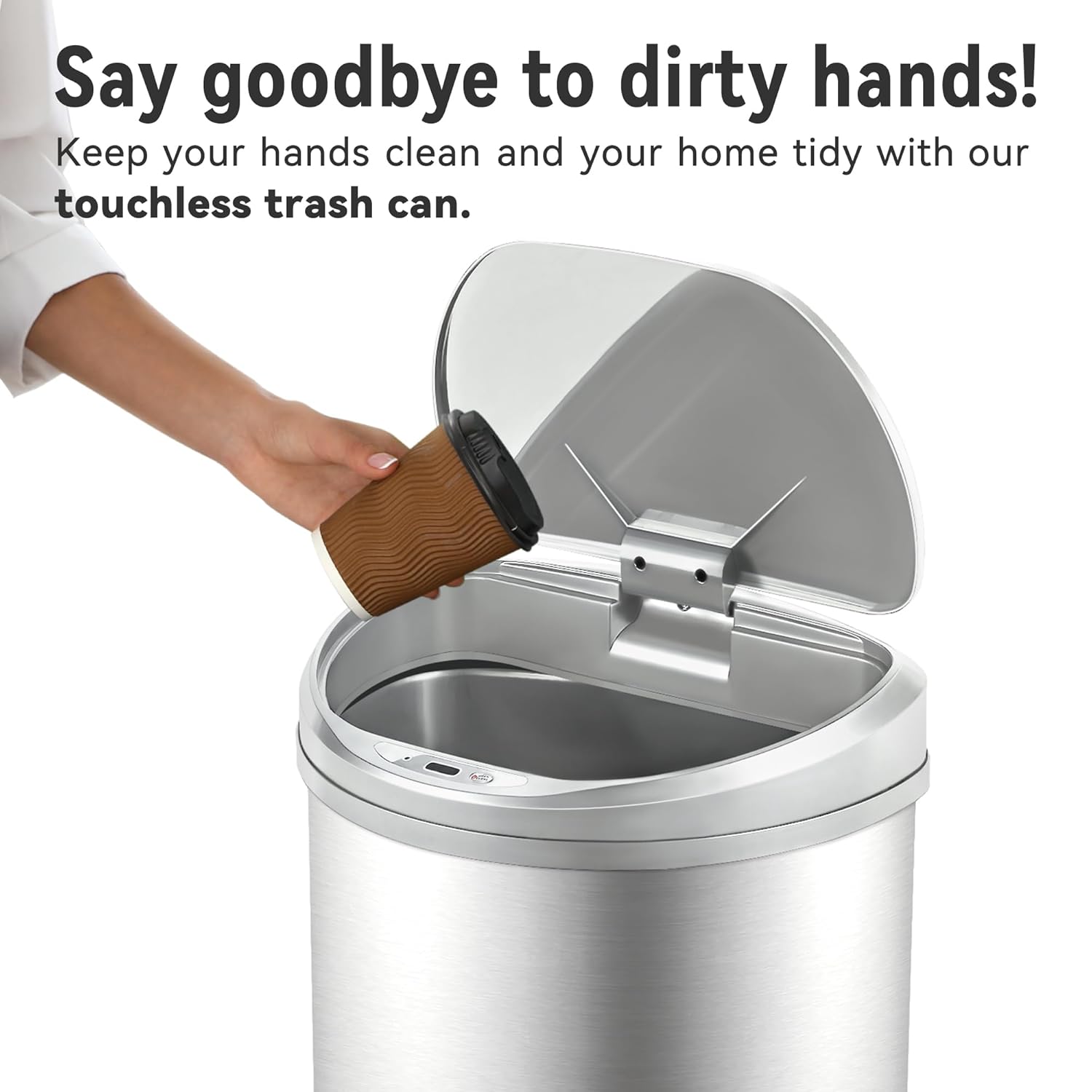
Image: Demonstrating touchless operation with the motion sensor.
Manual Open/Close Button
For extended opening or manual control, use the 'OPEN/CLOSE' buttons located on the lid.
- Press the 'OPEN' button to keep the lid open indefinitely.
- Press the 'CLOSE' button to close the lid. The motion sensor will reactivate after the lid is closed manually.
Mantenimiento
Limpieza
To maintain the appearance and functionality of your trash can:
- Limpie el exterior del cuerpo de acero inoxidable con un paño suave y húmedo.amp paño. Evite limpiadores abrasivos o productos químicos agresivos que puedan dañar el acabado.
- The stainless steel is designed to be fingerprint, scratch, and oil resistant.
- Clean the sensor window on the lid with a soft, dry cloth to ensure proper function.
- Do not immerse the lid in water or place it under running water, as this can damage the electronic components.
- The interior of the trash can body can be cleaned with mild soap and water. Ensure it is completely dry before reinserting the liner ring and lid.

Image: Stainless steel construction features for easy maintenance.
Reemplazo de batería
When the lid's operation becomes slow or inconsistent, it is time to replace the batteries. Refer to the 'Battery Installation' section for detailed steps.
Solución de problemas
If you encounter issues with your Ninestars Automatic Motion Sensor Trash Can, please refer to the following common problems and solutions:
| Problema | Posible causa | Solución |
|---|---|---|
| Lid does not open when sensor is activated. | Baterías agotadas o bajas. La ventana del sensor está sucia u obstruida. La tapa no está correctamente alineada. | Replace batteries with new D-sized batteries. Clean the sensor window with a soft, dry cloth. Ensure the lid is correctly seated on the trash can body. |
| La tapa se abre o se cierra lentamente. | Batería baja. | Replace batteries with new D-sized batteries. |
| Lid remains open or opens randomly. | Sensor is continuously detecting an object. Sensor is exposed to direct sunlight or strong artificial light. | Ensure no objects are within the sensor's range. Relocate the trash can to an area with less direct light interference. |
| La tapa hace ruidos inusuales. | Obstrucción del mecanismo. | Check for any debris or foreign objects obstructing the lid's opening/closing mechanism. |
Presupuesto
- Marca: Nueve estrellas
- Modelo: 13 Gallon D-Shaped
- Capacidad: 13 galones (50 litros)
- Mecanismo de apertura: Sensor de movimiento
- Material: Plástico, acero inoxidable
- Forma: En forma de D
- Tipo de acabado: Cepillado
- Fuerza: 2 x D-sized batteries (not included)
- Dimensiones del producto: 15.12" de largo x 12.13" de ancho x 26.61" de alto (38.4 cm de largo x 30.8 cm de ancho x 67.6 cm de alto)
- Usos recomendados: Kitchen, Indoor Room, Home Office, Laundry Room, Garage, Lobby, Classroom
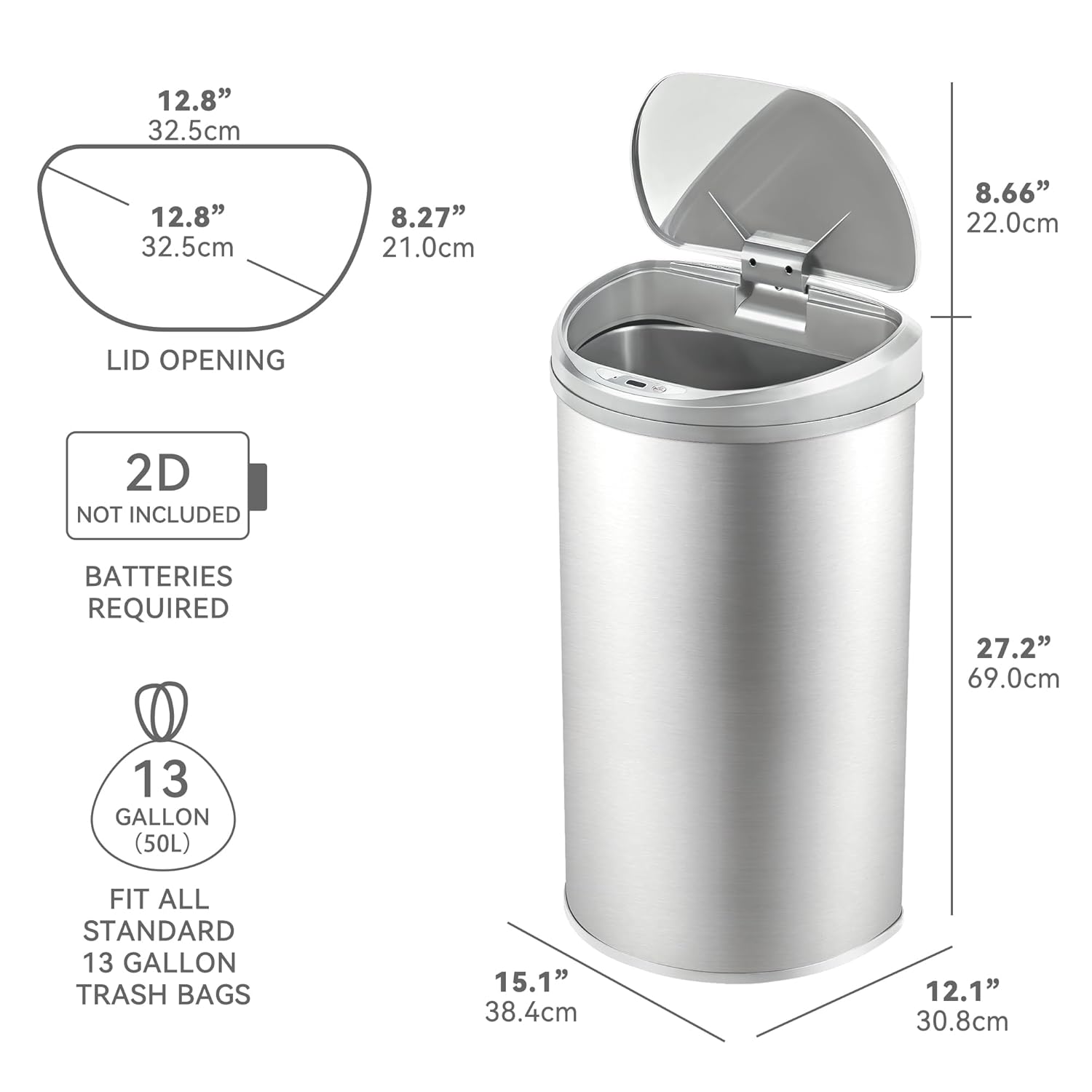
Image: Product dimensions and battery requirement.
Garantía y soporte
Información de garantía
This Ninestars product typically comes with a 2-year warranty. Please refer to your purchase documentation or the manufacturer's official webSitio para conocer los términos y condiciones específicos de la garantía.
Atención al cliente
For further assistance, troubleshooting not covered in this manual, or warranty claims, please contact Ninestars customer support through their official websitio o la información de contacto proporcionada con su compra.