
1. Introducción
This manual provides instructions for the Miracase Magnetic Wallet with Stand. This accessory is designed to securely attach to MagSafe-compatible iPhones and magnetic cases, offering card storage and a versatile stand function. Please read this manual thoroughly to ensure proper use and care of your product.
2. Características del producto
- Fuerte fijación magnética: Features 4000g of holding force for secure attachment to your device.
- Soporte para teléfono integrado: Converts into a stand for both landscape and portrait viewmodos de ing.
- Titular de la tarjeta: Designed to securely hold 4 to 5 cards.
- Diseño desmontable: Allows for easy removal to facilitate wireless charging.
- Material de primera calidad: Constructed from durable PU leather for a comfortable feel.
- Amplia compatibilidad: Compatible with iPhone 17 Pro Max/17 Pro/17/Air/16 Pro Max/16 Pro/16 Plus/16/15 Pro Max/15 Pro/15 Plus/15/14 Pro Max/14 Pro/14 Plus/14/13 Pro Max/13 Pro/13/12 Pro Max/12 Pro/12 without a case, or with a magnetic case. No compatible con iPhone 13/12 mini.
3. Contenido del paquete
- 1 x Miracase Magnetic Wallet with Stand
4. Configuración e instalación
Follow these steps to set up your Miracase Magnetic Wallet with Stand:
- Prepare su dispositivo: Ensure your iPhone is a compatible model (iPhone 12-17 series, excluding mini models) and is either without a case or equipped with a MagSafe-compatible magnetic case.
- Attach the Wallet: Align the Miracase Magnetic Wallet with the MagSafe area on the back of your iPhone or magnetic case. The wallet will snap into place securely due to its strong magnets.
- Insertar tarjetas: Open the wallet to access the card slots. Gently slide your cards (up to 4-5) into the designated slots. Ensure cards are fully inserted to prevent them from falling out.
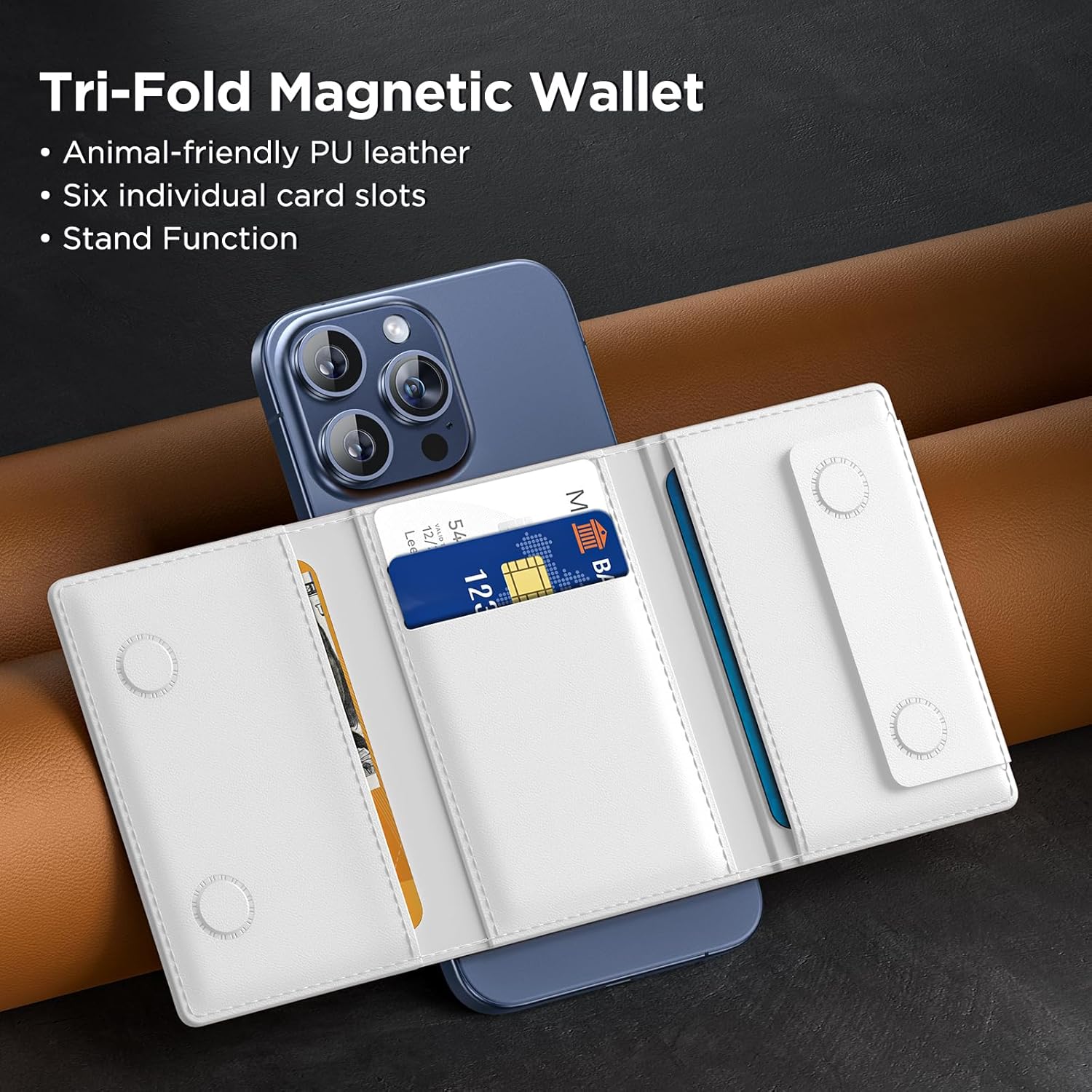
Figure 4.1: Inserting cards into the Miracase Magnetic Wallet.

Figure 4.2: Demonstrating the strong magnetic attraction of the wallet.
5. Instrucciones de funcionamiento
The Miracase Magnetic Wallet offers versatile functionality:
5.1 Using the Stand Function
The wallet can be folded to create a stable stand for your iPhone in both landscape and portrait orientations.
- Para el modo horizontal: Fold the wallet outwards along its creases to form a triangular stand. Place your iPhone horizontally on a flat surface with the wallet supporting it.
- Para el modo retrato: Fold the wallet in a similar manner, but position your iPhone vertically. The wallet will provide stable support for upright viewEn.
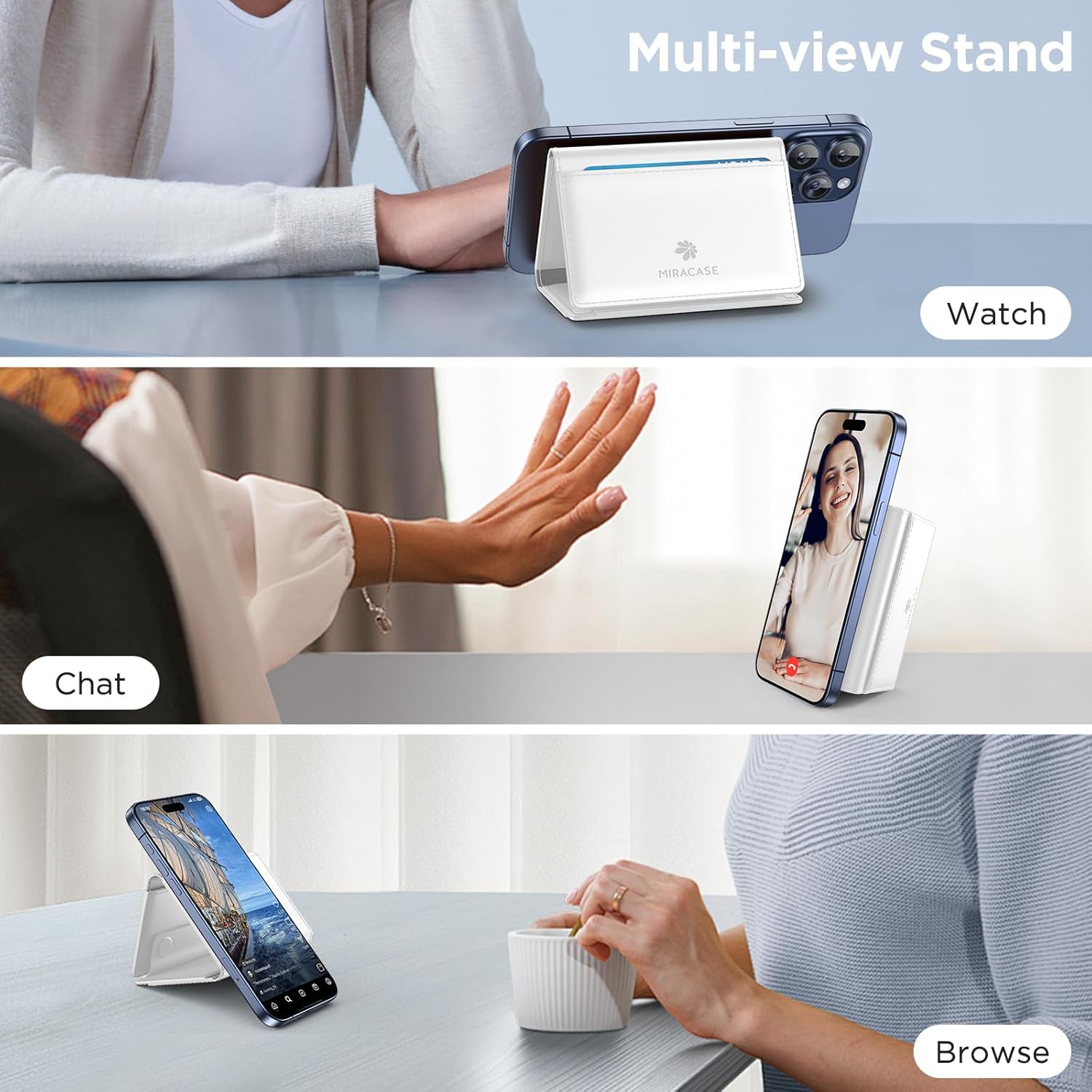
Figure 5.1: Using the multi-view stand function.
5.2 Detaching for Wireless Charging
To use wireless charging, simply detach the magnetic wallet from your iPhone. The strong magnetic connection allows for easy removal and reattachment.
5.3 Card and Cash Storage
The wallet features multiple slots for cards and a dedicated area for folded cash. Ensure items are placed securely within the wallet before closing.
Video 5.1: Demonstration of the Miracase Tri-Fold Magnetic Stand Wallet features, including card and cash storage, and stand functionality.
6. Mantenimiento
To maintain the appearance and functionality of your Miracase Magnetic Wallet:
- Limpieza: Limpie la superficie de cuero PU con un paño suave.amp paño. Evite productos químicos agresivos o limpiadores abrasivos.
- Almacenamiento: Store the wallet in a cool, dry place away from direct sunlight when not in use.
- Evite llenar demasiado: Do not overfill the card slots, as this can stretch the material and affect its ability to hold cards securely over time.
7. Solución de problemas
If you encounter any issues with your Miracase Magnetic Wallet, refer to the following common solutions:
- La billetera no se sujeta de forma segura:
- Ensure your iPhone is a MagSafe-compatible model (iPhone 12-17 series, excluding mini models).
- Verify that your phone case, if used, is MagSafe-compatible. Non-magnetic cases will prevent proper attachment.
- Check for any debris or obstructions between the wallet and your phone/case.
- Cards falling out:
- Asegúrese de no exceder la capacidad recomendada de 4 a 5 tarjetas.
- Verify that cards are fully inserted into the slots.
- Stand function is unstable:
- Ensure the wallet is fully unfolded into its triangular stand shape.
- Place the phone and wallet on a flat, stable surface.
8. Especificaciones
| Característica | Especificación |
|---|---|
| Dimensiones del producto | 0.5 x 3.9 x 2.7 pulgadas |
| Peso del artículo | 2.89 onzas |
| Material | Cuero PU |
| Color | D-White |
| Capacidad de la tarjeta | 4-5 cartas |
| Fuerza magnética | 4000G |
| Compatibilidad | MagSafe-compatible iPhones (12-17 series, excluding mini models) or magnetic cases |
9. Garantía y soporte
Miracase products are designed for quality and durability. If you encounter any product problems or require assistance, please contact Miracase customer support. We are committed to offering a satisfactory solution for any issues you may experience.
For support, please visit the official Miracase store or contact us through the platform where you purchased the product.