
Introducción
This manual provides comprehensive instructions for the setup, operation, maintenance, and troubleshooting of your HUAYU RM-DS909 Replacement TV Remote Control. Designed for seamless compatibility with DSTV LCD/LED televisions, this remote offers intuitive control and reliable performance. Please read this manual carefully to ensure optimal use of your new remote control.
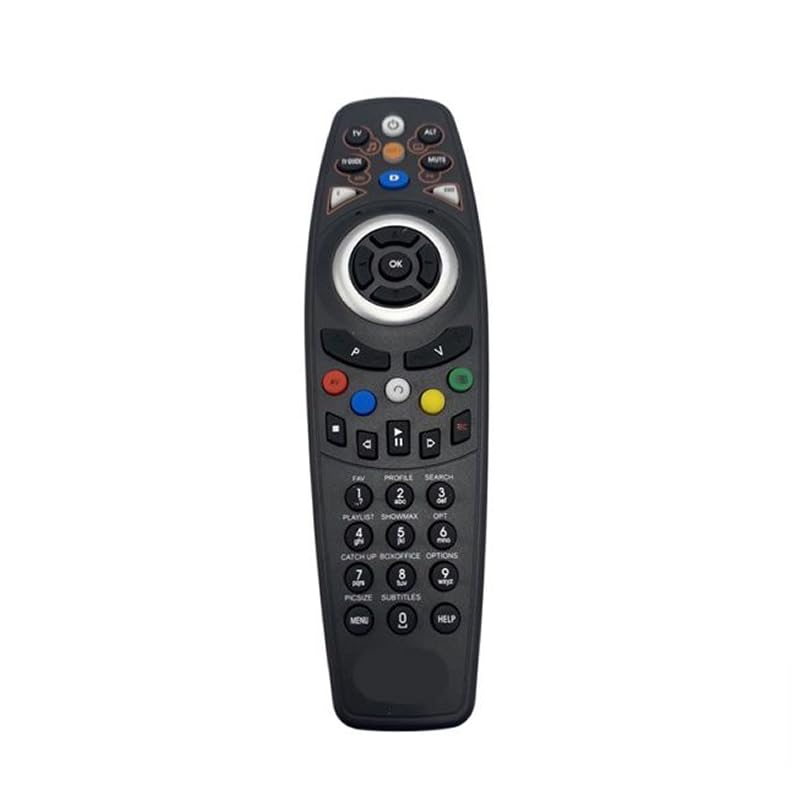
Imagen: Frente view of the HUAYU RM-DS909 Replacement TV Remote Control.
Configuración
1. Instalación de la batería
- Ubique el compartimiento de la batería en la parte posterior del control remoto.
- Deslice la tapa del compartimiento de la batería hacia abajo y retírela.
- Insert two (2) AAA batteries (not included) into the compartment, ensuring the positive (+) and negative (-) terminals align correctly with the indicators inside.
- Vuelva a colocar la tapa del compartimiento de la batería deslizándola en su lugar hasta que encaje firmemente.

Image: Battery compartment with cover removed, showing AAA battery slots.
2. Uso inicial
The HUAYU RM-DS909 remote control is designed for direct use with compatible DSTV LCD/LED televisions. No complex programming or pairing is required. Once batteries are installed, the remote is ready to operate your television.
Instrucciones de funcionamiento
This remote control provides access to all standard functions of your DSTV LCD/LED television. Below is a general guide to common button functions:
- Botón de encendido: Enciende o apaga el televisor.
- Canal arriba/abajo: Cambia de canal de televisión.
- Subir/Bajar volumen: Ajusta el volumen del audio.
- Botón de silencio: Silencia o restaura el audio.
- Botones de navegación (flecha) y OK: Se utiliza para navegar por los menús y confirmar selecciones.
- Botón Menú/Inicio: Accede al menú principal del televisor o a las funciones inteligentes.
- TV Guide Button: Muestra la guía electrónica de programas.
- Botones de colores (rojo, verde, amarillo, azul): These buttons typically correspond to specific functions within menus or interactive services, as indicated on your TV screen.
- Controles de reproducción (Reproducir, Pausar, Detener, Rebobinar, Avance rápido, Grabar): Used for media playback functions, often with PVR or connected devices.
- Teclado numérico (0-9): Para entrada de canal directa.
For specific functions related to your DSTV decoder or TV model, refer to your television's or decoder's user manual.
Mantenimiento
- Limpieza: Limpie el control remoto con un paño suave y seco. No utilice limpiadores líquidos ni productos abrasivos, ya que pueden dañar la superficie o los componentes internos.
- Reemplazo de batería: Reemplace las pilas cuando el control remoto responda con lentitud o deje de funcionar. Siempre reemplace ambas pilas simultáneamente por pilas AAA nuevas. No mezcle pilas viejas y nuevas, ni pilas de diferentes tipos.
- Almacenamiento: Si no va a utilizar el control remoto durante un período prolongado, retire las pilas para evitar fugas y posibles daños. Guarde el control remoto en un lugar fresco y seco, alejado de la luz solar directa y de temperaturas extremas.
Solución de problemas
- El control remoto no responde:
- Asegúrese de que las baterías estén insertadas correctamente con la polaridad correcta.
- Reemplace las baterías viejas con baterías AAA nuevas.
- Verifique si hay obstrucciones entre el control remoto y el sensor infrarrojo del televisor.
- Ensure you are within the effective operating range and pointing the remote towards the TV.
- Rango operativo limitado:
- Weak batteries can reduce the remote's range. Replace them if necessary.
- Bright light sources (e.g., direct sunlight, fluorescent lights) can interfere with the infrared signal.
- Botones específicos que no funcionan:
- Asegúrese de que el control remoto esté limpio y que no haya residuos que obstruyan los botones.
- Si solo fallan algunos botones, podría indicar un daño interno. Considere reemplazar el control remoto.
Presupuesto
| Número de modelo | RM-DS909 (Internal Model: 930) |
| Marca | HUAYU |
| Tecnología de conectividad | Infrarrojos (IR) |
| Dispositivos compatibles | DSTV LCD/LED Televisions |
| Tipo de batería | 2 x AAA (no incluido) |
| Material | abdominales |
| Color | Negro |
| Característica especial | Funcionalidad inteligente |
| Número máximo de dispositivos compatibles | 1 |
Garantía y soporte
Garantía del fabricante
This HUAYU remote control comes with a Garantía del fabricante de 1 años from the date of purchase. This warranty covers defects in materials and workmanship under normal use. It does not cover damage caused by misuse, accidents, unauthorized modifications, or battery leakage.
Atención al cliente
For further assistance, troubleshooting not covered in this manual, or warranty claims, please contact your retailer or the point of purchase. Please have your purchase receipt and product model number (RM-DS909) available when seeking support.