
1. Introducción
Thank you for choosing the MESTEK TH11 Digital Temperature and Humidity Meter. This device is designed for precise measurement of ambient temperature, relative humidity, wet bulb temperature, and dew point temperature. Its portable and user-friendly design makes it suitable for a wide range of applications, from home environments to industrial and agricultural settings. Please read this manual thoroughly before use to ensure proper operation and to maximize the lifespan of your instrument.

Image 1.1: The MESTEK TH11 meter highlighting its multi-functional capabilities including ambient temperature, humidity, wet bulb, and dew point measurements.
2. Información de seguridad
- No intente desmontar ni modificar el instrumento.
- Mantenga el dispositivo alejado del agua y de entornos con alta humedad para evitar daños.
- Evite exponer el dispositivo a temperaturas extremas o luz solar directa durante períodos prolongados.
- Reemplace las baterías rápidamente cuando aparezca el indicador de batería baja para garantizar lecturas precisas.
- Deseche las baterías usadas de acuerdo con las normas locales.
- Limpie el dispositivo con un paño suave y seco. No utilice limpiadores abrasivos ni disolventes.
3. Producto terminadoview
3.1. Contenido del paquete
Al abrir el paquete, verifique que todos los artículos estén presentes y en buenas condiciones:
- 1 x MESTEK TH11 Digital Temperature and Humidity Meter
- 3 pilas AAA
- 1 x Bolsa de tela
- 1 x Destornillador
- 1 x Manual de usuario

Image 3.1: The complete packing list for the MESTEK TH11, showing all included accessories.
3.2. Componentes del dispositivo
Familiarize yourself with the main parts of your MESTEK TH11 meter:
- Sensor de sonda: Located at the top, this high-precision Swiss SHT30 sensor measures temperature and humidity.
- Pantalla de visualización: A backlit LCD for clear reading of measurement values.
- Teclas de función: Buttons for power, mode selection, unit switching, and data hold.
- Compartimento de la batería: Ubicado en la parte trasera para la instalación de baterías AAA.

Image 3.2: Labeled diagram of the MESTEK TH11, indicating the probe sensor, display screen, and function keys, along with its dimensions.
3.3. Características de la pantalla
The backlit LCD provides clear readings and important indicators:
- Pantalla doble: Shows both temperature and humidity simultaneously.
- Iluminar desde el fondo: Mejora la visibilidad en condiciones de poca luz.
- Indicación de batería baja: Aparecerá un icono cuando sea necesario reemplazar las baterías.
- Retención de datos (HOLD): Congela la medición actual en la pantalla.
- MÁXIMO MINIMO: Displays maximum or minimum recorded values.
- WB/DP: Indicates Wet Bulb or Dew Point temperature mode.
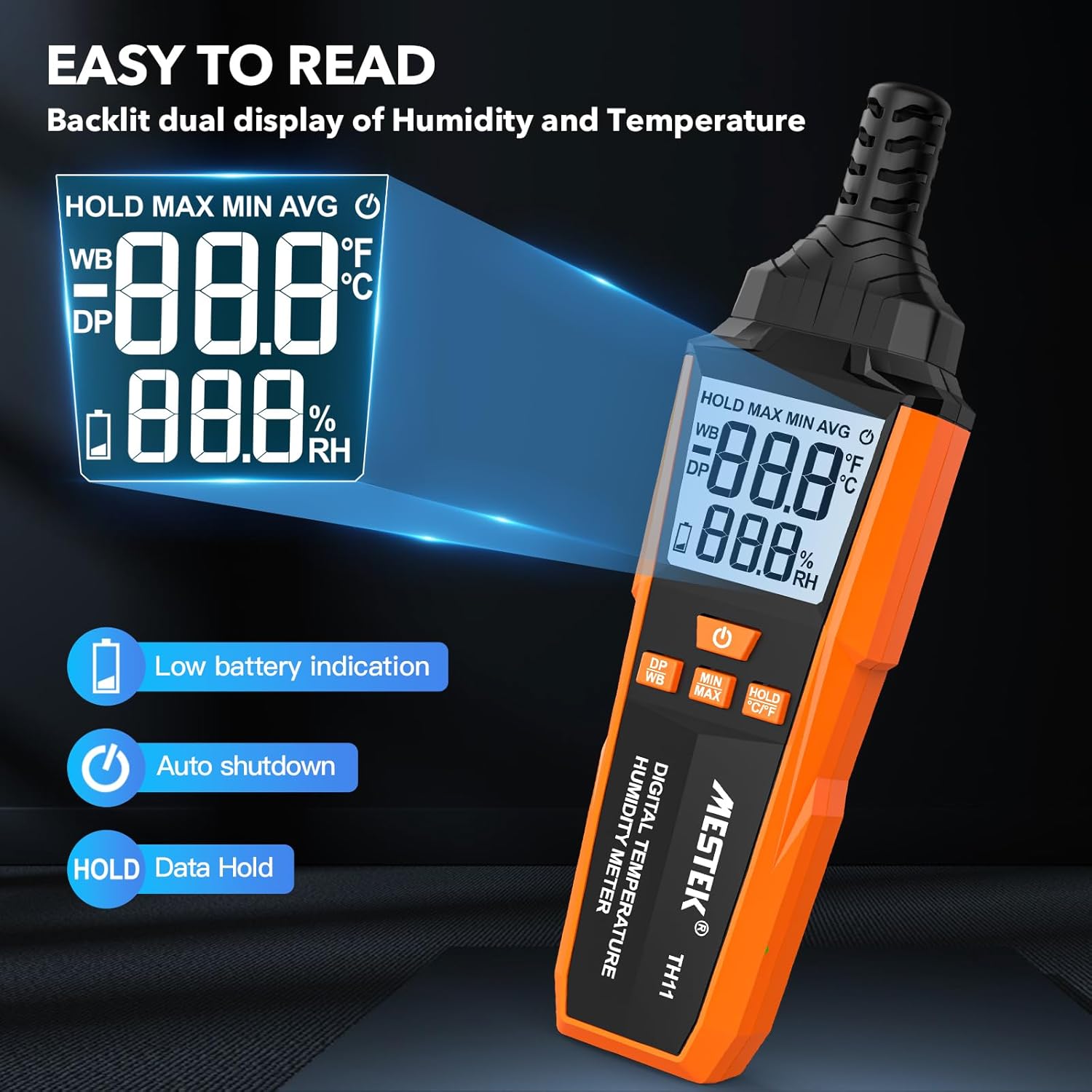
Image 3.3: The MESTEK TH11's backlit display, illustrating its clarity and indicators for low battery and data hold.
4. Configuración
4.1. Instalación de la batería
The MESTEK TH11 requires 3 AAA batteries for operation. Follow these steps to install them:
- Localice la tapa del compartimiento de la batería en la parte posterior del dispositivo.
- Utilice el destornillador proporcionado para aflojar el tornillo de la tapa del compartimento de la batería.
- Retire la cubierta.
- Inserte 3 pilas AAA, asegurándose de la polaridad correcta (+/-) como se indica dentro del compartimento.
- Vuelva a colocar la tapa del compartimiento de la batería y apriete el tornillo.
5. Instrucciones de funcionamiento
5.1. Encendido y apagado
- Para encender el dispositivo, presione el Botón de encendido ().
- Para apagar el dispositivo, mantenga presionado el botón Botón de encendido for approximately 2 seconds. The device also features an automatic shutdown function after 30 minutes of inactivity to conserve battery life.

Image 5.1: The automatic shutdown feature of the MESTEK TH11, activating after 30 minutes of inactivity.
5.2. Cambio de unidad (°C/°F)
- Para cambiar entre Celsius (°C) y Fahrenheit (°F), mantenga presionada la tecla HOLD °C/°F button durante aproximadamente 2 segundos.
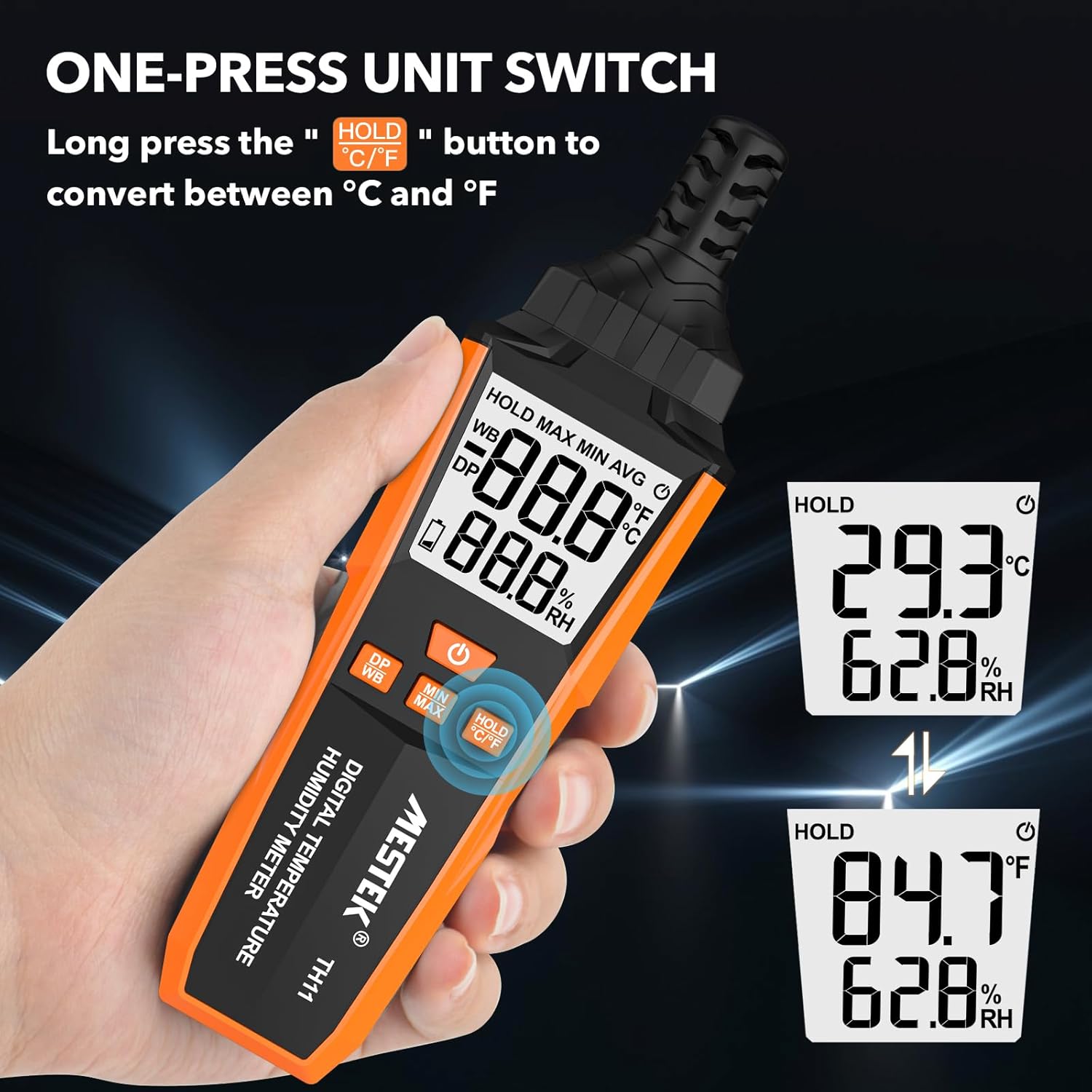
Image 5.2: The MESTEK TH11 showing how to switch between Celsius and Fahrenheit temperature units.
5.3. Función de retención de datos
- To freeze the current measurement on the display, short press the HOLD °C/°F button. The "HOLD" icon will appear on the screen.
- Press the button again to exit the data hold mode.

Image 5.3: The MESTEK TH11 display indicating the active HOLD function.
5.4. Minimum/Maximum Value Measurement
- A view the maximum recorded temperature and humidity, short press the Botón MIN/MAX. The "MAX" icon will appear.
- Presione el Botón MIN/MAX De nuevo a view the minimum recorded values. The "MIN" icon will appear.
- Press the button a third time to return to real-time measurement.

Image 5.4: The MESTEK TH11 displaying the maximum and minimum recorded temperature and humidity values.
5.5. Wet Bulb / Dew Point Mode
- To switch between Wet Bulb (WB) and Dew Point (DP) temperature display, short press the Botón DP/WB. The corresponding icon will be shown on the display.
6. Aplicaciones
The MESTEK TH11 Digital Temperature and Humidity Meter is versatile and can be used in various environments:
- Hogar: Monitor indoor climate in bedrooms, children's rooms, and living areas for comfort and health.
- Oficina: Ensure optimal working conditions by monitoring office temperature and humidity.
- Agricultura: Ideal for gardens, greenhouses, and agricultural crops to maintain suitable growing conditions.
- Industria: Useful in warehouses, cellars, and facilities with air conditioning systems for environmental control.
- Entornos especializados: Suitable for maternity wards and areas requiring precise climate control.

Imagen 6.1: Examples of the MESTEK TH11's diverse applications in home, plant, storage, and warehouse settings.
6.1. Ambient Temperature and Relative Humidity Reference Values
For optimal conditions in various environments, consider the following reference values:
| Ambiente | Temperatura | Humedad relativa (RH) |
|---|---|---|
| Human Body Comfort | 15-25 °C | 45%-75% de humedad relativa |
| Room Environment | 40%-70% de humedad relativa | |
| Library/Art Gallery/Museum | 40%-60% de humedad relativa | |
| Electronic Equipment/Communication Room | 45%-60% de humedad relativa | |
| Agricultural/Cotton/Wool Textiles Storage | 40%-60% de humedad relativa | |
| Dairy Products Storage | 50%-60% de humedad relativa | |
| Fruit Storage | 60%-70% de humedad relativa | |
| Best Convalescent Environment | 30%-50% de humedad relativa |
Table 6.1: Reference values for ambient temperature and relative humidity in various settings.
7. Especificaciones
| Parámetro | Valor |
|---|---|
| Número de modelo | TH11 |
| Marca | MESTEK |
| Peso | 210 gramos |
| Dimensiones (L x An x Al) | 18.8 x 5.4 x 3.4 cm |
| Color | Naranja |
| Estilo | Moderno |
| Fuente de poder | Funciona con pilas |
| Tipo de batería | Pilas alcalinas 3 x AAA |
| Precisión de la medición (temperatura) | ±0.1 °C |
| Estilo de pantalla | Digital |
| Tipo de montaje | Handheld / Freestanding |
| Características especiales | High Accuracy, Backlit Display, Data Hold, Min/Max, Auto Shutdown, Low Battery Indicator |
| Rango de humedad | 0-99 % de humedad relativa |
| Rango de temperatura | -20 °C ~ 60 °C (-4 °F ~ 140 °F) |
| Rango de temperatura del punto de rocío | -50 °C ~ 60 °C (-58 °F ~ 140 °F) |
| Rango de temperatura de bulbo húmedo | -20 °C ~ 60 °C (-4 °F ~ 140 °F) |
| Tipo de sensor | Swiss SHT30 High-Precision Sensor |
| Samptasa de ling | Aproximadamente 1 segundo |
8. Mantenimiento
- Limpieza: Limpie el dispositivo con un paño suave y seco. No utilice limpiadores líquidos ni lo sumerja en agua.
- Almacenamiento: Si no lo utiliza durante un período prolongado, retire las pilas para evitar fugas. Guarde el dispositivo en un lugar fresco y seco, alejado de la luz solar directa y de temperaturas extremas.
- Cuidado del sensor: The probe sensor is delicate. Avoid touching it directly or exposing it to dust and debris.
9. Solución de problemas
- El dispositivo no se enciende:
Check if the batteries are installed correctly with the right polarity. Ensure the batteries are not depleted; replace them if necessary. - Lecturas inexactas:
Ensure the device has been in the environment for at least 15 minutes to stabilize. Check for any obstructions around the sensor. Replace old batteries. - La pantalla está oscura o parpadea:
Esto suele indicar que la batería está baja. Reemplace las baterías. - Los botones no responden:
Try powering off and on the device. If the issue persists, replace the batteries.
10. Garantía y soporte
The MESTEK TH11 Digital Temperature and Humidity Meter comes with a Garantía de 24 meses from the date of purchase, covering manufacturing defects. Additionally, MESTEK provides Soporte técnico de por vida para este producto.
If you encounter any issues, have questions, or require assistance, please do not hesitate to contact our customer support team. We are committed to providing satisfactory solutions.
For support, please refer to the contact information provided on the MESTEK official websitio o su plataforma de compra.