
1. Introducción
Thank you for choosing the Inwa MZ-622 Outdoor Bluetooth Speakers. This active and passive speaker system delivers 400W peak power for a loud stereo sound experience, suitable for both indoor and outdoor environments. Featuring Bluetooth 5.2 connectivity and an auxiliary input, these speakers offer versatile audio streaming options. Their weatherproof design ensures durability against splashes and light rain, making them ideal for patios, porches, gazebos, and garages. This manual provides detailed instructions for setup, operation, and maintenance to ensure optimal performance and longevity of your speaker system.

Imagen: Más alláview of Inwa 400W Outdoor Bluetooth Speakers highlighting key features like Bluetooth 5.2, AUX input, weatherproofing, stereo system, and remote control.
2. ¿Qué hay en la caja?
Verifique el contenido del paquete para asegurarse de que todos los artículos estén presentes:
- 1 x altavoz activo
- 1 x altavoz pasivo
- 1 adaptador de corriente CC de 12 V.
- 1 x control remoto
- 1 x RCA Cable (5m)
- 1 x 3.5mm Auxiliary Input Cable
- Mounting Accessories (4 x Expansion screws, 4 x Fastener screws)
- 1 x Manual de usuario
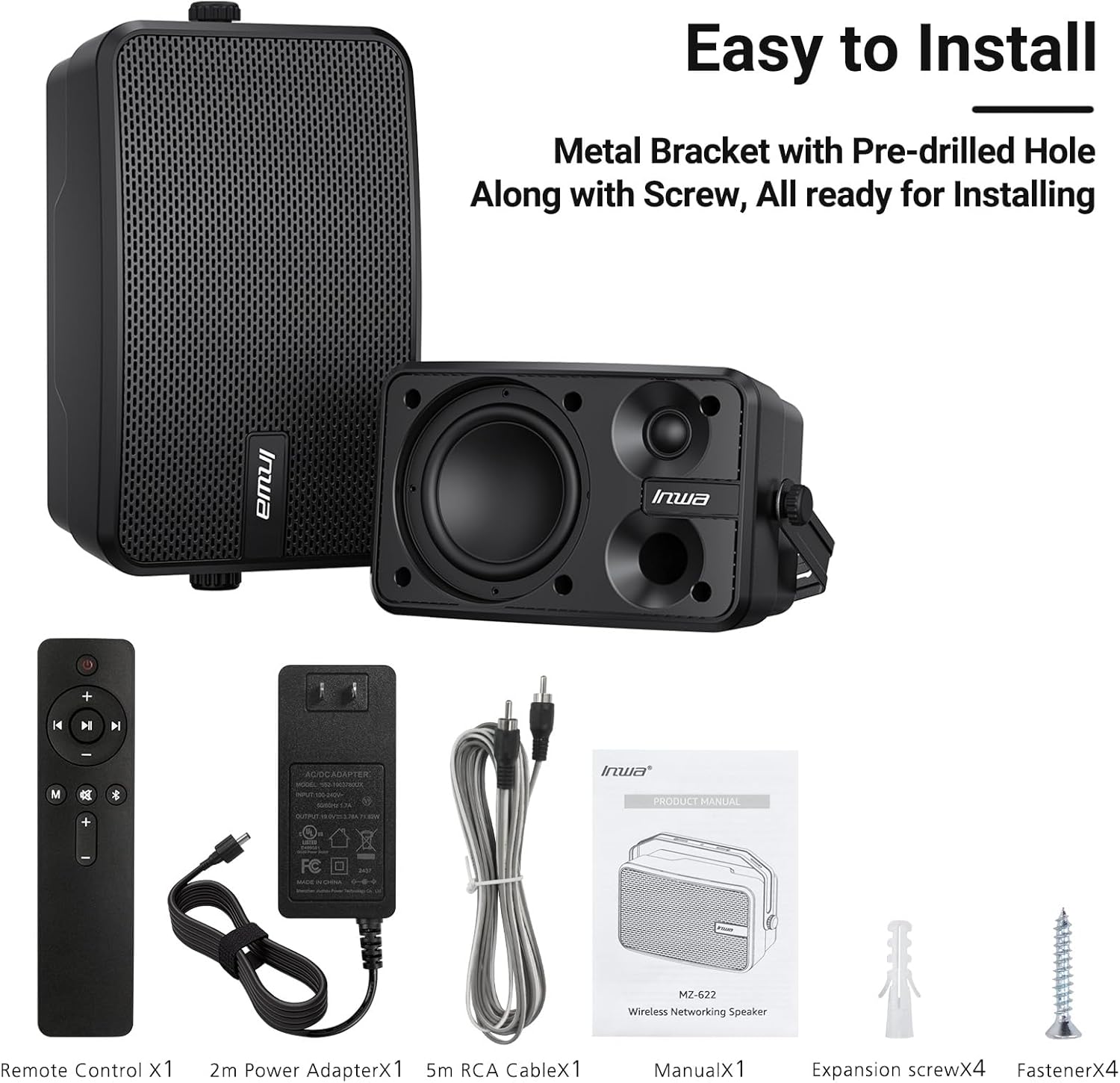
Image: All included components of the Inwa MZ-622 speaker system.
3. Instrucciones de configuración
3.1 Conexión de los altavoces
The Inwa MZ-622 system consists of one active speaker and one passive speaker. The active speaker contains the amplifier and controls, while the passive speaker connects to the active speaker.
- Connect the Passive Speaker: Use the provided RCA cable to connect the passive speaker to the active speaker. Ensure a secure connection.
- Conecte la electricidad: Plug the 12V DC power adapter into the active speaker's power input, then plug the adapter into a power outlet.
- Encendido: After connecting the power, the active speaker will automatically power on and enter Bluetooth mode, indicated by a flashing blue light.

Imagen: Detallada view of the rear connections for the active and passive speakers.
3.2 Conexión de la fuente de audio
The speakers support both Bluetooth wireless streaming and wired auxiliary input.
3.2.1 Conexión Bluetooth
- Ensure the active speaker is powered on and the blue indicator light is flashing, indicating Bluetooth pairing mode.
- En su teléfono inteligente, tableta o PC, habilite Bluetooth y busque los dispositivos disponibles.
- Select "Inwa MZ-622" (or similar name) from the list to pair. Once paired, the blue light will become solid.

Image: Illustration of Bluetooth 5.2 connectivity with a mobile device.
3.2.2 Auxiliary (AUX) Input Connection
- Connect one end of the provided 3.5mm auxiliary input cable to your external device (e.g., mobile phone, laptop, TV).
- Connect the other end of the 3.5mm auxiliary input cable to the AUX IN port on the active speaker.
- Press the 'M' button on the remote control to switch to AUX input mode. The indicator light on the active speaker will turn red.

Image: Connection diagram for AUX input with various devices.
3.3 Video Guide: Connection Method for MZ-622 Active + Passive Speakers
Video: A step-by-step guide demonstrating how to connect the active and passive Inwa MZ-622 speakers, including power and audio cables.
4. Instrucciones de funcionamiento
The Inwa MZ-622 speakers can be easily operated using the included remote control. The remote control primarily functions with the active speaker.
4.1 Funciones de control remoto
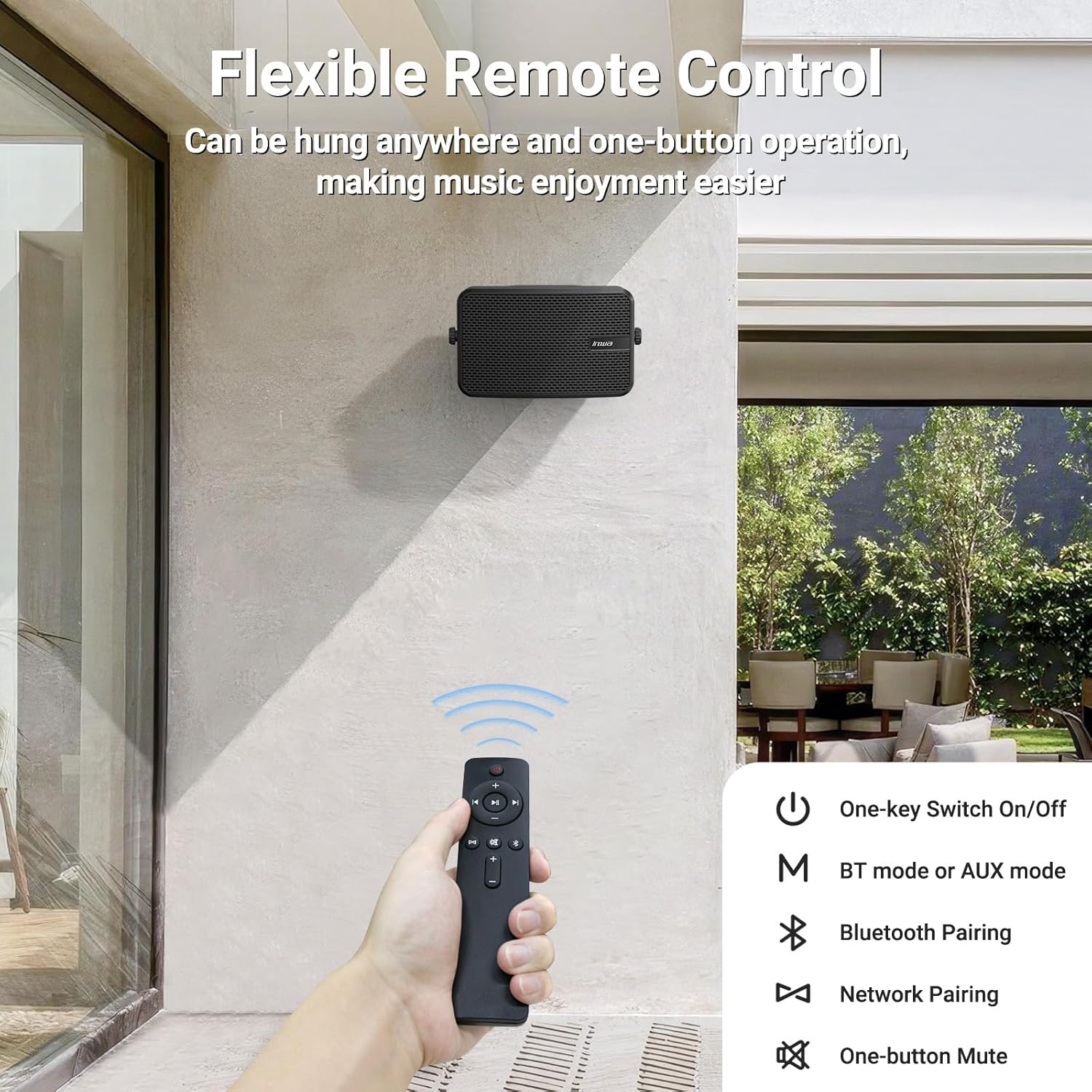
Image: The remote control for the Inwa MZ-622 speakers.
- Botón de encendido (⏻): Enciende o apaga el sistema de altavoces.
- Botón de modo (M): Switches between Bluetooth mode (blue indicator light) and AUX input mode (red indicator light).
- Bluetooth Pairing Button (Ⓘ): Inicia el modo de emparejamiento Bluetooth.
- Subir volumen (+): Aumenta el volumen.
- Bajar volumen (-): Disminuye el volumen.
- Botón de silencio (🔇): Silencia o reactiva el audio.
- Botón de reproducción/pausa (⏸): Reproduce o pausa el audio en modo Bluetooth.
- Pista anterior (⏮): Skips to the previous track in Bluetooth mode.
- Pista siguiente (⏭): Skips to the next track in Bluetooth mode.
Nota: In AUX input mode, track control buttons (Play/Pause, Previous, Next) on the remote are disabled as audio control is managed by the connected external device.
5. Colocación y Montaje
The Inwa MZ-622 speakers are designed for versatile placement, both indoors and outdoors. Their compact size (9.41"W x 6.54"D x 4.61"H) and included mounting accessories make installation straightforward.
5.1 Outdoor Placement Considerations
While the speakers are weatherproof and can withstand splashes and light rain, it is recommended to install them in locations that offer some protection from direct, heavy downpours or prolonged exposure to harsh elements. Ideal locations include:
- Under a patio cover
- On the underside of a porch roof
- Within a gazebo or outdoor bar area
- Inside a garage or small workshop

Image: The weatherproof construction of the Inwa speaker.
5.2 Instrucciones de montaje
The speakers come with metal brackets and pre-drilled holes for easy wall mounting. Use the provided expansion and fastener screws for secure installation.
- Elegir la ubicación: Select a suitable mounting location, considering sound dispersion and protection from extreme weather.
- Marcar agujeros: Hold the speaker bracket against the wall and mark the positions for drilling.
- Perforar agujeros: Drill pilot holes at the marked positions. Insert expansion screws if necessary for added stability.
- Soporte seguro: Attach the speaker bracket to the wall using the fastener screws.
- Adjuntar altavoz: Mount the speaker onto the secured bracket. Adjust the angle as desired for optimal sound direction.

Imagen: Example of outdoor wall mounting.
6. Especificaciones
| Característica | Detalle |
|---|---|
| Nombre del modelo | MZ-622 |
| Tipo de altavoz | Exterior |
| Potencia máxima de salida del altavoz | 400 vatios |
| Tecnología de conectividad | Auxiliar, Bluetooth |
| Tecnología de comunicación inalámbrica | Bluetooth |
| Versión de Bluetooth | 5.2 |
| Modo de salida de audio | Estéreo |
| Configuración de canales de sonido envolvente | 2.0 |
| Diámetro del woofer | 4 pulgadas |
| Tamaño del tweeter | 1 pulgadas |
| Material | Acrilonitrilo butadieno estireno (ABS) |
| es resistente al agua | Verdadero |
| Dimensiones del producto | 6.54" de profundidad x 9.41" de ancho x 4.61" de alto |
| Peso del artículo | 7.78 libras |
| Fuente de poder | Eléctrico con cable |
| Método de control | Remoto |
7. Mantenimiento
Para garantizar la longevidad y el rendimiento óptimo de sus altavoces Inwa MZ-622, siga estas pautas de mantenimiento:
- Limpieza: Limpie las cajas de los altavoces con un paño suave.amp cloth. Avoid using harsh chemicals or abrasive cleaners, as these can damage the ABS material and mesh grille.
- Protección contra la intemperie: Although weatherproof, it is advisable to protect the speakers from extreme weather conditions such as heavy storms, prolonged direct sunlight, or freezing temperatures when not in use for extended periods.
- Sistema de organización de cables: Ensure all cables are securely connected and not under strain. Periodically check cables for any signs of wear or damage.
- Almacenamiento: If storing the speakers for a long time, disconnect them from power, clean them, and store them in a cool, dry place.
8. Solución de problemas
If you encounter issues with your Inwa MZ-622 speakers, refer to the following common problems and solutions:
| Problema | Posible causa | Solución |
|---|---|---|
| Sin energía/El altavoz no se enciende | Adaptador de corriente no conectado o defectuoso. | Ensure the 12V DC power adapter is securely connected to the active speaker and a working power outlet. Test the outlet with another device. |
| No hay sonido de los altavoces | Volume too low; incorrect input mode; cables loose; device not playing audio. | Increase volume on both the speaker and the connected device. Press the 'M' button on the remote to cycle through modes (Bluetooth/AUX) until the correct mode is selected. Check all audio cables (RCA, AUX) for secure connections. Ensure your audio source is playing. |
| Bluetooth no emparejado | El altavoz no está en modo de emparejamiento; dispositivo Bluetooth desactivado; interferencia. | Ensure the active speaker's blue indicator light is flashing. Turn Bluetooth off and on again on your device. Move closer to the speaker. Disconnect other Bluetooth devices from your source. |
| El control remoto no funciona | Battery low/dead; remote out of range; line of sight blocked. | Replace the remote control battery. Ensure you are within range and have a clear line of sight to the active speaker. |
| Audio distorsionado | Volume too high; poor audio source quality; damaged cables. | Reduce the volume on both the speaker and the audio source. Test with a different audio source or cable. |
9. Garantía y soporte
The Inwa MZ-622 speakers come with a limited warranty. For specific warranty terms and conditions, please refer to the warranty information provided with your purchase or contact Inwa customer support.
For technical assistance, troubleshooting, or any other inquiries, please visit the official Inwa webSitio web o contacte con su departamento de atención al cliente. Los datos de contacto suelen encontrarse en el embalaje del producto o en la información del fabricante. websitio.