
Introducción
This manual provides essential instructions for the safe and efficient use of your UGREEN Nexode 20000mAh Power Bank and 65W USB C Charger Block. Please read this manual thoroughly before using the product and retain it for future reference.
¿Qué hay en la caja?
- UGREEN Nexode 20000mAh Power Bank
- UGREEN 65W USB C Charger Block (4-Port)
- USB-C to USB-C Charging Cable (x2)

Image: The UGREEN Nexode 20000mAh Power Bank, 65W USB C Charger, and two USB-C cables.
Producto terminadoview
UGREEN Nexode 20000mAh Power Bank
The UGREEN Nexode Power Bank features a compact, columnar design for portability and a TFT Smart Display to monitor charging status. It offers multiple output ports for simultaneous device charging.
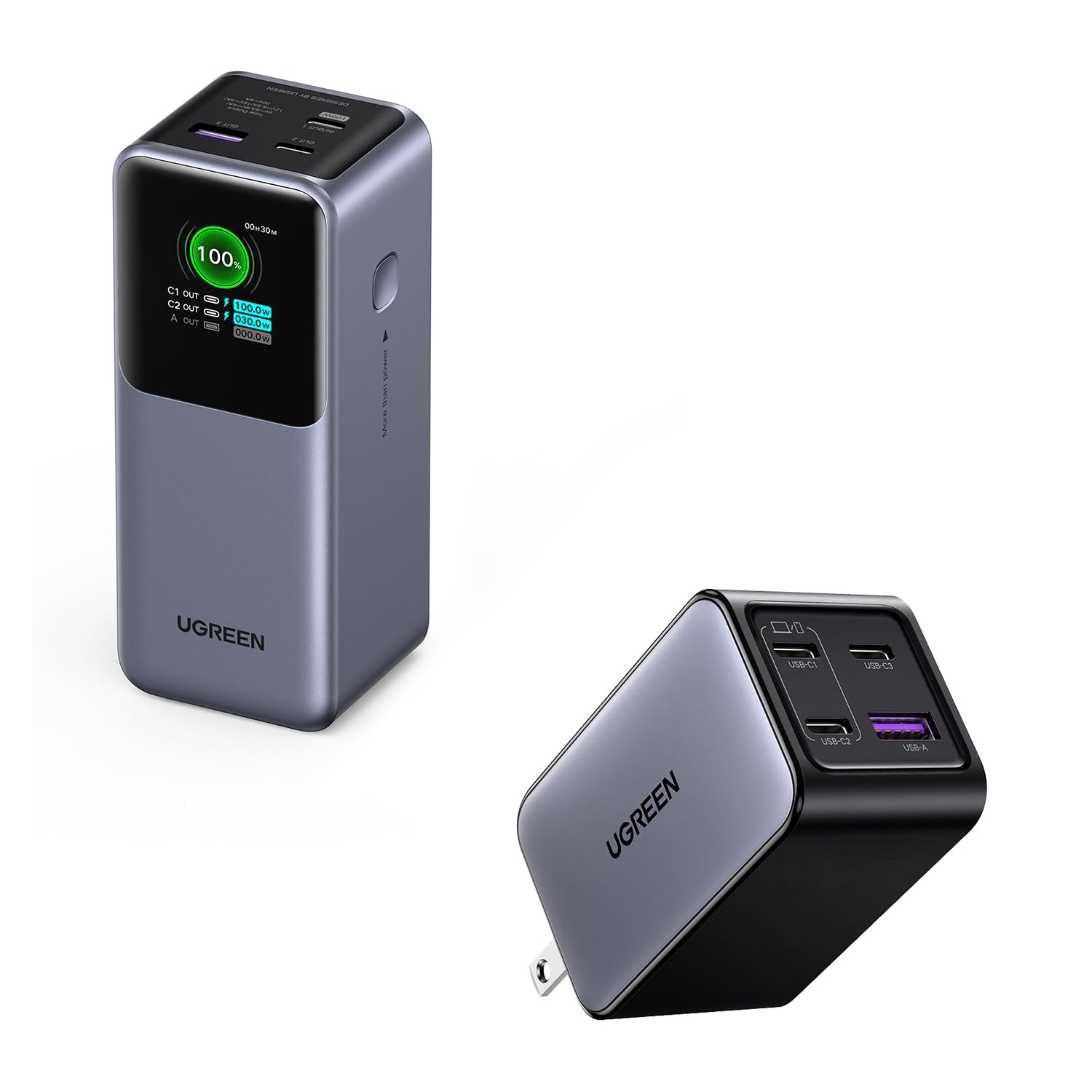
Imagen: Frente view of the UGREEN Nexode 20000mAh Power Bank, highlighting its display and compact form factor.
- Capacidad: 20000 mAh
- Max Output (OUT1): 100 W
- Puertos: Multiple USB-C and USB-A output ports
- Mostrar: TFT Smart Display for real-time charging information
- Características: Light & Compact design, 100W Fast Charging, Durable & Safe automotive-grade batteries with multiple protection.

Image: Close-up of the power bank's TFT Smart Display, showing battery percentage, input/output power, and real-time voltage / actual.
UGREEN 65W USB C Charger Block
The UGREEN 65W USB C Charger is a compact GaN charger with a foldable plug, designed for efficient multi-device charging.

Image: The UGREEN 65W USB C Charger Block, showing its four ports (3 USB-C, 1 USB-A).
- Salida máxima: 65 W (puerto único)
- Puertos: 3 USB-C ports, 1 USB-A port
- Características: GaN technology, Foldable plug, 4-Port Versatility for simultaneous charging.

Image: The UGREEN 65W USB C Charger demonstrating its compact size and foldable plug for easy travel.
Configuración
Carga inicial del banco de energía
- Connect the UGREEN 65W USB C Charger Block to a wall outlet.
- Use one of the provided USB-C to USB-C cables to connect the charger block to an input port (e.g., C1 IN) on the UGREEN Nexode Power Bank.
- The power bank's TFT Smart Display will show the charging status and remaining battery percentage. Fully charge the power bank before first use.
Connecting Devices to Charger Block
The 65W USB C Charger Block features 3 USB-C ports and 1 USB-A port. Connect your devices using appropriate charging cables.

Image: The UGREEN 65W GaN Charger simultaneously charging a laptop, phone, tablet, and earbuds, demonstrating its 4-in-1 capability.
Operante
Charging Devices with Power Bank
- Connect your device (e.g., laptop, smartphone, tablet) to an output port (OUT1, OUT2, A OUT) on the power bank using a compatible USB-C or USB-A cable.
- The power bank will automatically begin charging your device. The TFT Smart Display will show the output power for each port.
- For optimal fast charging, use the OUT1 port for devices requiring up to 100W.

Image: The UGREEN Nexode Power Bank connected to a MacBook Pro 16", illustrating its 100W super fast charging capability.
Understanding the TFT Smart Display
La pantalla proporciona información en tiempo real:
- Batería restante: Porcentajetage de carga izquierda.
- Potencia de entrada/salida: Wat actualtage for each connected port (C1 IN, C2 OUT, A OUT).
- Modo de carga lenta: Indicated when charging low-power devices.
- Volumen en tiempo realtage/Actual: Detailed electrical readings.
Charging Devices with 65W Charger Block
- Conecte el cargador a una toma de pared estándar.
- Connect your devices to any of the available USB-C or USB-A ports using compatible cables.
- The charger will automatically detect and deliver the optimal charging power for each connected device.
- For single-port use, USB C1/C2 ports support up to 65W max output.

Image: The UGREEN 65W USB C Charger connected to a MacBook Air M2, demonstrating its 65W full-speed charging capability.
Mantenimiento
- Keep the power bank and charger clean and dry. Avoid exposure to liquids, high humidity, or extreme temperatures.
- Do not drop, disassemble, or attempt to repair the devices yourself.
- Conservar en un lugar fresco y seco cuando no esté en uso.
- Para una salud óptima de la batería, cargue completamente el banco de energía al menos una vez cada tres meses si lo almacenará durante períodos prolongados.
Solución de problemas
- El dispositivo no se carga: Ensure cables are securely connected. Verify the power bank has sufficient charge or the charger block is plugged into a live outlet. Try a different cable or port.
- Carga lenta: Ensure your device and cable support fast charging. Some devices may limit charging speed if they are too hot or cold. Check if multiple devices are connected, as power output may be distributed.
- Power bank display not working: Ensure the power bank is charged. If the issue persists, contact customer support.
- Calentamiento excesivo: It is normal for charging devices to become slightly warm. If either the power bank or charger becomes excessively hot, disconnect it immediately and contact customer support.
Presupuesto
UGREEN Nexode 20000mAh Power Bank
- Capacidad: 20000 mAh
- Max Output (OUT1): 100 W
- Puertos: USB tipo C, USB tipo A
- Característica especial: Fast Charging, TFT Smart Display
UGREEN 65W USB C Charger Block
- Salida máxima: 65 W (puerto único)
- Puertos: 3x USB-C, 1x USB-A
- Característica especial: GaN Technology, Foldable Plug, Fast Charging
Información de seguridad
- No exponer al fuego o al calor extremo.
- Avoid using in environments with high humidity or near water.
- Mantener fuera del alcance de los niños.
- Utilice únicamente cables originales o compatibles certificados.
- No cortocircuite el dispositivo.
Garantía y soporte
Los productos UGREEN incluyen una garantía estándar. Para obtener información detallada sobre la garantía, soporte técnico o asistencia técnica, visite el sitio web oficial de UGREEN. webSitio web o contacte directamente con el servicio de atención al cliente. Tenga a mano el modelo del producto y la información de compra al contactar con el servicio de atención al cliente.