
1. Introducción
Thank you for choosing the CTOLITY AP1000 Portable Power Station. This device is designed to provide reliable and portable power for various applications, including outdoor camping, RV use, and home backup. Featuring a 1024Wh LiFePO4 battery and 1600W AC output, it offers fast charging capabilities and multiple output ports to meet your power needs.
Este manual proporciona información esencial para el funcionamiento seguro y eficiente de su central eléctrica. Léalo detenidamente antes de usarlo y consérvelo para futuras consultas.
2. Información importante de seguridad
Observe siempre las siguientes precauciones de seguridad para evitar lesiones o daños al dispositivo:
- No desmonte, repare ni modifique la unidad.
- Mantenga la unidad alejada del fuego, el agua y temperaturas extremas.
- No utilice ni guarde la unidad bajo la luz solar directa ni en entornos de alta temperatura.
- Asegúrese de que haya una ventilación adecuada durante el uso para evitar el sobrecalentamiento.
- Mantener fuera del alcance de los niños y las mascotas.
- Utilice únicamente accesorios y cables de carga aprobados.
- Evite dejar caer o someter la unidad a impactos fuertes.
- En caso de incendio, utilice un extintor de polvo seco. El agua puede causar una descarga eléctrica.
3. ¿Qué hay en la caja?
Verifique que todos los siguientes elementos estén incluidos en su paquete:
- CTOLITY AP1000 Portable Power Station
- Cable de carga de CA (entrada)
- Car Input Charging Cable (Car to XT60 Input)
- Cable de carga solar (entrada MC4 a XT60)
- Manual de usuario

Image: Package contents of the CTOLITY AP1000 Portable Power Station.
4. Producto terminadoview y configuración
4.1. Disposición del dispositivo
Familiarize yourself with the ports and controls on your AP1000 power station:

Image: Front panel of the CTOLITY AP1000, highlighting various input and output ports and the LCD display.
- Power Button/Main Switch: Enciende y apaga la unidad.
- Pantalla LCD: Shows input/output power, battery level, and warning icons.
- Salida CA (110 V): Two pure sine wave AC outlets (1600W total).
- Salida USB: Four QC3.0 USB-A ports (18W each).
- Salida tipo C: One PD100W and one 22.5W USB-C port.
- Salida CC (12 V/18 A): Two DC output ports.
- Salida del cargador de coche: One 12V/18A car charging output.
- Solar Panel Input (XT60): Up to 500W input for solar charging.
- AC Input (1000W): For fast wall charging.
- Protector de sobrecarga: Característica de seguridad.
- Luces LED: Integrated lighting with multiple modes.
4.2. Carga inicial
Before first use, fully charge the power station. Connect the AC charging cable to the AC input port and plug it into a wall outlet. The LCD display will indicate charging status.
5. Operación
5.1. Carga de la central eléctrica
The AP1000 offers multiple charging methods:
- Toma de pared de CA: Connect the AC charging cable to the AC input. The unit can fully recharge in approximately 1.2 hours (1000W input).
- Panel solar: Connect compatible solar panels (up to 500W) to the XT60 solar input port using the provided solar charging cable. The built-in MPPT controller optimizes charging. Full charge can be achieved in approximately 2 hours under optimal sunlight.
- Cargador de coche: Use the car charging cable to connect the unit to your vehicle's 12V outlet.

Image: Illustration of the three charging methods: solar, AC, and car charging.
5.2. Powering External Devices
Para alimentar sus dispositivos:
- Press the main power button to turn on the power station.
- Press the corresponding output button (AC, USB, DC) for the port you wish to use. The icon for the activated output will appear on the LCD.
- Conecte su dispositivo al puerto de salida apropiado.
- When finished, turn off the output ports and then the main power button to conserve battery.

Image: The CTOLITY AP1000 powering various devices simultaneously.
5.3. Información de la pantalla LCD
The intuitive LCD display provides real-time status updates:
- Potencia de entrada: Current power being drawn for charging.
- Potencia de salida: Current power being supplied to devices.
- Nivel de batería restante: Porcentajetage de cargo restante.
- Iconos de advertencia: Indicators for overload, high/low temperature, fan operation, etc.
- Remaining Charging/Discharging Time: Tiempo estimado hasta que esté lleno o vacío.

Image: Close-up of the LCD display with explanations of each indicator.
5.4. Función de iluminación LED
La central eléctrica incluye una luz LED integrada con múltiples modos:
- Brillo bajo: Para iluminación general.
- Brillo alto: For stronger light.
- Modo estroboscópico: Luz intermitente para señalización.
- Modo SOS: International Morse code for distress.

Image: The CTOLITY AP1000's LED light illuminating a campsitio.
6. Mantenimiento y almacenamiento
6.1. Cuidado de la batería
The AP1000 uses LiFePO4 (Lithium Iron Phosphate) battery cells, known for their longevity and safety. The advanced Battery Management System (BMS) provides comprehensive protection:
- Protección contra sobrecarga
- Protección contra descarga
- Protección contra sobrecorriente
- Sobre Voltage Protección
- Protección contra cortocircuitos
- Protección contra sobrecarga
- Protección térmica
- Battery Failure Protection
To maximize battery lifespan (rated for 3,000 cycles to 80% capacity):
- Evite descargar completamente la batería con frecuencia.
- Guarde la unidad con al menos el 50% de carga si no la utilizará durante períodos prolongados.
- Recharge the unit every 3-6 months if stored, even if unused.
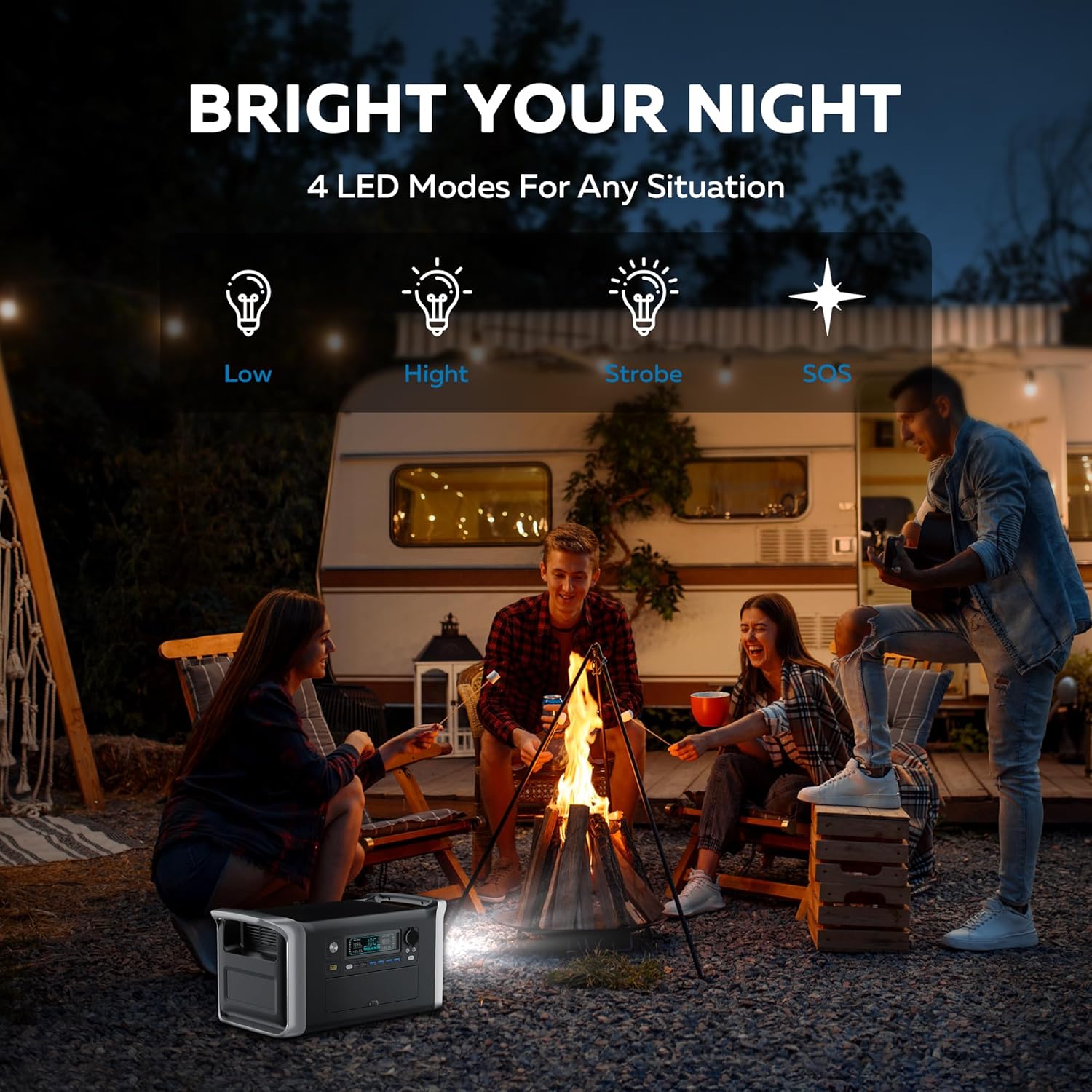
Image: Diagram showing the LiFePO4 battery structure and BMS protection features.
6.2. Limpieza y almacenamiento
- Limpie la unidad con un paño seco y suave. No utilice limpiadores abrasivos ni disolventes.
- Conservar en un lugar fresco y seco, alejado de la luz solar directa y la humedad.
- Asegúrese de que la unidad esté apagada antes de guardarla.
- The unit is designed to operate in temperatures from -20°C to 40°C.

Image: The CTOLITY AP1000 operating in cold temperatures.
7. Especificaciones
| Característica | Detalle |
|---|---|
| Marca | CTOLIDAD |
| Nombre del modelo | Apower1000 Portable Power Station |
| Tipo de batería | LiFePO4 (fosfato de hierro y litio) |
| Capacidad | 1024 Wh |
| Potencia de salida CA | 1600 W (nominal), 1800 W (pico) |
| Vol. De salida de CAtage | 110 voltios |
| Entrada de corriente alterna (CA) | 1000W (carga rápida) |
| Entrada solar (XT60) | Hasta 500W |
| Salida USB-A | 4 x QC3.0 (18W each) |
| Salida USB-C | 1 PD100W, 1 de 22.5W |
| Salida DC | 2 x 12 V/18 A |
| Salida de cargador de coche | 1 x 12 V/18 A |
| Tiempo de carga (CA) | Aproximadamente 1.2 horas |
| Tiempo de carga (solar) | Approx. 2 hours (500W input) |
| Ciclos de vida | 3,000 ciclos hasta un 80 %+ de capacidad |
| Dimensiones | 17.6" de largo x 9.2" de ancho x 8.6" de alto |
| Peso del artículo | 36.4 libras |
| Temperatura de funcionamiento | -20°C a 40°C |
| Material | abdominales |
| Nivel de sonido | 40 dB |
8. Solución de problemas
If you encounter issues with your CTOLITY AP1000, please refer to the following common problems and solutions:
- La unidad no se enciende: Ensure the power button is pressed firmly. Check if the battery is completely depleted; if so, connect to an AC outlet for charging.
- No hay salida de los puertos: Ensure the specific output button (AC, USB, DC) for the desired port is activated. Check if the device you are trying to power exceeds the power station's output limits (1600W AC).
- Carga lenta:
- Carga de CA: Verify the AC cable is securely connected and the wall outlet is functioning.
- Carga solar: Ensure solar panels are in direct sunlight and free from obstructions. Check cable connections. Cloudy weather or incorrect panel angle will reduce charging speed.
- Carga del coche: Confirm the car engine is running for optimal charging.
- Advertencia de sobrecarga: If an overload icon appears on the LCD, disconnect some devices to reduce the total power draw. The unit will automatically reset after a few seconds.
- Advertencia de temperatura: If high or low temperature icons appear, move the unit to an environment within the recommended operating temperature range (-20°C to 40°C) and allow it to cool down or warm up before resuming use.
Si el problema persiste, póngase en contacto con el servicio de atención al cliente.
9. Garantía y atención al cliente
The CTOLITY AP1000 Portable Power Station comes with a Garantía del fabricante de 1 año a partir de la fecha de compra. Esta garantía cubre defectos de materiales y mano de obra en condiciones normales de uso.
La garantía no cubre:
- Daños causados por mal uso, abuso o modificación no autorizada.
- Daños causados por desastres naturales o accidentes.
- Desgaste normal.
For warranty claims, technical assistance, or any questions regarding your product, please contact CTOLITY customer support through the retailer where you purchased the product or visit the official CTOLITY websitio para información de contacto.
CTOLITY Official Websitio: Visit the CTOLITY Store on Amazon