
1. Introducción
The MECCANIXITY MPPT Solar Charge Controller is designed to optimize the energy utilization efficiency of photovoltaic systems. It features a built-in maximum power tracking program to ensure your solar panels operate at their peak output point. This intelligent regulator is suitable for 12V/24V auto-adaptive systems and includes an LCD display for monitoring and configuration, along with dual USB ports for convenience.
2. Información de seguridad
- Asegúrese de que la batería tenga suficiente voltajetage for the controller to recognize the correct battery type during first use.
- Only use photovoltaic panels as a charging source. Do not connect DC or other power sources.
- Always connect the battery to the charge controller first, then connect the solar panel. When disconnecting, disconnect the solar panel first, then the battery.
- Ensure all wiring connections are secure and properly insulated to prevent short circuits or damage to equipment.
- Avoid touching bare wires. If necessary, use electrical tape to cover exposed wire ends.
3. Producto terminadoview

Figura 3.1: Frente view of the MECCANIXITY MPPT Solar Charge Controller 100A, showing the LCD display, control buttons, and dual USB ports.

Figura 3.2: detallada view of the controller's features, including the LCD display, Menu, Page Up, Page Down/Manual buttons, and 2 USB ports.
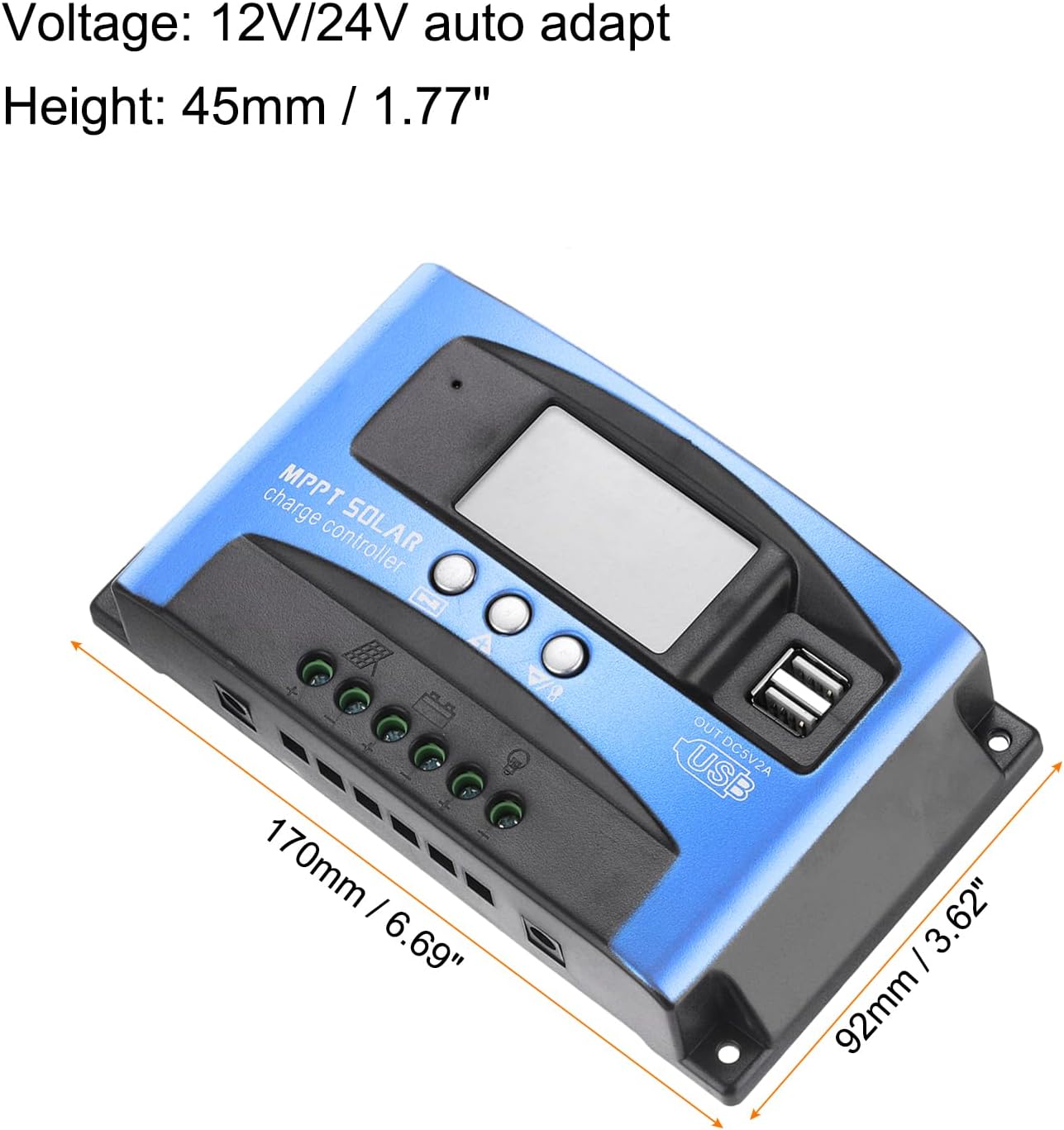
Figure 3.3: Dimensions of the MECCANIXITY MPPT Solar Charge Controller 100A, measuring 170mm (6.69") in length, 92mm (3.62") in width, and 45mm (1.77") in height.
Características principales:
- Tecnología MPPT: Maximizes energy harvest from solar panels.
- Pantalla LCD: Provides real-time status and data, allowing for easy mode switching and parameter configuration.
- Puertos USB duales: 5V/2A Max output for charging external devices.
- Vol automáticotage Adaptation: Supports 12V/24V systems.
- Protección integral: Incluye over-voltage, short circuit, overload, over-charge, and over-discharge protection.
4. Configuración e instalación
Diagrama de cableado:

Figure 4.1: Wiring diagram illustrating connections for solar panel, battery, load, and inverter.
Pasos de instalación:
- Conecte la batería: Connect the battery to the charge regulator's positive and negative terminals first. Ensure correct polarity.
- Conecte el panel solar: Connect the photovoltaic module (solar panel) to the charge regulator's positive and negative terminals.
- Conectar la carga: Connect the consumer (load) to the charge regulator's positive and negative terminals.
Important: Always connect the battery first and disconnect the solar panel first to prevent damage to the controller.
Video de instalación:
Video 4.1: This video demonstrates the proper installation sequence for the solar charge controller, emphasizing the importance of connecting the battery before the solar panel and disconnecting the solar panel first. It shows how to secure wiring and check connections.
5. Instrucciones de funcionamiento
LCD Display and Button Functions:
The LCD display provides real-time information about your solar system. The control buttons (Menu, Page Up, Page Down/Manual) allow you to navigate through different screens and adjust parameters.
- Pantalla principal: Muestra el volumen actual de la batería.tage y estado de carga.
- Flotador Voltage: Muestra el voltage at which the battery is maintained after full charge (e.g., 13.7V for 12V systems).
- Descarga Reconexión: El voltage at which the load will be reconnected after being disconnected due to low battery (e.g., 12.6V for 12V systems).
- Parada de descarga: El voltage at which the load will be disconnected to protect the battery from over-discharge (e.g., 10.7V for 12V systems).
- Tipo de batería: Allows selection of battery type (e.g., Sealed, Gel, Flooded).
- Modo de trabajo: Configures load output modes (e.g., 24-hour output, dusk-to-dawn, timed output).
Press the 'Menu' button to cycle through different display interfaces. Use the 'Page Up' and 'Page Down/Manual' buttons to adjust settings when in configuration mode (typically by long-pressing the 'Menu' button to enter setting mode).
6. Mantenimiento
- Revise periódicamente todas las conexiones del cableado para verificar su estanqueidad y ausencia de corrosión.
- Mantenga el controlador limpio y libre de polvo y residuos para garantizar una disipación adecuada del calor.
- Asegúrese de que haya una ventilación adecuada alrededor del controlador.
- Supervise la pantalla LCD para detectar códigos de error o lecturas inusuales.
7. Solución de problemas
Problemas comunes y soluciones:
- Sin pantalla/Sin energía: Verifique las conexiones de la batería y el vol.tage. Ensure the battery has sufficient charge.
- La batería no se carga: Verify solar panel connections and ensure adequate sunlight. Check for shading on solar panels. Confirm correct battery type setting.
- La carga no funciona: Check load connections. Ensure the battery voltage is above the discharge reconnect voltage. Verify load work mode settings.
- exceso de volumentagProtección contra sobrecorriente: The controller will automatically disconnect to protect the system. Identify the cause (e.g., too many solar panels, incorrect battery voltage) and rectify it before restarting.

Figure 7.1: The controller features a 7-point security protection system, including short circuit, open circuit, over current, over charge, over voltage, over load, and over discharge protection.
8. Especificaciones
| Parámetro | Valor |
|---|---|
| Volumentage | 12V/24V Auto Adapt |
| Corriente de carga nominal | 100A |
| Corriente de descarga | 30A |
| Tamaño | 170*92*45 mm (6.69 x 3.62 x 1.77 pulgadas) |
| Temperatura de funcionamiento | -35-80℃ / -31°F-176°F |
| Vol. De carga flotantetagmi (12 V/24 V) | 13.8 V / 27.6 V |
| Salida USB | 5V / 2A Max |
| Peso del artículo | 10.1 onzas |
9. Garantía y soporte
For warranty information and technical support, please refer to the product packaging or contact MECCANIXITY customer service directly. Keep your purchase receipt for warranty claims.