
Introducción
This manual provides detailed instructions for the GOBOULT Mirage Smart Watch. Please read this guide thoroughly to ensure proper setup, operation, and maintenance of your device. This smartwatch features a 1.39-inch HD display, Bluetooth calling, comprehensive health monitoring, and various sports modes.
¿Qué hay en la caja?
- GOBOULT Mirage Smart Watch
- Cable de carga
- Manual de usuario
- Tarjeta de garantía
Configuración
1. Carga del dispositivo
Before initial use, fully charge your GOBOULT Mirage Smart Watch. Connect the provided charging cable to the charging port on the back of the watch and to a standard USB power adapter (not included). The watch typically charges within 120 minutes.

Image: GOBOULT Mirage Smart Watch displaying its features, including charging capability.
2. Emparejamiento con su teléfono inteligente
- Download the official GOBOULT companion app from your smartphone's app store (available for iOS and Android).
- Asegúrese de que Bluetooth esté habilitado en su teléfono inteligente.
- Open the app and follow the on-screen instructions to search for and connect to your GOBOULT Mirage Smart Watch.
- Confirme la solicitud de emparejamiento tanto en su reloj como en su teléfono inteligente.
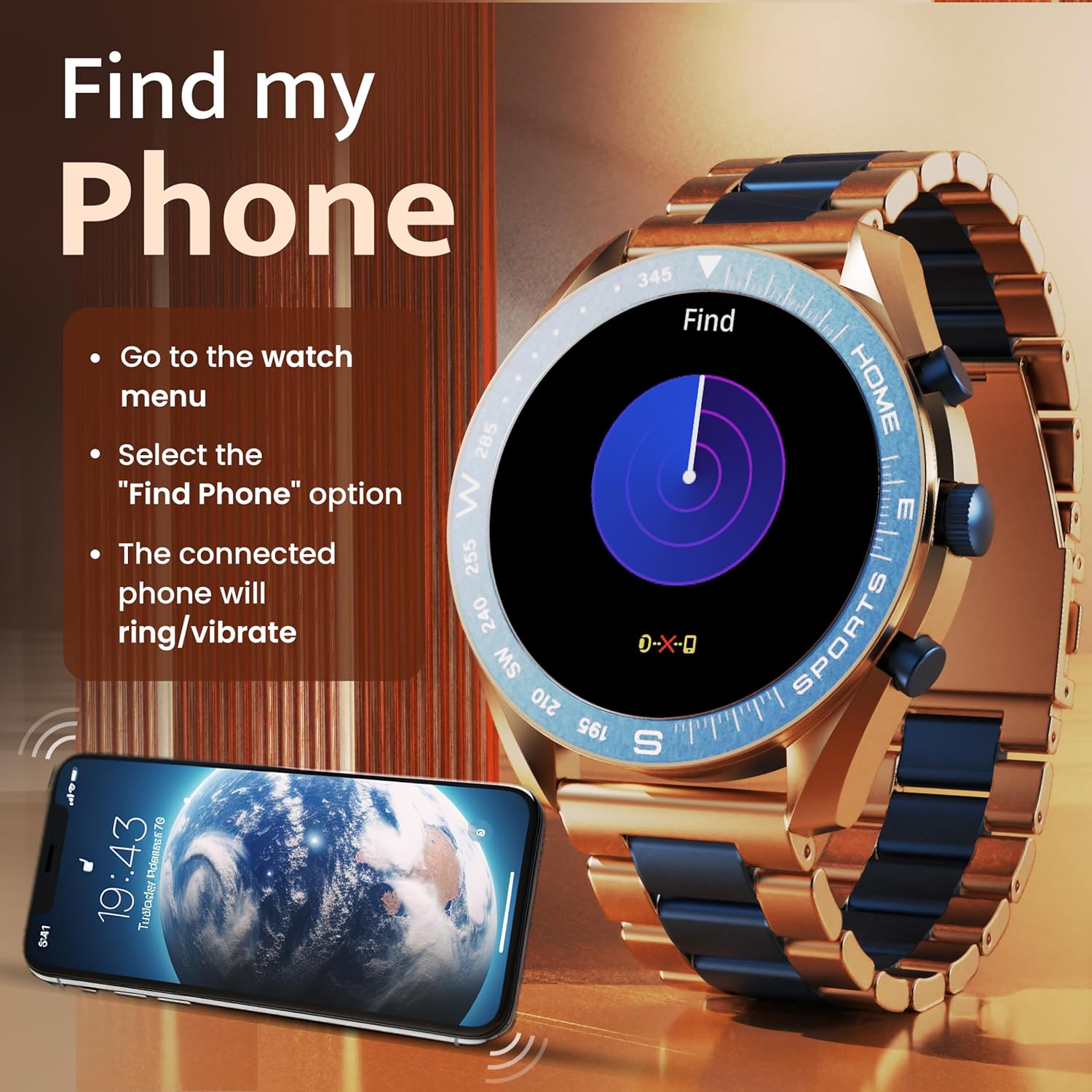
Image: The GOBOULT Mirage Smart Watch connected to a smartphone, illustrating connectivity.
Instrucciones de funcionamiento
1. Visualización y navegación
The GOBOULT Mirage features a 1.39-inch HD display with 360x360 pixels resolution and 500 nits peak brightness for clear visibility. Navigate the watch interface using touch gestures and the digital crown.
- Corona digital: Press to power on/off, switch UIs, and navigate menus. Rotate to scroll through options.
- Botones laterales: Use for quick access to specific functions, such as launching sports modes.

Image: GOBOULT Mirage Smart Watch highlighting the digital crown and its various functions.
2. Llamadas Bluetooth
With the built-in speaker and microphone, you can make and receive calls directly from your wrist once paired with your smartphone via Bluetooth 5.3.
- To answer a call, tap the green icon on the watch screen.
- To reject a call, tap the red icon.
- To make a call, access the dial pad or contacts through the watch menu.
Image: GOBOULT Mirage Smart Watch showing an incoming call notification.
3. Monitoreo de la salud
The GOBOULT Mirage provides comprehensive health tracking features:
- SpO2 Blood Oxygen Monitor: Mide los niveles de oxígeno en sangre.
- Monitor de frecuencia cardíaca: Seguimiento de frecuencia cardíaca 24 horas al día, 7 días a la semana.
- Monitor de sueño: Realiza un seguimiento de los patrones y la calidad del sueño.
- Breath Training Mode: Le guía a través de ejercicios de respiración.
- Recordatorio de beber agua: Te incita a mantenerte hidratado.
- Recordatorio de sedentarismo: Alerts you after periods of inactivity.
- Seguimiento de actividad: Registra los pasos, la distancia y las calorías quemadas.
- Seguimiento del ciclo menstrual: Helps monitor menstrual cycles.

Image: GOBOULT Mirage Smart Watch showcasing its complete health suite on the display.
4. Modos deportivos
Track your performance across over 120 sports modes. Access these modes quickly using the shortcut buttons.
- Examples include Running, Cycling, Yoga, Cricket, Badminton, and Basketball.

Image: GOBOULT Mirage Smart Watch showing the selection of over 120 sports modes.
5. Mira las caras
Personalize your watch with over 300 cloud-based watch faces. You can also customize the dial to match your style.

Image: GOBOULT Mirage Smart Watch illustrating the variety of 300+ cloud watch faces.
6. Notificaciones inteligentes
Receive SMS and other smart notifications directly on your watch. Ensure your watch is connected to your phone via Bluetooth for this feature to function.

Image: GOBOULT Mirage Smart Watch showing a push notification from a messaging app.
7. Asistente de voz con IA
Access an intelligent AI voice assistant for hands-free control. Long press the designated button or use the voice assistant icon on the screen to activate.
8. Encuentra mi teléfono
If you misplace your connected smartphone, use the 'Find My Phone' feature on your watch:
- Go to the watch menu.
- Select the "Find Phone" option.
- The connected phone will ring or vibrate, helping you locate it.
Image: GOBOULT Mirage Smart Watch showing the 'Find My Phone' interface.
9. Resistencia al agua
The GOBOULT Mirage Smart Watch is IP67 water-resistant, offering protection against dust and temporary immersion in water. It is suitable for daily wear and activities like hand washing or light rain.

Image: GOBOULT Mirage Smart Watch demonstrating its IP67 water resistance.
10. Mini Games
The watch includes several mini-games for entertainment during leisure time.
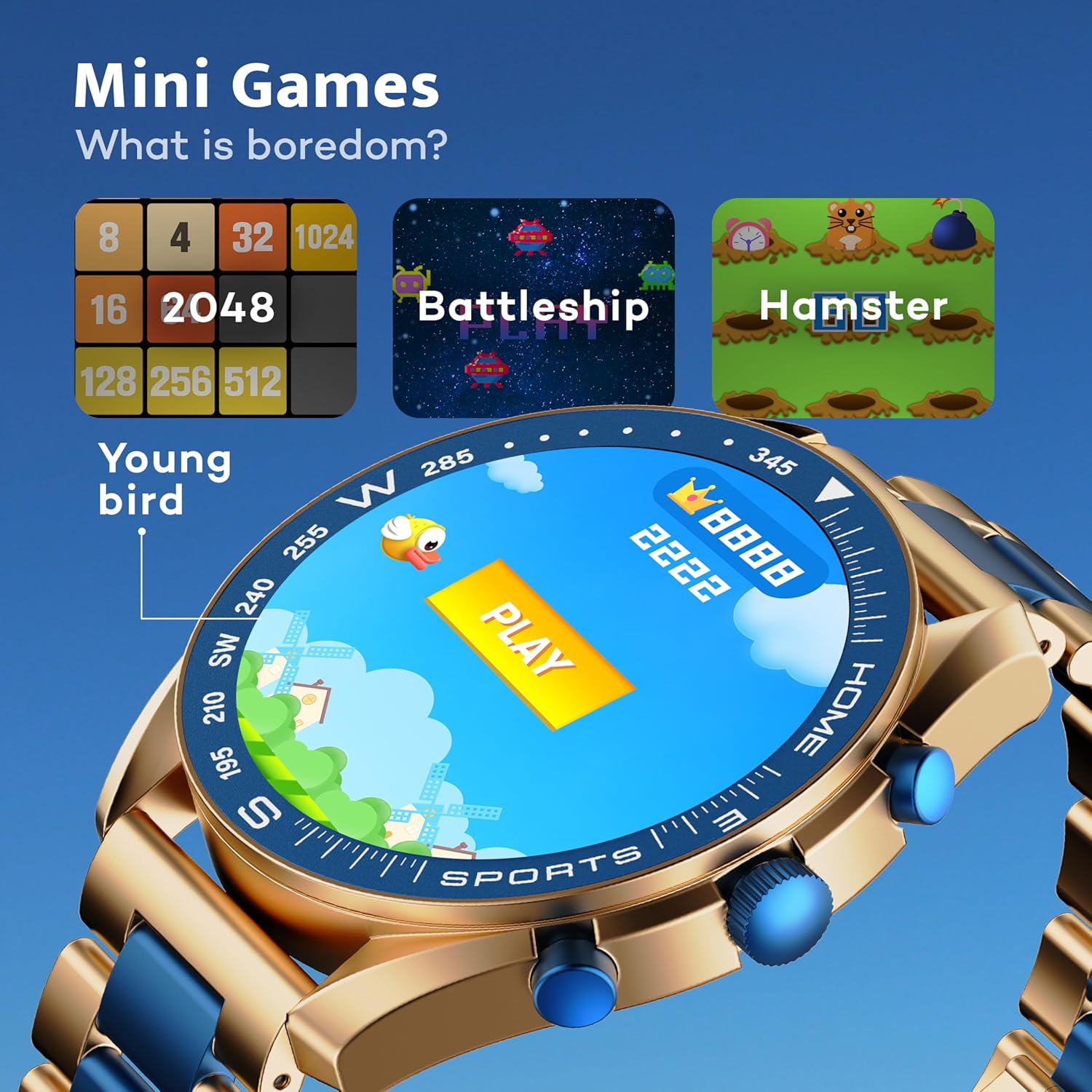
Image: GOBOULT Mirage Smart Watch showing the selection of mini-games.
Mantenimiento
1. Limpieza
- Limpie la pantalla y el cuerpo del reloj con un paño suave y seco.
- Para suciedad difícil, utilice un limpiador ligeramenteamp cloth and immediately dry the watch.
- Evite utilizar productos químicos agresivos o materiales abrasivos, ya que pueden dañar el acabado.
2. Pautas de resistencia al agua
- The IP67 rating means the watch is protected from dust and can withstand immersion in water up to 1 meter for 30 minutes.
- Do not use the watch for swimming, showering with hot water, or diving.
- Evite exponer el reloj a agua a alta presión o vapor.
- If the watch gets wet, dry it thoroughly before charging or using any buttons.
Solución de problemas
- El reloj no enciende: Asegúrese de que el reloj esté completamente cargado. Conéctelo al cargador durante al menos 30 minutos.
- No se puede emparejar con el teléfono: Asegúrate de que el Bluetooth esté activado en tu teléfono y que el reloj esté dentro del alcance. Reinicia ambos dispositivos e intenta emparejarlos de nuevo.
- Datos de salud inexactos: Asegúrese de que el reloj esté bien ajustado a su muñeca, ni demasiado apretado ni demasiado suelto. Limpie los sensores con regularidad.
- Duración de la batería corta: Reduce el brillo de la pantalla, desactiva las notificaciones innecesarias y limita el monitoreo continuo de la frecuencia cardíaca si no es necesario.
- Problemas de visualización: Reinicia el reloj. Si el problema persiste, contacta con atención al cliente.
Presupuesto
| Característica | Detalle |
|---|---|
| Marca | GOBOULT |
| Número de modelo | 8906133853464 |
| Tamaño de la pantalla | 1.39 pulgadas |
| Brillo | 500 Nits |
| Material del marco | Aleación de zinc |
| Tipo inalámbrico | Bluetooth 5.3 |
| Sistema operativo | iOS, Android |
| Resistencia al agua | IP67 |
| Tiempo de carga de la batería | 120 minutos |
| Tipo de batería | Polímero de litio |
| Peso del artículo | 106 gramos |
Garantía y soporte
Your GOBOULT Mirage Smart Watch comes with a warranty card included in the box. Please refer to this card for details regarding warranty coverage and terms.
For technical support, troubleshooting assistance, or warranty claims, please contact GOBOULT customer service through their official websitio o la información de contacto proporcionada en su tarjeta de garantía.