
Introducción
Welcome to the GOBOULT Mirage Smart Watch user manual. This guide provides detailed instructions on how to set up, operate, and maintain your new smartwatch. Please read this manual thoroughly to ensure optimal performance and longevity of your device.
Producto terminadoview
The GOBOULT Mirage Smart Watch is a feature-rich device designed to enhance your daily life with advanced health monitoring, communication, and fitness tracking capabilities. It features a vibrant 1.39-inch HD display, Bluetooth calling, and a durable zinc alloy frame.
Características principales:
- Pantalla HD de 1.39 pulgadas: Bright and clear screen with 500 nits brightness and 360x360 pixel resolution.
- Llamadas Bluetooth: Make and receive calls directly from your wrist with a built-in speaker and microphone.
- Vigilancia Integral de la Salud: Includes SpO2, heart rate, blood pressure, sleep tracking, breath training, and menstrual cycle tracking.
- Más de 120 modos deportivos: Track a wide range of physical activities with detailed metrics.
- Asistente de voz con IA: Hands-free control and access to features.
- Resistencia al agua IP67: Diseñado para soportar salpicaduras y polvo.
- Esferas de reloj personalizables: Over 300 cloud-based watch faces to personalize your device.
- Notificaciones inteligentes: Reciba alertas de llamadas, mensajes y notificaciones de aplicaciones.
- Batería de larga duración: Hasta 7 días de uso típico.
¿Qué hay en la caja?
- GOBOULT Mirage Smart Watch (Coal Black)
- Cable de carga
- Manual de usuario
- Tarjeta de garantía

Imagen: Más alláview of the GOBOULT Mirage Smart Watch highlighting its main features.
Guía de configuración
1. Carga del reloj inteligente
- Conecte el cable de carga magnético a los pines de carga en la parte posterior de su reloj inteligente.
- Conecte el extremo USB del cable a un adaptador de corriente USB estándar (se recomienda 5 V/1 A) o al puerto USB de una computadora.
- The watch display will show a charging indicator. A full charge takes approximately 120 minutes.
- Ensure the charging pins are clean and dry before charging to prevent corrosion.
2. Encendido / apagado
- Encendido: Press and hold the side button (digital crown) for a few seconds until the GOBOULT logo appears.
- Apagado: From the watch face, swipe down to access quick settings, or navigate to the settings menu. Select "Power Off" and confirm. Alternatively, press and hold the side button until the power off option appears.
3. Emparejamiento con su teléfono inteligente
- Download the official GOBOULT companion app from your smartphone's app store (available for iOS and Android).
- Asegúrese de que Bluetooth esté habilitado en su teléfono inteligente.
- Open the GOBOULT app and follow the on-screen instructions to create an account or log in.
- In the app, select "Add Device" or a similar option to search for your smartwatch.
- Select "GOBOULT Mirage" from the list of available devices.
- Confirme la solicitud de emparejamiento tanto en su teléfono inteligente como en el reloj inteligente.
- Una vez emparejado, el reloj sincronizará los datos con tu teléfono y podrás personalizar la configuración a través de la aplicación.
Instrucciones de funcionamiento
Navegación básica:
- Pantalla táctil: Desliza el dedo hacia la izquierda/derecha, arriba/abajo para navegar por los menús y las notificaciones. Toca para seleccionar elementos.
- Digital Crown (Side Button):
- Presione una vez: Return to the watch face from any screen, or wake the screen.
- Mantenga presionado: Power on/off, or access the AI Voice Assistant (configurable).
- Girar: Scroll through menus, lists, or adjust settings.
- Botón de acceso directo: The second physical button on the side can be customized for quick access to specific functions, such as launching sports modes.

Image: Digital crown and button functionalities for navigation and quick access.
Vigilancia de la salud
The GOBOULT Mirage Smart Watch offers a comprehensive suite of health tracking features. For accurate readings, ensure the watch is worn snugly on your wrist, about one finger's width from your wrist bone.
- Monitoreo del ritmo cardíaco: El reloj rastrea continuamente tu ritmo cardíaco. View datos en tiempo real en el reloj o tendencias detalladas en la aplicación.
- Monitoreo de SpO2 (oxígeno en sangre): Measure your blood oxygen levels on demand. Navigate to the SpO2 function on your watch and remain still for accurate results.
- Monitoreo de la presión arterial: Access the blood pressure feature on your watch for readings.
- Monitoreo del sueño: Wear your watch to bed to track your sleep patterns, including deep sleep, light sleep, and awake times. Data is available in the app.
- Breath Training Mode: Follow guided breathing exercises to help reduce stress and improve relaxation.
- Seguimiento de actividad: Monitorea los pasos, la distancia y las calorías quemadas a lo largo del día.
- Recordatorio de beber agua: Set reminders in the app to ensure you stay hydrated.
- Recordatorio de sedentarismo: Recibe alertas cuando hayas estado inactivo durante demasiado tiempo, alentándote a moverte.
- Seguimiento del ciclo menstrual: For female users, track and predict menstrual cycles through the companion app.

Image: The watch's health sensors and a summary of its health monitoring capabilities.
Modos deportivos
The GOBOULT Mirage Smart Watch supports over 120 sports modes to accurately track your workouts. From running to yoga, you can monitor your performance and progress.
Using Sports Modes:
- Access the sports mode menu from the watch's main interface or by using the dedicated shortcut button.
- Scroll through the list and select your desired activity (e.g., Running, Cycling, Yoga, Cricket, Badminton, Basketball).
- Tap to start the activity. The watch will begin recording data such as duration, heart rate, calories burned, and distance (where applicable).
- To pause or end an activity, swipe right or press the side button and follow the on-screen prompts.
- Review your workout summaries on the watch or in detail within the companion app.

Image: The watch interface showing various sports modes and quick access options.
Llamadas Bluetooth y notificaciones inteligentes
With Bluetooth 5.3 connectivity, your GOBOULT Mirage Smart Watch allows you to manage calls and receive notifications directly on your wrist.
Llamadas Bluetooth:
- Asegúrese de que su reloj esté emparejado con su teléfono a través de Bluetooth.
- Haciendo llamadas: Acceda al teclado de marcación o a la lista de contactos de su reloj para iniciar una llamada.
- Recibir llamadas: When a call comes in, the watch will display the caller ID. You can answer or reject the call directly from your wrist using the built-in speaker and microphone.
- Sincronización de contactos: Synchronize your phone contacts with the watch through the companion app for easy access.
Notificaciones inteligentes:
- Enable app notifications in the GOBOULT companion app on your smartphone.
- Your watch will display incoming messages, social media alerts, and other app notifications.
- Swipe up or down on the watch face to view su historial de notificaciones.

Image: Bluetooth calling features and interface on the smartwatch.

Image: Smart notifications and other quick access features like calculator and voice assistant.
Personalización
Caras de reloj:
Personalize your GOBOULT Mirage Smart Watch with over 300 cloud-based watch faces. You can change the watch face directly from the device or through the companion app.
- En guardia: From the watch face, press and hold the screen. Swipe left or right to browse available watch faces and tap to select.
- A través de la aplicación: Open the GOBOULT app, navigate to the watch face section, and explore a wider selection of designs. Download and apply your preferred watch face.

Imagen: ExampHay varias esferas de reloj personalizables disponibles para el reloj inteligente.
Características adicionales
Asistente de voz con IA:
Activate the AI Voice Assistant (compatible with Hey Siri and Ok Google) by long-pressing the digital crown or through a dedicated menu option. Use voice commands to perform various tasks hands-free.
Encuentra mi teléfono:
If your paired smartphone is misplaced, use the "Find My Phone" feature on your watch to make it ring or vibrate, helping you locate it quickly.
- Go to the watch menu.
- Select the "Find Phone" option.
- The connected phone will ring or vibrate.
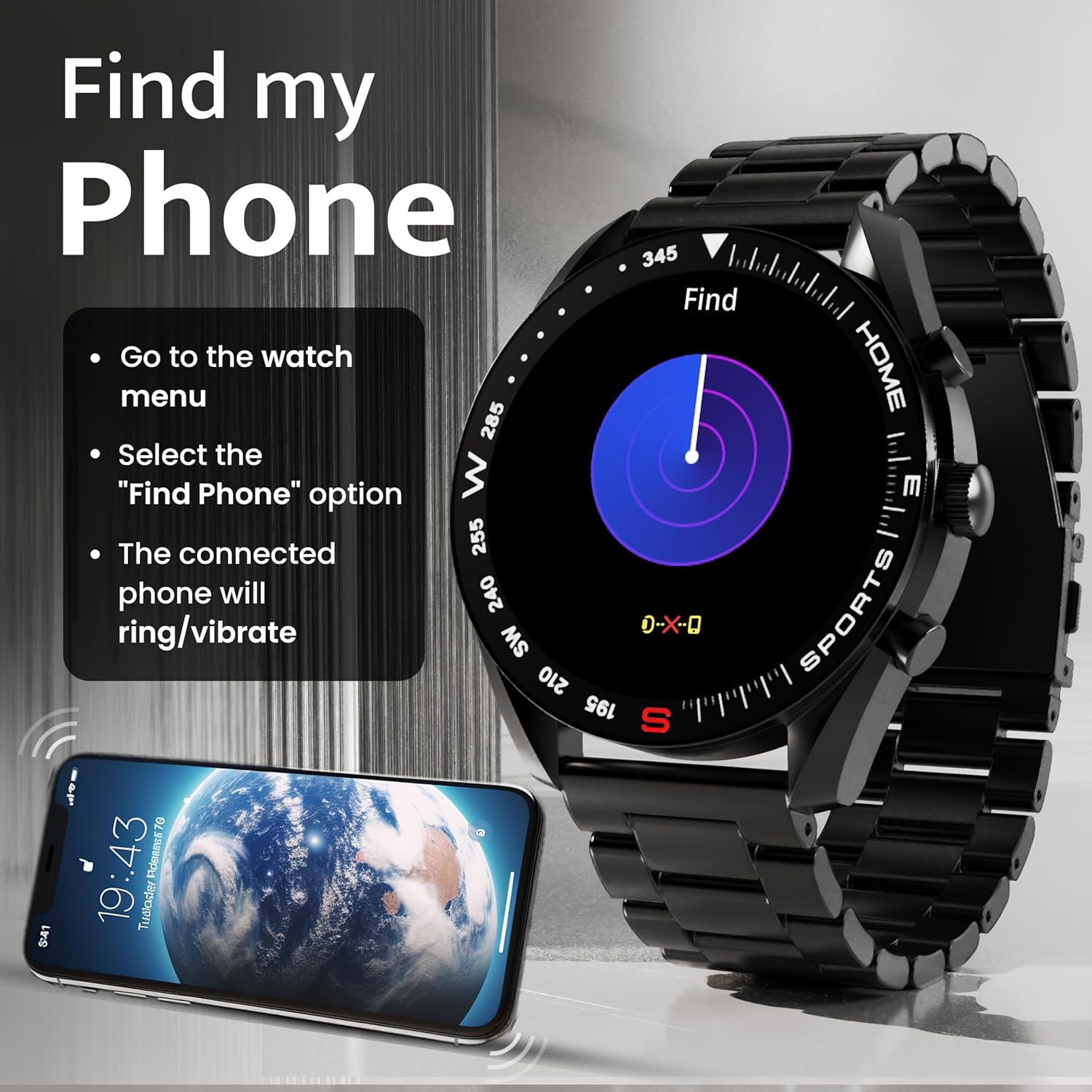
Image: How to use the 'Find My Phone' feature on the smartwatch.
Minijuegos:
The watch includes several mini-games for entertainment, such as 2048, Battleship, Hamster, and Young Bird.

Imagen: Examples of mini-games available on the smartwatch.
Mantenimiento
Cleaning Your Smart Watch:
- Limpie la pantalla y el cuerpo del reloj con un paño suave que no suelte pelusa.
- Para suciedad difícil, ligeramente dampEnjuague el paño con agua. Evite usar productos químicos agresivos o materiales abrasivos.
- Clean the charging pins regularly with a dry cloth or cotton swab to ensure proper charging.
Resistencia al agua (IP67):
The GOBOULT Mirage Smart Watch is IP67 water-resistant, meaning it is protected against dust ingress and can withstand immersion in water up to 1 meter for up to 30 minutes. However, it is not suitable for swimming, showering with hot water, or diving. Avoid exposure to high-pressure water or corrosive liquids.

Image: Information regarding the IP67 water and dust resistance of the smartwatch.
Ajuste de la correa:
The watch comes with a metallic strap adjustment tool. Refer to the included instructions or a professional for adjusting the strap length to ensure a comfortable and secure fit.

Image: The watch's zinc alloy frame and the metallic strap adjustment tool.
Solución de problemas
- El reloj no enciende: Asegúrese de que el reloj esté completamente cargado. Conéctelo al cable de carga y déjelo cargar durante al menos 30 minutos antes de volver a encenderlo.
- No se puede emparejar con el teléfono:
- Asegúrese de que Bluetooth esté habilitado en su teléfono y en el reloj.
- Ensure the watch is within the Bluetooth range (up to 10 meters).
- Reinicie tanto el teléfono como el reloj inteligente.
- Borre la memoria caché de Bluetooth de su teléfono u olvide el dispositivo e intente emparejarlo nuevamente.
- Ensure the GOBOULT companion app is updated to the latest version.
- Datos de salud inexactos: Asegúrese de que el reloj esté bien ajustado a su muñeca, ni demasiado apretado ni demasiado suelto. Limpie los sensores de la parte trasera del reloj. Evite movimientos excesivos durante las mediciones.
- Las notificaciones no aparecen:
- Check if notifications are enabled for the specific apps in the GOBOULT companion app.
- Ensure your phone's notification settings allow the GOBOULT app to display alerts.
- Verifique que el reloj esté conectado correctamente a su teléfono a través de Bluetooth.
- Duración de la batería corta: Reduce screen brightness, disable unnecessary features like continuous heart rate monitoring if not needed, and limit the number of active notifications. Ensure the watch is fully charged.
- La pantalla táctil no responde: Reinicia el reloj. Si el problema persiste, asegúrate de que la pantalla esté limpia y seca.
Presupuesto
| Característica | Detalle |
|---|---|
| Nombre del modelo | Espejismo |
| Tamaño de la pantalla | 1.39 pulgadas de alta definición |
| Resolución de pantalla | 360 x 360 píxeles |
| Brillo | 500 Nits Peak Brightness |
| Conectividad | Bluetooth 5.3 |
| Resistencia al agua | IP67 |
| Material del marco | Aleación de zinc |
| Tipo de batería | Polímero de litio |
| Duración media de la batería | Hasta 7 días |
| Tiempo de carga | Aproximadamente 120 minutos |
| Compatibilidad del sistema operativo | iOS, Android |
| Peso del artículo | 106 gramos |
| Componentes incluidos | Reloj inteligente, cable de carga, manual de usuario, tarjeta de garantía |
Garantía y soporte
Información de garantía:
Your GOBOULT Mirage Smart Watch comes with a manufacturer's warranty. Please refer to the included Warranty Card for specific terms, conditions, and duration of the warranty. Keep your purchase receipt as proof of purchase.
Atención al cliente:
If you encounter any issues or have questions not covered in this manual, please contact GOBOULT customer support. Contact details can typically be found on the Warranty Card or the official GOBOULT websitio.