
Producto terminadoview
The XO BE18 is a stereo audio wireless Bluetooth headset featuring RGB lighting. It is designed for immersive listening experiences and convenient communication, offering multiple playback modes including Bluetooth, AUX, TF card, and FM radio.
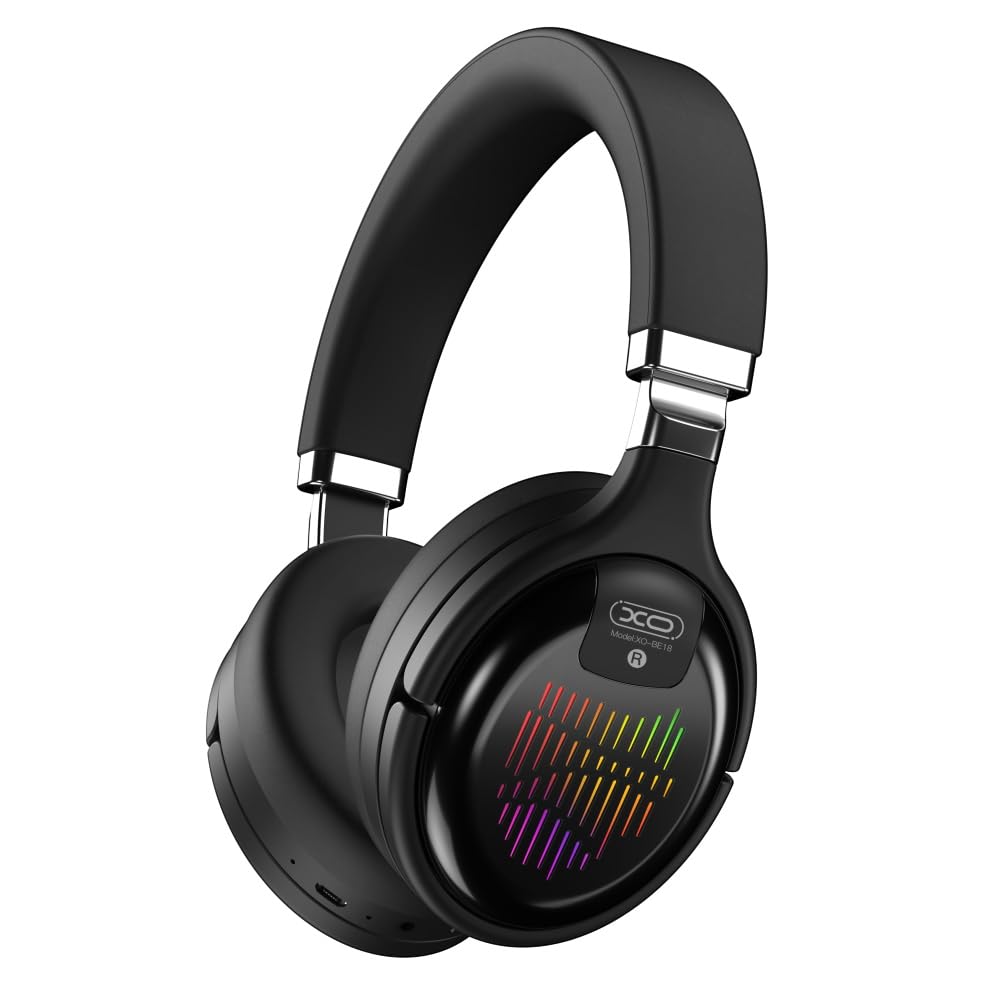
Image: The XO BE18 Wireless Bluetooth Headset, showcasing its over-ear design and integrated RGB lighting on the earcups.
Contenido del paquete
Asegúrese de que todos los artículos estén presentes en el paquete:
- XO BE18 Wireless Bluetooth Headset
- Cable de carga
- Manual de usuario (este documento)

Image: The XO BE18 headset shown within its retail packaging, indicating the included accessories.
Configuración
Cargar los auriculares
- Localice el puerto de carga en los auriculares.
- Connect the provided charging cable to the headset and a compatible USB power source (e.g., computer USB port, USB wall adapter).
- The LED indicator on the headset will typically show a specific color (e.g., red) during charging and change (e.g., turn off or blue) when fully charged.
- Una carga completa tarda aproximadamente 2.5 horas.
Encendido/apagado
- Para encender: Press and hold the Power button for approximately 3-5 seconds until the LED indicator lights up and you hear an audible prompt.
- Para apagar: Mantenga presionado el botón de encendido durante aproximadamente 3 a 5 segundos hasta que el indicador LED se apague y escuche un aviso audible.
Instrucciones de funcionamiento
Emparejamiento Bluetooth
- Asegúrese de que los auriculares estén apagados.
- Press and hold the Power button for approximately 5-7 seconds until the LED indicator flashes rapidly (e.g., alternating blue and red), indicating pairing mode.
- En su dispositivo (teléfono inteligente, tableta, computadora), habilite Bluetooth y busque los dispositivos disponibles.
- Select "XO BE18" from the list of found devices.
- Once paired, the LED indicator will typically flash slowly or turn solid blue, and you will hear a confirmation tone.
Controles básicos
The headset features various buttons for controlling audio playback and calls. Refer to the image below for button locations.

Imagen: Primer plano view of the XO BE18 headset earcup, highlighting the control buttons and ports.
- Botón de encendido: Mantén pulsado para encender o apagar. Pulsa brevemente para reproducir o pausar música o responder o finalizar llamadas.
- Subir volumen (+): Pulsación corta para subir el volumen. Pulsación larga para pasar a la siguiente pista.
- Bajar volumen (-): Pulsación corta para bajar el volumen. Pulsación larga para ir a la pista anterior.
- Botón de modo (M): Short press to switch between Bluetooth, AUX, TF card, and Radio modes.
Iluminación RGB
The headset features integrated RGB lighting on the earcups. This lighting typically activates automatically when the headset is powered on. Specific controls for the RGB lighting (if any) may be integrated with the mode button or a dedicated button not explicitly detailed.

Image: The XO BE18 headset displaying its colorful RGB lighting on the earcups.
Usando el micrófono
The built-in microphone allows for hands-free calls. When a call comes in, press the Power button once to answer. Press again to end the call.
Modo AUX
Connect an audio cable (not included) from your device's 3.5mm audio jack to the headset's AUX port to use it in wired mode. The headset does not require power in AUX mode.
Modo de tarjeta TF
Inserte una tarjeta TF (microSD) con audio files into the designated slot. Use the Mode button to switch to TF card mode.
Modo de radio
Use the Mode button to switch to Radio mode. The headset will automatically scan for available FM radio stations.
Mantenimiento
- Limpieza: Utilice un paño suave y seco para limpiar los auriculares. No utilice limpiadores abrasivos ni disolventes.
- Almacenamiento: When not in use, store the headset in a cool, dry place. The headset features a portable folding design for compact storage.
- Cuidado de la batería: Para prolongar la vida útil de la batería, evite descargarla por completo con frecuencia. Cargue los auriculares con regularidad, incluso si no los usa constantemente.
- Exposición al agua: Estos auriculares no son resistentes al agua. Evite la exposición al agua o a la humedad excesiva.

Image: The XO BE18 headset shown in its folded configuration, demonstrating its portable design.
Solución de problemas
| Problema | Posible solución |
|---|---|
| El auricular no se enciende. | Asegúrate de que los auriculares estén completamente cargados. Conéctalos a una fuente de alimentación y vuelve a intentarlo. |
| No se puede emparejar con el dispositivo. |
|
| No hay sonido o volumen bajo. |
|
| El micrófono no funciona. |
|
| La iluminación RGB no funciona. | Ensure the headset is powered on. If the issue persists, contact customer support. |
Presupuesto
| Característica | Detalle |
|---|---|
| Nombre del modelo | BE18 |
| Conectividad | Inalámbrico (Bluetooth V5.0) |
| alcance inalámbrico | Aproximadamente 10 metros |
| Tecnología de audio | Hi-Fis Audio, Intelligent Noise Reduction |
| Colocación de orejas | En la oreja |
| Control de ruido | Aislamiento de sonido |
| Micrófono | Incorporado |
| Capacidad de la batería | 250 mAh |
| Tiempo de reproducción de música | Unas 4 horas |
| Tiempo de llamada | Unas 4 horas |
| Tiempo de carga | Unas 2.5 horas |
| Tiempo de espera | Long Standby Capability |
| Potencia del altavoz | 3mW |
| Sensibilidad | 94 ± 3dBm |
| Relación señal/ruido | >=75dB |
| Frecuencia de trabajo | 20 Hz-20 KHz |
| Modos de juego | Bluetooth, AUX, TF Card, Radio |
| Protocolos Bluetooth | A2DP, HSP, HFP |
| Dimensiones (paquete) | 195 x 195 x 80 mm |
| Color | Negro |

Image: A detailed table outlining the technical specifications and product information for the XO BE18 headset.
Garantía y soporte
Este producto incluye una garantía estándar del fabricante. Para conocer los términos y condiciones específicos de la garantía, consulte la tarjeta de garantía incluida en el embalaje del producto o póngase en contacto con el vendedor donde lo adquirió.
For technical support or further assistance, please contact your retailer or visit the official XO websitio (si está disponible).