
MEGA MOTION HY-A03
Manual de usuario del hoverboard MEGA MOTION
Modelo: HY-A03
1. Introducción
Welcome to the world of MEGA MOTION! This manual provides essential information for the safe and optimal operation of your new 6.5-inch Two-Wheel Self Balancing Electric Scooter. Please read this manual thoroughly before first use to ensure proper handling, maintenance, and to prevent injury or damage.
Your MEGA MOTION Hoverboard is designed for fun and efficient personal transportation, featuring a robust design, intelligent balancing system, Bluetooth speaker, and vibrant LED lights.
2. Información de seguridad
WARNING: Riding a hoverboard can be dangerous. Always wear appropriate safety gear, including a helmet, knee pads, and elbow pads. Adult supervision is recommended for children.
- Utilice siempre casco y equipo de protección (rodilleras, coderas, muñequeras) cuando conduzca.
- No conduzca bajo la influencia del alcohol o las drogas.
- Asegúrese de que el hoverboard esté completamente cargado antes de cada uso.
- No supere la capacidad máxima de peso de 100 kg.
- Evite conducir sobre superficies mojadas, resbaladizas o irregulares.
- Be aware of your surroundings and other people/obstacles.
- Do not make sudden turns or rapid accelerations/decelerations.
- No intentes hacer acrobacias ni saltos.
- Keep fingers and all body parts clear of moving parts.
- Guarde el hoverboard en un lugar fresco y seco, alejado de la luz solar directa y de temperaturas extremas.

Image: Children demonstrating safe riding practices with helmets and protective gear.
3. ¿Qué hay en la caja?
Upon opening your MEGA MOTION Hoverboard package, you should find the following items:
- 1 x MEGA MOTION Hoverboard
- 1 x cargador
- 1 x Manual de instrucciones (este documento)
4. Producto terminadoview y características
The MEGA MOTION Hoverboard is a 6.5-inch self-balancing electric scooter designed for stability and enjoyment. Key features include:
- Construcción duradera: Made from high-quality ABS+PC material with 6.5-inch aluminum alloy wheels.
- Pedales antideslizantes: Unique non-slip pedal design for enhanced grip and safety.
- Sistema de protección inteligente: Features anti-shake, anti-fall, and anti-tilt mechanisms.
- Faros LED brillantes: Provides improved visibility and safety during night riding.
- Motores duales: Ensures full power and stable performance.
- Bocina Bluetooth: Connect your smartphone to play music while riding.
- Características de seguridad: Built-in battery overload protection, intelligent fault detection, low battery reminder, intelligent weight sensing, balance assist, explosion-proof tires, and overspeed warning.

Imagen: Frente view of the MEGA MOTION Hoverboard, highlighting its LED lights and sleek design.

Image: Product information diagram detailing the hoverboard's dimensions and main parts.

Image: Illustration of the dual motor intelligent drive system, highlighting its power and climbing capacity.
5. Configuración
5.1 Carga del Hoverboard
Before first use, fully charge your hoverboard. The charging time is approximately 2-3 hours.
- Asegúrese de que el hoverboard esté apagado.
- Conecte el cargador a una toma de corriente.
- Plug the charging cable into the charging port on the hoverboard.
- La luz indicadora del cargador cambiará (por ejemplo, de rojo a verde) cuando se complete la carga.
- Desconecte el cargador una vez que esté completamente cargado.

Image: Battery and charging information, showing key specifications.
6. Instrucciones de funcionamiento
6.1 First Ride and Balancing
The MEGA MOTION Hoverboard is designed for ease of learning, controlled by your center of gravity. Users can typically master the hoverboard in minutes.
- Coloque el hoverboard sobre una superficie plana y nivelada.
- Step onto one footpad, ensuring the hoverboard is stable.
- Quickly step onto the other footpad with your second foot.
- Stand upright and relax. Use slight shifts in your body weight to control movement.
- Lean slightly forward to move forward, and lean backward to slow down or move backward.
- Para girar, aplique más presión en la almohadilla del pie del lado hacia el cual desea girar.
- Para desmontar, pise un pie a la vez, asegurándose de que el hoverboard permanezca estable.
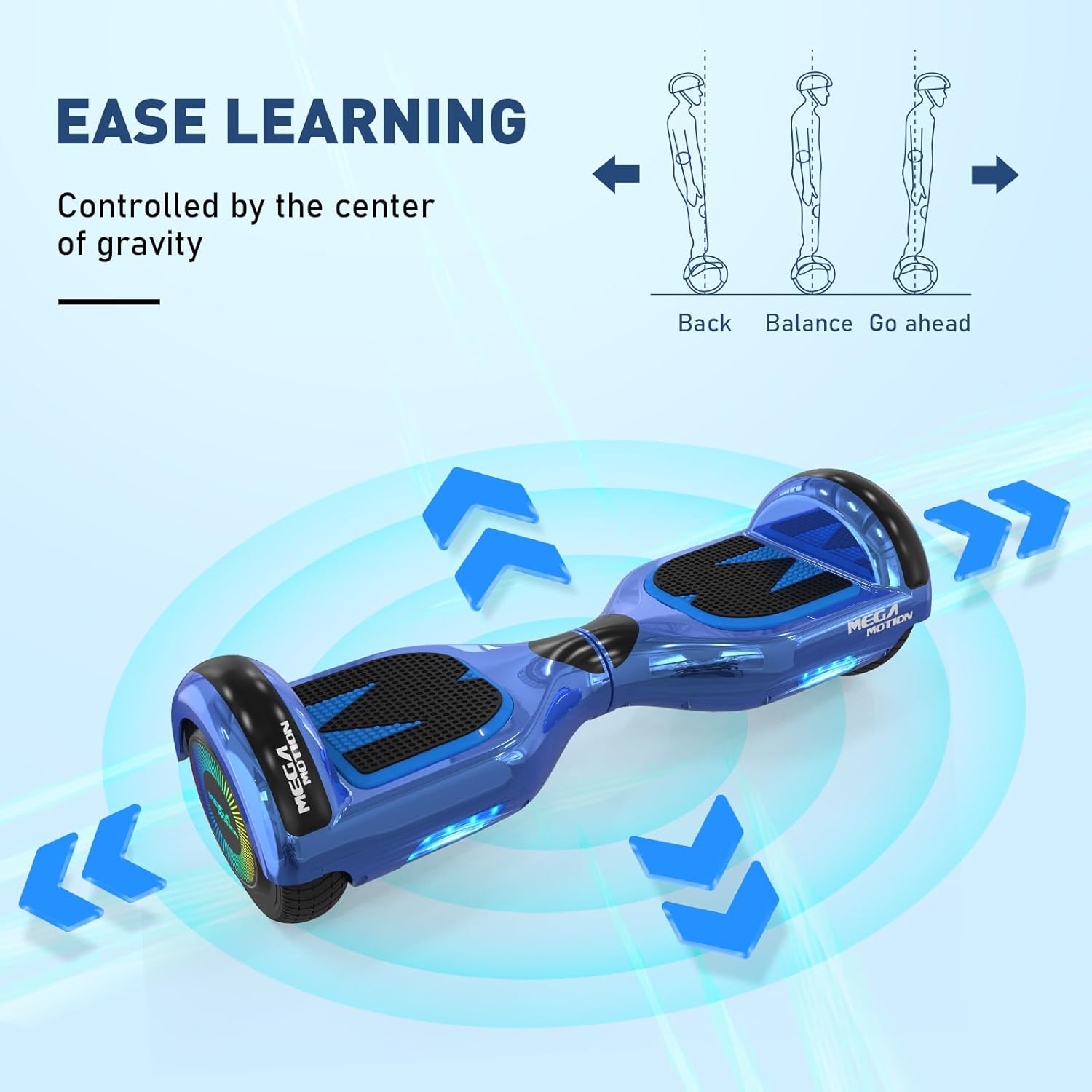
Image: Visual guide on how to control the hoverboard by shifting your center of gravity.
Funcionalidad del altavoz Bluetooth 6.2
Your hoverboard is equipped with a built-in Bluetooth speaker, allowing you to enjoy music while riding.
- Asegúrese de que el hoverboard esté encendido.
- Active Bluetooth en su teléfono inteligente u otro dispositivo compatible.
- Buscar dispositivos Bluetooth disponibles y seleccione el hoverboard (normalmente llamado 'Bluetooth' o similar).
- Una vez emparejado, puedes reproducir audio a través del altavoz del hoverboard.

Image: The hoverboard's integrated Bluetooth speaker feature.
6.3 Riding on Various Surfaces
The hoverboard is suitable for various road surfaces, but optimal performance and safety are achieved on smooth, flat ground.

Image: The hoverboard's adaptability to different road surfaces.
7. Mantenimiento
Proper maintenance will extend the life of your MEGA MOTION Hoverboard.
- Limpieza: Utilice un paño suave y seco.amp cloth to wipe down the hoverboard. Do not use harsh chemicals or abrasive cleaners. Do not wash with water directly.
- Almacenamiento: Store the hoverboard in a cool, dry place when not in use. Avoid direct sunlight and extreme temperatures.
- Cuidado de la batería: To avoid affecting battery life, charge the hoverboard at least once a month, even if it is not used for long periods of time.
- Inspección de neumáticos: Revise periódicamente los neumáticos para detectar desgaste.
- Inspección general: Before each use, check the status of the hoverboard for any loose parts or damage.
8. Solución de problemas
Si tiene problemas con su hoverboard, consulte los siguientes problemas y soluciones comunes:
| Problema | Posible causa | Solución |
|---|---|---|
| El hoverboard no se enciende | Batería baja; botón de encendido no presionado correctamente | Charge the hoverboard; Press and hold the power button firmly. |
| Hoverboard shaking uncontrollably | Calibration issue; Faulty sensor | Recalibrate the hoverboard (refer to manufacturer's specific calibration steps, usually involves powering off, placing on level ground, and holding power button); If issue persists, contact support. |
| El Bluetooth no se conecta | Bluetooth not enabled; Device too far; Interference | Ensure Bluetooth is on for both devices; Move closer to the hoverboard; Try pairing in a different location. |
| Duración corta de la batería | Battery not fully charged; Old battery; Improper charging habits | Ensure full charge; Follow monthly charging recommendation; Contact support if battery life significantly degrades. |
| Ruidos inusuales durante el funcionamiento | Componentes sueltos; Daños internos | Deje de usarlo inmediatamente y comuníquese con atención al cliente. |
9. Especificaciones
| Especificación | Detalle |
|---|---|
| Número de modelo | HY-A03 |
| Tamaño de la rueda | 6.5 pulgadas |
| Rango de carga | 20-100 kilogramos |
| Velocidad máxima | <15 km/h (Based on factory test) |
| Tiempo de carga | 2-3 horas |
| Tipo de batería | Polímero de litio (1 requerido) |
| Tipo de material | ABS+PC, Aluminum Alloy, Non-slip material |
| Dimensiones del producto | 58.5 x 19 x 17 cm |
| Peso del artículo | 6.83 kilogramos |
| Características especiales | Light Up Wheel, LED Light, Non-Slip Deck, Built-In Bluetooth speaker, Long Battery Life |
10. Garantía y soporte
For any questions during purchase or use, please contact MEGA MOTION customer support. Our team is dedicated to providing professional answers and assistance.
Consulte la documentación de compra o la del vendedor. webSitio para conocer los términos de garantía específicos y la información de contacto.
Ask a question about this manual
Ask about setup, troubleshooting, compatibility, parts, safety, or missing instructions. Manuals+ will review the question and use this page’s manual context to help answer it.